07 - Memory Management
Problem 1: Variable Partitioning
Section titled “Problem 1: Variable Partitioning”What’s variable partitioning in memory management? Briefly explain.
Solution
Variable partitioning is a memory management scheme where the operating system allocates memory segments of varying sizes based on the specific requirements of each process. Variable partitions are created on the fly as processes enter the system, ensuring that a process receives exactly the amount of memory it needs. While this approach effectively eliminates internal fragmentation (wasted space within a partition), it often leads to external fragmentation, where free memory becomes scattered into small, non-contiguous holes that may be too small to accommodate new incoming processes.
Problem 2: Physical vs Logical Addresses
Section titled “Problem 2: Physical vs Logical Addresses”In early architectures CPUs used to generate physical addresses to access RAM. What kind of problems did physical addresses create and how did memory management mechanisms solve these problems?
Solution
The use of physical addresses in early CPUs created two primary issues: a complete lack of memory protection and extreme difficulty with relocation. Since every process had direct access to the hardware’s address lines, a single error or malicious instruction could overwrite the Operating System’s kernel or another program’s data, leading to frequent system crashes. Furthermore, programs had to be compiled for specific, hard-coded memory locations, making it impossible to run multiple instances of a program or move a process to a different part of RAM to optimize space. Memory management solved these problems by introducing Logical Address Spaces and the Memory Management Unit (MMU), which act as an abstraction layer. This allows the CPU to work with “virtual” addresses that the hardware maps to physical RAM at runtime, ensuring processes are isolated from one another and can be loaded into any available memory fragment.
Problem 3: MMU with Base and Limit Registers
Section titled “Problem 3: MMU with Base and Limit Registers”Briefly explain how memory management with variable partitioning and a simple MMU with base and limit registers works. Does this memory management scheme use physical or logical addresses?
Solution
In this memory management scheme, each process is allocated a single, contiguous block of memory of the exact size it requires (variable partitioning). To manage this, the Memory Management Unit (MMU) uses two hardware registers: the base register, which stores the smallest physical address of the allocated partition, and the limit register, which stores the total size (range) of that partition. When a process runs, the CPU generates a logical address (also called a virtual address). The MMU first checks if this logical address is less than the value in the limit register to ensure the process isn’t accessing memory outside its bounds. If the check passes, the MMU adds the logical address to the base register to calculate the actual physical address in RAM. Therefore, this scheme uses logical addresses from the perspective of the CPU and the running program, while the MMU translates them into physical addresses for the hardware.
Problem 4: Virtual vs Physical Addresses
Section titled “Problem 4: Virtual vs Physical Addresses”What’s a virtual address? How does it differ from a physical address? Briefly explain.
Solution
A virtual address (also called a logical address) is an address generated by the CPU from the perspective of a running process. It exists within a process’s private, abstracted address space, allowing the program to act as if it has its own dedicated range of memory starting from zero. In contrast, a physical address refers to an actual, specific location in the hardware’s RAM chips. The key difference lies in abstraction and isolation: while multiple processes might use the same virtual address (e.g., 0x400500), the Memory Management Unit (MMU) translates those identical virtual addresses into distinct physical addresses. This decoupling allows the operating system to move data around in RAM, swap it to disk, or protect one process’s memory from another without the program needing to know its true physical location.
Problem 5: Same Address in Multiple Processes
Section titled “Problem 5: Same Address in Multiple Processes”Assume you have a simple program that declares a global variable and prints its address on the screen. When you run two copies of this program simultaneously, you see that both programs print the same address on the screen. How is this possible? Briefly explain.
Solution
This is possible because the address printed by the program is a logical address (or virtual address) rather than a physical location in the RAM chips. In modern operating systems, each process is provided with its own isolated Virtual Address Space, which is a contiguous range of addresses starting from zero that the process “believes” it owns entirely. When you run two copies of the same program, the Operating System and the Memory Management Unit (MMU) map the same logical address in each process to two entirely different locations in physical memory. This abstraction ensures that even though both programs report an address like 0x400500, the hardware-level translation redirects Process A’s data to one physical frame and Process B’s data to another, preventing them from interfering with each other.
Problem 6: Segmentation
Section titled “Problem 6: Segmentation”Briefly explain the motivation behind segmentation for memory management and how it works?
Solution
The primary motivation behind segmentation is to align memory management with the programmer’s view of a process. Instead of treating memory as a linear array of bytes, segmentation divides it into logical units called segments, such as the code, data, stack, and shared libraries. This allows each segment to grow or shrink independently and enables specific protection attributes (e.g., “read-only” for code segments or “read-write” for data segments) to be applied naturally to these logical blocks. Segmentation works by using a segment table, where each entry contains a base (the starting physical address) and a limit (the length of the segment). When the CPU generates a logical address, it consists of a segment number and an offset. The hardware uses the segment number as an index into the table to find the base address, checks that the offset is within the limit, and then adds the offset to the base to produce the final physical address.
Problem 7: Process Swapping
Section titled “Problem 7: Process Swapping”Briefly explain what process swapping is and what it was used for? In modern paging systems, is process swapping employed? Why or why not?
Solution
Process swapping is a memory management technique where an entire process is moved from main memory (RAM) to a secondary storage “backing store” (like a hard disk) and then brought back into memory later to continue execution. Its primary motivation was to increase multiprogramming levels in systems with limited RAM; by swapping out idle or blocked processes, the OS could free up space to load and run other processes that were ready to execute. In modern systems, traditional “entire-process” swapping is rarely employed. Instead, it has been replaced by demand paging, which swaps individual pages rather than the whole process. Modern OSs only swap out specific parts of a process that aren’t currently being used, which is far more efficient because it reduces the amount of I/O required and allows the system to run programs that are actually larger than the total physical RAM available.
Problem 8: External Fragmentation
Section titled “Problem 8: External Fragmentation”What’s external fragmentation in memory management? Is external fragmentation a problem in paging systems? Briefly explain.
Solution
External fragmentation occurs when total free memory is sufficient to satisfy a process’s request, but the available space is broken into small, non-contiguous blocks (holes) scattered throughout the RAM. This prevents the operating system from allocating memory to a new process because no single “hole” is large enough to hold it. In paging systems, external fragmentation is not a problem. This is because paging allows a process’s logical address space to be non-contiguous; a process can be scattered across any available physical memory frames. Since any free frame can be used to hold any page of a process, the system never needs a single, large contiguous block of physical RAM to load a program. However, paging can still suffer from internal fragmentation, which occurs if a process’s size is not an exact multiple of the fixed page size, leaving wasted space in the final frame.
Problem 9: Internal Fragmentation
Section titled “Problem 9: Internal Fragmentation”What’s internal fragmentation? In what memory management method does internal fragmentation occur? Briefly explain.
Solution
Internal fragmentation occurs when memory is allocated in fixed-sized blocks or partitions that are larger than the actual amount of memory requested by a process. The unused space remains “trapped” inside the allocated partition and cannot be used by other processes, leading to wasted RAM. This phenomenon primarily occurs in paging systems, where memory is allocated in fixed-size units called frames, and internal fragmentation typically occurs in the last page of a process if the process’s total size is not an exact multiple of the page size.
Problem 10: Memory Allocation Strategies
Section titled “Problem 10: Memory Allocation Strategies”Consider a system that uses variable partitioning for memory management. Assume that the system has 32KB total memory and the current snapshot of the memory is as follows:
Solution

Assume that the following 2 processes arrive in the given order: P4(4KB), P5(1KB). For each of the following memory management techniques, show the final state of the memory after the processes are allocated memory. (1) First fit, (2) Best Fit, (3) Worst fit.
(1) First fit

(2) Best fit

(3) Worst fit

Problem 11: First-Fit, Best-Fit, Worst-Fit
Section titled “Problem 11: First-Fit, Best-Fit, Worst-Fit”Given free memory partitions of 100K, 500K, 200K, 300K and 600K (in order) how would each of the First-fit, Best-fit, and Worst-fit algorithms place processes of 212K, 417K, 112K and 426K (in order)? Which algorithm makes the most efficient use of memory?
Solution
(1) First Fit
212K is placed in the 500K partition (leaving 288K).
417K is placed in the 600K partition (leaving 183K).
112K is placed in the remaining 288K partition (leaving 176K).
426K cannot be placed as no remaining partition is large enough.
(2) Best Fit
212K is placed in the 300K partition (leaving 88K).
417K is placed in the 500K partition (leaving 83K).
112K is placed in the 200K partition (leaving 88K).
426K is placed in the 600K partition (leaving 174K).
All processes are successfully placed.
(3) Worst Fit
212K is placed in the 600K partition (leaving 388K).
417K is placed in the 500K partition (leaving 83K).
112K is placed in the remaining 388K partition (leaving 276K).
426K cannot be placed as no remaining partition is large enough.
In this scenario, Best-fit is the most efficient algorithm because it is the only one that successfully allocates all four processes. While First-fit and Worst-fit fail to accommodate the final 426K process, Best-fit preserves larger contiguous blocks of memory for future use by selecting the smallest available partition that satisfies each request.
Problem 12: Paging
Section titled “Problem 12: Paging”All modern memory management schemes use paging. Briefly explain the main motivation behind paging and if paging requires hardware support.
Solution
The main motivation behind paging is to eliminate external fragmentation and the need for contiguous memory allocation. By dividing physical memory into fixed-sized blocks called frames and logical memory into same-sized blocks called pages, the operating system can scatter a process’s data across any available frames in RAM. This ensures that as long as there are enough free frames anywhere in the system, a process can be loaded, regardless of whether those frames are adjacent to one another. Paging absolutely requires hardware support in the form of a Memory Management Unit (MMU). Because every memory access must be translated from a logical page number to a physical frame number at runtime, doing this purely via software would be far too slow. The MMU uses a page table and often a high-speed cache called a Translation Lookaside Buffer (TLB) to perform these address translations near-instantaneously, ensuring that the abstraction of virtual memory does not significantly degrade system performance.
Problem 13: Paging Advantages and Disadvantages
Section titled “Problem 13: Paging Advantages and Disadvantages”List 1 advantage and 1 disadvantage of paging.
Solution
An advantage of paging is the elimination of external fragmentation, as any available free frame in physical memory can be allocated to any logical page, regardless of its location. A primary disadvantage is the internal fragmentation that occurs when a process’s size is not an exact multiple of the page size, leaving the last allocated frame partially empty and its remaining space unusable.
Problem 14: Multi-Level Page Tables
Section titled “Problem 14: Multi-Level Page Tables”What’s the motivation behind multi-level page tables? Briefly explain.
Solution
The primary motivation behind multi-level page tables is to reduce the amount of physical memory required to store the page table itself. In a modern 64-bit system with a single-level “flat” page table, the table would be huge---potentially gigabytes in size---and would need to be stored contiguously in RAM for every running process, even if the process only uses a small fraction of its available virtual address space. Multi-level paging works by breaking the page table into a hierarchy (like a tree). The top-level table points to smaller, secondary page tables, which only need to be created and kept in RAM if the corresponding range of virtual addresses is actually being used by the process. This allows the operating system to leave large “holes” in a process’s address space unmapped, significantly saving memory by avoiding the storage of page table entries for unused virtual memory.
Problem 15: Page Table Entry (PTE)
Section titled “Problem 15: Page Table Entry (PTE)”List 3 things that are stored in a Page Table Entry (PTE) and briefly explain what each is used for?
Solution
A Page Table Entry (PTE) typically stores the following three critical components to manage virtual-to-physical mapping:
-
Frame Number: This is the physical address of the page frame in RAM. It is used by the MMU to translate the logical page number into a specific physical location.
-
Present/Absent Bit (Valid/Invalid Bit): This bit indicates whether the page is currently loaded in physical memory. If the CPU attempts to access a page where this bit is “0” (absent), it triggers a page fault.
-
Protection Bits: These bits define the access rights for the page (e.g., Read-Only, Read/Write, or Execute). They are used by the hardware to ensure a process does not perform unauthorized operations, such as writing to a code segment.
Problem 16: Page Table Size Calculation
Section titled “Problem 16: Page Table Size Calculation”A machine has 48-bit virtual addresses and 32-bit physical addresses with a page size of 8KB. (1) How many entries are needed for the page table? (2) How many frames are there in the physical memory?
Solution
For a machine with a 48-bit virtual address space and an 8KB page size (8 x 1024 = bytes), the following calculations apply:
-
Page Table Entries: The number of entries is determined by the total number of pages in the virtual address space. With 48-bit addresses, there are bytes of virtual memory. Dividing this by the page size results in entries.
-
Physical Frames: The number of frames is determined by the physical address space. With 32-bit addresses, there are bytes of physical RAM. Dividing this by the frame size (which equals the page size, bytes) results in = frames.
Problem 17: Copy-on-Write (CoW)
Section titled “Problem 17: Copy-on-Write (CoW)”What is the effect of allowing two entries in a page table to point to the same page frame in memory? Explain how this effect can be used to decrease the amount of time and memory needed to copy a large amount of memory from one place to another. What would the effect of updating some byte in one page be on the other page? How would you make sure that updating a byte in one page does not change the same byte in the other page?
Solution
Allowing two page table entries to point to the same physical page frame results in shared memory, where different virtual addresses map to the exact same hardware location. This is used to decrease copy time and memory via a technique called Copy-on-Write (COW); instead of physically duplicating a large block of data, the OS simply creates a second pointer to the original frame, making the “copy” nearly instantaneous and requiring almost no additional RAM. If you update a byte in one page while they are sharing the same frame, the change would be immediately visible in the other page because both virtual addresses refer to the same physical bits. To prevent this and ensure that updating one does not change the other, the OS marks these shared pages as read-only. When a process attempts to write to the page, a page fault occurs; the OS then intercepts the request, physically copies the data to a new frame, updates the page table for the writing process to point to this new frame, and changes the permissions to read-write.
Problem 18: Translation Lookaside Buffer (TLB)
Section titled “Problem 18: Translation Lookaside Buffer (TLB)”What’s Translation Look Aside Buffer (TLB)? What is it used for? Briefly explain.
Solution
A Translation Lookaside Buffer (TLB) is a small, high-speed hardware cache located within the CPU’s Memory Management Unit (MMU). It is specifically designed to store the most recently used mappings between virtual page numbers and physical frame numbers. Its primary purpose is to accelerate address translation. Without a TLB, every memory access by a program would require at least two physical memory lookups: one to read the page table entry from RAM and another to access the actual data. Because the TLB is made of faster associative memory (SRAM), the MMU can check it first; if the mapping is found (a TLB hit), the translation happens almost instantaneously, significantly reducing the performance overhead of paging.
Problem 19: TLB Flushing on Context Switch
Section titled “Problem 19: TLB Flushing on Context Switch”Why does an OS need to flush the TLB during a context switch? Can you propose a fix to this problem so that the TLB need not be flushed after a context switch?
Solution
An OS must flush the TLB during a context switch because TLB entries store virtual-to-physical mappings that are unique to a specific process. Since multiple processes use the same range of virtual addresses (e.g., both Process A and Process B might have data at address 0x4000), failing to flush the TLB would allow a new process to incorrectly use the cached physical mappings of the previous process, leading to data corruption or security breaches. To avoid flushing the TLB, hardware can implement Address Space Identifiers (ASIDs). With this fix, each TLB entry is tagged with a unique ID representing the process it belongs to. During a translation, the MMU only considers a TLB hit valid if the ASID in the entry matches the ASID of the currently running process. This allows mappings from multiple different processes to coexist in the TLB simultaneously, significantly improving performance by preserving cached translations across context switches.
Problem 20: Address Space Identifiers (ASIDs)
Section titled “Problem 20: Address Space Identifiers (ASIDs)”We discussed in class that typically OSs keep a separate page table for each process. Since the logical address space of all processes are the same, the TLB must be flushed during a context switch. Suggest a fix that would NOT require the TLB to be flushed during a context switch. What are the implications of your suggestion?
Solution
The most effective fix is to implement Address Space Identifiers (ASIDs). This involves hardware support where each TLB entry is tagged with a unique ID corresponding to the process that owns that mapping. When a context switch occurs, the OS updates a hardware register with the ASID of the new process. During address translation, the TLB only registers a “hit” if the virtual page number matches and the tagged ASID matches the current process’s ID. This prevents one process from accidentally (or maliciously) using the cached translations of another. Implications of using ASIDs are:
-
Performance Gain: The system avoids the “TLB cold start” penalty after a context switch. Frequent processes can find their mappings already in the cache, significantly reducing memory access latency.
-
Hardware Complexity: The TLB must be slightly larger to store the ASID bits for every entry, and the MMU logic becomes more complex to perform the dual-matching (VPN + ASID).
-
Software Management: The Operating System must manage a pool of ASIDs. Since the number of ASID bits is limited (e.g., 8 or 12 bits), the OS must handle “ASID recycling” if the number of active processes exceeds the available hardware IDs.
Problem 21: Multi-Level Paging with 64-bit Addresses
Section titled “Problem 21: Multi-Level Paging with 64-bit Addresses”Why would it be a bad idea to use a 2-level page table (page directory and page table) for a processor that supports 64-bit memory addresses (using a 4KB page size)?
Solution
Using a 2-level page table for a 64-bit address space is a bad idea because the Page Directory itself would be too large to fit in memory. In a 64-bit system with 4KB () pages, you have 52 bits left for the page numbers. If you split this into only two levels (e.g., 26 bits for the directory and 26 bits for the page table):
-
Massive Top-Level Table: A directory with entries (assuming 8 bytes per entry) would require 512MB of contiguous physical memory just for the first level of the table.
-
Inefficiency: One of the primary goals of multi-level paging is to save memory by not allocating tables for unused address space. A 2-level structure in a 64-bit space forces a massive initial allocation, defeating the purpose of hierarchical paging.
To solve this, 64-bit processors (like x86-64) typically use 4-level or 5-level page tables, which break the address space into much smaller, manageable chunks at each level.
Problem 22: Two-Level Page Table Parameters
Section titled “Problem 22: Two-Level Page Table Parameters”Suppose your machine has 32 bit virtual addresses and uses a 2-level page table. Virtual addresses are split into a 9 bit top-level page table field, an 11 bit second level page table field, and an offset. How large are the pages? How many pages are there in the virtual address space? If the machine has 1GB physical memory, how many frames does the memory have?
Solution
Page Size: The offset uses the remaining bits not allocated to the page tables (32 - 9 - 11 = 12 bits). A 12-bit offset corresponds to a page size of bytes, which is 4KB.
Number of Pages: The total number of pages is determined by the bits used for the page table indices (9 + 11 = 20 bits). There are virtual pages.
Number of Frames: With 1GB ( bytes) of physical memory and a page (frame) size of 4KB ( bytes), the number of frames is / = frames.
Problem 23: Effective Access Time with Page Faults
Section titled “Problem 23: Effective Access Time with Page Faults”Supposed we have an OS that uses paged virtual memory and further suppose that the OS stores the page table in CPU registers. (Thus, in this problem, you may assume that looking into the page table has negligible time cost.) Assume that it takes 8 milliseconds to service a page fault if an empty page frame is available or if the victim page is not dirty, and 20 milliseconds if the victim page is dirty. Suppose further that physical memory takes 1 microsecond to access. If the page replacement algorithm selects a dirty victim page 60 percent of the time, then what is the maximum acceptable page fault rate for an effective access time of no more than 2 microseconds? Express the page fault rate “p” as the probability that a memory reference results in a page fault.
Solution
To find the maximum acceptable page fault rate p, we use the formula for Effective Access Time (EAT), accounting for the two different page fault recovery times.
1. Identify the Variables
-
Memory Access Time (ma): 1 us
-
Service Time (Clean/Empty): 8 ms = 8,000 us
-
Service Time (Dirty): 20 ms = 20,000 us
-
Dirty Victim Probability: 60% (0.6)
-
Clean Victim Probability: 40% (0.4)
2. Calculate Average Page Fault Service Time (S)
S = (0.6 x 20,000 us) + (0.4 x 8,000 us)
S = 12,000 us + 3,200 us = 15,200 us
3. Solve for p using the EAT Formula
The EAT is defined as (1-p) x ma + p x S. We want EAT ≤ 2 us:
(1-p) x 1 + p x 15,200 ≤ 2
1 - p + 15,200p ≤ 2
15,199p ≤ 1
p ≤ 1/15,199
The maximum acceptable page fault rate p is 1 in 15,199 memory accesses.
Problem 24: Logical and Physical Address Calculations
Section titled “Problem 24: Logical and Physical Address Calculations”Consider a logical address space of 8 pages of 1024 bytes each, mapped onto a physical memory of 32 frames.
Solution
(a) How many bits are there in the logical address?
There are 13 bits in the logical address. This is calculated by taking pages (for 8 pages) and adding bytes per page (for 1024 bytes), resulting in total addresses.
(b) How many bits are there in the physical address?
There are 15 bits in the physical address. This is calculated by taking frames (for 32 frames) and adding bytes per frame, resulting in total physical addresses.
(c) If the OS requires all pages of process to be in memory for it to run, how many processes can the OS load to memory at the same time?
If the OS requires all 8 pages of a process to be in memory simultaneously, the system can load 4 processes at the same time ((32 total frames)/(8 frames per process) = 4).
Problem 25: Single-Level Paging Parameters
Section titled “Problem 25: Single-Level Paging Parameters”Consider a 32-bit computer that has 1GB of physical memory. This machine employs single-level paging with 8192 byte frames.
Solution
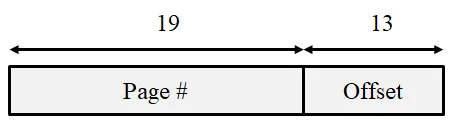
(a) Show the parts of a virtual address, i.e., how many bits are used for offset, how many bits for indexing the page table?
Offset: The page size is bytes, so 13 bits are used for the offset.
Page Table Index: With a 32-bit virtual address, the remaining 19 bits (32 - 13) are used for the page table index (page number).
(b) How many physical frames does the machine have? How many virtual pages does the machine have? How many bytes does a process page table occupy in memory?
Physical Frames: 1 GB / 8 KB = / = frames
Virtual Pages: / = pages
Page Table Size: Assuming a standard 4 bytes (32 bits) per Page Table Entry (PTE), the table occupies x 4 bytes = bytes = 2MB.
(c) A user process generates the virtual address 0x345672F3. Compute the page number and offset from the virtual address and explain how the system establishes the corresponding physical location.
The offset is the last 13 bits (3 hex digits + 1 bit): 0x12F3.
The page number is the remaining upper bits: 0x34567 >> 1 (or 0x1A2B3).
Physical memory computation: The MMU extracts the page number, looks up the corresponding frame number in the Page Table (or TLB), and concatenates that frame number with the offset to form the physical address.
(d) Assume that memory access takes 100 microseconds. This machine uses TLB and TLB access takes 100 nano seconds. Assume a 90% TLB hit ration, compute the effective memory access time.
Effective Access Time (EAT) = 0.90 x (100 + 100,000) + 0.10 x (100 + 100,000 + 100,000)
EAT = 90,090 + 20,010 = 110,100 ns.
Problem 26: TLB Hit Ratio and EAT
Section titled “Problem 26: TLB Hit Ratio and EAT”The percentage of time that any page number is found in the TLB is called the hit ratio. Assume a TLB hit ratio of 90% and a single-level page table. If it takes 10 nanoseconds to lookup the TLB, and 100 nanoseconds to access memory, calculate the effective memory-access time.
Solution
The effective memory access time (EAT) is calculated based on whether the page mapping is found in the TLB (hit) or requires a lookup in the page table in main memory (miss)
-
TLB Hit (90%): TLB lookup + Main memory access = 10 ns + 100 ns = 110 ns
-
TLB Miss (10%): TLB lookup + Page table access in memory + Main memory access = 10ns + 100 ns + 100 ns = 210 ns
-
Calculate the weighted average: EAT = (0.90 x 110 ns) + (0.10 x 210 ns) = 99 ns + 21 ns = 120 ns
Problem 27: 16-bit Single-Level Paging
Section titled “Problem 27: 16-bit Single-Level Paging”Consider a 16-bit architecture that uses single-level paging. Assume the frame size is 256 bytes, and the total physical memory size is 16KB.
Solution
(a) What’s the total virtual memory size? How many frames does the physical memory have?
Total Virtual Memory: A 16-bit architecture supports addresses, which is 64KB.
Physical Frames: 16KB/256bytes = / = = 64 frames.
(b) Draw the virtual address and show how many bits are used for offset and how many bits are used for page number.
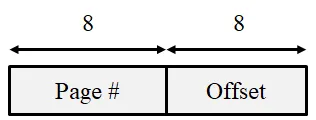
(c) How many entries does a process’s page table have? What’s the size of a process’s page table?
Entries: The number of entries equals the number of virtual pages (/ = ), which is 256 entries.
Size: Assuming a 2-byte (16-bit) entry to hold the frame number and control bits, the table size is 256 x 2 bytes = 512 bytes.
(d) Show a diagram that shows how address translation occurs. Draw TLB, page table and physical memory. Assume all pages of a process are in the memory for the process to run.
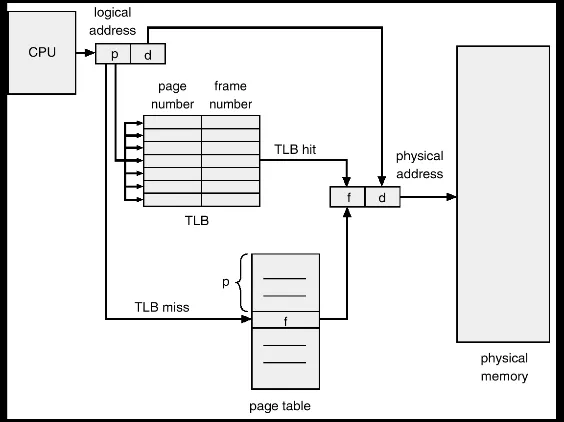
(e) Assume TLB search takes 1ns and memory access takes 100ns. For a TLB hit rate of 90%, compute the effective memory access time.
TLB Hit (90%): TLB_search + RAM_access = 1ns + 100ns = 101ns
TLB Miss (10%): TLB_search + PageTable_access + RAM_access = 1ns + 100ns + 100ns = 201ns
EAT: 0.90 x 101ns + 0.10 x 201ns = 90.9ns + 20.1ns =111ns
Problem 28: 32-bit Single-Level Paging
Section titled “Problem 28: 32-bit Single-Level Paging”Consider a 32-bit computer that has 1GB of physical memory. This machine employs single-level paging with 8KB frames.
Solution
(a) Show the parts of a virtual address, i.e., how many bits are used for offset, how many bits for indexing the page table?
Offset: The page size is bytes, so 13 bits are used for the offset.
Page Table Index: With a 32-bit virtual address, the remaining 19 bits (32 - 13) are used for the page table index.
(b) How many physical frames does the machine have? How many bytes does a process page table occupy in memory?
Physical Frames: 1GB / 8KB = / = frames.
Page Table Size: There are virtual pages. Assuming each Page Table Entry (PTE) is 4 bytes, the table size is x 4 bytes = bytes = 2MB.
(c) A user process generates the virtual address 0x345612F3. What’s the page number, what is the offset.
Virtual Address (Hex): 0x345612F3
Binary Representation: 0011 0100 0101 0110 0001 0010 1111 0011Offset (Lower 13 bits): 1 0010 1111 0011 🡪 0x12F3
Page Number (Upper 19 bits): 0011 0100 0101 0110 000 🡪 0x1A2B0
(d) Explain how the system establishes the corresponding physical location. Distinguish between software and hardware operations.
Hardware (MMU/TLB): The CPU extracts the page number from the virtual address and checks the TLB. If found (TLB hit), the hardware immediately concatenates the frame number with the offset to form the physical address. If a miss occurs, the MMU automatically walks the page table in memory to find the mapping.
Software (OS): The Operating System is generally not involved in every translation. It only intervenes during a page fault (if the page isn’t in RAM), where it must load the page from disk and update the page table, or during a context switch to update the page table base register.
(e) Assume that memory access takes 100 microseconds. This machine uses TLB and TLB access takes 100 nano seconds. Assume a 90% TLB hit ration, compute the effective memory access time.
TLB Hit (90%): TLB + RAM = 100ns + 100,000ns = 100,100ns
TLB Miss (10%): TLB + RAM (table) + RAM (data) = 100ns + 100,000ns + 100,000ns = 200,100ns
EAT: (0.90 x 100,100) + (0.10 x 200,100) = 90,090 + 20,010 = 110,100ns (or 110.1us).
Problem 29: Page Table Entry Structure
Section titled “Problem 29: Page Table Entry Structure”A certain computer provides its users with a virtual address space of bytes. The computer has bytes of physical memory. The virtual memory is implemented by paging with 2-level page tables, and the page size is 64 bytes.
Solution
(a) Show the parts of a virtual address, i.e., how many bits are used for offset, how many bits for indexing the outer page table, and how many bits for indexing the inner page table?
Offset: Since the page size is bytes, the offset is 6 bits
Total Page Number Bits: 16 total bits - 6 offset bits = 10 bits for the page indices
Inner and Outer Page Tables: With 2-level paging, these 10 bits are typically split. Assuming a balanced approach where each table fits within one page (64 bytes) and each entry is 2 bytes, each table would have 32 () entries. This results in: Outer Page Table Index: 5 bits, Inner Page Table Index: 5 bits
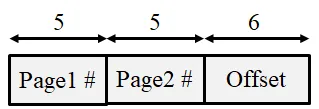
(b) A user process generates the virtual address 0x12F3. What’s the outer page number, the inner page number and the offset?
0x12F3 = 0001 0010 1111 0011
Outer Page Number (First 5 bits): 00010 = 0x02
Inner Page Number (Next 5 bits): 01011 = 0x0B
Offset (Last 6 bits): 110011 = 0x33
(c) Explain how the system establishes the corresponding physical location. Distinguish between software and hardware operations.
Hardware (MMU/TLB): The CPU extracts the page number from the virtual address and checks the TLB. If found (TLB hit), the hardware immediately concatenates the frame number with the offset to form the physical address. If a miss occurs, the MMU automatically walks the page table in memory to find the mapping.
Software (OS): The Operating System is generally not involved in every translation. It only intervenes during a page fault (if the page isn’t in RAM), where it must load the page from disk and update the page table, or during a context switch to update the page table base register.
Problem 30: Page Replacement Algorithms
Section titled “Problem 30: Page Replacement Algorithms”Consider a logical (virtual) address space of eight pages of 1024 words each, mapped onto a physical memory of 32 frames.
Solution
(a) How many bits are there in the logical address space?
The logical address is the sum of the bits needed to identify a page and the bits needed to identify the offset within that page. Page Index: 8 pages = , so 3 bits. Offset: 1024 words = , so 10 bits. Total: 3 + 10 =13 bits.
(b) How many bits are there in the physical address space?
Frame Index: 32 frames = , so 5 bits. Offset: words, so 10 bits. Total: 5 + 10 = 15 bits.
Problem 31: FIFO Page Replacement
Section titled “Problem 31: FIFO Page Replacement”Consider a system with an average memory access time of 100 nano-seconds, a three level page table (meta-directory, directory, and page table). For full credit, your answer must be a single number and not a formula.
Solution
(a) If the system had an average page fault rate of for any page accessed (data or page table related), and an average page fault took 1msec to service, what is the effective memory access time (assume no TLB or memory cache).
EAT = 4 x 100ns + // You have to access the page no matter what
x 1ms // Time to handle a page fault
EAT = 4 x 100ns + 1 x 100ns = 500ns
(b) Now assume the system has no page faults, we are considering adding a TLB that will take 1 nano-second to lookup an address translation. What hit rate in the TLB is required to reduce the effective access time to 160ns?
EAT = 1ns + p x 100ns + // TLB hit
(1-p) x 400ns // TLB miss
We want EAT to be 160ns. So 160ns = 401ns - 300ns x p
p = 241/300 = 0.8033. So 80.33% hit rate is necessary
(c) Somebody suggests increasing the page size to improve the system’s performance. List 2 advantages and 2 disadvantages of making such a decision.
Advantages: (1) Smaller page tables, (2) Less page faults may result due to locality of reference. Disadvantages: (1) More internal fragmentation, (2) More data to move between memory and disk during page fault handling.
Problem 32: Optimal Page Replacement
Section titled “Problem 32: Optimal Page Replacement”Consider a memory management system that uses paging. The page size is 512 bytes. Assume that the memory contains 16 pages labeled 0 through 15 and the OS is resident on the first 4 pages of the memory. Assume that there is a single process in the system using up 3 pages of memory. Specifically, the process is resident on physical blocks 5, 7, and 11.
Solution
(a) Show the current snapshot of the memory and the page table of the current process.
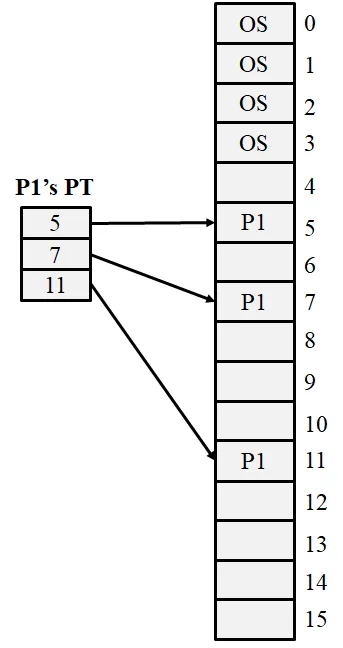
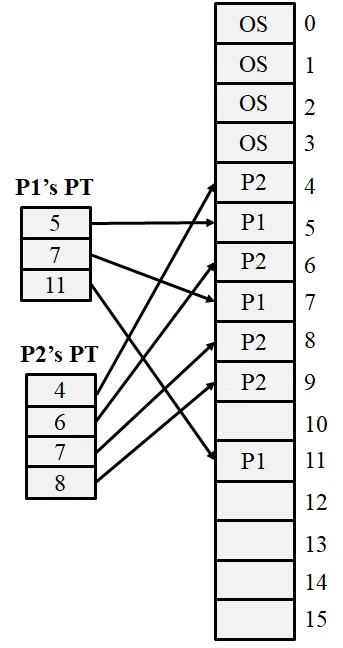
(b) Assume now that a new process arrives and requires 2000 bytes of memory. Allocate space for this process, show its page table, and depict the current snapshot of the memory.
The new process requires 4 pages: 4x512 = 2048 bytes. Let’s say that the OS allocates frames 4, 6, 8 and 9 for the new process. Then the new snapshot becomes:
(c) What’s internal fragmentation as it applies to memory management. How many bytes are wasted for the newly arriving process in (b) due to internal fragmentation?
Internal Fragmentation occurs when the memory allocated to a process is slightly larger than the memory requested. This happens because the system allocates memory in fixed-size chunks (pages/frames), and the process’s last chunk is often not completely filled. Wasted Bytes for the new process: Total space allocated: 4 pages x 512 bytes} = 2048 bytes. Space requested: 2000 bytes. Wasted (Internal Fragmentation): 2048 - 2000 = 48 bytes
Problem 33: LRU Page Replacement
Section titled “Problem 33: LRU Page Replacement”Consider an OS running on the following machine: (1) a two level page table (the pointer to the page directory is stored in a register) (2) a memory reference takes 100 nanoseconds
Solution
(a) If there is no TLB in the system, and 0.001% of attempts to access physical memory cause a page fault that takes 10msec to service, what is the effective memory access time?
Assume that page directories and tables are pinned down (always) in memory. We need to access the page dir, the page table, and then the data reference. The reference to data could cause a page fault. EAT = 300ns + x 10ms = 400 ns.
(b) If we add a TLB and 75% of all page-table references are found there, and 0.001% of the remaining memory references to access physical memory cause a page fault that takes 10msec to service, what is the effective access time of user space memory.
Adding a TLB implies that 75% of the time we can skip the memory address translation using page tables. Also if the item is in the TLB, we know it is in memory (not paged out). EAT = .75 x 100ns + .25 x 400 ns = 175ns.
Problem 34: Not Frequently Used (NFU)
Section titled “Problem 34: Not Frequently Used (NFU)”Consider an operating system that uses paging in order to provide virtual memory capability; the paging system employs both a TLB and a single-level page table. Assume that page tables are pinned in physical memory. Draw a flow chart that describes the logic of handling a memory reference. Your chart must include the possibility of TLB hits and misses, as well as page faults. Be sure to mark which activities are accomplished by hardware, and which are accomplished by the OS’s page fault exception handler.
Solution
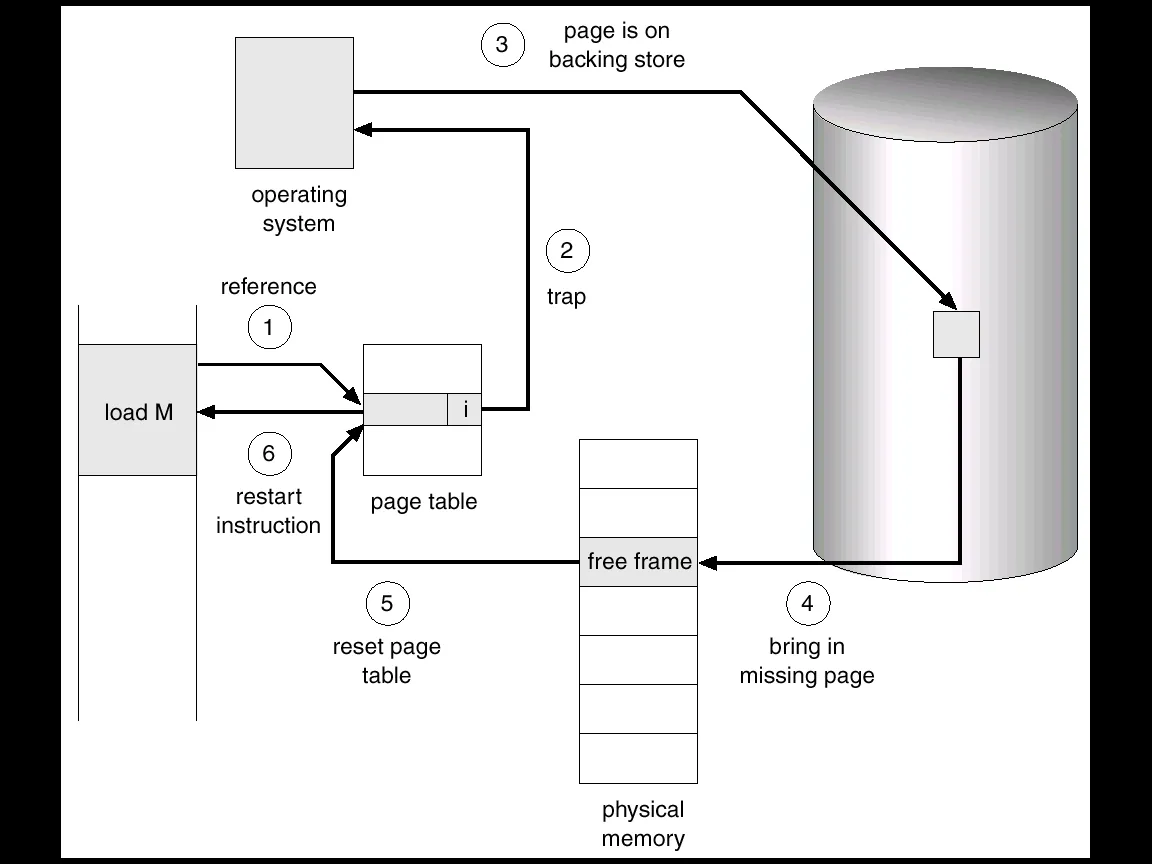
Problem 35: Page Fault Statistics
Section titled “Problem 35: Page Fault Statistics”Briefly explain how a page fault occurs and the steps that the memory management system takes to handle a page fault.
Solution
A page fault occurs when a running process attempts to access a virtual memory address that is not currently mapped to a physical frame in RAM. This is detected by the Memory Management Unit (MMU) when it finds the “valid-invalid” bit in the page table set to “invalid.” Here are the steps to handle a page fault:
-
Trap to the OS: The MMU generates a trap, pausing the process and switching control to the operating system kernel.
-
Internal Table Check: The OS looks at an internal table (often in the Process Control Block) to verify if the memory access was a legitimate request to a valid virtual address or an illegal access.
-
If illegal, the process is terminated (Segmentation Fault).
-
If legal, the OS proceeds to fetch the page.
-
Find a Free Frame: The OS searches the Free Frame List in physical memory. If no frames are free, a page replacement algorithm (like LRU) is run to evict a “victim” page.
-
Disk I/O (The “Swap In”): The OS schedules a disk operation to read the desired page from the swap space or executable file into the newly allocated physical frame.
-
Update Page Table: Once the I/O is complete, the OS updates the process’s page table by entering the new frame number and changing the status bit from “invalid” to “valid.”
-
Restart Instruction: The OS restores the process state and restarts the specific CPU instruction that caused the fault. The process can now access the data as if it had been in memory all along.
Problem 36: Belady Anomaly
Section titled “Problem 36: Belady Anomaly”What’s Belady’s anomaly? Briefly explain.
Solution
Belady’s Anomaly is a counterintuitive phenomenon in operating systems where increasing the number of physical page frames results in an increase in the number of page faults for a specific memory access sequence. In most page replacement algorithms (like LRU), adding more memory always helps or at least doesn’t hurt. However, for the FIFO (First-In, First-Out) page replacement algorithm, it is possible to get more page faults by increasing the physical memory. This is called Belady’s anomaly.
Problem 37: Working Set Model
Section titled “Problem 37: Working Set Model”Consider the following sequence of virtual memory references generated by a single process in a pure paging system: 10, 11, 104, 170, 73, 309, 185, 245, 246, 434, 458, 364
Solution
(a) Assuming a page size of 100 words, what is the reference string corresponding to these memory references?
The page number is calculated as Address/(Page Size). With a page size of 100 words:
10, 11 🡪 0
104, 170 🡪 1
73 🡪 0
309 🡪 3
185 🡪 1
245, 246 🡪 2
434, 458 🡪 4
364 🡪 3
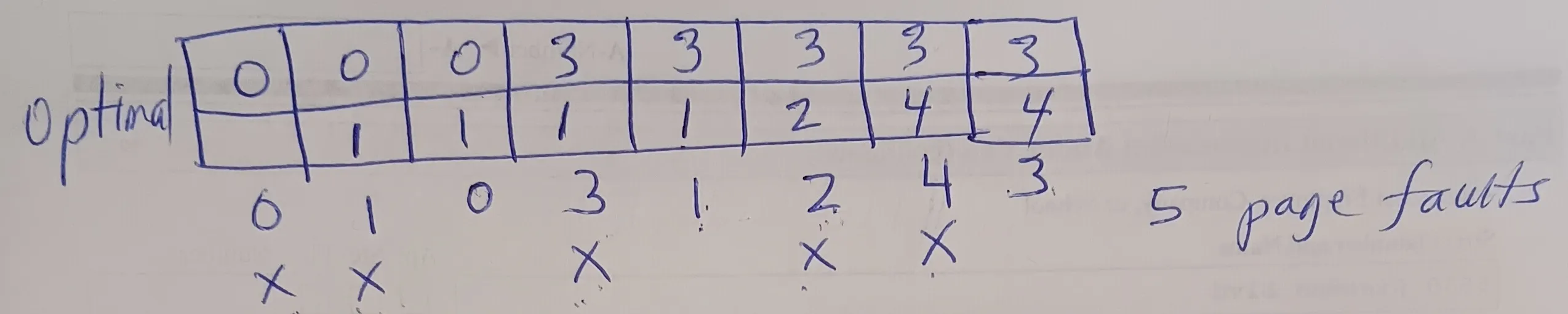
Reference String: 0, 0, 1, 1, 0, 3, 1, 2, 2, 4, 4, 3
Simplified for unique transitions: 0, 1, 0, 3, 1, 2, 4, 3
(b) Determine the number of page faults under each of the following page replacement strategies, assuming that two page frames are available to the process: Optimal, FIFO, LRU
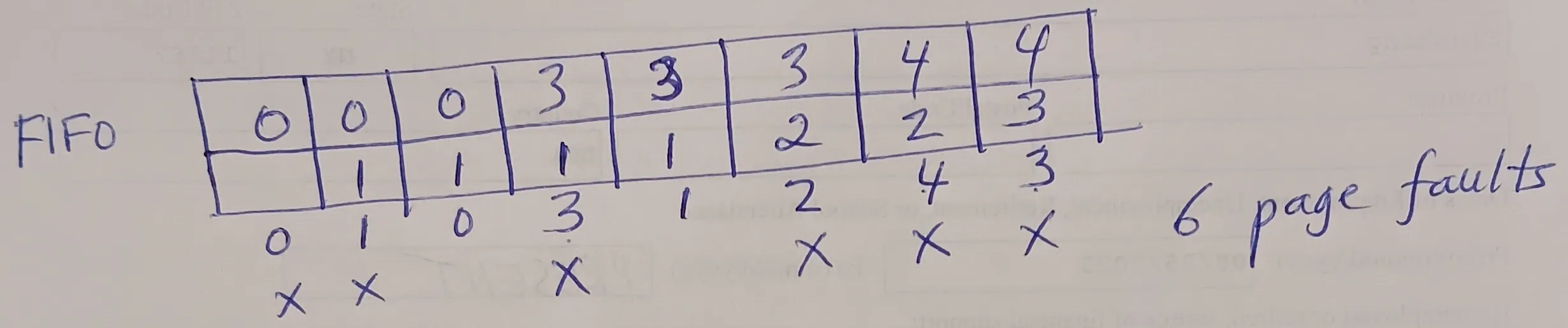
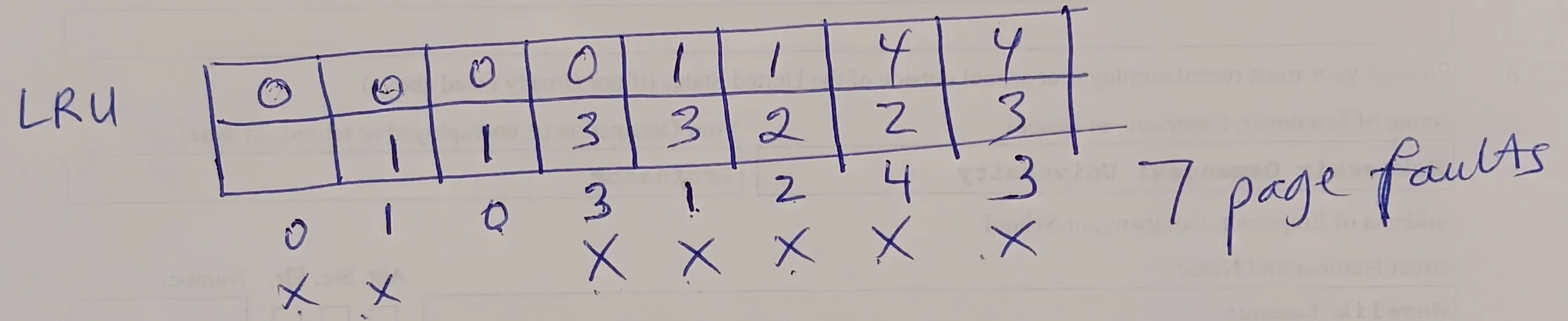
Problem 38: FIFO with Belady Anomaly
Section titled “Problem 38: FIFO with Belady Anomaly”Given the reference string 1, 2, 3, 1, 2, 1, 3, 4, 3, 5, 6, 4, 3 and a physical memory of 3 frames, show the state of the memory with Optimal, FIFO, LRU page replacement algorithms. Count the total number of page faults.
Solution
Optimal:
1 2 3 1 2 1 3 4 3 5 6 4 31 1 1 1 1 1 1 4 4 4 4 4 4
2 2 2 2 2 2 2 2 5 6 6 6
3 3 3 3 3 3 3 3 3 3 2
X X X X X5 page faults
FIFO:
1 2 3 1 2 1 3 4 3 5 6 4 31 1 1 1 1 1 1 4 4 4 4 4 3
2 2 2 2 2 2 2 2 5 5 5 5
3 3 3 3 3 3 3 3 6 6 6
X X X X X X X7 page faults
LRU:
1 2 3 1 2 1 3 4 3 5 6 4 31 1 1 1 1 1 1 1 1 5 5 5 3
2 2 2 2 2 2 4 4 4 6 6 6
3 3 3 3 3 3 3 3 3 4 4
X X X X X X X X X9 page faults
Problem 39: LRU Implementation
Section titled “Problem 39: LRU Implementation”Given the reference string 1, 2, 4, 3, 2, 4, 3, 5, 4, 3, 5, 6, 1, 3, 5 and a physical memory of 3 frames, show the state of the memory after each reference with Optimal, FIFO, LRU page replacement algorithms. Count the total number of page faults.
Solution
Optimal:
1 2 4 3 2 4 3 5 4 3 5 6 1 3 5
1 1 1 3 3 3 3 3 3 3 3 3 3 3 3
2 2 2 2 2 2 5 5 5 5 5 5 5 5
4 4 4 4 4 4 4 4 4 6 1 1 1X X X X X X X
7 page faults
FIFO:
1 2 4 3 2 4 3 5 4 3 5 6 1 3 5
1 1 1 3 3 3 3 3 3 3 3 3 1 1 1
2 2 2 2 2 2 5 5 5 5 5 5 3 3
4 4 4 4 4 4 4 4 4 6 6 6 5X X X X X X X X X X X X
12 page faults
LRU:
1 2 4 3 2 4 3 5 4 3 5 6 1 3 5
1 1 1 3 3 3 3 3 3 3 3 3 1 1 1
2 2 2 2 2 2 5 5 5 5 5 5 3 3
4 4 4 4 4 4 4 4 4 6 6 6 5X X X X X X X X X
9 page faults
Problem 40: LRU Approximation
Section titled “Problem 40: LRU Approximation”Consider the following page reference string: 1, 2, 3, 4, 2, 1, 5, 6, 2, 1, 2, 3, 7, 6, 3, 2, 6, 5, 3, 2, 2, 1. How many page faults would occur for Optimal, FIFO, LRU page replacement algorithms assuming 4 memory frames. Remember that all frames are initially empty, so your first unique pages will all cost one fault each. Also show the state of the memory after each page reference and indicate the victim page when a page fault occurs.
Problem 41: Clock Algorithm
Section titled “Problem 41: Clock Algorithm”Consider a reference string 1, 2, 3, 4, 2, 5, 7, 2, 3, 2, 1, 7, 8. How many page faults would occur for Optimal, FIFO, LRU page replacement algorithms assuming 4 memory frames? Remember all frames are initially empty, so your first unique pages will all cost one fault each.
Problem 42: Reference Bit Usage
Section titled “Problem 42: Reference Bit Usage”Consider the following page reference string: 1, 2, 3, 4, 2, 1, 2, 5, 7, 6, 3, 2, 1, 2, 3, 4. How many page faults would occur for Optimal, FIFO, LRU page replacement algorithms assuming 4 memory frames? Remember all frames are initially empty, so your first unique pages will all cost one fault each.
Problem 43: Clock vs LRU
Section titled “Problem 43: Clock vs LRU”Consider the following page reference string: 1, 3, 2, 5, 1, 3, 4, 1, 3, 2, 5. How many page faults would occur for Optimal, FIFO, LRU page replacement algorithms assuming 3 memory frames? Remember all frames are initially empty, so your first unique pages will all cost one fault each.
Problem 44: Recently Used Pages
Section titled “Problem 44: Recently Used Pages”Consider the reference string 1, 2, 3, 4, 5, 2, 3, 4, 3, 2, 4, 2, 4. Assuming the working set strategy, determine the minimum window size such that the string generates at most 5 page faults. Show which pages are in the working set (and, thus, in memory) at each reference.
Solution
First of all, notice that regardless of the WS size, the first 5 page references will each cause a page fault. After that we must never have a page fault so that the total number of page faults is 5 at the end. If we analyze the rest of the string after 5, the only referenced pages are {2, 3, 4}. This means that these 3 pages must always be in the WS after page 5 is referenced. Using this information, if WS = 5, after page reference 5, WS = {1, 2, 3, 4, 5}. Then in the rest of the page references, we won’t have any page faults. So we have a total of 5 page faults.
Is 5 the minimum possible WS size? Let’s see if WS = 4 works. After the first 4 references, WS = {1, 2, 3, 4}. After page 5 is referenced, we must evict a page. Given that we will need pages 2, 3, and 4 in the future, we will evict page 1. So WS = {2, 3, 4, 5}. In the rest of the reference string, we are only referencing pages 2, 3 and 4, all of which are in the WS. So, no more page faults. So WS=4 also works.
How about WS = 3? After the first 3 page references, WS = {1, 2, 3}. When we reference page 4, we have to evict one page. Given that we need 2 and 3 in the future, we have to evict 1. So, WS = {2, 3, 4}. Now, when we reference page 5, we have to evict a page from WS. But we need al of these pages in the future. So regardless of which page we evict from the WS, that evicted page will result in an page fault in the future. This means that WS size = 3 does not work.
So, WS must have a size of at least 4 in order for us to have at most 5 page faults.
Problem 45: Not Recently Used (NRU)
Section titled “Problem 45: Not Recently Used (NRU)”Why is it difficult to perfectly implement LRU page replacement algorithm? What bit(s) in the PTE do OSs use to approximate LRU?
Solution
Implementing a perfect Least Recently Used (LRU) algorithm is difficult because it requires the hardware to maintain a precise chronological record of every memory access. To do this perfectly, the system would need to:
-
Update a timestamp or a stack on every single memory reference.
-
Search or sort through these values during a page fault to find the oldest one.
Doing this in software is too slow, and doing it in hardware is too expensive and complex for high-speed CPU cycles. Instead of perfect LRU, most Operating Systems use the Reference Bit found in the Page Table Entry (PTE). When a page is referenced (read or written), the hardware automatically sets this bit to 1. The OS periodically clears these bits to 0. By checking which bits are still 1, the OS identifies “recently used” pages versus “not recently used” pages.
Problem 46: LRU Clock or Second Chance
Section titled “Problem 46: LRU Clock or Second Chance”Briefly explain how LRU clock or second chance algorithm works.
Solution
The Clock (Second Chance) algorithm approximates LRU by using a Reference Bit in each Page Table Entry and a “clock hand” pointing to the next victim candidate. Here is how it works:
-
Hardware Action: When a page is accessed, the hardware sets its Reference Bit to 1.
-
Software Action (on Page Fault): The OS inspects the page at the clock hand:
-
If Bit is 1: The page gets a “second chance.” The OS clears the bit to 0 and moves the hand to the next page.
-
If Bit is 0: This page hasn’t been used since the last pass. The OS selects it as the victim for eviction.
- Advance Hand: After an eviction and replacement, the clock hand moves to the next position for the next fault.
Problem 47: Enhanced Second Chance Algorithm
Section titled “Problem 47: Enhanced Second Chance Algorithm”Briefly explain how LRU enhanced second chance algorithm works.
Solution
The Enhanced Second Chance algorithm improves the basic Clock algorithm by considering both the Reference (R) bit and the Modify/Dirty (M) bit. This prioritizes keeping pages that have been modified to avoid the high cost of writing them back to disk. The OS searches for a victim by categorizing pages into four classes (in order of preference for eviction):
-
(0, 0): Neither recently used nor modified (Best candidate).
-
(0, 1): Not recently used, but modified (Requires a disk write).
-
(1, 0): Recently used, but clean (Likely to be used again).
-
(1, 1): Recently used and modified (Worst candidate).
The process: The “clock hand” scans the circular buffer. It looks for the first page in the lowest available class. During the scan, it may also clear the Reference bits (changing a class 3 to a class 2, or a class 4 to a class 2) to give pages a “second chance” before they are eventually evicted. By favoring the eviction of clean pages (Classes 1 and 3), the system significantly reduces total I/O overhead.
Problem 48: Working Set of a Process
Section titled “Problem 48: Working Set of a Process”What’s meant by the working set of a process. Given the reference string 1, 2, 3, 2, 1, 3, 2, 1 and a reference window size of 5, what’s the process’s working set at the end of the last page reference?
Solution
The Working Set of a process is the collection of unique pages referenced by that process during a specific most recent time interval (defined by a window size Delta). It represents the set of pages the process actively needs in memory to avoid excessive page faults (thrashing). Notice that the only pages we reference in the reference string are 1, 2 and 3. Given a WS size of 5, all of these pages will be in the WS. So the final WS = {1, 2, 3}.
Problem 49: Thrashing
Section titled “Problem 49: Thrashing”What’s trashing and how does it occur? Briefly explain.
Solution
Thrashing is a state of extreme performance degradation where the OS spends significantly more time swapping pages in and out of disk than actually executing instructions. It occurs when the sum of the working sets of all active processes exceeds the total number of available physical memory frames.
-
High Multiprogramming: The OS admits too many processes into memory.
-
Frame Depletion: Each process receives fewer frames than it needs to store its active “working set.”
-
Continuous Faulting: A process faults, evicts a page from another process, which then immediately faults to get that page back.
-
CPU Idle Time: Because processes are constantly waiting for disk I/O, CPU utilization drops. The OS may mistakenly try to increase multiprogramming to compensate, making the problem even worse.