08-InputOutput, 09-SecondaryStorage, 10-FileSystems
Practice Problems
Section titled “Practice Problems”Problem 1: I/O request life cycle
Section titled “Problem 1: I/O request life cycle”Describe in detail the life cycle of an I/O request such as “read”. That is, explain the entire set of steps taken from the time the user app issues the “read” system call until the system call returns with the data from the kernel. Assume that the I/O request completes successfully.
Solution
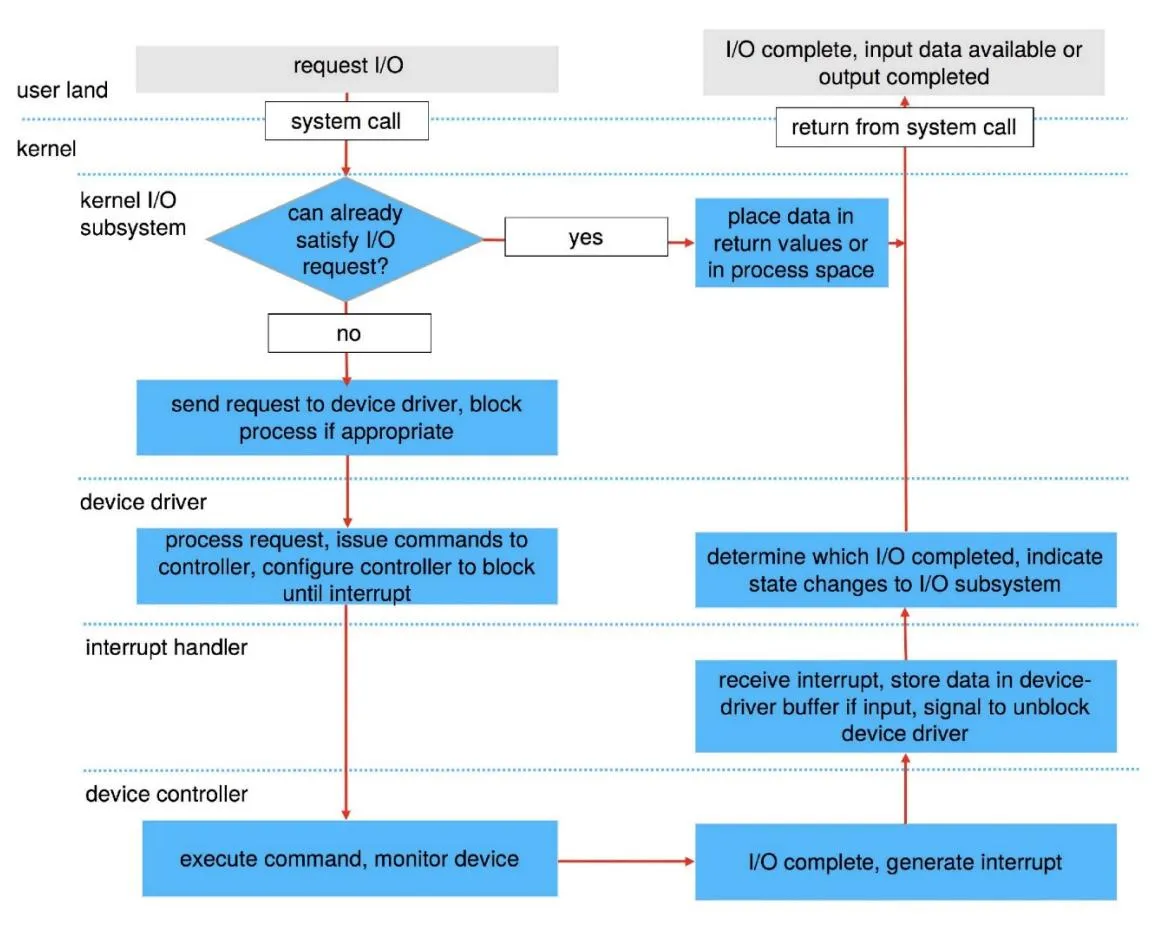
Problem 2: Device drivers
Section titled “Problem 2: Device drivers”What’s a device driver? Why is it necessary to implement a new device driver for each OS?
Solution
A device driver is a specialized software component that acts as an intermediary between the operating system and a specific hardware peripheral. It translates high-level OS commands (like “write data”) into the low-level electrical signals or commands understood by the hardware. Implementing a new driver for each OS is necessary because:
- Different Kernels: Every OS has a unique kernel architecture, internal API, and data structures. A driver written for the Windows kernel cannot communicate with the Linux or macOS kernel.
- Management Models: Different operating systems handle interrupts, memory management, and I/O scheduling in distinct ways, requiring the driver to be tailored to those specific system behaviors.
Problem 3: Linux I/O device classification
Section titled “Problem 3: Linux I/O device classification”Briefly explain how Linux classifies all I/O devices. Give one example of an I/O device under each category.
Solution
Linux classifies I/O devices into three primary categories:
- Block Devices: These store data in fixed-size blocks (e.g., 512 or 4096 bytes) and allow for random access, meaning the OS can jump to any block.
- Example: Hard Disk Drive (HDD) or Solid State Drive (SSD).
- Character Devices: These handle data as a stream of individual bytes or characters. They do not support random access; data is read or written sequentially.
- Example: Keyboard or Serial Port.
- Network Devices: These are accessed through the BSD socket interface rather than the standard file system. They handle data packets rather than streams or blocks.
- Example: Ethernet Card or Wi-Fi Adapter.
Problem 4: I/O device naming
Section titled “Problem 4: I/O device naming”How does Linux “name” I/O devices? Is it different than Windows? If so, how?
Solution
Linux “names” I/O devices by representing them as special files located in the /dev directory. This follows the “everything is a file” philosophy, where the OS interacts with hardware using standard file operations like read() and write(). Here is a comparison of naming conventions between Linux & Windows:
- Linux (Path-based): Devices are identified by hierarchical paths.
- Storage: /dev/sda (first SATA/SCSI drive), /dev/nvme0n1 (NVMe drive).
- Terminals: /dev/tty0.
- Windows (Letter/Interface-based): Devices are identified by drive letters or internal object namespaces (separate namespaces)
- C: or D: for disk drives, COM1, COM2 etc. for serial ports.
Problem 5: I/O call semantics
Section titled “Problem 5: I/O call semantics”Briefly explain the I/O call semantics available in Linux. If you have a single threaded application but multiple file descriptors to read from, which I/O call semantic makes more sense? Would your answer change if you have a multi-threaded application?
Solution
Linux provides three primary I/O call semantics that define how a process interacts with the kernel during data transfer:
- 1. Blocking (Synchronous) I/O: The default behavior where the calling process is suspended (put into a wait state) until the I/O operation completes. It is simple to program but inefficient for a single thread managing multiple devices, as the thread cannot perform any other tasks while waiting. If we want a single thread to handle multiple descriptors, we must use I/O Multiplexing with select/poll system call.
- 2. Non-Blocking I/O: The I/O call returns immediately, regardless of whether the operation finished. If no data is ready, it returns a specific error code (like EAGAIN). This allows a process to “poll” multiple devices, though it is most effectively used with I/O Multiplexing (select, poll, or epoll) to monitor many file descriptors at once.
- 3. Asynchronous I/O (AIO): The process initiates an I/O request and continues execution immediately while the kernel performs the operation in the background. Once the transfer is complete, the kernel notifies the process via a signal or a callback. This is the most complex to implement but offers high performance for I/O-heavy applications.
For a single-threaded application with multiple file descriptors, I/O Multiplexing makes the most sense. It allows the single thread to efficiently wait on all descriptors simultaneously without wasting CPU cycles on “busy-waiting” (polling) or getting stuck on one inactive descriptor while others have data ready. In a multi-threaded design, you could use Blocking I/O by assigning one thread per file descriptor. However, if you have thousands of descriptors, I/O Multiplexing remains more efficient to avoid the high memory and context-switching overhead of managing too many threads. This is why Node.js uses a single thread and I/O multiplexing to handle thousands of HTTP requests/sec.
Problem 6: Device Independent Software layer functions
Section titled “Problem 6: Device Independent Software layer functions”List 4 functions of the Device Independent Software layer.
Solution
The Device-Independent Software Layer provides a uniform interface to user-level applications by performing several critical roles:
- Scheduling: It manages and orders I/O requests via per-device queues to optimize hardware throughput (e.g., minimizing disk seek times).
- Buffering: It temporarily stores data in memory during transfers to handle asynchronous arrivals (like network packets) and to bridge the gap between different transfer sizes (e.g., matching a 10 byte write to a 4-KB disk block).
- Caching: It maintains copies of recently accessed data in fast memory (the Disk I/O Cache) to avoid redundant, slow physical hardware access.
- I/O State Management: The kernel tracks the current state of all active I/O, including open file tables, network connections, and character device positions, to ensure data is routed correctly to the requesting process.
Problem 7: High-level I/O libraries
Section titled “Problem 7: High-level I/O libraries”Given that the OS already provides “read” and “write” system calls to read from/write to an I/O device, why do most programmers still prefer using a high-level I/O library to perform I/O? Briefly explain.
Solution
Most programmers prefer high-level I/O libraries (like stdio.h in C or java.io) over raw system calls for three primary reasons:
- Efficiency via User-Space Buffering: System calls are expensive because they require a context switch from user mode to kernel mode. High-level libraries buffer data in user space, grouping many small “writes” into a single system call to minimize this overhead.
- Portability: System call interfaces (like read or write) vary between operating systems (e.g., POSIX vs. Windows API). High-level libraries provide a consistent, platform-independent interface, allowing the same code to run on different OSs.
- Convenience and Formatting: Libraries provide sophisticated formatting tools (like printf or scanf) that handle complex data type conversions (integers, floats, strings) which raw byte-oriented system calls do not support.
Problem 8: Disk cylinders
Section titled “Problem 8: Disk cylinders”What’s is a cylinder (as it applies to disks). Briefly explain.
Solution
A cylinder is the set of all tracks that are at the same radial distance from the center of the spindle across all platter surfaces.
Problem 9: Rotational latency
Section titled “Problem 9: Rotational latency”What’s rotational latency (as it applies to disks). Briefly explain.
Solution
Rotational latency (or rotational delay) is the time required for the specific disk sector requested by the OS to rotate under the read/write head after the head has reached the correct track.
Problem 10: Average rotational latency
Section titled “Problem 10: Average rotational latency”What’s the average rotational latency for a disk that rotates at 7200rpm?
Solution
For a disk rotating at 7200 RPM, the average rotational latency is:
- Rotations per second: (7200 rotations)/(60 seconds) = 120 rotations/sec
- Time for one full rotation: 1sec/120 = 1000ms/120 = 8.33ms
- Average Rotational Latency: 8.33ms/2 = 4.17ms
Problem 11: Seek time
Section titled “Problem 11: Seek time”What’s seek time (as it applies to disk)? Briefly explain.
Solution
Seek time is the time required for the disk’s read/write head to physically move the actuator arm to the specific cylinder (track) where the requested data is located.
Problem 12: SSDs vs HDDs
Section titled “Problem 12: SSDs vs HDDs”Briefly explain the pros and cons of using Non-Volatile Memory (SSDs) compared to hard disks (HDDs).
Solution
Non-Volatile Memory (SSDs)
- Pros:
- Speed: Near-zero seek time and rotational latency because there are no moving parts.
- Durability: Highly resistant to physical shock and vibration.
- Quiet/Efficient: Silent operation and lower power consumption.
- Cons:
- Cost: Higher price per gigabyte compared to HDDs.
- Write Endurance: NAND flash memory cells degrade after a finite number of write cycles (though wear-leveling algorithms mitigate this).
Hard Disk Drives (HDDs)
- Pros:
- Capacity/Cost: Much cheaper for storing massive amounts of data (terabytes).
- Cons:
- Performance: Limited by mechanical speed (seek time and rotational latency).
- Fragility: Moving parts are susceptible to mechanical failure and damage if dropped.
Problem 13: SSD physical structure
Section titled “Problem 13: SSD physical structure”Briefly describe the physical structure of an SSD. That is, what is a page, what is a block as they apply to SSDs. How does an SSD perform the “modify” operation?
Solution
An SSD is composed of NAND flash memory chips, which are organized into a specific hierarchy:
- Page: The smallest unit for reading and writing (typically 4 KB - 16 KB).
- Block: A collection of pages (typically 64 - 256 pages). This is the smallest unit that can be erased. Unlike an HDD, an SSD cannot overwrite data directly because a page must be in an “erased” state before it can be written to. To “modify” data:
-
- Read: The SSD reads the entire block containing the target page into a memory buffer.
-
- Modify: It updates the specific page in the buffer.
-
- Write: It writes the updated data to a new, empty block.
-
- Erase: The old block is marked as “stale” and eventually cleared by Garbage Collection.
-
Problem 14: Flash Translation Layer
Section titled “Problem 14: Flash Translation Layer”What’s the purpose of the Flash Translation Layer (FTL) in SSDs? How does the SSD update the FTL during garbage collection?
Solution
The Flash Translation Layer (FTL) is a hardware/software component within the SSD controller that maps Logical Block Addresses (LBAs) from the OS to Physical Block Addresses (PBAs) on the NAND flash. Here are some of the purposes of FTL:
- Abstraction: It makes the SSD appear like a traditional hard drive to the OS, hiding the complex flash geometry.
- Wear Leveling: It distributes writes across all physical blocks to ensure the flash cells wear out evenly.
- Bad Block Management: It identifies and skips retired (failed) memory cells.
When the SSD performs Garbage Collection, it moves “valid” pages from a fragmented block to a new, clean block so the old one can be erased.
- Relocation: The controller copies the valid data to a new physical location.
- Table Update: The FTL immediately updates its internal mapping table to point the original logical address to this new physical address.
- Invalidation: The old physical entries are marked as invalid/stale, allowing the block to be safely erased and reused.
Problem 15: TRIM command
Section titled “Problem 15: TRIM command”Briefly describe the role of the TRIM command sent from the OS to an SSD.
Solution
The TRIM command allows the operating system to inform the SSD controller which blocks of data are no longer considered “in use” (e.g., after a user deletes a file). Here are the roles of TRIM:
- Logical vs. Physical Sync: Without TRIM, an SSD doesn’t know a file was deleted until the OS tries to overwrite those same sectors. TRIM provides this “heads-up” immediately.
- Efficiency: It allows the SSD to skip moving “deleted” data during Garbage Collection, which reduces internal data copying.
- Performance & Lifespan: By reducing unnecessary writes (Write Amplification), TRIM maintains higher write speeds over time and extends the physical life of the NAND flash cells.
Problem 16: Write leveling
Section titled “Problem 16: Write leveling”What’s “write leveling” as it applies to SSDs and why is it needed?
Solution
Wear leveling is a technique used by the SSD controller to distribute write and erase cycles evenly across all physical memory blocks in the drive. Here is why it is needed:
- Finite Lifespan: Each NAND flash memory cell can only be erased and rewritten a limited number of times (its “program/erase” or P/E cycle limit) before it wears out and can no longer reliably store data.
- Preventing Premature Failure: Without wear leveling, the OS might repeatedly write to the same logical sectors (like file system metadata). This would cause those specific physical blocks to fail quickly, rendering the entire drive unusable even if most of the other flash cells are still perfectly healthy.
Problem 17: Why file systems are necessary
Section titled “Problem 17: Why file systems are necessary”Given that the device independent layer allows a disk to be read in blocks, why is it still necessary to implement a file system?
Solution
Device Independent Layer exports a disk as an array of raw blocks. This is a very low level interface for a disk. Typically, general users would like to see a disk as a set of files and directories. To turn a raw disk into files, directories and permissions, a file system is required. Additionally, a file system is required to track which blocks are free and which are occupied, preventing new files from overwriting existing data.
Problem 18: SSTF disk scheduling
Section titled “Problem 18: SSTF disk scheduling”Assume that the disk head is currently over cylinder 20 and you have disk requests for the following cylinders: 35, 22, 15, 55, 72, 8. In what order would you serve these requests if you were to employ Shortest Seek Time First (SSTF) scheduling algorithm?
Solution
To serve these requests using the Shortest Seek Time First (SSTF) algorithm, we always choose the cylinder closest to the current head position:
- 20 → 22: Closest available.
- 22 → 15: 15 (7 away) is closer than 35 (13 away).
- 15 → 8: 8 (7 away) is closer than 35 (20 away).
- 8 → 35: Only 35, 55, and 72 remain; 35 is the nearest.
- 35 → 55: 55 is closer than 72.
- 55 → 72: Final request.
Final Order: 22, 15, 8, 35, 55, 72.
Problem 19: C-SCAN disk scheduling
Section titled “Problem 19: C-SCAN disk scheduling”Suppose that a disk drive has 5000 cylinders, numbered 0 to 4999. The drive is currently serving a request at cylinder 143, and the previous request was at cylinder 125. The queue of pending requests, in FIFO order, is 86, 1470, 913, 1774, 948, 1509, 1022, 1750, 130. In what order would you serve these requests if you were to employ C-SCAN scheduling algorithm?
Solution
In C-SCAN (Circular SCAN), the disk head moves in one direction (usually towards higher cylinder numbers) and, upon reaching the end, immediately returns to the start without serving requests on the way back. Since the previous request was at 125 and the current is at 143, the head is moving in the increasing direction. Therefore, C-SCAN Service order will be:
- 913
- 948
- 1022
- 1470
- 1509
- 1750
- 1774
- (Head moves to the very end at 4999)
- (Head “wraps around” to the start at 0)
- 86
- 130
Final Sequence: 913, 948, 1022, 1470, 1509, 1750, 1774, 86, 130.
Problem 20: Disk scheduling algorithms
Section titled “Problem 20: Disk scheduling algorithms”Assume that the disk request queue consists of the following disk requests each specified by the cylinder number: 111, 97, 123, 90, 102. Further assume that the disk arm is currently located over cylinder number 100. In what order would the requests be scheduled by this File System if it employs:
(a) First Come First Served (FCFS) policy?
Solution (a)
First Come First Served (FCFS) policy: 111, 97, 123, 90, 102
(b) Shortest Seek Time First (SSTF) policy?
Solution (b)
Shortest Seek Time First (SSTF) policy: 102, 97, 90, 111, 123
(c) SCAN policy? Assume the disk head is moving towards increasing cylinder numbers.
Solution (c)
SCAN policy: 102, 111, 123, 97, 90
(d) C-SCAN policy? Assume the disk head is moving towards increasing cylinder numbers.
Solution (d)
C-SCAN policy: 102, 111, 123, 90, 97
Problem 21: SSTF and C-SCAN comparison
Section titled “Problem 21: SSTF and C-SCAN comparison”Consider a disk with the disk head currently located on cylinder number 100 and moving outside (towards bigger numbered cylinder numbers). Assume that the current disk requests are for the following cylinders of the disk: 30, 12, 150, 120, 105, 160, 55, 77, 88. For the following disk scheduling algorithms, show in what order the requests will be served.
(a) Shortest Seek Time First
Solution (a)
Shortest Seek Time First: 105, 120, 150, 160, 88, 77, 55, 30, 12
(b) C-SCAN
Solution (b)
C-SCAN: 105, 120, 150, 160, 12, 30, 55, 77, 88
Problem 22: Comparing disk scheduling algorithms
Section titled “Problem 22: Comparing disk scheduling algorithms”Assume that the disk request queue consists of the following disk requests specified by a cylinder number: 45, 24, 123, 56, 124, 100, 80. Further assume that the disk arm is currently located over the cylinder number 88. In what order would the requests be scheduled by this file system if the file system employs:
(a) First Come First Served (FCFS) policy?
Solution (a)
First Come First Served (FCFS) policy: 45, 24, 123, 56, 124, 100, 80
(b) Shortest Seek Time First (SSTF) policy?
Solution (b)
Shortest Seek Time First (SSTF) policy: 80, 100, 123, 124, 56, 45, 24
(c) SCAN policy? Assume the disk head is moving towards increasing cylinder numbers.
Solution (c)
SCAN policy: 100, 123, 124, 80, 56, 45, 24
(d) C-SCAN policy? Assume the disk head is moving towards increasing cylinder numbers.
Solution (d)
C-SCAN policy: 100, 123, 124, 24, 45, 56, 80
Problem 23: SSD lifespan calculation
Section titled “Problem 23: SSD lifespan calculation”An SSD has the following characteristics:
(a) Write amplification factor (WAF): 2, i.e., each write causes a total of 2 writes on the SSD
(b) Endurance: 1000 write cycles per block
(c) Total capacity: 500 GB
(d) A workload writes 100 GB of data to the SSD every day.
Estimate the SSD’s lifespan in years, assuming all blocks are written evenly (wear leveling is perfect).
Solution
Total writes per day: 2 × 100 GB = 200 GB.
Total endurance: 500 GB × 1000 cycles = 500,000 GB
Lifespan: (Total endurance)/(Total writes per day) = (500,000 GB)/(200 GB/day) = 2500 days ≈ 6.85 years
Problem 24: Superblock contents
Section titled “Problem 24: Superblock contents”List 2 items that are stored in the superblock of a file system.
Solution
The superblock stores critical metadata about the entire file system’s structure. Two key items include:
- File System Size: The total number of blocks in the file system.
- Free Block List: A pointer to or a bitmap of all currently available (unallocated) data blocks.
Other items include the magic number to identify the file system type and the total number of inodes.
Problem 25: Contiguous allocation
Section titled “Problem 25: Contiguous allocation”What is contiguous allocation? What difficulty occurs with contiguous allocation?
Solution
Contiguous allocation requires each file to occupy a set of strictly adjacent blocks on the disk (e.g., blocks 50 through 55). Here is how it works:
- Structure: The directory entry for a file only needs to store the starting block address and the length (number of blocks).
- Performance: It is extremely fast for sequential access because the disk head doesn’t need to move much to read the entire file.
The biggest drawback is external fragmentation. As files are created and deleted, the free disk space is broken into small, scattered holes.
- The Problem: You might have 100 free blocks total, but if they aren’t in one continuous string, you cannot save a new 50-block file.
- The Solution: Frequent compaction (defragmentation) is required to slide files together and create large contiguous free spaces, which is time-consuming and resource-intensive.
Problem 26: External fragmentation
Section titled “Problem 26: External fragmentation”What is external fragmentation in a system with contiguous files?
Solution
External fragmentation occurs when the total available disk space is sufficient to store a file, but the space is divided into several small, non-contiguous gaps (holes) between existing files. It happens because:
- In a contiguous allocation system, a file must be stored in a single, continuous set of blocks.
- As files are created and deleted over time, the disk becomes a “checkerboard” of used and unused space.
- If a new file requires 50 blocks, but the largest single gap is only 40 blocks, the file cannot be stored—even if there are 100 free blocks in total across the disk.
Problem 27: Internal fragmentation
Section titled “Problem 27: Internal fragmentation”What’s internal fragmentation as it applies to a file system?
Solution
Internal fragmentation occurs when a file is smaller than the fixed-size block (or cluster) allocated to it by the file system. It happens because:
- Fixed Blocks: File systems divide disk space into equal-sized units (e.g., 4 KB blocks).
- The “Leftover” Space: If a file is only 1 KB, the file system still allocates a full 4 KB block. The remaining 3 KB within that block is “trapped”—it cannot be used by any other file.
Here is why internal fragmentation matters in file systems:
- Wasted Capacity: On a disk with millions of small files, the cumulative amount of wasted space (the “tail” of every file) can significantly reduce the actual usable storage.
- Trade-off: Larger block sizes improve performance (fewer overhead lookups) but increase internal fragmentation.
Problem 28: Fragmentation with linked allocation
Section titled “Problem 28: Fragmentation with linked allocation”Can linked allocation in a file system have external fragmentation? Internal fragmentation?
Solution
Linked allocation handles fragmentation differently than contiguous allocation:
- External Fragmentation: No. A file can be scattered across any available blocks on the disk, connected by pointers. As long as there is at least one free block anywhere, it can be added to a file’s chain.
- Internal Fragmentation: Yes. Like most file systems, space is allocated in fixed-size blocks. If a file’s last portion is smaller than the block size, the remaining space in that final block is wasted and cannot be used by other files.
A unique drawback of linked allocation is that it also wastes a small amount of space in every block to store the pointer to the next block, slightly reducing the effective payload capacity.
Problem 29: Linked allocation tradeoffs
Section titled “Problem 29: Linked allocation tradeoffs”List 1 advantage and 1 disadvantage of using linked allocation in a file system.
Solution
Linked allocation uses a chain of pointers to connect a file’s blocks across the disk.
- Advantage: No External Fragmentation. Since a file can be scattered across any available blocks, every single free block on the disk can be utilized. There is no need for expensive disk compaction.
- Disadvantage: No Random Access. To read the nth block of a file, the system must start at the first block and follow the pointers through all preceding n-1 blocks. This makes seeking to a specific point in a large file very slow.
Problem 30: Single directory tradeoffs
Section titled “Problem 30: Single directory tradeoffs”List 1 advantage and 1 disadvantage of using a single directory.
Solution
A single-level directory (or flat file system) stores all files in one single location, requiring every file to have a unique name.
- Advantage: Its biggest advantage is simplicity - it is extremely easy to implement and manage for very small systems with few files. There is no complex path resolution or nested data structures to traverse.
- Disadvantage: The biggest disadvantage is naming collisions. As the number of files increases, it becomes difficult for users to remember and create unique names. If two users want to name a file data.txt, the system cannot distinguish between them, leading to accidental overwrites or naming conflicts.
Problem 31: DAG directories vs tree directories
Section titled “Problem 31: DAG directories vs tree directories”List two issues that must be addressed to handle Directed Acyclic Graph (DAG) directories vs. simple tree directories.
Solution
- Duplicate Traversal (Backups/Search): Since a file can have multiple paths, a simple recursive traversal might process (or back up) the same file multiple times. Systems must track “visited” nodes to avoid redundancy.
- Deletion Integrity (Reference Counting): You cannot simply delete a file when one link is removed. You must maintain a reference count in the metadata (inode) and only deallocate the disk blocks when the count reaches zero.
Problem 32: Hard-links vs soft-links
Section titled “Problem 32: Hard-links vs soft-links”Explain the difference between a hard-link and a soft-link.
Solution
The primary difference lies in whether the link points directly to the data (inode) or to a path name.
Hard Link
- Definition: A direct pointer to the same inode as the original file.
- Behavior: It is indistinguishable from the original file. If you delete the original name, the data remains accessible through the hard link until all links are deleted (reference count reaches zero).
- Constraint: Cannot link across different file systems or link to directories.
Soft Link (Symbolic Link)
- Definition: A special type of file that contains a text path to another file or directory.
- Behavior: If the original file is moved or deleted, the soft link becomes “broken” (a dangling pointer).
- Advantage: Can link to directories and can span across different file systems or even network drives.
Problem 33: Hard-link behavior after deletion
Section titled “Problem 33: Hard-link behavior after deletion”Assume that user A owns a file named “file.txt” and user B has a hard link to this file named “file1.txt”. Assume user A removes “file.txt” by issuing the Linux command “rm file.txt”. Now user B tries to access “file1.txt” by executing the command “file1.txt”. Will user B be able to access this file? Why or why not? Briefly explain.
Solution
Yes, User B will still be able to access the file. When a hard link is created, both “file.txt” and “file1.txt” point directly to the same inode (the data structure on the disk that stores the file’s attributes and block locations). Each inode maintains a count of how many hard links point to it. In this case, the count was 2. When User A issues rm file.txt, the system only removes that specific directory entry and decrements the inode’s reference count to 1. The actual data on the disk is only deleted (deallocated) when the reference count reaches 0. Since User B’s link still exists, the reference count is greater than zero, and the file remains perfectly intact and accessible under the name “file1.txt”.
Problem 34: Soft-link behavior after deletion
Section titled “Problem 34: Soft-link behavior after deletion”Assume that user A owns a file named “file.txt” and user B has a soft link to this file named “file1.txt”. Assume user A removes “file.txt” by issuing the Linux command “rm file.txt”. Now user B tries to access “file1.txt” by executing the command “file1.txt”. Will user B be able to access this file? Why or why not? Briefly explain.
Solution
No, User B will not be able to access the file. A soft link (symbolic link) is simply a small file that contains the text path to the original file, rather than pointing to the actual data (inode). When User A deletes file.txt, the actual data is removed from the disk (assuming no other hard links exist). User B’s link file1.txt still exists, but it is now a “broken” or “dangling” link. It points to a filename that no longer exists in the directory. When User B tries to access the link, the system follows the path to file.txt, fails to find it, and returns a “No such file or directory” error.
Problem 35: UNIX filesystem protection bits
Section titled “Problem 35: UNIX filesystem protection bits”What are the 9 protection bits used in a UNIX filesystem?
Solution
Read, write, and execute for each of user, group, and other/world.
Problem 36: Write and close system calls
Section titled “Problem 36: Write and close system calls”Explain why the write and close system calls may not result in data immediately being written to disk.
Solution
The write and close system calls often don’t result in immediate disk activity due to write-back caching (or buffer caching) in the operating system. When a program calls write(), the data is typically copied from the application’s memory into a buffer cache in the OS kernel. The OS then returns control to the program immediately to improve performance, planning to “flush” that data to the physical disk later (asynchronously). The close() system call simply deallocates the file descriptor. It does not usually force the OS to write the cached buffers to the disk. This is done for performance reasons: Disk I/O is orders of magnitude slower than RAM. Grouping many small writes into one large physical disk operation is much more efficient. Furthermore, reducing the frequency of physical writes can extend the life of storage hardware, especially flash-based SSDs.
Problem 37: Seek system call behavior
Section titled “Problem 37: Seek system call behavior”Does the seek system call result in a disk head moving (explain your answer)?
Solution
No, the seek system call does not result in immediate physical disk head movement. The lseek() system call is a software-level operation that only updates the file offset pointer (a variable) in the system’s open file table. It simply tells the operating system where the next read or write should occur within the file’s logical address space. The actual physical movement of the disk head (the seek time) only occurs later, when a subsequent read() or write() command is issued at that new offset.
Problem 38: I-node contents
Section titled “Problem 38: I-node contents”List 2 items that are stored in an i-node.
Solution
An inode contains the metadata for a specific file, excluding its name. Two key items stored within it are:
- File Permissions: The access rights (read, write, execute) for the owner, group, and others.
- Data Block Pointers: A list of direct and indirect pointers that specify the physical disk addresses where the file’s data is stored.
Other common items include the file size, owner ID, and link count.
Problem 39: Directory entry information
Section titled “Problem 39: Directory entry information”In a file system that uses i-nodes, what information do we store in each directory entry?
Solution
In a file system that uses i-nodes, each directory entry is intentionally simple and typically stores only two primary pieces of information:
- File Name: The human-readable string used to identify the file.
- i-node Number: A pointer (index) to the specific i-node on the disk that contains all the file’s metadata and data block locations.
Problem 40: Block size tradeoffs
Section titled “Problem 40: Block size tradeoffs”List 1 advantage and 1 disadvantage of making the block size big in a file system.
Solution
Advantage: Better Throughput. Larger blocks allow the OS to read or write more data in a single I/O operation. This reduces the number of seeks and metadata lookups, which significantly speeds up the transfer of large files.
Disadvantage: Increased Internal Fragmentation. Since disk space is allocated in full blocks, a small 1 KB file will still occupy the entire large block. The unused space in that block is wasted and cannot be used by other files.
Problem 41: Block cache purpose and management
Section titled “Problem 41: Block cache purpose and management”What’s the purpose of having “block cache” in I/O systems. How is it managed by the OS? Briefly explain.
Solution
The block cache (or buffer cache) is a portion of main memory (RAM) used to store copies of frequently accessed disk blocks. The primary goal is to reduce disk I/O latency. Since RAM is orders of magnitude faster than physical disks (especially HDDs), satisfying a read or write request from the cache significantly boosts system performance. The OS manages the cache using two main strategies:
- Replacement Policy: To decide which blocks to remove when the cache is full, the OS typically uses an LRU (Least Recently Used) algorithm, assuming that blocks accessed recently are likely to be accessed again soon.
- Write Strategy: The OS must decide when to sync modified (“dirty”) blocks back to the disk. It often uses delayed writes (write-back), where data stays in RAM for a short period before being flushed to the disk in bulk to improve efficiency.
Problem 42: Blocks read with 4096 byte blocks
Section titled “Problem 42: Blocks read with 4096 byte blocks”Consider a file system that uses 4096 byte blocks. Assume that a program opens a file stored in this file system and issues the following system calls in the given sequence: read(100); seek(2000); read(700); read(100); seek(5300); read(100); read(200). Assume that seek(location) moves the file pointer to the given location on the file. In response to this sequence of operations, how many blocks are read from the disk? Justify your answer.
Solution
To determine the number of physical reads, we track the file pointer’s position relative to the 4096-byte block boundaries.
-
Block 0 (Bytes 0–4095):
- read(100): Reads bytes 0–100. (Block 0 is fetched into cache).
- seek(2000): Moves pointer to 2000. (No disk I/O).
- read(700): Reads bytes 2000–2700. (Already in cache).
- read(100): Reads bytes 2700–2800. (Already in cache).
-
Block 1 (Bytes 4096–8191):
- seek(5300): Moves pointer to 5300. (No disk I/O).
- read(100): Reads bytes 5300–5400. (Block 1 is fetched into cache).
- read(200): Reads bytes 5400–5600. (Already in cache).
Summary: The first four operations stay within the range of Block 0. The last three operations stay within the range of Block 1. Since the OS caches blocks, only two unique physical blocks are requested from the storage device.
Problem 43: Blocks read with 1024 byte blocks
Section titled “Problem 43: Blocks read with 1024 byte blocks”Consider a file system that uses 1024 byte blocks. Assume that a program opens a file stored in this file system and issues the following system calls in the given sequence: read(500); seek(700); read(200); read(100); seek(3000); read(200). Assume that seek(location) moves the file pointer to the given location. In response to this sequence of operations, how many blocks are read from the disk? Justify your answer.
Solution
To determine the number of physical reads, we track the file pointer’s position relative to the 1024-byte block boundaries.
-
Block 0 (Bytes 0–1023):
- read(500): Accesses bytes 0–500. (Block 0 is read into the cache).
- seek(700): Moves the pointer to 700. (No disk I/O).
- read(200): Accesses bytes 700–900. (Already in cache).
- read(100): Accesses bytes 900–1000. (Already in cache).
-
Block 2 (Bytes 2048–3071):
- seek(3000): Moves the pointer to 3000. (No disk I/O).
- read(200): Accesses bytes 3000–3200. (Block 2 is read into the cache). Note: Because this read crosses the boundary at 3072, the OS would also fetch Block 3 (bytes 3072– 4095) to complete the request.
The system must fetch the blocks containing the requested byte ranges. Since the first set of calls stays within the first 1024 bytes and the final call spans the end of the third block and the start of the fourth, the OS performs 3 physical reads for the necessary blocks (Blocks 0, 2 and 3).
Problem 44: Reaching the millionth byte
Section titled “Problem 44: Reaching the millionth byte”A UNIX system has just been rebooted (i.e., the file buffer and name translation caches are empty). What is the minimum number of disk blocks that must be read to get to the millionth byte of the file “/a/big/file” assuming the file-system uses 4096 byte blocks and 32-bit i-node numbers?
Solution
- Read root i-node
- Read root directory and find “a”
- Read i-node for “/a”
- Read directory chunk and find “big”
- Read i-node for “/a/big”
- Read directory chunk and find “file”
- Read i-node for “/a/big/file”
- Read indirect block for the file (since 4KB blocks hold 1024 pointers, files up to 4MB are in direct or indirect block)
- Read the data block
A total of 9 blocks must be read to reach the millionth byte.
Problem 45: Bit vector vs linked free block list
Section titled “Problem 45: Bit vector vs linked free block list”Explain why a bit vector implementation of a free block list can provide increased reliability and performance compared with keeping a list of free blocks where the first few bytes of each free block provide the logical sector number of the next free block.
Solution
1. Performance: Spatial Locality
- Bit Vector: Since the entire disk state is represented by a compact string of bits (usually kept in RAM), the OS can use fast bitwise CPU instructions to quickly find contiguous runs of free blocks. This allows for contiguous allocation, which significantly reduces disk head seek time.
- Linked List: To find multiple free blocks, the OS must physically read a free block from the disk just to find the pointer to the next one. This “pointer chasing” causes excessive disk I/O and usually results in fragmented file allocation.
2. Reliability: Data Integrity
- Bit Vector: Because it is a small, centralized structure, it is practical to keep redundant copies (mirrors) in different disk locations. If one part of the vector is corrupted, only a small portion of the disk’s status is affected, and it can often be reconstructed by scanning the inodes.
- Linked List: It is a “single point of failure” chain. If a single block in the free list becomes corrupted or is accidentally overwritten, the pointers to all subsequent free blocks are lost, effectively “shrinking” the available capacity of the disk until a slow consistency check (like fsck) is run.
Problem 46: I-node based file system analysis
Section titled “Problem 46: I-node based file system analysis”Consider an i-node based file system that uses 512 byte blocks and that a block number occupies 4 bytes. Assume that the i-node has 4 direct pointers, 1 indirect pointer and 1 double indirect pointer.
(a) List 2 items that are stored in the directory entry for this file.
Solution (a)
File Name: The character string (e.g., “file.txt”) used by the user to identify the file. i-node Number: The unique index or pointer used by the OS to look up the file’s metadata and disk block locations in the i-node table.
(b) What’s the maximum possible file size in this file system?
Solution (b)
To calculate the maximum file size for this i-node configuration, we first determine how many block pointers a single 512-byte block can hold:
Pointers per block (N): 512 bytes / 4 bytes per pointer = 128 pointers.
Now, we calculate the total number of blocks accessible:
- Direct Pointers: 4 blocks.
- Single Indirect Pointer: 1 × N = 128 blocks.
- Double Indirect Pointer: 1 × N² = 128 × 128 = 16,384 blocks.
Total Blocks: 4 + 128 + 16,384 = 16,516 blocks.
Maximum File Size: 16,516 blocks × 512 bytes/block = 8,456,192 bytes
(c) Assuming the i-node is in memory, if an application opens the file, reads 600 bytes and closes the file, how many disk blocks will be read from the disk. You must justify your answer.
Solution (c)
In this scenario, 2 disk blocks will be read from the disk. The number of physical reads is determined by how many unique blocks the OS must fetch to satisfy the 600-byte request, given the 512-byte block size and the i-node structure:
Block 0 (Bytes 0–511): To read the first 512 bytes, the OS uses the first direct pointer in the i-node to fetch the first block from the disk.
Block 1 (Bytes 512–1023): To read the remaining 88 bytes (), the OS must access the second block of the file. It uses the second direct pointer in the i-node to fetch this block from the disk.
(d) Assuming the i-node is in memory, if an application opens a 5000 byte sized file and reads it sequentially, how many disk blocks will be read from the disk. You must justify your answer.
Solution (d)
To read a 5000-byte file sequentially with 512-byte blocks, a total of 11 disk blocks must be read.
Data Blocks (10 blocks): A 5000-byte file requires ceil(5000 / 512) = 10 data blocks. The first 4 blocks are accessed via Direct Pointers (4 × 512 = 2,048 bytes). The remaining 2,952 bytes (5,000 - 2,048) must be stored in the next 6 blocks.
Indirect Index Block (1 block): Because the i-node only has 4 direct pointers, it can only “see” the first 2,048 bytes of the file. To reach the 5th block and beyond, the OS must use the Single Indirect Pointer. The Single Indirect Pointer does not point to data; it points to an Index Block on the disk that contains the addresses of the next 128 data blocks. The OS must perform 1 additional physical read to fetch this Index Block into memory so it can find the addresses for data blocks 5 through 10.
Summary of Reads: 10 Data Blocks (containing the actual 5000 bytes) + 1 Indirect Index Block (to find the addresses of data blocks 5–10) = Total Disk Reads: 11 blocks (10 for data blocks, 1 for the first indirect block).
Problem 47: Reconstructing free-space list
Section titled “Problem 47: Reconstructing free-space list”Consider a system where free space is kept in a free-space list. Suppose that the pointer to the free-space list, stored in the superblock, is lost. Can the system reconstruct the free-space list? Explain your answer.
Solution
Yes. Since the location of the root directory is still known (inferred from the superblock), you can start from the root directory and determine all blocks occupied by all files and directories in the system by recursively traversing all directories in the file system. Recall that the blocks occupied by a file or directory are reachable from the i-node of the file (in a FS which uses i-nodes). Once all occupied blocks are determined, the remaining blocks are put to the free list, thus completing the reconstruction.
Problem 48: Contiguous allocation file system
Section titled “Problem 48: Contiguous allocation file system”Consider a file system that employs contiguous allocation with a block size of 1024 bytes, and assume you have the following directory:
| File | Start | Length |
|---|---|---|
| a.txt | 5 | 2 |
| b.txt | 2 | 3 |
(a) Reading from a.txt
char buffer[2048];int fd = open("a.txt", READ_ONLY);read(fd, buffer, 100); // [1]read(fd, buffer, 900); // [2]read(fd, buffer, 1000); // [3]close(fd);(b) Reading and writing to b.txt
char buffer[2048];int fd = open("b.txt", READ_WRITE);seek(fd, 1000); // [1]read(fd, buffer, 1100); // [2]write(fd, buffer, 2000); // [3]close(fd);For each of the read calls in (a), which physical disk blocks are actually read from the disk (if any)? Justify your answer.
Solution (a)
Read [1]: The file pointer starts at 0. To get the first 100 bytes, the OS must fetch the first logical block of the file. Since the file starts at physical Block 5, that block is read into the system’s buffer cache.
Read [2]: This request asks for the next 900 bytes (taking the pointer to 1000). Since 1000 is still less than the block size of 1024, all requested data resides within the already-cached Block 5. No disk I/O occurs.
Read [3]: This request asks for 1000 more bytes (taking the pointer to 2000). Because the pointer crosses the 1024-byte boundary, the OS must fetch the second logical block of the file. In contiguous allocation, this is the very next physical block: Block 6.
Total Disk Reads: 2 (Blocks 5 and 6).
For each of the seek/read calls in (b), which physical disk blocks are actually read from the disk (if any)? Justify your answer.
Solution (b)
Seek [1]: The seek system call is a software operation. It moves the file offset pointer to 1000, but no data is requested yet, so no physical disk head movement or block reading occurs.
Read [2]: This request asks for 1100 bytes starting from offset 1000.
- Offset 1000 to 1023: These 24 bytes are at the very end of the file’s first logical block (Physical Block 2). The OS must read Block 2 into the cache.
- Offset 1024 to 2047: The next 1024 bytes constitute the file’s second logical block (Physical Block 3). The OS must read Block 3 into the cache.
- Offset 2048 to 2100: The final 53 bytes are at the start of the file’s third logical block (Physical Block 4). So the OS also reads physical block 4 to satisfy that.
Total Disk Reads: 3 (Blocks 2, 3 & 4)
Would the last write call in (b) succeed? Why or why not? Justify your answer.
Solution (c)
No, the last write call in (b) would not succeed. It would likely return an error or fail to write the full amount. In this specific disk layout, a.txt starts immediately at Block 5. There are no free blocks following b.txt (Block 4) to allow it to grow. In contiguous allocation, if the adjacent block is already occupied, the file cannot expand without being moved to an entirely new, larger hole on the disk.
Problem 49: Contiguous file system allocation
Section titled “Problem 49: Contiguous file system allocation”Consider a file system that uses contiguous allocation, i.e., files are stored contiguously on the disk. Assume that the disk partition over which the file system resides contains 15 blocks, labeled 1 through 15. The block size is 512 bytes, the first block contains the superblock, and the rest of the blocks are initially empty. The file system uses a single level directory system, i.e., only the root directory exists.
| File | Size (bytes) |
|---|---|
| a.txt | 600 |
| b.dat | 300 |
| c.avi | 1100 |
| d.txt | 1600 |
(a) Show the contents of the root directory.
Solution (a)
In a contiguous allocation system, the root directory must store the starting block and the length (number of blocks) for each file. Block 1 will store the superblock, which will store the location of the root directory. Let’s say we store the root directory in block 2. Then the files will be stored in blocks 3-15. Since block size is 512 bytes:
- a.txt requires 2 blocks: ceil(600/512). So, a.txt is stored in blocks 3 & 4.
- b.dat requires 1 block: ceil(300/512). So, b.dat is stored in block 5.
- c.avi requires 3 blocks: ceil(1100/512). So, c.avi is stored in blocks 6, 7 & 8.
- d.txt requires 4 blocks: ceil(1600/512). So, d.txt is stored in blocks 9, 10, 11 and 12.
Given this, here are the contents of the root directory:
| File name | Start block | Length (bytes) |
|---|---|---|
| a.txt | 3 | 600 |
| b.dat | 5 | 300 |
| c.avi | 6 | 1100 |
| d.txt | 9 | 1600 |
(b) Show the contents of the disk. In particular show the blocks that each file occupies on the disk.
Solution (b)
| 1 | 2 | 3 | 4 | 5 | 6 | 7 | 8 | 9 | 10 | 11 | 12 | 13 | 14 | 15 |
|---|---|---|---|---|---|---|---|---|---|---|---|---|---|---|
| Superblock | root directory | a.txt | a.txt | b.dat | c.avi | c.avi | c.avi | d.txt | d.txt | d.txt | d.txt |
Problem 50: Simulating hierarchical directories
Section titled “Problem 50: Simulating hierarchical directories”Given a filesystem that supports only one directory (i.e. it’s not possible to create sub-directories) and 8 character filenames, explain how you could write a user level library that simulates hierarchical directories. That is, the given file system only supports the following file operations: creat, open, read, write, seek, close. Your library must not only support these file operations, but also support the following directory operations: mkdir, rmdir, chdir. Describe how you would implement these file and directory operations on top of the given file system and specifically discuss what happens when the user opens /a.txt and /dir1/a.txt and calls mkdir(“/dir1/dir2”).
Solution
To simulate a hierarchy on a flat system, the library acts as a translation layer. It treats specific files in the flat OS as “Virtual Directories” that contain a lookup table.
1. Core Mechanism: The Mapping Table
Each virtual directory is a standard OS file. Its content consists of a list of entries:
[User-Defined Name] | [OS-Generated 8-Char Name] | [Type: File/Dir]
- The Root (/): One specific 8-character filename (e.g., ROOT_DIR) is hardcoded in the library as the starting point.
- Unique Naming: Since the OS requires unique 8-char names, the library maintains a counter or hash to generate names like FILE0001, DIR00002, etc., ensuring no collisions at the OS level.
2. Implementation of Operations
- mkdir(path):
- Traverse the path to the parent directory.
- Generate a new unique 8-char filename (e.g., XY7890ZZ).
- Call OS creat(“XY7890ZZ”).
- Append the mapping (“new_dir_name” -> “XY7890ZZ”, TYPE_DIR) to the parent directory’s file.
- chdir(path):
- The library maintains a Current Working Directory (CWD) variable in memory, storing the 8-char OS name of the current virtual directory.
- chdir simply updates this variable after verifying the path exists.
- open(path):
- The library parses the path. For /dir1/a.txt, it opens the ROOTDIR file, looks up dir1 to find its OS name, opens _that file, and looks up a.txt to find its actual OS name.
- It then calls OS_open(“ACTUAL_NAME”).
3. Specific Examples
- Opening /a.txt vs /dir1/a.txt:
- /a.txt: The library looks in the Root file for “a.txt” finds OS_NAME_1.
- /dir1/a.txt: The library looks in the Root for “dir1” finds OS_NAME_DIR1. It then opens OS_NAME_DIR1 and looks for “a.txt” finds OS_NAME_2.
- Even though both are named “a.txt” by the user, they map to different 8-character names in the OS, preventing a conflict.
- mkdir(“/dir1/dir2”):
- Library opens the OS file representing /dir1.
- Library generates a new unique name, say DIR00005.
- Library calls OS_creat(“DIR00005”).
- Library writes the entry (“dir2” | “DIR00005” | DIR) into the /dir1 OS file.
Problem 51: I-node file system with multiple pointer levels
Section titled “Problem 51: I-node file system with multiple pointer levels”Consider a file system (FS) that has both a logical and physical block sizes of 512 bytes. Assume that the file system uses i-nodes. Within a i-node, the FS stores 10 direct pointers, 1 single indirect pointer, 1 double indirect pointer and 1 triple indirect pointer. Further assume that disk block addresses require 4 bytes.
(a) What’s the maximum size of a file stored in this file system?
Solution (a)
Since disk block addresses are 4 bytes, each block can hold 512/4 = 128 disk block addresses. So the maximum number of blocks that a file in this FS can hold is: 10 (direct pointers) + 128 (single indirect pointers) + 128² (double indirect pointers) + 128³ (triple indirect pointers). The maximum file size is then (10 + 128 + 128² + 128³) × 512 bytes.
(b) Consider a 220 byte file stored in this file system. Assume that an application issues an open system call to open this file, located in the current directory. Further assume that the file system uses inodes and the i-node for the current directory is already in memory. Describe the actions taken by the file system during open() system call for this file. (Assume that the current directory contents fit into a single disk block). How many blocks are read from the disk? Justify your answer.
Solution (b)
When the open system call is executed on a file, the FS first reads the contents of the current directory from the disk. To do this the FS looks at the i-node of the current directory and follows the first direct pointer (assuming the directory contents fit into a single disk block). After reading the contents of the directory to memory, the FS searches the filename within the directory and learns the i-node of the file. The FS then reads the i-node of the file to complete the open system call. Of course, the protections are checked at each step. In conclusion the FS reads a total of 2 blocks.
(c) Assume that the file described in part (a) is already open. Further assume that the process that opened the file reads first 100 bytes of the file. How many disk blocks are read from the disk for this operation. Justify your answer.
Solution (c)
First 100 bytes of the file resides inside the first block of the file. Since the i-node of the file is in memory (read during open), the FS simply reads the first direct block from the disk, copies the first 100 bytes to the user’s buffer and returns from the read system call. So FS reads just 1 block from the disk during this operation.
(d) Consider the process in part (c) that has opened the file and read the first 100 bytes. Assume now that the same process now reads the next 800 bytes of the file, that is, bytes 100-900. How many disk blocks are read from the disk for this operation. Justify your answer.
Solution (d)
First block is already in memory. So the FS reads blocks 2 and 3, copies appropriate many bytes to the user buffer and returns from the read system call. So the FS reads 2 blocks during this operation.
(e) Consider the process in part (c) that has opened the file and read the first 100 bytes. Assume that the process now seeks to byte 215 of the file, and reads 1040 bytes. How many disk blocks are read from the file? Justify your answer.
Solution (e)
215 resides in block 215 / 512 = 0 (integer division). Since block 0 is already in memory from part (c), we need to check which blocks are needed. Actually, 215 is in block 0 (bytes 0-511). Since we’re reading 1040 bytes starting at byte 215, we need bytes 215-1255. This spans blocks 0, 1, and 2. Block 0 is already in memory. So the FS reads blocks 1 and 2, for a total of 2 blocks read during this operation.
(f) Consider the process in part (c) that has opened the file and read the first 100 bytes. Assume now that the process writes 512 bytes to the file starting at the current file position. How many disk blocks are read/written from/to the file. Assume that the FS implements a write-through caching policy, meaning that a dirty block is immediately flushed out to the disk. Justify your answer.
Solution (f)
The FS first fills in block 0, which is in memory and writes it to disk. The FS then reads in the 2nd block and writes 100 bytes to it and then writes it to the disk. So a total of 2 disk blocks are written and 1 block is read for a total of 3 disk blocks.