01- Introduction
Problem 1
List 2 benefits of having an OS?
Instructor Solution
Here are some benefits of having an OS:
(1) Programming simplicity: OS makes programming the machine easier. Instead of seeing the hardware details, the users see abstractions such as files, directories, sockets etc.
(2) Portability: Your programs continue to run without any changes even some hardware is changed such as when you change your disk or network interface card.
(3) Efficiency: OS code is optimized for users to use the hardware in the most efficient way.
(4) Protection: OS protects different processes from interfering with each other and with the OS so that they fairly share the same hardware resources.
(5) Security: OS provides security against outsiders via authentication and intrusion detection and prevention via firewalls.
Elaboration (by LLM):
An operating system provides value by creating layers of abstraction and enforcing system-level policies:
Programming Simplicity through Abstraction:
- Without an OS, programmers would write code directly for specific hardware, which is tedious and error-prone
- The OS provides standard abstractions: files (instead of raw disk sectors), sockets (instead of network hardware details), processes (instead of CPU context)
- Example: To save data, you call
fopen()andfprintf()instead of programming disk I/O hardware manually - This vastly reduces development time and increases code maintainability
Portability and Hardware Independence:
- OS abstractions hide hardware differences from applications
- A program written for Linux can be recompiled and run on Windows because both OSs provide similar abstractions (files, system calls, memory)
- When you upgrade your hard drive or network card, existing programs continue to work without modification because the OS driver layer handles hardware differences
- This allows software to have a longer lifespan and reach broader markets
Efficiency and Resource Optimization:
- OS engineers optimize code for CPU scheduling, memory management, and I/O handling
- Individual programmers would likely write inefficient code if they managed these resources directly
- OS techniques like caching, prefetching, and CPU scheduling maximize hardware utilization
Protection and Security:
- OS enforces privilege separation: user processes cannot directly access hardware or crash the system
- Memory protection prevents one process from corrupting another’s data
- Authentication and firewalls prevent unauthorized access to the system
Without an OS, every programmer would need to be a hardware expert, programs would be hardware-specific, and system stability would be impossible to guarantee.
Problem 2
How does an OS provide I/O device independence to application programs?
Instructor Solution
An OS provides I/O device independence by implementing a layer of abstraction between the application and the hardware, typically through a standardized System Call API. Instead of writing code to communicate with the specific electrical signals of a particular hard drive or network interface card, applications use generic system calls like read() or write(). The OS maps these calls to device drivers, which are specialized software modules that translate the generic requests into the specific commands required by the actual hardware. By decoupling the high-level logic from the low-level hardware details, the OS allows the same application to run on various hardware configurations without needing to be modified or recompiled.
Elaboration (by LLM):
I/O device independence is one of the most valuable abstractions an OS provides:
The Problem Without Abstraction:
- Without an OS, each program would need to know the exact electrical protocol and registers for every device
- A
read()operation would require completely different code for a SATA disk vs. an NVMe drive - Programs would be tied to specific hardware manufacturers
- Adding new hardware would require rewriting application code
How the OS Solves This:
Standard API:
- Applications use generic system calls:
read(fd, buffer, count)andwrite(fd, buffer, count) - These calls don’t mention specific hardware; they just specify what the program needs
- The same application code works on any hardware the OS supports
Device Drivers:
- OS vendors write device drivers for each supported device
- A device driver is a kernel module that translates
read()/write()into device-specific commands - When a new disk model comes out, the vendor releases a driver; applications work without changes
Virtual File System (VFS):
- Linux/Unix uses a unified VFS layer above all devices
- All devices appear as files in
/dev/:/dev/sda(disk),/dev/eth0(network),/dev/tty(terminal) - Applications read from any device the same way:
read(fd, buffer, 512)
Example:
// Same code works for disk, network, USB, etc.
int fd = open("/dev/sda", O_RDONLY);
read(fd, buffer, 512);  // Works for ANY storage device
Benefit: Application vendors only write code once; users can run the same binary on computers with different hardware configurations.
Problem 3
Briefly explain how polling-based I/O works.
Instructor Solution
In polling-based I/O, also known as programmed I/O, the CPU takes an active role in monitoring the status of a hardware device by repeatedly reading its status register in a loop. When the CPU needs to perform an I/O operation, it issues the command and then enters a “busy-wait” state, continuously “asking” the device if it has completed the task or is ready to receive more data. Because the CPU cannot move on to other instructions until the device bit changes state, this method is highly inefficient for slow devices, as it consumes 100% of the CPU’s cycles on a single task and prevents any meaningful CPU-I/O overlap.
Elaboration (by LLM):
Polling is a simple but inefficient approach to I/O:
Basic Mechanism:
- CPU issues an I/O command to device
- CPU enters a loop, repeatedly checking the device’s status register
- On each iteration, CPU reads: “Is the operation done yet?”
- Once device sets a status bit indicating completion, CPU reads the data and continues
Why It’s Inefficient:
- Wasted CPU Cycles: The CPU spins in a loop doing nothing productive while the device operates
- No CPU-I/O Overlap: CPU is blocked; it cannot do other useful work
- Busy-Wait: The CPU consumes 100% power and generates heat checking a device that’s probably not ready
- Terrible Scaling: Reading from a slow disk might waste thousands of CPU cycles
Example:
// Polling: CPU wastes cycles checking this
status = read_device_status_register();
while ((status & DONE_BIT) == 0) {
    status = read_device_status_register();  // Check again...
}
data = read_device_data();  // Finally!
When It’s Used:
- Modern systems rarely use polling for I/O
- Exception: real-time systems where predictability matters more than efficiency
- High-performance networking sometimes polls instead of using interrupts (NAPI in Linux)
Comparison: Interrupt-driven I/O is far superior because the CPU can do other work while the device operates.
Problem 4
Briefly explain how interrupt-driven I/O works.
Instructor Solution
In interrupt-driven I/O, the CPU issues an I/O command to a device and then immediately moves on to other tasks rather than waiting for a response. The hardware device works independently and, once it has finished the operation or is ready for the next data transfer, it triggers a hardware signal called an interrupt to notify the CPU. Upon receiving this signal, the CPU temporarily suspends its current process, executes an interrupt handler in the kernel to manage the I/O data, and then resumes its previous work. This approach eliminates “busy-waiting,” enabling CPU-I/O overlap and allowing the operating system to maintain high efficiency by running other programs while the I/O operation is in progress.
Elaboration (by LLM):
Interrupt-driven I/O is the modern standard approach that enables CPU-I/O overlap:
Basic Mechanism:
- CPU issues an I/O command to device
- CPU immediately returns to executing other instructions (does NOT wait)
- Device operates independently in the background
- Once device completes the operation, it raises an interrupt signal
- CPU stops whatever it’s doing, handles the interrupt (reads data), and resumes
Key Advantage: CPU-I/O Overlap
Instead of one task blocking while I/O completes, the scheduler can run other processes:
Time      CPU Activity             Disk Activity
0-100µs:  Process A (I/O call)     Disk idle
100-1000µs: Process B running      Disk reading ← overlap!
1000µs:   Interrupt from disk      Disk done
          Kernel saves ProcessA
          ProcessA continues
The disk works while other processes use the CPU—massive efficiency gain.
Interrupt Handler:
When the interrupt fires, the kernel:
- Saves current process state (context switch to kernel)
- Executes interrupt handler (moves data from device to memory)
- Wakes up waiting process (moves to ready queue)
- Returns to whatever was running
Why It’s Better Than Polling:
- CPU doesn’t waste cycles checking device status
- Multiple I/O operations can overlap
- System can run more processes in parallel
- Power consumption is lower (CPU can sleep while waiting)
Cost: Small overhead of context switching and interrupt handling, but far outweighed by efficiency gains.
Problem 5
What is Direct Memory Access (DMA) and briefly explain how it works and why it is useful?
Instructor Solution
Direct Memory Access (DMA) is a specialized hardware feature that allows I/O devices to transfer large blocks of data directly to or from main memory without continuous intervention from the CPU. Instead of the CPU moving data byte-by-byte (which would happen in standard interrupt-driven I/O), the CPU simply gives the DMA controller the starting memory address and the total number of bytes to transfer, then moves on to other work. Once the transfer is complete, the DMA controller sends a single interrupt to the CPU to signal that the data is ready. This is incredibly useful because it prevents the CPU from being “bogged down” by high-speed data transfers—such as those from disk drives or network cards—significantly increasing overall system performance and throughput.
Elaboration (by LLM):
DMA is a specialized hardware subsystem that further optimizes I/O by completely removing the CPU from data movement:
Problem Without DMA:
In interrupt-driven I/O without DMA, even though the CPU doesn’t poll, it still handles every data byte:
- CPU initiates disk read
- Device finishes reading one chunk (e.g., 512 bytes)
- Device interrupts CPU
- CPU must transfer all 512 bytes from device buffer to memory
- Device finishes next chunk
- CPU interrupts again and transfers 512 more bytes
- Repeat thousands of times…
For high-speed devices (network: gigabits/sec), this becomes a bottleneck.
How DMA Works:
-
Setup: CPU tells DMA controller:
- Starting memory address (where to put data)
- Number of bytes to transfer
- Device to read from
-
Transfer: DMA controller takes over the data bus and moves bytes directly from device to memory (CPU not involved)
-
Completion: When done, DMA controller sends a single interrupt to CPU
Example:
// CPU says "transfer 1MB from disk to memory"
dma_setup(disk_device, memory_addr, 1MB);

// CPU continues doing other work
process_network_packets();

// 10ms later: interrupt says "transfer done"
handle_dma_interrupt();  // Data is already in memory!
Why It’s Useful:
- CPU Freed Up: CPU can do real work instead of moving data
- Single Interrupt: One interrupt for 1MB instead of thousands for smaller chunks
- Bus Utilization: DMA doesn’t compete with CPU for memory bus access (has its own)
- High-Throughput I/O: Makes gigabit networks and fast SSDs practical
Real-World Impact:
Without DMA, a gigabit network card transferring 125 MB/sec would consume nearly 100% of a modern CPU just moving bytes. DMA reduces this to < 1%.
Problem 6
What is the primary purpose of an Interrupt Request (IRQ)?
Instructor Solution
To signal the CPU that a hardware device needs immediate attention. An IRQ is the electrical or logical signal used by hardware to pause the CPU’s current task to handle a time-sensitive event such as the pressing of a key, the completion of a disk read, or the arrival of a network packet.
Elaboration (by LLM):
An IRQ is the fundamental mechanism that enables hardware devices to grab the CPU’s attention:
What Is an IRQ?
- An IRQ (Interrupt Request) is an electrical signal on dedicated hardware lines that devices use to notify the CPU
- Each device or type of event has its own IRQ number (IRQ0 for timer, IRQ1 for keyboard, etc.)
- In modern systems, IRQs can be routed through an interrupt controller (PIC or APIC) to manage priorities
Why IRQs Are Essential:
Without IRQs, the CPU would have to continuously poll every device (“Is keyboard ready? Is disk ready? Is network packet here?”), which would be extremely inefficient.
IRQ vs. Polling:
| Method | Who Initiates? | CPU Overhead | Response Time |
|---|---|---|---|
| Polling | CPU checks device | High | Slow |
| IRQ | Device notifies CPU | Low | Fast |
Example Timeline with IRQ:
Time 0:  CPU running Process A
Time 5:  User presses keyboard key
Time 6:  Keyboard device raises IRQ1
Time 7:  CPU pauses Process A
         CPU jumps to keyboard interrupt handler
         Interrupt handler reads keyboard
         Interrupt handler queues keystroke
Time 8:  CPU resumes Process A
The CPU didn’t waste time checking the keyboard; the keyboard device told the CPU when it had data.
Types of Events That Trigger IRQs:
- Timer tick (preemptive multitasking)
- Keyboard/mouse input
- Disk I/O completion
- Network packet arrival
- Hardware error (parity error, etc.)
Priority: Some IRQs are higher priority than others. A hardware error might have higher priority than a keyboard interrupt.
Problem 7
What is the Interrupt Vector Table (IVT) or Interrupt Descriptor Table (IDT)?
Instructor Solution
The IVT is an array of function pointers and acts as a lookup directory where the CPU finds the entry point for the code (the interrupt service routine ISR) needed to handle a specific interrupt.
Elaboration (by LLM):
The IVT/IDT is a critical kernel data structure that directs interrupt handling:
Definition:
The Interrupt Vector Table (IVT) or Interrupt Descriptor Table (IDT) is an array of entries in kernel memory where each entry corresponds to a different interrupt type or IRQ number.
Structure:
Each entry in the IVT contains:
- Address of ISR: The kernel address where the interrupt handler routine lives
- Privilege Level: Whether the handler runs in kernel or user mode
- Gate Type: Whether it’s an interrupt gate, trap gate, or task gate
How It Works:
- CPU receives an interrupt (IRQ5 from disk)
- CPU looks up entry 5 in the IVT
- Entry 5 contains the address of the disk interrupt handler
- CPU jumps to that address and executes the handler
IVT in Memory:
  Entry 0: Address of Divide-by-Zero handler
  Entry 1: Address of Debug handler
  Entry 2: Address of NMI handler
  ...
  Entry 5: Address of Disk I/O handler   ← IRQ5 points here
  ...
  Entry 32: Address of Timer handler
  ...
Why It’s Necessary:
- Flexible: Different ISRs can be installed at different addresses
- Fast: CPU looks up handler address in O(1) time
- Multiplex: Single hardware line (e.g., PCI shared IRQ) can be handled by kernel code that dispatches to the correct driver
- Protected: Only kernel can modify the IVT (prevents user code from hijacking interrupts)
Size: x86 systems typically support 256 interrupt vectors (0-255). Entries 0-31 are reserved for CPU exceptions (divide-by-zero, page faults, etc.); 32+ are for external IRQs.
Real System: In Linux, the IVT is called the IDT (Interrupt Descriptor Table) and is set up early in the boot process.
Problem 8
What is an Interrupt Service Routine (ISR) and who is responsible for writing it?
Instructor Solution
ISRs are software functions found within device drivers that define exactly how the OS should interact with the hardware. They are implemented by the device driver developers.
Elaboration (by LLM):
An ISR is the actual handler code that executes when an interrupt fires:
Definition:
An Interrupt Service Routine (ISR) is a kernel function that executes in response to a hardware interrupt. It contains the code that handles the specific interrupt event.
Typical ISR Responsibilities:
- Acknowledge the Device: Tell the device “I received your interrupt”
- Read Data: If applicable, read data from device buffer (e.g., keyboard input, network packet)
- Handle Error: Check for error conditions
- Update Kernel Data Structures: Wake up a process, queue data, etc.
- Return Control: Return from interrupt so interrupted code can resume
Example (Simplified Keyboard ISR):
void keyboard_isr() {
    // 1. Acknowledge interrupt to keyboard controller
    outb(0x20, 0x61);

    // 2. Read which key was pressed
    int keycode = inb(0x60);

    // 3. Convert keycode to ASCII
    char ascii = keycode_to_ascii(keycode);

    // 4. Add to keyboard buffer
    keyboard_buffer[buffer_head++] = ascii;

    // 5. Wake up any process waiting for keyboard input
    wake_process(waiting_for_keyboard);
}
Who Writes ISRs:
Device driver developers write ISRs because they must understand the specific hardware protocol:
- Keyboard protocol (what registers mean what)
- Disk controller protocol (what commands to send)
- Network card protocol (how to read packet data)
- Etc.
The OS vendor (Linux, Microsoft) sometimes provides ISRs for common devices; third-party vendors write ISRs for specialized hardware.
ISR Constraints:
- Fast: ISRs must complete quickly (blocking other interrupts)
- Minimal: Do only essential work (move data, acknowledge device)
- Careful: ISRs run in kernel mode with full privileges
- No Blocking: Cannot call sleeping functions (mutexes, disk I/O)
- No User Access: Cannot call user-space functions (would crash!)
Deferred Work: For heavy processing, ISRs often queue work for a kernel thread to handle later (bottom-half handling in Linux).
Problem 9
When a CPU receives an IRQ, what is the very first thing it must do before jumping to the ISR?
Instructor Solution
Save the current state (registers/flags) onto the stack so it can resume exactly where it left off once the interrupt is finished.
Elaboration (by LLM):
Saving state is essential for resuming the interrupted process correctly:
Why Saving State Is Critical:
Without saving the interrupted process’s state, the CPU would have no way to resume it. The ISR will use CPU registers and modify flags; if these aren’t saved first, the interrupted process would resume with corrupted state.
What Must Be Saved?
The CPU automatically saves:
- Program Counter (EIP/RIP): Address of the instruction being executed when interrupt arrived
- Processor Flags (EFLAGS): Status flags like Zero flag, Carry flag, etc.
- Code Segment Selector: Privilege level, segment information
Some systems also save:
- General-Purpose Registers: EAX, EBX, ECX, EDX, ESI, EDI, EBP (saved by ISR or CPU)
- Stack Pointer: ESP (if privilege level changes from user to kernel)
When Does It Happen?
The CPU hardware automatically saves EIP and EFLAGS when an interrupt occurs—this is done by the CPU’s interrupt handling circuitry, not software.
Additional registers are saved by the ISR code using PUSH instructions.
Where Is It Saved?
The saved state is pushed onto the kernel stack (or interrupted process’s stack if already in kernel).
Visual Timeline:
Time T:    CPU executing Process A at address 0x1000
           Instruction: ADD EAX, EBX
           Flags: ZF=0, CF=1, ...

           IRQ5 fires (disk interrupt)

           CPU Hardware Action:
           - PUSH EIP (0x1000)
           - PUSH EFLAGS (ZF=0, CF=1, ...)

           CPU jumps to ISR address from IVT

ISR:       PUSH EBX  ; Save more registers
           PUSH ECX
           ... handle interrupt ...
           POP ECX
           POP EBX
           IRET      ; Pops EIP and EFLAGS, resumes at 0x1000

Time T+ε:  Process A resumes at 0x1000
           All registers and flags restored exactly as they were
IRET Instruction:
The IRET (Interrupt Return) instruction reverses this:
- Pops EIP from stack
- Pops EFLAGS from stack
- Resumes execution at the saved address with saved flags
Without saving state first, the interrupted process would be corrupted irreversibly.
Problem 10
What instruction is typically used at the end of an ISR to return the CPU to its previous task?
Instructor Solution
IRET is specifically designed to pop the saved flags and instruction pointer off the stack to resume the interrupted process.
Elaboration (by LLM):
IRET (Interrupt Return) is a special CPU instruction that reverses the interrupt mechanism:
What IRET Does:
The IRET instruction performs these steps atomically:
- Pop EIP (or RIP in 64-bit): Restores the program counter to where the interrupt occurred
- Pop EFLAGS (or RFLAGS): Restores processor flags to their saved state
- Pop CS (Code Segment): Restores the code segment (privilege level may change)
- Resume Execution: CPU continues executing at the restored EIP
Why Not Just RET?
A regular RET instruction only pops the return address (EIP); it doesn’t restore EFLAGS or handle privilege level changes. If an interrupt occurred in user mode, a simple RET would leave the CPU in kernel mode—a catastrophic security hole.
Atomic Operation:
IRET is atomic—the CPU executes it as a single indivisible unit. This is critical because:
- Switching privilege levels mid-instruction would be unsafe
- Flags must be restored together with EIP for correct semantics
Simplified ISR with IRET:
// In assembly
keyboard_isr:
    PUSH EBX         ; Save additional registers
    PUSH ECX

    // ... handle interrupt ...
    MOV AL, [0x60]   ; Read keyboard data
    MOV [buffer], AL ; Store in buffer

    POP ECX          ; Restore registers
    POP EBX

    IRET             ; Restore EIP, EFLAGS, privilege level
                     ; Resume interrupted process
Privilege Level Change:
If the interrupt occurred while the CPU was in user mode (privilege level 3), IRET automatically switches back to user mode. The saved CS register contains the privilege level information.
Comparison with System Call Return:
- Interrupt: Use
IRETto restore both EIP and EFLAGS - System Call: May use
SYSRET/SYSEXITorIRETdepending on how the call was made
The key difference: Interrupts save EFLAGS, so IRET is needed to restore them properly.
Problem 11
Why are the first 32 entries in the x86 IVT/IDT reserved?
Instructor Solution
They are reserved for CPU-internal exceptions like ‘Divide by Zero’ or ‘Page Faults’.
Elaboration (by LLM):
The first 32 entries are reserved for CPU-generated exceptions, not device interrupts:
CPU Exceptions (Entries 0-31):
These are synchronous events generated by the CPU itself during execution, not external devices:
| Entry | Exception | Cause |
|---|---|---|
| 0 | Divide by Zero | DIV/IDIV by zero |
| 1 | Debug | Debugger breakpoint (INT 1) |
| 2 | NMI (Non-Maskable) | Unmaskable interrupt (hardware error) |
| 3 | Breakpoint | INT 3 instruction (debugger) |
| 4 | Overflow | INTO instruction when overflow flag set |
| 5 | Bound Range Exceeded | BOUND instruction violation |
| 6 | Invalid Opcode | Unknown CPU instruction |
| 7 | Device Not Available | Floating-point unit unavailable |
| 8 | Double Fault | Exception during exception handling |
| 10 | Invalid TSS | Bad Task State Segment (x86 multitasking) |
| 11 | Segment Not Present | Invalid segment descriptor |
| 12 | Stack-Segment Fault | Stack segment violation |
| 13 | General Protection | Privileged instruction in user mode |
| 14 | Page Fault | Invalid memory access |
| 16 | Floating-Point | FPU error |
| 17 | Alignment Check | Unaligned memory access |
| 18 | Machine Check | Hardware failure detected |
Why Reserved?
- Standardization: Intel/AMD defined these for all x86 systems—uniform across all machines
- Essential: The CPU cannot function without handlers for these exceptions
- Internal: Generated by CPU logic, not external devices
- Priority: Many are critical (page fault, general protection fault)
External IRQs Start at Entry 32:
Entries 32-255 are available for device interrupts:
- IRQ0 (timer) → Entry 32
- IRQ1 (keyboard) → Entry 33
- IRQ3-15 → Entries 35-47
- IRQ32+ (modern APIC) → Entries 48+
Why This Matters for Programmers:
When you write a kernel or device driver:
- Never put device handlers in entries 0-31
- Always use entries 32+ for IRQ handlers
- Respect the Intel standard so your code works on any x86 system
Example Kernel Initialization Code:
// Set up CPU exception handlers (entries 0-31)
set_exception_handler(0, divide_by_zero_handler);
set_exception_handler(8, double_fault_handler);
set_exception_handler(14, page_fault_handler);

// Set up device interrupt handlers (entries 32+)
set_irq_handler(32, timer_handler);      // IRQ0
set_irq_handler(33, keyboard_handler);   // IRQ1
Problem 12
Briefly summarize the relationship between IRQ, IVT, and ISR.
Instructor Solution
IRQ is the interrupt signal or number, IVT is the directory, an array of function pointers to the functions that will handle the interrupt, and ISR is the handler code. This correctly identifies the trigger, the lookup mechanism, and the resulting action.
Elaboration (by LLM):
These three concepts form the foundation of interrupt-driven I/O:
The Flow:
Device Event (e.g., keyboard press)
        ↓
IRQ Signal (electrical signal from device)
        ↓
CPU receives IRQ, looks up entry in IVT
        ↓
IVT directs CPU to ISR address
        ↓
CPU executes ISR code
        ↓
ISR handles event (reads data, wakes process)
        ↓
IRET returns control to interrupted code
IRQ (Interrupt ReQuest):
- Definition: The signal that initiates the entire interrupt sequence
- Source: Hardware device (keyboard, disk, timer, network card)
- Nature: Electrical signal on dedicated hardware line
- Numbering: IRQ0 = timer, IRQ1 = keyboard, IRQ4 = serial port, etc.
- Role: “Hey CPU, something happened that needs your attention!”
IVT (Interrupt Vector Table):
- Definition: Kernel data structure (array of entries)
- Location: In kernel memory (fixed address known to CPU)
- Content: Each entry contains the memory address of an ISR
- Indexing: Entry number = IRQ number (mostly)
- Role: “For IRQ5, go execute the code at address 0xC0001000”
- Protection: Kernel-only; user code cannot modify
ISR (Interrupt Service Routine):
- Definition: The actual kernel function that handles the interrupt
- Written by: Device driver developers
- Executes in: Kernel mode with full privileges
- Responsibility: Read device data, process it, wake processes, acknowledge device
- Duration: Very short (microseconds to milliseconds)
- Role: “Okay, the keyboard sent IRQ1. Let me read which key was pressed and queue it.”
Concrete Example:
User presses 'A' key

Hardware detects keystroke
    ↓
Keyboard controller raises IRQ1

CPU stops running Process B
Saves Process B's state
    ↓
CPU looks up IVT[1]
    ↓
IVT[1] contains: 0xC0005000
    ↓
CPU jumps to 0xC0005000 (keyboard_isr function)
    ↓
keyboard_isr() {
    data = read_keyboard_port();  // Gets 'A'
    queue_char('A');              // Adds to buffer
    wake_process(waiting_shell);  // Wakes shell
}
    ↓
keyboard_isr returns (IRET)
    ↓
Process B resumes exactly where it left off
Summary Table:
| Concept | Role | Key Property |
|---|---|---|
| IRQ | Signal | External, asynchronous |
| IVT | Lookup table | Kernel memory, fixed |
| ISR | Handler code | Kernel function |
Without all three:
- No IRQ → devices can’t notify CPU
- No IVT → CPU doesn’t know which code to run
- No ISR → no code to handle the event
Problem 13
What are the major components of an operating system? Briefly explain their responsibilities.
Instructor Solution
(1) Process Manager: Deals with the creation, scheduling, synchronization of the processes running in the system.
(2) Memory Manager: Deals with the allocation, deallocation and protection of RAM to active processes in the system.
(3) I/O Manager: Deals with managing both the physical hardware—like disks, keyboards, and network cards—and the logical organization of data into files and directories. It abstracts the complexities of the hardware, providing a uniform interface (like a file descriptor) that allows processes to read from or write to a disk just as easily as they would a network socket or a terminal.
Elaboration (by LLM):
These three subsystems are the pillars of every operating system:
Process Manager (Scheduler & Dispatcher):
Responsibilities:
- Creation:
fork(),CreateProcess()to spawn new processes - Scheduling: Decide which process runs next (round-robin, priority-based, etc.)
- Context Switching: Save/restore process state during preemption
- Synchronization: Mutexes, semaphores to coordinate multiple processes
- Termination: Handle
exit()andkill, reap zombie processes
Key Operations:
Process Manager maintains: {ready_queue, blocked_queue}
Timer interrupt fires every 10ms → run scheduler
Scheduler picks next process → run dispatcher
Dispatcher loads process state → resume execution
Memory Manager (Virtual Memory):
Responsibilities:
- Allocation:
malloc(), page allocation for heap/stack - Deallocation:
free(), page reclamation - Protection: Enforce memory boundaries (one process cannot read another’s memory)
- Virtual Memory: Page tables, paging, swapping to disk
- Fragmentation: Manage unused memory, compaction
Key Operations:
Process requests memory: malloc(1000)
Memory Manager finds free page frame
Allocates to process
Marks page as "in use"
If no free frames: evict least-used page to disk
I/O Manager (Device Management & File System):
Responsibilities:
- Device Drivers: Manage specific hardware (disk controllers, network cards)
- File System: Provide files and directories (logical abstraction)
- Buffering: Cache frequently accessed data in memory
- Interrupt Handling: Manage IRQs from I/O devices
- Resource Allocation: Assign disk bandwidth, network bandwidth, etc.
Key Operations:
User calls: read("file.txt")
I/O Manager translates to disk block locations
Initiates disk read (interrupt-driven)
Device reads data
Interrupt fires → I/O Manager moves data to user buffer
User process wakes up with data ready
Interactions Between Subsystems:
Process Manager          Memory Manager          I/O Manager
    |                         |                       |
    | fork()                  |                       |
    +──────→ needs memory ────→|                       |
    |                         |                       |
    | malloc()                |                       |
    +──────────────────────→ |                       |
    |                         |                       |
    | open("file.txt")        |                       |
    +──────────────────────────────────────────────→ |
    |                         |                       |
    | read() blocks           |   ← I/O interrupt     |
    |                         | wakes up process     |
Real-World Example:
When you run cat file.txt:
- Process Manager: Creates new process, schedules it
- Memory Manager: Allocates memory for the process
- I/O Manager: Opens the file, reads disk blocks
- Process Manager: Blocks cat process while waiting for disk
- I/O Manager: Disk interrupt fires, wakes process
- Memory Manager: Ensures output buffer is accessible
- Process Manager: Schedules cat to run again with data ready
All three subsystems work together seamlessly.
Problem 14
Briefly explain what’s multi-tasking and what is the main motivation for it? Is Linux a multi-tasking OS? Why or why not?
Instructor Solution
Multi-tasking is an operating system’s ability to keep multiple processes in memory and execute them concurrently by rapidly switching the CPU among them. The primary motivation is to maximize CPU utilization; by scheduling a new task whenever the current one is waiting for I/O or an external event, the OS ensures the processor remains busy rather than sitting idle. Linux is a multi-tasking OS because its kernel uses a sophisticated scheduler to manage thousands of processes, giving each a “time slice” so they appear to run simultaneously to the user.
Elaboration (by LLM):
Multi-tasking is a fundamental feature of modern operating systems:
Definition:
Multi-tasking is the OS’s ability to manage multiple processes in memory and execute them concurrently by rapidly switching the CPU among them. At any instant, only one process is executing (on single-core systems), but the OS rotates through processes so quickly that they appear simultaneous to the user.
Motivation: CPU Utilization
Without multi-tasking:
Time 0-100ms:  Process A reads from disk (CPU idle)
Time 100-200ms: CPU finally has data, Process A runs
Time 200-300ms: Process A writes to network (CPU idle)
CPU sits idle 66% of the time!
With multi-tasking:
Time 0-100ms:   Process A issues disk read
Time 0-10ms:    Process B runs
Time 10-20ms:   Process C runs
Time 20-30ms:   Process D runs
...
Time 100ms:     Disk interrupt! Wake Process A
Time 100-110ms: Process A continues
CPU never sits idle—processes run while others wait for I/O.
How Multi-tasking Works:
- Timer Interrupt: Hardware timer fires every 10ms (adjustable)
- Context Switch: OS saves current process state, loads next process
- CPU-I/O Overlap: While one process waits for I/O, others use CPU
- Fairness: Scheduler ensures all processes get CPU time
Throughput Improvement:
Multi-tasking can increase utilization from ~30% (single-task) to ~90% (multi-task).
Is Linux Multi-tasking?
Yes, absolutely. Linux is a multi-tasking OS because:
- Multiple Processes: Can have thousands of processes running simultaneously
- Sophisticated Scheduler: The Linux kernel (CFS—Completely Fair Scheduler) manages process scheduling
- Time Slices: Each process gets a small quantum (typically 1-100ms)
- Concurrent Execution: Processes appear to run in parallel even on single-core CPUs
- Process States: Kernel tracks ready, running, and blocked queues
Example:
$ cat /proc/stat    # Check CPU utilization
$ ps aux            # List thousands of processes
$ top              # Watch processes switch in real-time
Even on a single-core CPU, Linux efficiently multi-tasks 100+ processes.
Related Concepts:
- Multi-processing: Multiple independent processes (✅ Linux supports this)
- Multi-threading: Multiple threads within one process (✅ Linux supports this)
- Time-sharing: Same as multi-tasking in most contexts (✅ Linux does this)
- Preemptive Multitasking: OS forces process off CPU (✅ Linux does this)
Without multi-tasking, you could only run one program at a time—no background processes, no parallel compilation, no web server handling multiple clients. Modern systems would be unusable.
Problem 15
Briefly explain when you will use a timesharing OS? Is Windows a timesharing OS?
Instructor Solution
A timesharing OS is one that divides the time into slices and allocates each task a time slice or quantum of CPU time creating the illusion that each task has exclusive access to hardware resources. The goal is to minimize response time. Windows is a timesharing OS because its scheduler uses preemptive multitasking to distribute processor time among competing threads; this prevents any single application from monopolizing the CPU and ensures the system remains responsive to user input.
Elaboration (by LLM):
Timesharing is a specialized scheduling strategy for interactive systems:
Definition:
Timesharing is an OS design where CPU time is divided into small slices (quanta, typically 1-100ms), and each process/user gets a small quantum in round-robin fashion. The goal is to minimize response time—how quickly a user sees feedback.
When to Use Timesharing OS:
Interactive Systems:
- Desktop computers (Ubuntu, Windows, macOS)
- Workstations where users expect quick response
- Servers handling multiple interactive users
- Mobile devices (Android, iOS)
Not for:
- High-throughput batch systems (maximize CPU utilization instead)
- Embedded real-time systems (minimize latency, not response time)
- Scientific computing farms (maximize parallel execution)
Timesharing vs. Multi-tasking:
| Feature | Multi-tasking | Timesharing |
|---|---|---|
| Processes | Multiple processes OK | Multiple processes required |
| Goal | Maximize CPU utilization | Minimize response time |
| Context Switch | When I/O or on timer | Regularly on timer (frequent) |
| Time Quantum | Long or variable | Fixed, small (10-100ms) |
| User Interaction | Batch-oriented | Interactive, real-time |
How Timesharing Works:
Scheduler with 4 processes (A, B, C, D)
Time quantum = 10ms

Time 0-10ms:   Process A runs (quantum expires)
               Save A's state → Load B's state
Time 10-20ms:  Process B runs
               Save B's state → Load C's state
Time 20-30ms:  Process C runs
               Save C's state → Load D's state
Time 30-40ms:  Process D runs
               Save D's state → Load A's state
Time 40-50ms:  Process A runs again
Each process gets CPU time regularly, creating the illusion of simultaneous execution.
Is Windows a Timesharing OS?
Yes. Windows is a timesharing OS because:
- Preemptive Multitasking: Timer interrupt forces CPU to switch processes every ~20ms
- Response Time Focus: Desktop apps remain responsive even when other programs run
- Fair Scheduling: Windows scheduler distributes CPU time in small quanta
- Thread-Based: Windows uses threads that time-share CPU cores
Example:
When you:
- Run a slow file copy in the background
- Open a new application
- Click a window
The OS interrupts the file copy process every 20ms, giving other processes a turn. This is why your desktop stays responsive even during heavy background tasks.
Timesharing Overhead:
Frequent context switching has a cost:
- Saving/restoring process state: ~1µs per switch
- TLB/cache misses due to process switching
- 40 switches/sec × 1µs = 0.04% overhead (acceptable)
For comparison, a high-throughput batch system might switch only once per second to minimize overhead.
Modern Timesharing Variations:
Completely Fair Scheduler (Linux CFS):
- Processes get CPU time proportional to priority
- No fixed time quantum; more sophisticated
Priority-Based (Windows):
- Higher-priority processes get longer quanta
- Interactive processes get priority boost
Multilevel Feedback Queues:
- Different queues for different process types
- Adaptive quanta based on behavior
Timesharing is why your personal computer feels responsive—the OS ensures every process gets regular attention.
Problem 16
What’s a timer interrupt? What is it used for in modern timesharing OSs?
Instructor Solution
A timer interrupt is a hardware-generated signal produced by a dedicated physical clock (the system timer) that periodically pauses the CPU’s current execution and transfers control to the operating system’s kernel. In modern timesharing operating systems, this interrupt is the fundamental mechanism used to implement preemptive multitasking. Each process is assigned a small “time slice” or quantum; when the timer interrupt fires, the OS scheduler regains control to check if the current process has exhausted its slice. If it has, the OS performs a context switch, saving the state of the current process and loading the next one. This ensures that no single program can monopolize the CPU, maintaining system responsiveness and providing the illusion that multiple applications are running simultaneously.
Elaboration (by LLM):
Timer interrupts are the heartbeat of preemptive multitasking:
Hardware Timer:
- Dedicated hardware clock on the motherboard (programmable interval timer)
- Generates an electrical signal at regular intervals (e.g., every 10ms, 100Hz)
- Signal is wired to CPU as a hardware interrupt (IRQ0 on x86)
- Independent of CPU execution; fires regardless of what the CPU is doing
Why Timer Interrupts Are Essential:
Without timer interrupts, a process could run forever and never yield the CPU:
- If Process A has a bug (infinite loop), CPU would be stuck
- Other processes would never get to run
- System would appear frozen
With timer interrupts, the OS forces process switches:
Time 0-10ms:   Process A running
Time 10ms:     Timer fires (IRQ0)
               CPU stops Process A mid-execution
               Kernel saves A's state
               Scheduler picks Process B
               Dispatcher loads B's state
Time 10-20ms:  Process B running
Time 20ms:     Timer fires again
               CPU stops Process B
               Scheduler picks Process C
               ...
Quantum (Time Slice):
The interval between timer ticks is called the quantum or time slice (typically 1-100ms):
- Too small: excessive context switching overhead
- Too large: sluggish response time
- Sweet spot: 10-20ms on modern systems
Preemptive vs. Cooperative:
Preemptive (with timer):
- OS forces process to yield after quantum expires
- Ensures fairness
- One bad process cannot starve others
- Modern systems use preemptive scheduling
Cooperative (without timer):
- Process must voluntarily call
yield()orsleep() - If a process never yields, others starve
- Example: old Mac OS before OS X
What Happens in Timer ISR:
void timer_isr() {
    // 1. Acknowledge timer hardware
    acknowledge_timer();

    // 2. Increment system tick counter
    jiffies++;

    // 3. Update current process's time used
    current_process->time_used += QUANTUM;

    // 4. If process exceeded quantum, mark for reschedule
    if (current_process->time_used >= QUANTUM) {
        current_process->state = READY;
        reschedule_needed = true;
    }

    // 5. Call scheduler
    if (reschedule_needed)
        scheduler();
}
Real-World Frequency:
Linux on x86 typically:
- Timer frequency: 100Hz (10ms quantum) or 1000Hz (1ms quantum)
- Can be adjusted via kernel parameter:
CONFIG_HZ - Higher frequency = more responsive but more overhead
Timer in Timesharing vs. Batch:
Timesharing: Timer fires frequently (high frequency) → quick context switches → responsive system
Batch: Timer might fire less frequently → longer quanta → fewer interrupts, but less responsive
Without the timer interrupt, timesharing systems would be impossible.
Problem 17
Define the essential properties of the following 2 types of operating systems: batch, timesharing.
Instructor Solution
A batch operating system is designed for high efficiency and throughput by grouping similar jobs into batches and executing them sequentially without manual intervention, making it ideal for large-scale, repetitive tasks like payroll processing. Its essential properties include the lack of direct user interaction during execution and a primary goal of maximizing CPU utilization. In contrast, a timesharing operating system focuses on minimizing response time to provide an interactive experience for multiple users simultaneously. It achieves this through round-robin CPU scheduling, where the processor rapidly switches between tasks using small “time slices” or quanta. This creates the illusion that each user has exclusive access to the system, supporting concurrent interactive sessions and real-time communication.
Elaboration (by LLM):
Batch and timesharing systems represent fundamentally different design philosophies:
Batch OS:
Goal: Maximize throughput (jobs completed per hour)
Use Cases:
- 1950s-1970s mainframes
- Modern scientific computing farms
- Off-peak system backups
- Nightly data processing jobs
Characteristics:
- No User Interaction: Jobs submitted as cards or tapes, run unattended
- Sequential Execution: One job completes before next starts
- Long Quantum: Processes run until I/O or completion
- Non-preemptive: OS doesn’t interrupt running jobs
- Batch Submission: Group similar jobs for efficiency
Example Schedule:
8:00 AM:  Job 1 (payroll) starts
8:45 AM:  Job 1 finishes → Job 2 (inventory) starts
9:30 AM:  Job 2 finishes → Job 3 (reports) starts
10:15 AM: Job 3 finishes
Advantage: High CPU utilization; no wasted context switching Disadvantage: Terrible response time; no interactivity
Timesharing OS:
Goal: Minimize response time (user feels system is responsive)
Use Cases:
- Interactive desktop (Windows, Linux, macOS)
- Multi-user servers (shared systems)
- Real-time systems
- Mobile devices
Characteristics:
- Interactive: Users sit at terminals and expect quick feedback
- Concurrent Users: Multiple users logged in simultaneously
- Short Quantum: Context switches every 10-100ms
- Preemptive: OS forces process off CPU via timer interrupt
- Fair Scheduling: Each user/process gets regular CPU time
Example Schedule:
Time 0-10ms:   User A's process runs
Time 10-20ms:  User B's process runs
Time 20-30ms:  User C's process runs
Time 30-40ms:  User A's process runs again (round-robin)
Each user feels like they have exclusive access (though CPU actually multiplexes).
Comparison Table:
| Aspect | Batch | Timesharing |
|---|---|---|
| Goal | Maximize throughput | Minimize response time |
| User Interaction | None (automated) | Interactive |
| Context Switches | Few (expensive) | Many (cheap cost) |
| Quantum | Long or variable | Short/fixed (10-100ms) |
| Response Time | Minutes/hours | Milliseconds |
| Users | One or non-existent | Multiple simultaneous |
| CPU Idle Time | Minimal | Some (user think time) |
| Example | Payroll processing | Linux desktop |
Key Insight:
Batch systems optimize for work done per unit time (throughput). Timesharing systems optimize for time to first response (latency).
A timesharing OS can run batch jobs, but with higher overhead due to frequent context switching.
Problem 18
Briefly define the following terms: (1) multi-tasking (2) timesharing. Does every timesharing OS have to be multi-tasking?
Instructor Solution
Multi-tasking is the ability of an OS to load multiple processes into memory and execute them concurrently by overlapping their CPU and I/O cycles to maximize efficiency. Timesharing is a logical extension of multi-tasking designed for interactive use, where the CPU distributes small “time slices” (quanta) to various users or tasks to ensure rapid response times, creating the illusion of exclusive hardware access. Consequently, every timesharing OS must be a multi-tasking OS because the mechanism of sharing time across multiple interactive sessions fundamentally relies on the ability to manage and switch between multiple tasks.
Elaboration (by LLM):
These terms are related but not identical:
Multi-tasking:
Definition: OS manages multiple processes in memory and switches CPU between them
Goal: Maximize CPU utilization by avoiding idle time
Mechanism:
- Keep multiple processes in memory
- When one blocks on I/O, run another
- Context switch between ready processes
Example:
Process A reads disk (blocked, waiting)
  ↓ (context switch)
Process B uses CPU while A waits
  ↓ (disk finishes, A becomes ready)
Process A continues (or B continues, depends on scheduler)
CPU-I/O Overlap:
Multi-tasking allows CPU and I/O to overlap, greatly improving utilization:
Without multi-tasking:
CPU: [A compute] [idle] [A compute] [idle]...
I/O:          [disk]           [disk]

With multi-tasking:
CPU: [A]  [B]  [C]  [A]  [B]  [C]...
I/O:    [A disk]        [B disk]
CPU stays busy while I/O happens in parallel.
Timesharing:
Definition: OS divides CPU time into small slices and distributes fairly among users/processes
Goal: Provide interactive experience to multiple users simultaneously
Key Difference from Multi-tasking:
- Multi-tasking: Context switch when I/O or explicit yield
- Timesharing: Context switch periodically (timer-based) even if process is ready
Mechanism:
- Timer interrupt every 10ms
- Each process gets quantum of CPU time
- Preemptive scheduling (OS forces switch)
Example:
User A: [type] [wait] [type] [wait]...
        ^                  ^
        Process A runs     A blocked on input
        while waiting      OS switches to B
Relationship:
Must Timesharing Systems Be Multi-tasking?
Yes, absolutely. Reasons:
- Multiple Concurrent Users: Timesharing requires multiple users/processes active simultaneously
- Context Switching: Timesharing depends on switching between multiple tasks
- Definition: Timesharing literally means “sharing time among multiple tasks”
You cannot have timesharing with a single process—that would just be a regular interactive OS.
Historical Examples:
| OS | Multi-task? | Timeshare? | Era |
|---|---|---|---|
| UNIX v6 | Yes | Yes | 1970s |
| DOS 1.0 | No | No | 1981 |
| Windows 3.x | Yes | No | 1985-1990 |
| Windows 95 | Yes | Yes | 1995 |
| Linux | Yes | Yes | 1991+ |
DOS was not multi-tasking; Windows 95 added preemptive multitasking/timesharing.
Why The Confusion?
In common usage, “multitasking” and “timesharing” are sometimes used interchangeably, but technically:
- Multitasking: capability to run multiple tasks
- Timesharing: specific scheduling strategy (timer-based, preemptive)
A more precise term is “preemptive multitasking,” which combines both concepts.
Problem 19
If your workload consists only of batch jobs, i.e., jobs that work in the background requiring no user interaction, would you use a timesharing OS? Why or why not? Briefly explain.
Instructor Solution
If your workload consists strictly of background batch jobs with no user interaction, you would not use a timesharing OS because its primary goal—minimizing response time—is unnecessary for non-interactive tasks. Timesharing systems introduce significant overhead due to frequent context switching and the management of “time slices,” which would actually decrease the overall throughput of your batch jobs. Instead, a simple multi-tasking OS would be more efficient, as these prioritize CPU utilization and throughput by allowing a job to run until it is finished or needs to wait for I/O, thereby completing the total workload in less time.
Elaboration (by LLM):
This decision hinges on understanding OS design goals and their cost-benefit tradeoffs:
Why NOT Timesharing for Batch?
The Core Issue:
Timesharing’s fundamental goal is minimizing response time, which has significant overhead costs:
| Overhead Component | Cost | Value for Batch | Value for Interactive |
|---|---|---|---|
| Timer interrupts | ~0.1-1% CPU overhead | None | High (fairness) |
| Context switches | Cache flush, memory | Wastes resources | Necessary for fairness |
| Scheduling logic | CPU cycles per switch | Unnecessary | Necessary |
| Multi-level queues | Complexity overhead | Overkill | Needed for priority |
Concrete Example:
Batch Job (50s CPU + 1s I/O):

Timesharing OS:
- Timer fires every 10ms → 6000 context switches
- Each switch: save 30+ registers, flush cache
- Process again: 5000+ cycles of overhead
- Total overhead: ~5-10s lost to context switching

Batch OS:
- Job runs to completion or I/O block
- No timer interrupts
- 1-2 context switches per job (on I/O only)
- Total overhead: ~50-100ms
Why Multi-tasking (without Timesharing) is Better:
Multi-tasking still provides I/O overlap without timesharing overhead:
Job A: [compute 20s] [disk I/O 1s] [compute 30s] → total 51s
Job B: [compute 25s] [disk I/O 1s] [compute 25s] → total 51s

With simple multi-tasking (no time slices):
Timeline:
0-20s:   Job A running
20-21s:  Job A blocks on disk
21-46s:  Job B running (A's I/O happens in parallel)
46-47s:  Job B blocks on disk
47-50s:  Job A finishes remaining 30s
50-51s:  Job B finishes remaining 25s
Total:   ~51s (I/O overlapped!)

With timesharing (timer every 10ms):
Add: context switches every 10ms even when no I/O
  = more overhead, same 51s+ total time
Throughput vs. Latency:
| Metric | Batch (Goal) | Timesharing (Goal) |
|---|---|---|
| Jobs/hour | Maximize (throughput) | Less important |
| Response time | Irrelevant | Minimize (latency) |
| User happiness | Not waiting | Minimal wait time |
For batch: Users don’t care when job finishes, just that it finishes (ideally today). For interactive: User waiting at terminal wants immediate feedback (sub-second).
Why Multi-tasking Still Works:
Multi-tasking achieves CPU utilization without preemptive overhead:
- I/O Overlap: While Process A waits for disk, CPU runs Process B
- No Timer Overhead: Processes yield naturally when they block on I/O
- Simple Scheduling: FIFO queue, minimal scheduler overhead
- Cache Friendly: Long-running processes keep data cached
Real-World Comparison:
- Old IBM Mainframes: Batch-focused systems, no timesharing → high throughput for data processing
- Modern Linux: Timesharing → good for mixed interactive + batch workloads
- HPC Clusters: Often use simpler scheduling for batch jobs → better throughput
When Timesharing Makes Sense:
If you have a mixed workload (some interactive users + some batch jobs), timesharing handles both reasonably well, even with overhead.
But for pure batch? Overhead wastes CPU cycles that could be doing actual work.
Problem 20
Consider a system where I/O devices can only be programmed (controlled) with polling. Would a multitasking OS be able to increase CPU utilization in this system? Justify your answer.
Instructor Solution
In a system where I/O devices are controlled strictly via polling, a multi-tasking OS will not be able to increase CPU utilization. In an interrupt-driven system, the OS can increase utilization by switching to another task while one process waits for I/O; however, with polling, the CPU must actively and repeatedly check the device’s status in a “busy-wait” loop. Because the CPU itself is the mechanism performing the check, it remains occupied by the polling task and cannot be effectively reassigned to other work during the I/O wait period. Consequently, the CPU is “utilized” only in the sense that it is running instructions, but it is not performing productive work for other processes, essentially negating the primary efficiency benefit of multi-tasking.
Elaboration (by LLM):
This problem highlights the critical role of interrupts in making multi-tasking effective:
The Core Problem with Polling:
Polling is a “busy-wait” mechanism where the CPU continuously checks a device status register:
// Pseudo-code for polling
while (device.status != READY) {
    // Spin in this loop, doing nothing productive
}
// Device is now ready
data = device.read();
Key Issue: The CPU is tied up in the spinning loop; it cannot do other work.
Multi-tasking with Interrupts (Efficient):
Process A: [compute] [request disk read]
           ↓ (blocks, waiting for I/O)
           CPU is freed up!

Process B runs: [compute useful work]

Meanwhile (async):
Disk device: [reading data...]
             [data ready!]
             [generates interrupt]

CPU response to interrupt:
- Save Process B state
- Handle interrupt, move data
- Wake up Process A
- Resume Process B or switch to A
CPU is utilized productively!
Multi-tasking with Polling (Inefficient):
Process A: [compute] [request disk read]
           ↓
           Polls disk:
           ```
           while (disk.busy) {
               count++;  // Waste CPU cycles
           }
           ```

Process B: [can't run because A is polling!]

Disk device: [reading data...]
             [data ready!]
             [no interrupt capability]

Process A finally checks status: [data ready]
Process A: [resume compute]
Process B: Still blocked!
CPU is busy but doing nothing useful.
Why Multi-tasking Fails with Polling:
| Factor | Interrupts (Good) | Polling (Bad) |
|---|---|---|
| Device ready detection | Async (automatic) | Synchronous (loop) |
| CPU can do other work | Yes | No |
| Context switch trigger | Automatic | Must wait for poll |
| CPU utilization | High + productive | High + wasteful |
| Response time | Fast | Varies |
Real-World Analogy:
- Interrupt-driven: Waiter brings food when ready (async notification)
- Polling: Customer keeps asking “Is my food ready?” every second (busy-wait)
In both cases the system is “active,” but only the first is productive.
Why Polling Still Happens:
Some older or embedded systems use polling because:
- Simplicity: Easier to implement than interrupt handlers
- Legacy hardware: No interrupt support available
- Real-time constraints: Predictable polling timing (some edge cases)
But for general-purpose systems, interrupts are essential for multi-tasking.
Mathematical Comparison:
Assume: 1 disk I/O operation takes 100ms
With interrupts:
- Process A blocks (0 CPU used)
- Process B runs (100% CPU used)
- Total: 100ms of CPU work done
- Utilization: 100%

With polling:
- Process A spins in loop (100% CPU used, 0 work)
- Process B blocked (0 CPU used)
- Total: 0ms of useful CPU work done
- Utilization: 0% (busy but unproductive!)
Conclusion:
Multi-tasking only improves CPU utilization if the OS can take the CPU away from waiting processes. Polling-based systems don’t have this capability—the waiting process controls the CPU until I/O completes. Therefore, multi-tasking cannot increase utilization on polling-only systems.
Problem 21
Explain why it is necessary to re-implement your Linux program under Windows (for most non-trivial code).
Instructor Solution
It is necessary to re-implement a Linux program for Windows because the two operating systems provide entirely different System Call APIs. That is, the “abstractions” provided by the OS—such as how a program requests to open a file, create a process, or manage memory—differ significantly. Linux uses the POSIX standard and system calls like fork() and execv() whereas Windows relies on the Win32 API and calls like CreateProcess().
Elaboration (by LLM):
The root issue is that each OS defines its own interface between user-space programs and kernel services:
System Call API Differences:
| Task | Linux POSIX | Windows Win32 |
|---|---|---|
| Create process | fork() + execv() | CreateProcess() |
| Open file | open() | CreateFileA() |
| Read from file | read() | ReadFile() |
| Manage memory | mmap(), brk() | VirtualAlloc() |
| Create thread | pthread_create() | CreateThread() |
| Create pipe | pipe() | CreatePipe() |
| Signal handling | signal() | Windows events/waits |
Why These Differences Exist:
-
Design Philosophy Differences
- Linux: Follow UNIX tradition (everything is a file descriptor)
- Windows: Unique abstractions (HANDLEs, file paths)
-
Different Hardware Abstractions
- Linux targets UNIX-like behavior
- Windows abstracts Windows-specific concepts
-
Historical Evolution
- UNIX/POSIX: 50+ years of standardization
- Windows: Different lineage (DOS → Windows NT)
Example: Creating a Subprocess
Linux:
// Simple fork + exec pattern
pid_t child = fork();           // Clone current process
if (child == 0) {
    execv("/bin/ls", args);      // Replace process with /bin/ls
} else {
    waitpid(child, NULL, 0);     // Wait for child
}
Windows:
// CreateProcess requires explicit setup
PROCESS_INFORMATION pi;
STARTUPINFO si = {0};
si.cb = sizeof(si);

CreateProcess(
    "C:\\Windows\\System32\\cmd.exe",  // Full path required
    args,
    NULL, NULL,
    FALSE,
    0,
    NULL,
    NULL,
    &si,
    &pi
);
WaitForSingleObject(pi.hProcess, INFINITE);  // Wait
Why Not Just Translate?
Can a simple translation layer work?
// Attempt at wrapper
int fork() {
    // Try to use CreateProcess to emulate fork
    // Problem: fork() clones memory; CreateProcess doesn't
    // Problem: fork() returns in parent AND child; CreateProcess returns only in parent
    // This is fundamentally incompatible!
}
Answer: Some APIs are incompatible at a conceptual level.
| Concept | Linux Behavior | Windows Behavior | Translation Feasibility |
|---|---|---|---|
| fork() | Clone entire process | Launch separate exe | Hard (different model) |
| Signals | Async interrupts | Events/callbacks | Hard (different model) |
| File perms | Unix permissions | ACLs | Moderate (mapping) |
| Pipes | File descriptor-based | Named handles | Moderate (mapping) |
What About Portable Frameworks?
Libraries like Qt or wxWidgets provide abstraction layers:
// Qt (cross-platform)
QProcess p;
p.start("ls");
p.waitForFinished();
// Under the hood: calls fork+execv on Linux, CreateProcess on Windows
Advantages: Write once, run anywhere (with library) Disadvantages:
- Library overhead
- Limited to what the library supports
- Still need to understand OS-specific concepts
High-Level Languages:
Languages like Python or Java provide abstraction:
# Python (works on both Linux and Windows)
import subprocess
subprocess.run(["ls"])  # Internally uses fork() on Linux, CreateProcess() on Windows
Why Abstraction Matters:
High-level language (Python, Java):
    ↓
Standard library (subprocess module)
    ↓
    ├─→ Linux: fork() + execv()
    └─→ Windows: CreateProcess()
    ↓
    ↓
OS kernel
The standard library handles the translation.
The Real Issue:
Low-level systems programming (C, C++, assembly) requires OS-specific calls because:
- Performance-critical code needs direct hardware access
- Abstractions add overhead
- Certain features are OS-specific (e.g., Linux
epoll, WindowsIOCP)
Conclusion:
Re-implementation is necessary because:
- System Call APIs differ fundamentally
- Design philosophies are different (UNIX vs. Windows)
- Some APIs have no direct equivalent (fork, signals)
- Performance-critical code avoids abstraction layers
However:
- High-level languages can abstract these differences
- Portable libraries (Qt, wxWidgets) help
- POSIX compliance tools (Cygwin, WSL) can bridge gaps
But for direct system calls and native APIs, re-implementation is necessary for non-trivial code.
Problem 22
Why is it necessary to have two modes of operation, e.g., user and kernel mode, in modern OSs? Briefly explain the difference between the user mode and kernel mode.
Instructor Solution
Modern OSs require dual-mode operation to provide system-wide protection, preventing user processes from accidentally or maliciously interfering with the core system or each other. In User Mode, software operates with restricted privileges, allowed to execute only a safe subset of CPU instructions and access its own private memory; this ensures that if a process crashes, the failure remains isolated. In contrast, Kernel Mode (privileged mode) grants the OS unrestricted access to all hardware, memory, and the full CPU instruction set. To perform protected operations—such as accessing a disk or network—a user program must execute a system call, which triggers a secure transition into kernel mode where the OS validates the request and executes it safely on the program’s behalf.
Elaboration (by LLM):
Dual-mode operation is the foundation of OS security and stability:
The Core Problem It Solves:
In early single-mode systems, any program could execute any instruction, leading to:
- One buggy program crashes entire system
- Malicious program could read other users’ data
- No resource isolation or protection
Example of Why This Matters:
// User program attempts dangerous operations
void *dangerous() {
    // Direct I/O manipulation (no OS supervision)
    outb(0x64, 0xFE);  // Reboot the computer!

    // Direct memory access (other processes' data)
    int *someone_elses_memory = (int*)0x12345678;
    *someone_elses_memory = 0;  // Corrupt other process

    // Disable interrupts (freeze the system)
    cli();  // Clear interrupt flag
}
In a single-mode system, this works (catastrophically). In dual-mode, these instructions are privileged and cause a General Protection Fault.
User Mode (Restricted Privileges):
| Capability | Allowed? | Reason |
|---|---|---|
| Execute code | Yes | Normal program execution |
| Read/write own mem | Yes | Program needs its own memory |
| Privileged instrs | No | Would break system integrity |
| Direct I/O | No | Could interfere with other tasks |
| Disable interrupts | No | Would freeze the system |
| Modify page tables | No | Would break memory isolation |
| Access other memory | No | Violates privacy and protection |
User Mode Example:
// Safe operations allowed
int x = 5;              // ✅ Access own memory
int y = x + 10;         // ✅ CPU arithmetic
printf("Hello\n");      // ✅ Library call (eventually syscall)
FILE *f = fopen(...);   // ✅ This triggers syscall (transitions to kernel)
Kernel Mode (Full Privileges):
| Capability | Allowed? | Reason |
|---|---|---|
| Any user operation | Yes | Must handle user tasks |
| Privileged instrs | Yes | Control hardware |
| Direct I/O | Yes | Manage devices |
| Access all memory | Yes | Manage all resources |
| Interrupt control | Yes | Schedule processes |
| Page table mods | Yes | Manage virtual memory |
Mode Bit in CPU:
The CPU has a single bit in the status register to track current mode:
Mode Bit = 0: Kernel Mode (privileged)
Mode Bit = 1: User Mode (restricted)

When instruction executes:
  if (instruction is privileged && mode_bit == 1) {
      trigger_general_protection_fault();
  }
Transitions Between Modes:
User → Kernel (via system call):
User program:
  mov $40, %eax          # System call number (40 = add)
  int $0x80              # Trap instruction

Hardware actions (automatic):
  1. Save user state (registers, PC)
  2. Set mode_bit = 0 (enter kernel)
  3. Jump to kernel handler at interrupt vector 0x80

Kernel code runs (now in kernel mode):
  - Validate parameters
  - Execute privileged operations
  - Perform actual work

Kernel → User (via iret):**
  iret                   # Return from interrupt

Hardware actions:
  1. Restore user state (registers, PC)
  2. Set mode_bit = 1 (return to user)
  3. Resume user code exactly where it stopped
Why Both Modes Are Necessary:
| Requirement | User Only | Kernel Only | Both (Dual) |
|---|---|---|---|
| Run user programs | ✅ | ✅ (slow) | ✅ |
| Protect against buggy programs | ❌ | ✅ (can’t) | ✅ |
| Efficient OS operations | ❌ | ✅ (only) | ✅ |
| Manage hardware directly | ❌ | ✅ (only) | ✅ |
Real-World Protection Examples:
Example 1: Faulty Program
void buggy_function() {
    int *p = NULL;
    *p = 42;            // Segmentation fault
}
With Dual-Mode:
- Program runs in user mode
- Illegal memory access detected by CPU
- Hardware triggers General Protection Fault (interrupt)
- OS catches fault, terminates offending process only
- Other processes continue running unaffected
- System stays up
Without Dual-Mode (hypothetical):
- Program could corrupt kernel memory
- Entire system crashes
- All running programs lost
Example 2: Malicious Program
void malicious() {
    // Try to read another user's password file
    FILE *f = fopen("/home/otheruser/.ssh/id_rsa", "r");
}
With Dual-Mode + File Permissions:
- User mode program cannot bypass OS security checks
open()syscall checks permissions in kernel mode- OS validates that user has access rights
- If not, syscall returns error
Without Dual-Mode:
- Program could bypass all checks
- Direct memory access to retrieve password
- Security completely compromised
Performance Consideration:
Cost of Dual-Mode:
Every system call incurs context switching overhead:
- Save user state (~100s of CPU cycles)
- Validate parameters (~10s of cycles)
- Execute privileged instruction
- Restore user state (~100s of cycles)
Why It’s Worth It:
The overhead is small compared to:
- Value of system stability
- Cost of attacks/data loss
- Cost of recovering from system crashes
Modern Extensions:
Modern CPUs have more than 2 modes:
- Intel: Rings 0-3 (kernel at ring 0, user at ring 3)
- ARM: Multiple privilege levels (EL0-EL3)
- Virtualization extensions: Additional modes for hypervisors
Conclusion:
Dual-mode operation is essential because:
- Process Isolation: One process can’t crash others
- Resource Protection: Prevents unauthorized access
- System Integrity: OS maintains control of hardware
- Security: Enforces access control policies
- Stability: Bugs are contained, don’t affect entire system
Without it, any program could compromise the entire system.
Problem 23
How does the OS change from the user mode to the kernel mode and vice versa?
Instructor Solution
The transition from user to kernel mode is triggered by a hardware interrupt, a software trap (exception), or the execution of a specific system call instruction (e.g., int, sysenter, or syscall). The CPU tracks the current privilege level using a mode bit in the status register—typically 1 for user mode and 0 for kernel mode—which is automatically flipped during these events to grant the OS full access to system resources. Once the kernel completes the requested task, the transition from kernel back to user mode is performed via a privileged “return from interrupt - iret” or “system return – sysexit or sysret” instruction. This instruction atomically resets the mode bit to 1, restores the saved process state (including the program counter), and resumes the user program exactly where it left off.
Elaboration (by LLM):
Mode transitions are one of the most critical OS mechanisms:
User → Kernel Transition (Three Types):
The OS can enter kernel mode via:
-
System Call (Intentional Software Trap)
User code: mov $40, %eax # System call number int $0x80 # Trap instruction (x86) Hardware actions: 1. Recognize int $0x80 instruction 2. Look up interrupt vector 0x80 in Interrupt Vector Table (IVT) 3. Push user registers onto kernel stack 4. Set privilege mode bit to 0 (kernel) 5. Jump to handler at address from IVT[0x80] -
Hardware Interrupt (External/Async)
Device hardware: [Timer expires after 10ms] [Disk finishes I/O operation] [Keyboard key pressed] Hardware actions: 1. Device sends electrical signal to CPU 2. CPU finishes current instruction 3. Push registers onto kernel stack 4. Set privilege mode bit to 0 5. Jump to appropriate interrupt handler -
Exception/Fault (Internal CPU Event)
User code executing:
    mov $10, %eax
    int $0                  # Divide by zero? Page fault? Illegal instruction?

CPU detects:
    1. Invalid operation
    2. Triggers internal exception
    3. Same as interrupt: save state, flip mode bit, jump to handler
Mode Bit Implementation (x86-64):
The RFLAGS register contains privilege information:
Bit 0:  CF  (Carry Flag)
...
Bit 2:  PF  (Parity Flag)
...
Bits 12-13: IOPL (I/O Privilege Level) - only modifiable in kernel
...
Bit 17: VM  (Virtual-8086 Mode)

Not a single "mode bit" but privilege level bits!

Actually, mode is determined by:
  - Current Privilege Level (CPL) in CS register
  - If CPL == 0: Kernel mode
  - If CPL == 3: User mode
The Interrupt Vector Table (IVT):
When int 0x80 executes, CPU uses 0x80 to index into IVT:
// IVT structure (x86)
typedef struct {
    uint16_t offset_low;        // Low 16 bits of handler address
    uint16_t selector;          // Code segment
    uint16_t attributes;        // Type, privilege, present bit
    uint16_t offset_high;       // High 16 bits (32-bit) or 32 bits (64-bit)
} idt_entry_t;

idt_entry_t idt[256];          // 256 possible interrupt vectors

// When int 0x80 executes:
handler_address = idt[0x80].offset;
kernel_code_segment = idt[0x80].selector;
// CPU jumps to handler_address in kernel_code_segment
Kernel → User Transition (Return):
After kernel handles the request:
Kernel code:
    // Finished handling system call
    // Restore user registers from kernel stack
    // etc.
    iret                        # Return from interrupt instruction

Hardware actions:
    1. Pop user registers from kernel stack (including program counter)
    2. Set privilege mode bit back to 1 (user mode)
    3. Jump to resumed user address (from popped program counter)
    4. User code continues exactly where it left off
The Atomic Nature of Mode Switch:
Mode changes must be atomic (indivisible):
// ILLEGAL (if user could do this):
mode_bit = 0;           // Enter kernel
// ... malicious kernel code here
mode_bit = 1;           // Back to user

// If allowed, user programs could:
// 1. Flip mode bit to 0
// 2. Execute privileged instructions
// 3. Flip mode bit back to 1
// 4. System is compromised!
Solution: Hardware-enforced atomicity
- Only CPU can flip mode bit
- Only during recognized events (system call, interrupt, exception)
- User code cannot execute these instructions directly
Example: Full System Call Execution
// User program
int fd = open("/etc/passwd", O_RDONLY);

// Assembly (what actually happens):
.user_code:
    mov $2, %eax                # Syscall number (2 = open on Linux x86)
    mov $path, %ebx             # arg1: filename
    mov $O_RDONLY, %ecx         # arg2: flags
    int $0x80                   # TRAP to kernel (mode changes here!)

.kernel_handler (automatic, can't be avoided):
    // Now executing in kernel mode
    // Privilege level has changed
    // Can execute privileged instructions

    // Validate syscall number in eax
    cmp $NR_SYSCALLS, %eax
    jge invalid_syscall

    // Call system call handler
    call *sys_call_table(,%eax,8)  // Call appropriate handler

    // Handler returns, result in eax
    iret                        # RETURN to user (mode changes back here!)

.user_code (resumed):
    // Back in user mode
    // fd now contains file descriptor or error code
Stack Switch:
During mode transition, CPU also switches stack pointers:
User-space stack (User Mode):
    [user variables]
    [local variables]
    [return addresses]

Kernel-space stack (Kernel Mode):
    [saved user registers]
    [kernel local variables]
    [kernel work data]

On syscall:
    1. Push user state to kernel stack
    2. Switch stack pointer from user_sp to kernel_sp

On return:
    1. Pop saved user state from kernel stack
    2. Switch stack pointer back to user_sp
    3. Resume user execution
Why This Matters:
| Requirement | Mechanism | Benefit |
|---|---|---|
| Security boundary | Mode bit + privileged instr | User can’t escape kernel |
| State consistency | Atomic transition | No partial-mode states |
| OS control | Only kernel can flip mode | OS maintains authority |
| Protection against bugs | Exceptions handled by OS | Crashes contained |
| Resource isolation | Kernel validates requests | Data protected |
Real-World Performance Impact:
Mode transitions have measurable cost:
Direct function call: ~2-10 CPU cycles

System call (mode transition):
    1. Check CPU privilege
    2. Validate syscall number
    3. Save registers
    4. Stack switch
    5. Execute handler
    6. Restore state
    7. Mode flip back
    Total: ~100-1000 CPU cycles

That's 10-100x slower!

This is why:
- Batch syscalls together when possible
- Use memory-mapped I/O for high-frequency operations
- Libraries cache results (e.g., `getpid()` caching)
Conclusion:
Mode transitions are:
- Hardware-enforced (CPU controls privilege level)
- Atomic (indivisible, no intermediate states)
- Secure (only kernel can authorize them)
- Costly (significant performance overhead)
This is the foundation of OS security and protection.
Problem 24
What is a Privileged Instruction, and what happens if a User Mode program tries to execute one?
Instructor Solution
A privileged instruction is any instruction that could disrupt the system or access the hardware resources directly (e.g., HLT instruction to stop the CPU, instructions to modify the Page Tables, or instructions to access I/O devices such as IN/OUT). If a User Mode program attempts one, the CPU generates a General Protection Fault (an internal trap or exception). The OS then takes control, usually terminating the offending program.
Elaboration (by LLM):
Privileged instructions are the hardware enforcement of OS protection:
Definition of Privileged Instructions:
Any instruction that:
- Modifies system state (page tables, mode bits, interrupt handlers)
- Accesses hardware directly (I/O ports, physical memory)
- Affects other processes (invalidate cache, modify TLB)
- Halts/controls CPU (stop execution, reset)
These are only executable in Kernel Mode (privilege level 0).
Examples of Privileged Instructions:
| Instruction | x86 | ARM | Purpose |
|---|---|---|---|
| Halt CPU | HLT | WFI (Wait) | Stop execution |
| Load IDT | LIDT | N/A | Set interrupt handlers |
| Load GDT | LGDT | N/A | Set segment descriptors |
| Page table | MOV CR3 | MCR (p15,0) | Set page table location |
| Clear TLB | INVLPG | TLBI | Flush address translation |
| I/O access | IN/OUT | LDRB/STRB | Read/write device ports |
| Load mode | LLDT | MSR | Change privilege level |
| Enable IRQ | STI | MSR IE | Enable interrupts |
| Disable IRQ | CLI | MSR IE | Disable interrupts |
Examples in More Detail:
1. Page Table Modification (MOV CR3, x86):
// In kernel mode (privileged):
mov %rbx, %cr3              # Load new page table (allowed)

// In user mode (unprivileged):
mov %rbx, %cr3              # General Protection Fault!
Why privileged?
- Page tables define process memory isolation
- User modifying page tables could access other process memory
- User could bypass security restrictions
2. I/O Device Access (IN/OUT, x86):
// Read from port 0x60 (keyboard)
in $0x60, %al               # (privileged)

// Write to port 0x64 (keyboard controller)
out %al, $0x64              # (privileged)
Why privileged?
- Devices controlled through port I/O
- User processes could send illegal commands to devices
- Could interfere with other processes’ I/O
3. Interrupt Control (CLI/STI, x86):
// Disable interrupts
cli                         # Clear interrupt flag (privileged)

// Re-enable interrupts
sti                         # Set interrupt flag (privileged)
Why privileged?
- If user disables interrupts, OS loses control (timer can’t fire)
- User could hijack CPU indefinitely
- System becomes unresponsive
4. CPU Halt (HLT, x86):
hlt # Halt CPU (privileged)Why privileged?
- Stops all execution
- Only kernel should decide when to shut down
- User program could freeze entire system
What Happens When User Executes Privileged Instruction?
Step-by-step:
1. CPU decodes instruction
   hlt                         # User program attempts

2. CPU checks privilege level
   Current privilege level = 3 (user mode)
   Instruction privilege level required = 0 (kernel)

3. Privilege check fails!
   CPU triggers exception

4. General Protection Fault (GPF)
   CPU performs interrupt:
   - Save user state
   - Set privilege level to 0
   - Jump to exception handler

5. OS exception handler
   void gpf_handler() {
       // Print error message
       printf("Process %d: illegal instruction\n", current_pid);

       // Terminate the process
       terminate_process();

       // Schedule next process
       scheduler();
   }

6. User process is killed
   - All resources released
   - Memory freed
   - File handles closed
   - Other processes continue
Real-World Example:
#include <stdio.h>

int main() {
    printf("About to execute HLT...\n");

    asm volatile("hlt");  // Privileged instruction

    // Never reaches here
    printf("This won't print\n");
    return 0;
}
Compilation and execution:
$ gcc -o test test.c
$ ./test
About to execute HLT...
Segmentation fault (core dumped)
[OS killed the process]
Actually, might be SIGSEGV not “seg fault” from HLT, but result is same: process dies.
Protection Demonstration:
User-Mode Attempt:
void try_cli() {
    // This is in user mode
    __asm__("cli");         // Disable interrupts (privileged!)
    // If it executes: program dies
    // Usually: "Illegal instruction" signal
}
Kernel-Mode (Allowed):
// In kernel code (CPL = 0)
void disable_interrupts() {
    __asm__("cli");         // Allowed in kernel!
    // ... critical section ...
    __asm__("sti");         // Re-enable
}
Why This Protection Is Essential:
| Attack Scenario | Without Protection | With Privileged Instrs |
|---|---|---|
| User disables interrupts | System freezes | Process killed |
| User modifies page table | Access other mem | Process killed |
| User loads new IDT | Arbitrary syscalls | Process killed |
| User does I/O | Device corruption | Process killed |
Modern CPU Support:
All modern CPUs implement privileged instruction protection:
| CPU Family | Protection Mechanism | Verification Method |
|---|---|---|
| x86-64 | CPL in CS register | Hardware checks on decode |
| ARM | CPSR/SPSR register | Hardware checks on decode |
| RISC-V | mstatus register | Hardware checks on decode |
| PowerPC | MSR register | Hardware checks on decode |
Exceptions vs. Traps:
When user executes privileged instruction:
Exception (Hardware-triggered):
    User program executes HLT (privileged)
    ↓
    CPU hardware detects privilege violation
    ↓
    Exception #13 (General Protection Fault)
    ↓
    OS exception handler invoked
    ↓
    Process killed

This is NOT a normal exception like division by zero;
it's specifically a privilege violation exception.
Conclusion:
Privileged instructions are:
- Hardware-enforced (CPU checks privilege level on every protected instruction)
- Protective (prevent user programs from breaking the system)
- Selective (only allow safe operations in user mode)
- Failsafe (violation triggers exception, process killed)
This is how the OS maintains control even with untrusted user code running.
Problem 25
Which of the following instructions should be privileged, i.e., not allowed in user mode? (1) Read the system clock, (2) turn off interrupts, (3) switch from user to kernel mode. Briefly justify your answer.
Instructor Solution
Of the three, (2) turning off interrupts is the only strictly privileged instruction. Turning off interrupts must be restricted because if a user process could disable them, it could prevent the OS from regaining control by preventing the timer interrupt to fire, effectively hijacking the CPU. Instruction (1) reading the system clock is non-privileged because it is a read-only operation that does not threaten system stability. Crucially, (3) switching from user to kernel mode (via instructions like syscall or int) must also be nonprivileged. If it were privileged, a user program would be unable to request OS services. However, this instruction is a “protected gate”: while a user can execute it, the hardware forces the CPU to jump to a pre-defined, secure kernel location, ensuring the user cannot execute their own code with elevated privileges.
Elaboration (by LLM):
This problem reveals subtleties in privilege level design:
Analysis of Each Instruction:
1. Read the System Clock (RDTSC or clock_gettime)
Privilege Level Required: Non-privileged (User Mode allowed)
Reasoning:
// User wants to know current time
uint64_t cycles = __rdtsc();  // Read x86 Time Stamp Counter
Why non-privileged?
- Read-only operation: Doesn’t modify system state
- No side effects: Getting time doesn’t affect others
- Common use case: User programs frequently need current time
- Safe: Reading a counter can’t break the system
However:
Some systems restrict it for security (prevents timing attacks):
// Hypothetical restricted version:
rdtsc                          # May trigger exception on some systems
Modern x86:
RDTSCoften allowed in user mode- Can be configured via CR4 register (kernel only)
- Some VMs restrict it for isolation
Practical implications:
// User-mode code (this works on most systems)
#include <time.h>

time_t t = time(NULL);         // Non-privileged syscall
clock_t c = clock();           // Non-privileged syscall
2. Turn Off Interrupts (CLI on x86)
Privilege Level Required: Privileged (Kernel Mode only)
Reasoning:
cli # Clear Interrupt FlagWhy must be privileged?
- Blocks OS control: Prevents timer interrupt
- CPU hijacking: User could run forever without context switch
- System freeze: Other processes starve
- Privilege escalation: Could interfere with security
Detailed threat:
void malicious() {
    __asm__("cli");            // Disable interrupts

    // Now OS can't interrupt this process!
    while (1) {
        // CPU stays here forever
        // Timer interrupt can't fire
        // OS never gets control back
        // System appears frozen
    }
}
Impact if allowed:
Timeline:
0ms:  Timer interrupt should fire
10ms: Timer interrupt should fire
20ms: Timer interrupt should fire (blocked by malicious code)
30ms: [system hung, can't do anything]
Impact if not allowed:
Timeline:
0ms:   Malicious code runs: cli
       CPU tries to execute CLI
       Privilege check: CPL=3 (user), needs CPL=0
       General Protection Fault!
       OS kills process

10ms:  Next process runs (system continues normally)
Real-world example:
// Try this on Linux:
#include <stdio.h>

int main() {
    printf("Attempting to disable interrupts...\n");
    __asm__("cli");             // This will fail
    printf("Still running\n");  // Won't reach here
    return 0;
}
Output:
Attempting to disable interrupts...
Illegal instruction (core dumped)
3. Switch from User to Kernel Mode (syscall/int)
Privilege Level Required: Non-privileged (User Mode CAN execute)
But with a “Protected Gate” mechanism!
Reasoning:
// x86: syscall or int 0x80
syscall                        # Switch to kernel mode
int $0x80                      # Trigger system call
Why must user be able to execute?
- User programs need OS services
- Without it, user programs can’t do anything useful
- Every
open(),read(),write()needs this
Why is it safe despite mode switching?
The “Protected Gate” mechanism:
User code:
  mov $40, %rax               # Syscall number
  syscall                     # Execute syscall instruction

Hardware actions (automatic):
  1. Recognize syscall instruction
  2. Check: is this allowed? YES (non-privileged)
  3. Save user state (RIP, RFLAGS, RSP)
  4. Switch to kernel privilege level
  5. Load kernel stack pointer (from MSR)
  6. Jump to FIXED kernel address (from MSR)

Key constraint:
  ✅ User can execute syscall
  ❌ User CANNOT choose where to jump
  ❌ User CANNOT choose privilege level
  ❌ CPU forces jump to pre-approved handler
Why user can’t exploit this:
// What user might try:
__asm__("mov $0, %rcx");       // Try to set jump address
__asm__("mov $0, %rcx");       // Can't override handler address
__asm__("syscall");            // Hardware ignores user values
                               // Jumps to fixed kernel address
                               // (defined in IA32_LSTAR MSR)
Hardware enforcement:
IA32_LSTAR MSR:  0xffffffff81000000  (kernel handler)

When user executes syscall:
  RIP = IA32_LSTAR            # Hardware-forced
  CPL = 0                     # Hardware-forced
  Stack = kernel_stack        # Hardware-forced

User cannot change these values!
Comparison: If Switch Were Privileged
If syscall/int were privileged:
Problem: User programs can't execute them!

Result:
  User wants to open file
  → calls open()
  → library tries to execute int 0x80 (privileged!)
  → General Protection Fault
  → Program dies
  → Cannot do any I/O

System becomes unusable!
Summary Table:
| Instruction | Privileged? | Reason |
|---|---|---|
| Read clock (RDTSC) | No | Safe, read-only, common use |
| Turn off interrupts (CLI) | Yes | Could hijack CPU, freeze system |
| Switch mode (syscall/int) | No | User needs it, but hardware protects |
Key Insight:
Privilege isn’t binary; it’s more nuanced:
- Unprivileged, Safe:
RDTSC, arithmetic, memory ops - Unprivileged, Protected:
syscall/int(hardware enforces control) - Privileged, Dangerous:
CLI,LIDT,MOV CR3
The Protection Spectrum:
                    ← Increasing Privilege Required →

User read-only     syscall/int        Interrupt control    Page tables
operations         (protected gate)    & device I/O         & mode switch
├─ RDTSC       ├─ Hardware-                ├─ CLI          ├─ MOV CR3
├─ Read mem    │  controlled jump          ├─ STI          ├─ LIDT
├─ Math        │  to fixed kernel          ├─ IN/OUT       ├─ LGDT
│              │  location                 ├─ HLT          └─ etc.
Real-World Testing:
# Try to disable interrupts (fails)
$ __asm__("cli")
Illegal instruction

# Try syscall (works, protected)
$ __asm__("syscall")
[Handled by kernel safely]

# Try to read clock (works)
$ __asm__("rdtsc")
[Returns cycle count]
Conclusion:
- Interrupt control must be privileged to maintain OS control
- Clock reading should be unprivileged as it’s safe and commonly needed
- Mode switching must be unprivileged but protected (user needs it, but hardware prevents abuse)
This three-way distinction shows the sophistication of CPU privilege design.
Problem 26
What is the difference between a standard library call (like printf) and a system call (like write)?
Instructor Solution
A standard library call is just a regular function call within User Mode; the CPU never changes privilege levels. A System Call is a request to the Kernel to perform a privileged action. Usually, library functions like printf() act as “wrappers”—they do some formatting in User Mode and then eventually execute a system call like write() to actually send data to the kernel.
Elaboration (by LLM):
Understanding this distinction is crucial to how user programs interact with the OS:
Standard Library Call (e.g., printf)
Definition: A function in the C standard library that executes entirely in User Mode
How printf works:
#include <stdio.h>

int main() {
    printf("Hello, World!\n");      // Library call
}
Execution steps:
1. User program calls printf()
   ↓
2. Control transfers to libc (user-space library)
   ↓
3. Library code executes (User Mode, CPL=3)
   ├─ Parse format string
   ├─ Convert arguments to strings
   ├─ Build output buffer
   ↓
4. Library calls write() syscall
   ↓
5. Control transfers to kernel via syscall instruction
   ↓
6. Kernel executes write() (Kernel Mode, CPL=0)
   ├─ Validate parameters
   ├─ Check file descriptor
   ├─ Write to device
   ↓
7. Control returns to library
   ↓
8. Library returns to user program
Code implementation (simplified):
// In libc (user-space code)
int printf(const char *format, ...) {
    va_list args;
    va_start(args, format);

    // Format string in user mode
    char buffer[1024];
    vsnprintf(buffer, sizeof(buffer), format, args);

    // Actually write the formatted output
    // This syscall transitions to kernel mode
    write(STDOUT_FILENO, buffer, strlen(buffer));

    va_end(args);
    return 0;
}
Key characteristics:
| Aspect | Property |
|---|---|
| Privilege Level | User Mode (CPL=3) |
| Execution Speed | Fast (no mode switch) |
| Risk Level | Safe (bounded by library code) |
| Side Effects | None (just computation) |
| Hardware Access | None (needs syscall) |
System Call (e.g., write)
Definition: A request from user mode to kernel mode to perform privileged operation
How write syscall works:
#include <unistd.h>

int main() {
    write(STDOUT_FILENO, "Hello\n", 6);  // System call
}
Execution steps:
1. User program calls write() (wrapper in libc)
   ↓
2. Wrapper sets up syscall number (4 = write on Linux x86)
   mov $4, %eax                # Syscall number for write
   mov $1, %ebx                # arg1: STDOUT_FILENO
   mov $buffer, %ecx           # arg2: buffer pointer
   mov $6, %edx                # arg3: count
   ↓
3. Execute syscall instruction
   syscall                     # TRAP to kernel
   ↓ [MODE SWITCH TO KERNEL]
   ↓
4. Hardware-enforced jump to kernel handler
   ├─ Privilege level changes (CPL: 3→0)
   ├─ Stack switched to kernel stack
   ├─ Jump to fixed kernel handler address
   ↓
5. Kernel validates syscall
   ├─ Check syscall number is valid (4 is valid)
   ├─ Extract arguments from registers
   ↓
6. Kernel executes actual write operation
   ├─ Validate file descriptor (fd=1 is stdout)
   ├─ Check permissions
   ├─ Copy data from user buffer to kernel
   ├─ Write to actual output device/file
   ├─ Return result (bytes written)
   ↓
7. Return from syscall (iret or sysret instruction)
   ├─ Privilege level changes back (CPL: 0→3)
   ├─ Stack switched back to user stack
   ├─ Jump back to user code
   ↓ [MODE SWITCH BACK TO USER]
   ↓
8. User program continues, result in eax
Key characteristics:
| Aspect | Property |
|---|---|
| Privilege Level | Kernel Mode (CPL=0) |
| Execution Speed | Slow (includes mode transition ~500-1000cy) |
| Risk Level | Protected (OS validates all requests) |
| Side Effects | Major (affects I/O, can access devices) |
| Hardware Access | Yes (only in kernel mode) |
Practical Example: Layering
// User code
printf("User input: %s\n", user_string);

// Expands to (approximately):
{
    char buffer[1024];
    sprintf(buffer, "User input: %s\n", user_string);  // Format (user mode)
    write(STDOUT_FILENO, buffer, strlen(buffer));      // I/O (syscall)
}

// write() is a syscall, which involves:
{
    // Library wrapper (user mode)
    long __syscall_write(int fd, const char *buf, size_t count) {
        register long rax asm("rax") = SYS_write;   // rax = 1
        register long rdi asm("rdi") = fd;          // rdi = fd
        register long rsi asm("rsi") = (long)buf;   // rsi = buf
        register long rdx asm("rdx") = count;       // rdx = count

        asm volatile("syscall");                     // Transition to kernel

        return rax;  // Kernel's result
    }
}
Cost Comparison:
Function call overhead:
  - Push return address: 1 cycle
  - Jump to function: ~2 cycles
  - Setup stack frame: ~5 cycles
  - Return: ~2 cycles
  Total: ~10 cycles

System call overhead:
  - Setup arguments in registers: 5-10 cycles
  - Execute syscall instruction: ~10-20 cycles
  - Mode switch (privilege level change): ~30 cycles
  - Validate syscall number: ~10 cycles
  - Save kernel context: ~50 cycles
  - Execute handler: ~100-1000 cycles (varies)
  - Restore context: ~50 cycles
  - Return from syscall: ~10 cycles
  Total: ~500-1500 cycles (100-150x slower!)
Why System Calls Are Expensive:
System call = Mode switch + Hardware context save/restore + Validation

System Call Breakdown:
├─ Privilege level transition (hardware: ~30cy)
├─ Context save (registers to memory: ~50cy)
├─ Parameter validation (software: ~20cy)
├─ Actual work (varies: 100-10000cy)
└─ Context restore (memory to registers: ~50cy)

Simple function call:
├─ Function preamble (5-10cy)
├─ Function work (variable)
└─ Return (5cy)
When Each Is Used:
| Operation | Library Call | System Call | Why |
|---|---|---|---|
| Math (sin, cos) | ✅ | ❌ | No kernel work |
| String ops | ✅ | ❌ | Pure computation |
| Memory alloc | ✅ (malloc) | ❌ (usually) | Library manages |
| File I/O | ❌ | ✅ (write) | Needs kernel |
| Network I/O | ❌ | ✅ (send) | Needs kernel |
| Process create | ❌ | ✅ (fork) | Needs kernel |
| Timer setting | ❌ | ✅ (alarm) | Needs kernel |
Library Buffering Example:
Many libraries buffer output to amortize syscall cost:
// printf with buffering
printf("Line 1\n");      // Stored in buffer, NO syscall yet
printf("Line 2\n");      // Stored in buffer, NO syscall yet
printf("Line 3\n");      // Stored in buffer, NO syscall yet
// Three printf calls = 0 syscalls!

fflush(stdout);          // NOW: one write() syscall
                         // Transfers all 3 lines in single syscall

// Saves overhead: 3 syscalls → 1 syscall
// Savings: ~1000+ cycles
Conclusion:
| Aspect | Library Call | System Call |
|---|---|---|
| Privilege level | User (3) | Kernel (0) |
| Mode transition | None | Yes (expensive) |
| Hardware access | No | Yes |
| Speed | Fast | Slow (~100x) |
| Typical use | Computation | I/O, resource mgmt |
| Protection level | Low | High (validated) |
Rule of thumb:
- Library calls = fast computation functions (math, string, formatting)
- System calls = anything involving hardware, devices, or protected resources
Most user programs make thousands of library calls but only dozens of system calls per second.
Problem 27
What’s the difference between a trap and an interrupt?
Instructor Solution
The primary difference between a trap and an interrupt lies in their source and timing: a trap is a synchronous event generated by the CPU itself during the execution of a specific instruction, whereas an interrupt is an asynchronous event triggered by external hardware. A trap occurs at the same point every time a program is run with the same data—for example, due to a software error (like division by zero), a page fault, or an intentional request for an OS service (a system call). In contrast, an interrupt can occur at any time regardless of which instruction the CPU is currently executing, such as when a keyboard key is pressed, a timer expires, or data arrives from a network card. In both cases, the CPU saves its state and switches to kernel mode to execute a specific handler, but a trap is a “software-generated” event tied to the current instruction flow, while an interrupt is a “hardware-generated” event external to it.
Elaboration (by LLM):
These two mechanisms are often confused, but they’re fundamentally different:
Trap (Synchronous Event)
Definition: Exception or error condition detected by the CPU during instruction execution
Characteristics:
- Synchronous: Tied to specific instruction being executed
- Predictable location: Same input produces trap at same place
- Caused by: Current instruction or data
- Deterministic: Same sequence every time
Types of Traps:
-
System Calls (intentional)
int fd = open("/etc/passwd", O_RDONLY); // Internally: // mov $2, %eax # syscall number // int $0x80 # Trap instruction (intentional!) -
Faults (errors)
int *p = NULL; *p = 42; // Segmentation fault (trap) int x = 10 / 0; // Division by zero (trap) int y = array[1000]; // Page fault / out of bounds (trap) -
Exceptions
mov 0xdeadbeef, %eax # Access privileged instruction (trap)
Trap Detection:
Instruction execution:
  ↓
CPU detects error/exception
  ├─ Division by zero? → trap
  ├─ Illegal instruction? → trap
  ├─ Page fault? → trap
  ├─ Privilege violation? → trap
  └─ Intentional syscall? → trap
  ↓
Hardware raises exception
  ├─ Save CPU state
  ├─ Set privilege to kernel mode
  ├─ Jump to trap handler
Timeline of Trap:
User program:
    mov $10, %eax           # Line 1: executes normally
    int $0, $0              # Line 2: divide by zero HERE
    ...                     # Line 3: (never executes)

Trap detection:
    Line 2: CPU detects division by zero
    ↓
    CPU saves state (registers, PC points to line 2)
    ↓
    Jump to exception handler
    ↓
    Handler decides: kill process or fix fault
    ↓
    If kill: line 3+ never execute
    If fix: restart at line 2 or skip to line 3
Interrupt (Asynchronous Event)
Definition: External hardware device signals CPU that something needs attention
Characteristics:
- Asynchronous: Happens independently of current instruction
- Unpredictable timing: Can occur at any moment
- Caused by: External device
- Non-deterministic: Same code, different interrupt time each run
Types of Interrupts:
-
Timer Interrupt (periodic)
[Timer device counting down] [Every 10ms: signal CPU] [CPU may be anywhere in code] -
Device Interrupt (I/O complete)
[User presses keyboard key] [Keyboard controller signals CPU: data ready!] [CPU interrupts whatever it's doing] -
Network Interrupt
[Network packet arrives] [NIC controller signals CPU: packet ready!] -
Disk Interrupt
[Disk read operation completes]
[Disk controller signals CPU: data ready!]
Interrupt Detection:
External device:
  ├─ Timer expires → sends signal
  ├─ Key pressed → sends signal
  ├─ Network packet arrives → sends signal
  └─ Disk I/O completes → sends signal

CPU detects interrupt:
  ├─ Checks interrupt pins
  ├─ If signal present: acknowledge
  ├─ Save current instruction state
  ├─ Switch to kernel mode
  ├─ Jump to interrupt handler
Timeline of Interrupt:
User program:
    mov $10, %eax           # Line 1: executing
    add %ebx, %eax          # Line 2: executing
    ...                     # Line 3: [TIMER INTERRUPT FIRES HERE]
    mov %eax, (%ecx)        # Line 4: (paused, may not execute yet)

Hardware interrupt:
    [Timer signal arrives]
    ↓
    CPU finishes current instruction (line 3)
    ↓
    CPU saves state (all registers, PC points to line 4)
    ↓
    Switch to kernel mode
    ↓
    Jump to timer interrupt handler
    ↓
    Handler runs: update process timer, schedule next process
    ↓
    Execute iret (return from interrupt)
    ↓
    CPU restores state (registers, PC to line 4)
    ↓
    User program resumes: line 4 executes
Detailed Comparison:
| Aspect | Trap | Interrupt |
|---|---|---|
| Timing | Synchronous (at instru) | Asynchronous (random) |
| Cause | Current instruction | External device |
| Predictability | Deterministic | Non-deterministic |
| When detected | While executing instr | Between instructions |
| Saved PC points to | Faulting instruction | Next instruction |
| Recovery | Restart, skip, or fix | Resume next instr |
| Examples | syscall, divide-by-zero | timer, keyboard, disk |
| Frequency | Per syscall or error | Periodic or on event |
Code Example: Trap
// TRAP: division by zero
int safe_divide(int a, int b) {
    if (b == 0) {
        // Handle trap manually
        return -1;
    }
    return a / b;  // No trap if b != 0
}

// TRAP: access violation
void access_null() {
    int *p = NULL;
    int x = *p;  // Trap! (segmentation fault)
}
Code Example: Interrupt
// INTERRUPT: cannot predict when timer fires
int main() {
    for (int i = 0; i < 1000; i++) {
        // Timer might interrupt:
        //   - After 1st iteration?
        //   - After 50th iteration?
        //   - During this loop body?
        //   - Not at all?
        // Unpredictable!
        do_work();
    }
}
Hardware Implementation:
Trap (CPU-internal):
Instruction decoder:
  ├─ Decode instruction
  ├─ Check for errors
  │  ├─ Illegal instruction? → trap
  │  ├─ Privilege violation? → trap
  │  └─ Division by zero? → trap
  ├─ Execute instruction
  ├─ Check results
  │  └─ Page fault? → trap
  └─ Continue
Interrupt (CPU-external):
CPU execution loop:
  ├─ Fetch next instruction
  ├─ Execute instruction
  ├─ Check interrupt pins
  │  ├─ Timer signal? → interrupt
  │  ├─ Device signal? → interrupt
  │  └─ Network signal? → interrupt
  ├─ If interrupt: handle and return
  └─ Continue to next instruction
Stack Behavior:
Trap:
User stack:                Kernel stack (after trap):
[user data]                [saved eip] ← points to trap instruction
[user data]                [saved registers]
                           [trap handler data]
Interrupt:
User stack:                Kernel stack (after interrupt):
[user data]                [saved eip] ← points to NEXT instruction
[user data]                [saved registers]
                           [interrupt handler data]
When Interrupt Handler Starts:
Trap handler:
  eip = address of faulting instruction
  Can re-execute same instruction after fix

Interrupt handler:
  eip = address of next instruction
  Will resume from next instruction after return
Example: Page Fault (Trap)
int main() {
    int array[10];
    int x = array[100];     // Trap! Out of bounds
                            // Saved eip points here
    return 0;
}
Handler can:
- Allocate more memory
- Restart instruction (array[100] access again)
- Or terminate process if invalid
Example: Timer Interrupt (Interrupt)
int i = 0;
while (1) {
    i++;                    // [timer interrupt fires here]
                            // Saved eip = i++
                            // But handler returns to NEXT instruction
                            // (i++ already happened)
}
Real-World Statistics:
On a typical Linux system:
Traps (syscalls) per second:     ~100-1000
Traps (faults) per second:       ~10-100

Interrupts (timer) per second:   ~10,000 (10ms interval)
Interrupts (device) per second:  ~100-10,000 (depends on devices)

System call traps:               0.01% of interrupts
Page faults:                     1% of interrupts
Conclusion:
| Feature | Trap | Interrupt |
|---|---|---|
| Initiation | CPU (internal) | Device (external) |
| Timing | Tied to instruction | Random |
| Predictable | Yes (same input, same place) | No (non-deterministic) |
| Purpose | Handle error or request | Service device |
| Frequency | On demand | Periodic/event-based |
| Recovery PC | Points to trap instruction | Points to next instr |
Both mechanisms are essential:
- Traps = controlled, synchronous OS communication
- Interrupts = responsive, asynchronous device handling
Together they enable the OS to manage both user requests and external hardware events.
Problem 28
How does the OS kernel know which specific system call to execute (e.g., open vs. read) when a user program traps to the kernel with a system call?
Instructor Solution
Before trapping to the kernel with a system call, the user program must load a System Call Number into a specific register, e.g., eax in 32-bit x86, rax in 64-bit x86. When the CPU switches to the kernel mode, the kernel looks at the value in this register, validates it and uses it as an index into the System Call Table (an array of function pointers) to find the correct kernel function to run.
Elaboration (by LLM):
This is the dispatch mechanism that routes syscalls to the correct handler:
The System Call Dispatch Flow:
User program:
  1. Load syscall number into register
     mov $1, %eax              # 1 = write syscall

  2. Load arguments into registers
     mov $fd, %ebx
     mov $buffer, %ecx
     mov $count, %edx

  3. Trap to kernel
     int $0x80

Kernel:
  4. Interrupt handler receives control
     ├─ Save user state
     ├─ Read syscall number from eax
     │  eax = 1
     │
     ├─ Validate syscall number
     │  if (eax >= NR_SYSCALLS) {
     │      return -ENOSYS;  // Invalid syscall
     │  }
     │
     ├─ Look up handler in System Call Table
     │  handler = sys_call_table[eax]
     │  handler = sys_call_table[1]
     │  handler = &sys_write      // Function pointer
     │
     ├─ Call syscall handler
     │  result = (*handler)(arg1, arg2, arg3, ...)
     │  result = sys_write(fd, buffer, count)
     │
     ├─ Store return value in eax
     │  eax = result
     │
     └─ Return to user
        iret
System Call Table (Linux x86-32)
The syscall table is a simple array of function pointers:
// kernel/entry.S or arch/x86/kernel/syscall_32.tbl

#define __NR_exit           1
#define __NR_fork           2
#define __NR_read           3
#define __NR_write          4
#define __NR_open           5
#define __NR_close          6
#define __NR_waitpid        7
// ... hundreds more ...
#define __NR_syscall        499  // Total syscalls

// System call table (array of function pointers)
asmlinkage const sys_call_ptr_t sys_call_table[NR_SYSCALLS] = {
    [__NR_restart_syscall] = (sys_call_ptr_t) sys_restart_syscall,
    [__NR_exit]            = (sys_call_ptr_t) sys_exit,
    [__NR_fork]            = (sys_call_ptr_t) sys_fork,
    [__NR_read]            = (sys_call_ptr_t) sys_read,
    [__NR_write]           = (sys_call_ptr_t) sys_write,
    [__NR_open]            = (sys_call_ptr_t) sys_open,
    [__NR_close]           = (sys_call_ptr_t) sys_close,
    [__NR_waitpid]         = (sys_call_ptr_t) sys_wait4,
    // ... etc ...
};
The Lookup Mechanism:
// In kernel, when syscall handler is invoked:

uint32_t syscall_number = user_eax;  // From user's eax register

// Validate
if (syscall_number >= NR_SYSCALLS) {
    return -ENOSYS;  // "Function not implemented"
}

// Get function pointer from table
sys_call_ptr_t handler = sys_call_table[syscall_number];

// Call the handler
long result = (*handler)(arg1, arg2, arg3, arg4, arg5, arg6);

// Return result to user
user_eax = result;
Concrete Example: write() System Call
// User program
#include <unistd.h>

int main() {
    write(1, "Hello\n", 6);
    return 0;
}

// Compilation to assembly:
.global main
main:
    mov $1, %eax              # eax = 1 (__NR_write on Linux x86)
    mov $1, %ebx              # ebx = fd (stdout)
    mov $buffer, %ecx         # ecx = buffer pointer
    mov $6, %edx              # edx = count (6 bytes)
    int $0x80                 # TRAP to kernel

    mov $0, %eax              # return 0
    ret

// What kernel does:
// 1. Reads eax = 1
// 2. Looks up sys_call_table[1]
// 3. Finds: sys_call_table[1] = &sys_write
// 4. Calls: sys_write(1, buffer, 6)
// 5. Returns result
System Call Table (Linux x86-64)
Modern 64-bit systems use syscall instead of int 0x80:
// For 64-bit syscalls, register mapping is different:
// rax = syscall number
// rdi = arg1
// rsi = arg2
// rdx = arg3
// r10 = arg4  (not rcx!)
// r8  = arg5
// r9  = arg6

// System call table is similar but larger
asmlinkage const sys_call_ptr_t sys_call_table[NR_SYSCALLS] = {
    [0] = sys_read,
    [1] = sys_write,
    [2] = sys_open,
    [3] = sys_close,
    // ... etc ...
};
Windows Equivalent (Win32 API)
Windows doesn’t use syscall numbers; instead it uses direct function calls:
// Windows
HANDLE hFile = CreateFile(
    "file.txt",
    GENERIC_READ,
    0,
    NULL,
    OPEN_EXISTING,
    FILE_ATTRIBUTE_NORMAL,
    NULL
);

// Win32 is object-oriented; it returns HANDLE objects
// Not based on syscall numbers like UNIX
Why This Design?
| Benefit | Explanation |
|---|---|
| Simplicity | Syscall number = array index |
| Efficiency | O(1) lookup time (array access) |
| Security | Syscall number validated before dispatch |
| Stability | Handlers at fixed addresses |
| Flexibility | Can add/remove syscalls by extending table |
Validation Importance:
// Critical for security!

// UNSAFE (hypothetical):
handler = sys_call_table[syscall_number];  // What if eax is huge?
(*handler)(...);                           // Out of bounds access!

// SAFE (real):
if (syscall_number >= NR_SYSCALLS) {
    return -ENOSYS;  // Reject invalid syscall number
}
handler = sys_call_table[syscall_number];
(*handler)(...);
What If User Passes Wrong Syscall Number?
// User passes invalid syscall number
mov $9999, %eax           # Invalid syscall number
int $0x80

// Kernel:
if (9999 >= NR_SYSCALLS) {  // 9999 >= ~500?
    return -ENOSYS;          // "Function not implemented"
}
// Never reaches the handler
Real-World Listing (Linux x86-32):
$ grep -E "^#define __NR_" /usr/include/asm/unistd.h | head -20

#define __NR_exit           1
#define __NR_fork           2
#define __NR_read           3
#define __NR_write          4
#define __NR_open           5
#define __NR_close          6
#define __NR_waitpid        7
#define __NR_creat          8
#define __NR_link           9
#define __NR_unlink        10
Libc Wrapper Pattern:
Standard C library provides wrappers to hide syscall details:
// User calls (high-level):
#include <unistd.h>

ssize_t write(int fd, const void *buf, size_t count);

// Libc implementation (low-level):
#define SYS_write 4

long write(int fd, const void *buf, size_t count) {
    long result;

    // Setup syscall
    asm("mov %1, %%eax\n\t"     // eax = SYS_write
        "mov %2, %%ebx\n\t"     // ebx = fd
        "mov %3, %%ecx\n\t"     // ecx = buf
        "mov %4, %%edx\n\t"     // edx = count
        "int $0x80\n\t"         // syscall
        "mov %%eax, %0\n\t"     // result = eax
        : "=a" (result)
        : "i" (SYS_write), "r" (fd), "r" (buf), "r" (count)
        : "%ebx", "%ecx", "%edx"
    );

    return result;
}
Syscall Table Growth (Linux):
Year    Syscalls
1991    ~100
2000    ~200
2010    ~300
2020    ~400+
2024    ~450+

Why growth?
- New hardware features (AVX, TSX, etc.)
- New subsystems (FUSE, bpf, etc.)
- Performance optimizations (getrandom, etc.)
- Security hardening (pledge, etc.)
ARM Syscall Table (for comparison):
// ARM (32-bit) uses same concept:
// Syscall number in r7 register

#define __ARM_NR_write      4
#define __ARM_NR_read       3
// ... etc ...

// Dispatcher is identical: table lookup by number
Conclusion:
The syscall dispatch mechanism is:
- Simple: User loads number into register
- Fast: Kernel does array lookup (O(1))
- Secure: Validates number before use
- Extensible: Easy to add new syscalls
- Universal: Same on all UNIX-like systems
This design has been proven effective across 50+ years of UNIX history.
Problem 29
Explain why it is not possible to use call/ret pair of instructions to call and return from an OS system call function in modern general-purpose OSs?
Instructor Solution
It is not possible to use a standard call/ret pair for system calls because these instructions are designed for near calls within the same privilege level and do not have the hardware capability to change the CPU’s mode bit. A standard call simply pushes the return address onto the stack and jumps to a new location, but it cannot elevate a process from User Mode to Kernel Mode. In contrast, modern system calls require a secure transition that involves switching privilege levels, swapping to a protected kernel stack, and jumping to a strictly defined, pre-validated entry point in the kernel (the interrupt vector or syscall handler). Instructions like syscall/sysret or int/iret are specifically engineered to perform these actions atomically, ensuring that a user program cannot gain unrestricted access to the system by simply jumping into the middle of kernel code.
Elaboration (by LLM):
This is a fundamental design issue in CPU architecture:
What call/ret Do:
// Regular function call
call function_address

// In detail:
// 1. Push return address onto stack
//    push %rip+next_instruction_size
// 2. Jump to function
//    jmp function_address
// 3. Function executes in same privilege level
// 4. ret pops return address and jumps back
//    pop %rip

// Register before/after:
Before: CPL = 3 (user mode)
After:  CPL = 3 (STILL user mode!)
Why This Fails for Syscalls:
// What if user tried this?

void *kernel_write = 0xffffffff81000000;  // Kernel address
call kernel_write                          // Hypothetical call

// Hardware behavior:
// 1. Push return address (stack in user space)
// 2. Jump to kernel address
// 3. Execute kernel code (but still in user mode!)
// 4. User can execute kernel instructions (DISASTER!)

// Problems:
// - Still in user mode (CPL = 3)
// - Can't execute privileged instructions
// - Can modify kernel stack from user space
// - Could jump to middle of kernel function
// - Security completely broken!
Why syscall/sysret Work:
// System call instruction (modern x86-64)
syscall

// Hardware behavior (atomic):
// 1. Read target address from IA32_LSTAR MSR
// 2. Save current privilege level
// 3. Change privilege to kernel mode (CPL = 0)
// 4. Save return address (in rcx, not on user stack)
// 5. Switch to kernel stack (from MSR)
// 6. Jump to kernel address (from MSR)

// Key differences:
// - Privilege level FORCED to 0 (hardware does it)
// - Stack FORCED to kernel stack (hardware does it)
// - Jump address FORCED to fixed address (hardware does it)
// - User cannot override ANY of these!

Before: CPL = 3, RSP = user_stack
After:  CPL = 0, RSP = kernel_stack (not user's choice!)
Comparison Table:
| Aspect | call Instruction | syscall Instruction |
|---|---|---|
| Privilege change | None (CPL stays same) | Hardware-forced (3→0) |
| Stack switch | Manual (user space) | Hardware-forced (kernel) |
| Return address save | Pushed by call | Saved in rcx (MSR-defined) |
| Jump target | Can be anywhere | Fixed (IA32_LSTAR) |
| Controllable by | User program | Hardware MSR (kernel only) |
| Secure? | NO | YES |
The Attack If call Were Used:
Hypothetical scenario (DON’T do this in real code!):
// Imagine kernel_write is at 0xffffffff81123456

void *kernel_write = (void*)0xffffffff81123456;

// Attempt 1: Direct call (FAILS)
asm volatile("call *%0" : : "r"(kernel_write));
// Result: Segmentation fault (can't jump to kernel space in user mode)

// Attempt 2: Try to bypass with jump first
asm volatile("jmp *%0" : : "r"(kernel_write));
// Result: Access violation (no privilege to execute kernel code)

// Even if user could jump to kernel code:
// - Still in user mode (CPL = 3)
// - Privileged instructions will fault
// - Kernel memory access will fail
// - System uncompromised (by luck, not design)
Hardware Protection Layers:
Layer 1: Memory segmentation
  User page tables don't map kernel addresses
  Attempting to jump to kernel address = page fault

Layer 2: Privilege level checks
  Even if mapped, CPL = 3 prevents privileged instrs

Layer 3: Special syscall instructions
  syscall/sysret force privilege changes safely
  int/iret (older) do same via interrupt mechanism
Why Privilege Level Switch Must Be Atomic:
Consider if privilege switching were split into steps:
// INSECURE (hypothetical):
step1: change_privilege_to_0();  // CPL = 3 → ?
// [What if interrupt here? Or exception?]
step2: execute_kernel_code();    // Now in kernel mode
step3: change_privilege_to_3();  // CPL = 0 → 3

// Problems:
// 1. Race conditions between steps
// 2. What if interrupted between step1-2?
// 3. Kernel state inconsistent
// 4. Could exploit timing window
Solution: Atomic Instructions
// syscall (atomic, indivisible):
syscall

// Hardware executes as single unit:
{
    // Save state
    rcx = return_rip;
    r11 = rflags;

    // Switch privilege
    CPL = 0;

    // Switch stack
    RSP = kernel_stack_from_MSR;

    // Jump
    RIP = IA32_LSTAR;
}
// All or nothing - can't interrupt mid-way
Historical Context: int Instruction
Before syscall (pre-2000s), UNIX used software interrupts:
int $0x80 // Trigger interrupt 0x80Hardware behavior (atomic):
{
    // Lookup Interrupt Descriptor Table (IDT)
    descriptor = IDT[0x80];

    // Save state
    [kernel_stack] = return_address;
    [kernel_stack] = flags;

    // Change privilege
    CPL = descriptor.privilege_level;

    // Switch stack
    // Switch segment

    // Jump to handler
    RIP = descriptor.handler_address;
}
Why Not Use call Even for int?
int is necessary because:
- Atomic privilege switch -
calldoesn’t do this - Stack switch -
callkeeps same stack - Pre-validated entry point -
calljumps anywhere - Interrupt vector security - Hardware validates
Real-World Protection Example:
// Simulating what happens:

// User code (user mode)
syscall

// Hardware (automatic):
// 1. Set CPL = 0 (kernel mode)
// 2. Load kernel stack from MSR
// 3. Jump to handler address from MSR

// Kernel handler executes (kernel mode)
// User cannot interfere because:
// - Can't change CPL back to 0 (only kernel can)
// - Can't change MSR values (privileged)
// - Can't modify kernel stack (different segment)
// - Completely isolated!

// At end:
sysret

// Hardware (automatic):
// 1. Set CPL = 3 (user mode)
// 2. Restore original stack (RSP from previous rsp value)
// 3. Jump back to original code
CPU Verification:
Modern CPUs hardware-verify syscall setup:
// In kernel (during boot):
wrmsr(IA32_LSTAR, handler_address);  // Where to jump
wrmsr(IA32_STAR, privilege_info);    // Privilege bits

// These MSR values cannot be modified from user mode
// Attempting to write MSR in user mode = General Protection Fault
Why call/ret Are Fast for Normal Functions:
Despite not working for syscalls, call/ret are preferred for normal code:
// Normal function call (FAST)
int add(int a, int b) {
    return a + b;
}

// Compilation:
// 1. call add              (2 cycles)
// 2. Inside: add a + b    (1 cycle)
// 3. ret                  (2 cycles)
// Total: ~5 cycles

// System call (SLOW)
// 1. syscall              (100+ cycles)
// 2. Mode switch          (50 cycles)
// 3. Handler execution    (100+ cycles)
// 4. sysret               (50 cycles)
// Total: ~500+ cycles

// For system calls, the overhead is worth the security!
Conclusion:
call/ret cannot be used for syscalls because:
- No privilege level switch -
callstays in same mode - No stack switch - Uses user stack (unsafe)
- No entry point protection - Can jump anywhere
- Race conditions - Not atomic if split into steps
- Security breach - User could execute kernel code unsafely
Instead, syscall/int instructions are specifically designed to:
- Force privilege switch atomically - Hardware-enforced
- Switch stacks automatically - Kernel stack from MSR
- Jump to fixed address - Cannot be overridden
- Validate permissions - Hardware checks privilege
This is why modern CPUs have these special instructions.
Problem 30
Describe 2 methods by which arguments are passed from a user process to the kernel in system calls. How does Linux pass arguments to the kernel during a system call?
Instructor Solution
There are three primary methods for passing arguments to the OS during a system call: (1) Using registers, (2) using a memory block (or table), and (3) using the stack. Passing arguments in CPU registers is the fastest method because it avoids additional memory reads, though it is limited by the number of physical registers available. For more complex data, a process can store parameters in a block of memory and pass the starting address of that block in a register. Linux primarily utilizes the register method for speed; however, when a system call requires extensive data (such as network configurations), it employs the address-passing method, where a register holds a pointer to a user-space structure that the kernel then validates and copies into its own memory space.
Elaboration (by LLM):
Argument passing is critical for syscall performance:
Method 1: Register-Based Passing
How It Works:
CPU registers are used to hold argument values directly.
x86-32 Syscall (using int 0x80):
mov $4, %eax              # eax = syscall number (write)
mov $1, %ebx              # ebx = arg1 (fd)
mov $buffer, %ecx         # ecx = arg2 (buf)
mov $count, %edx          # edx = arg3 (count)
int $0x80

// Kernel receives:
// eax = syscall number
// ebx = arg1
// ecx = arg2
// edx = arg3
x86-64 Syscall (using syscall):
mov $1, %rax              # rax = syscall number (write)
mov $1, %rdi              # rdi = arg1 (fd)
mov $buffer, %rsi         # rsi = arg2 (buf)
mov $count, %rdx          # rdx = arg3 (count)
syscall

// Kernel receives:
// rax = syscall number
// rdi = arg1
// rsi = arg2
// rdx = arg3
// r10 = arg4 (not rcx!)
// r8 = arg5
// r9 = arg6
ARM Syscall:
mov $r0, arg1             # r0 = arg1
mov $r1, arg2             # r1 = arg2
mov $r2, arg3             # r2 = arg3
mov $r7, syscall_num      # r7 = syscall number
swi 0                     # Software interrupt
Advantages of Register-Based:
- Fast: No memory access (registers are on-chip)
- Direct: Values available immediately
- Typical: Most common for small argument counts
Disadvantages:
- Limited: Only 5-6 arguments fit in registers (typical)
- Architecture-dependent: Different registers on different CPUs
Limited Registers Problem:
// What if a syscall needs 10 arguments?
// Can't fit 10 values in 6 registers!

// Example: futex syscall (complex)
// futex(int *uaddr, int op, int val, struct timespec *timeout,
//       int *uaddr2, int val3)
// That's 6 arguments, barely fits!

// What about even more complex syscalls?
Method 2: Memory-Based Passing (Pointer to Struct)
How It Works:
Instead of passing values directly, pass a pointer to a structure in user memory.
// User program prepares data structure
struct syscall_args {
    int fd;
    void *buffer;
    int count;
    // Additional fields
};

struct syscall_args args = {
    .fd = 1,
    .buffer = buffer_ptr,
    .count = 6,
};

// Pass only the pointer
register long rax asm("rax") = SYS_custom;
register long rdi asm("rdi") = (long)&args;  // Pointer to struct
asm volatile("syscall");
Advantages:
- Unlimited: Can pass arbitrary amount of data
- Flexible: Structure can contain nested data
- Necessary: For complex syscalls with large data
Disadvantages:
- Slow: Extra memory access to read arguments
- Validation overhead: Kernel must verify user space pointer
- Two-phase: Syscall number in register, data via pointer
Kernel-Side Validation:
// Kernel receives user-space pointer
void *user_args_ptr = (void*)rdi;

// Check validity (CRITICAL!)
if (!access_ok(VERIFY_READ, user_args_ptr, sizeof(struct args))) {
    return -EFAULT;  // Bad pointer!
}

// Copy data from user space to kernel space
struct syscall_args kernel_args;
if (copy_from_user(&kernel_args, user_args_ptr, sizeof(kernel_args))) {
    return -EFAULT;  // Copy failed
}

// Now kernel uses kernel_args safely
// (isolated from user changes)
Why Copy to Kernel Space?
// WRONG: Use pointer directly
void process_syscall(void *user_ptr) {
    struct args *args = (struct args*)user_ptr;
    printf("%d\n", args->fd);  // Read from user space
    // What if user modifies args->fd here? (TOCTOU attack)
    int fd = args->fd;         // Value might have changed!
    open(fd);                  // Bug!
}

// CORRECT: Copy first, then use
void process_syscall(void *user_ptr) {
    struct args kernel_args;
    copy_from_user(&kernel_args, user_ptr, sizeof(kernel_args));

    // Now safe - kernel has its own copy
    // User modifications don't affect kernel
    int fd = kernel_args.fd;
    // fd is stable, safe to use
}
Method 3: Stack-Based Passing
How It Works:
Older systems sometimes use user stack to pass arguments.
// Push arguments on user stack
push $count              # arg3
push $buffer            # arg2
push $fd                # arg1
call syscall_handler    # or int 0x80
Disadvantages:
- Slow: Stack in memory (cache miss likely)
- Unsafe: Stack pointer unreliable (could be corrupted)
- Complex: Needs careful stack management
- Deprecated: Rarely used in modern systems
Linux’s Approach (Hybrid)
For most syscalls: Register-based
// Write syscall (simple, uses registers)
write(int fd, const void *buf, size_t count);

// Kernel layout:
// rax = syscall number (1)
// rdi = fd
// rsi = buf
// rdx = count
For complex syscalls: Pointer-based
// Socket creation (complex)
#include <sys/socket.h>

int socket(int domain, int type, int protocol);
// Could use registers (only 3 args)

// But socket syscall needs more info sometimes
// Architecture-dependent details, flags, etc.
// May pass pointer for extended options
Example: ioctl() with Complex Data
// ioctl for network configuration
struct ifreq ifr;
strcpy(ifr.ifr_name, "eth0");
// ... setup other fields ...

// Pass pointer to structure
ioctl(fd, SIOCSETIFADDR, &ifr);

// Kernel:
// rax = syscall number (ioctl)
// rdi = fd
// rsi = request code (SIOCSETIFADDR)
// rdx = &ifr (pointer to user structure)
Comparison of Methods:
| Method | Speed | Data Size | Complexity | Modern Use |
|---|---|---|---|---|
| Registers | Fast | Small | Simple | Primary (6 args) |
| Pointer | Medium | Large | Complex | For complex data |
| Stack | Slow | Variable | Complex | Rare/legacy |
Performance Impact:
// Register-based syscall
for (int i = 0; i < 1000000; i++) {
    write(1, "x", 1);  // Fast: ~500-1000 cycles each
}

// Pointer-based syscall
struct data {
    int fd;
    char *buf;
    int count;
} args;

for (int i = 0; i < 1000000; i++) {
    syscall(SYS_write, &args);  // Slower: ~600-1500 cycles
                                 // Extra memory access
}
Real-World Examples (Linux x86-64):
Simple (register-based):
// getpid() - no arguments
// Syscall #39
// Kernel receives nothing (all args = 0)

// write(int fd, const void *buf, size_t count)
// Syscall #1
// rdi = fd, rsi = buf, rdx = count

// read(int fd, void *buf, size_t count)
// Syscall #0
// rdi = fd, rsi = buf, rdx = count
Complex (pointer-based):
// epoll_wait(int epfd, struct epoll_event *events,
//            int maxevents, int timeout)
// Syscall #232
// rdi = epfd, rsi = &events, rdx = maxevents, r10 = timeout

// The struct epoll_event is passed by pointer
// Kernel copies result structures back to user space
Validation Checklist (Kernel-Side):
When syscall passes user-space pointer:
1. Pointer address check
   if (ptr < USER_SPACE_START || ptr > USER_SPACE_END) {
       return -EFAULT;
   }

2. Alignment check
   if (ptr % alignment_required != 0) {
       return -EINVAL;
   }

3. Size check
   if (ptr + size > USER_SPACE_END) {
       return -EFAULT;
   }

4. Accessibility check
   if (!access_ok(VERIFY_READ, ptr, size)) {
       return -EFAULT;
   }

5. Copy to kernel space
   if (copy_from_user(&kernel_data, ptr, size)) {
       return -EFAULT;  // Copy failed (page fault?)
   }

6. Now safe to use kernel_data
Why Not Just Use Registers for Everything?
// Modern CPUs: ~16-32 general-purpose registers
// But:
// - Some reserved for CPU use
// - Some for function call ABI
// - Return value needs a register
// - Leaves only 5-6 for syscall args

// Linux limit: 6 register-based arguments
// If 7+ args needed: use pointer method
Future Trends:
Modern syscalls increasingly use:
- Pointer-based passing for new syscalls
- Extensible structures (can add fields without breaking ABI)
- Flags in structures instead of separate arguments
Example: New clone3() syscall uses extensible struct:
struct clone_args {
    __aligned_u64 flags;      // How to clone
    __aligned_u64 pidfd;      // PID file descriptor
    __aligned_u64 child_tid;  // Child TID
    __aligned_u64 parent_tid; // Parent TID
    // ... more fields possible ...
};

clone3(struct clone_args *cl_args, size_t size);
Benefits:
- Size parameter allows kernel to ignore unknown fields
- Easy to extend without breaking old binaries
- Solves the “too many arguments” problem
Conclusion:
Linux uses:
-
Register-based for simple syscalls (≤6 arguments)
- Fast, direct, most common
-
Pointer-based for complex syscalls or large data
- More flexible, but slower
- Requires careful kernel validation
-
Hybrid approach for extensible syscalls
- Best of both worlds: structure + size parameter
This balance between performance and flexibility makes Linux syscall ABI stable and efficient.
Problem 31
Briefly explain why it is necessary to switch to a kernel stack allocated for the process during the execution of a system call?
Instructor Solution
It is necessary to switch to a kernel stack during a system call primarily to protect the OS. By using a dedicated, isolated stack, the OS protects itself from user-space errors; for example, if a user program has an invalid stack pointer or has suffered a stack overflow, the kernel would crash if it attempted to use that same corrupted memory. More importantly, this switch prevents malicious interference: if the kernel used the user stack, a multi-threaded process could potentially modify the stack data while the kernel is still acting on it, leading to privilege escalation. Switching to a private, fixed-size stack in protected kernel memory ensures a clean, predictable environment where the OS can safely execute privileged instructions.
Elaboration (by LLM):
The kernel stack switch is a critical security and stability mechanism:
Why Not Use User Stack?
Naive approach: Kernel uses user’s stack pointer directly
// INSECURE (hypothetical):

User code:
    int *corrupted_esp = (int*)0x12345;  // Invalid pointer
    mov corrupted_esp, %esp              // Set user's RSP
    int $0x80                            // Syscall

Kernel receives control:
    // Kernel tries to use user's RSP for stack
    // RSP points to invalid memory
    // Push to kernel stack causes: page fault, corruption, crash
Problem 1: User Stack Corruption
// User program has buggy stack
int main() {
    char buffer[10];
    strcpy(buffer, "extremely_long_string");  // Stack overflow!
    // RSP now points to garbage/corrupted memory

    write(1, "Hello", 5);  // Syscall
    // Kernel tries to use corrupted RSP?
}
If kernel used this corrupted stack:
- Push operations go to bad memory
- Registers get corrupted
- Kernel crashes
- Entire system fails
Problem 2: TOCTOU (Time-of-Check Time-of-Use) Attack
// User code (multi-threaded)
Thread 1:
    int data = 5;
    syscall_do_work(&data);     // Pass pointer
    // Kernel reading from user stack

Thread 2 (running in parallel):
    data = 999;                  // Modify shared data
    // What if this happens while kernel is using it?
If kernel used user’s stack:
- Thread 1 calls syscall with &data pointer
- Kernel reads: data = 5
- Thread 2 modifies: data = 999
- Kernel reads again: data = 999 (INCONSISTENT!)
Problem 3: Privilege Escalation Attack
// Malicious code
int *user_stack = get_stack_pointer();

// Overwrite kernel return address on stack
user_stack[0] = 0x12345678;  // Malicious address

syscall();
// Kernel uses user stack
// Puts return address on... user's corrupted stack
// When iret executes, jumps to malicious address
// With kernel privileges!
Solution: Separate Kernel Stack
How it works:
Memory layout:

User Space (CPL=3):
  ┌─────────────────┐
  │  User Stack     │  ← Untrusted, can be corrupted
  │  (RSP while     │
  │   in user mode) │
  └─────────────────┘

Kernel Space (CPL=0):
  ┌─────────────────┐
  │ Kernel Stack    │  ← Protected, isolated per-process
  │ (different RSP  │
  │  while in kernel)│
  └─────────────────┘
Syscall Transition:
User code:
    mov $40, %eax          # Syscall number
    int $0x80              # Trap

Hardware (automatic):
    ├─ Save user RSP
    ├─ Load kernel RSP from TSS (Task State Segment)
    ├─ Switch to kernel segment
    └─ Jump to handler

Kernel code (now on kernel stack):
    // RSP points to kernel space
    // User stack completely isolated
Why Separate Stack Matters:
| Aspect | User Stack | Kernel Stack |
|---|---|---|
| Location | User space | Kernel space |
| Accessibility | User can corrupt | Protected by MMU |
| Can be modified by | Buggy user code | Only kernel |
| Size constraints | Variable (heap) | Fixed, pre-alloc |
| Isolation | Shared in process | Per-thread |
Stack Content During Syscall:
Before syscall:
User Stack:
  [user local vars]
  [saved caller registers]
  [return address]

During syscall (kernel stack active):
Kernel Stack:
  [saved user registers]  ← CPU pushed automatically
  [saved EIP]             ← Return address
  [saved EFLAGS]
  [saved DS]
  [kernel local variables]
  [syscall handler data]

User Stack (untouched):
  [user local vars]       ← Still there, but not used
  [saved caller registers]
  [return address]
Real-World Protection Example:
// Vulnerable scenario if kernel used user stack:

int stack_overflow_attack() {
    char buffer[10];

    // Overflow to corrupt stack
    strcpy(buffer, "AAAAAAAAAAAAAAAAAAAAAA");

    // Now stack is corrupted
    int result = syscall_add(1, 2, &result);  // Syscall

    // With user stack: kernel crashes or gets exploited
    // With separate stack: kernel safe, attack fails
}
Stack Switch Mechanism (x86):
The Task State Segment (TSS) stores per-task stack pointers:
struct tss {
    uint32_t previous_task_link;
    uint32_t esp0;          // Kernel stack for CPL=0
    uint32_t ss0;           // Kernel segment for CPL=0
    uint32_t esp1;          // Stack for CPL=1 (rarely used)
    uint32_t ss1;
    uint32_t esp2;          // Stack for CPL=2 (rarely used)
    uint32_t ss2;
    // ... other fields ...
};

// When privilege level changes from 3→0:
// CPU automatically:
//   1. Reads ESP0 from TSS
//   2. Sets RSP = ESP0
//   3. Switches to SS0 segment
//   4. Now safe kernel stack!
Per-Thread Kernel Stacks:
Modern systems allocate separate kernel stack per thread:
struct thread_info {
    unsigned long flags;
    int preempt_count;
    struct mm_struct *mm;
    // ...
};

// Each thread gets:
kernelstack_t stack[THREAD_SIZE / sizeof(kernelstack_t)];
// Usually 8KB per thread (2 pages on x86)
Stack Size and Overflow Protection:
// Kernel stack is much smaller than user stack

User stack:      8MB (typical)
Kernel stack:    4-8KB (fixed)

Why fixed size?
  1. Predictable: kernel knows stack limits
  2. Cheap: saves memory per-task
  3. Safe: overflow detected, process killed
Conclusion:
Kernel stack switch is necessary because:
- Protection: User stack can be corrupted (overflow, invalid pointer)
- Isolation: Prevents user from interfering with kernel operations
- Security: Prevents TOCTOU attacks and privilege escalation
- Predictability: Kernel has controlled environment
- Fault containment: Stack overflow kills process, not kernel
Without separate stacks, user bugs would crash the kernel, and malicious code could exploit the kernel itself.
Problem 32
In x86 Linux, there are two ways to make a system call and return from it: int 0x80/iret and syscall/sysret. What’s the advantage of using the latter as opposed to the former?
Instructor Solution
The primary advantage of using syscall/sysret over the legacy int 0x80/iret is significantly higher performance due to reduced hardware overhead. The int 0x80 instruction triggers a full software interrupt, which requires the CPU to perform multiple time-consuming memory accesses: it must look up the interrupt handler in the Interrupt Vector Table (IVT), save the entire CPU state (including the stack pointer, flags, and return address) to the stack, and perform complex privilege level checks. In contrast, syscall is a “fast-path” instruction designed specifically for system calls in 64-bit Linux; it avoids the IVT entirely by jumping to a kernel address pre-stored in a Model-Specific Register (MSR) and saves only the bare minimum state (storing the return address in the rcx register instead of on the stack).
Elaboration (by LLM):
This is a clear case where specialized hardware instructions outperform general-purpose mechanisms:
int 0x80 Mechanism (Legacy, Slow)
Execution flow:
int 0x80 instruction
  ↓
CPU recognizes interrupt
  ↓
1. Look up Interrupt Vector Table (IDT)
   memory_access = IDT_base + (0x80 * 8)
   descriptor = load_from_memory(memory_access)
   ↓
2. Extract handler address from descriptor
   handler_address = descriptor.offset_low | (descriptor.offset_high << 16)
   ↓
3. Check privilege level transitions
   current_cpl = read_cpl()
   target_cpl = descriptor.dpl
   if (current_cpl > target_cpl) error
   ↓
4. Save CPU state to stack
   push EFLAGS
   push CS
   push EIP
   (3 memory writes)
   ↓
5. Load new segment
   CS = descriptor.selector
   SS = descriptor.selector  (or read from TSS)
   ↓
6. Load new stack pointer (from TSS)
   ESP = TSS.esp0
   ↓
7. Jump to handler
   EIP = handler_address
Cycle breakdown for int 0x80:
1. Instruction decode:                    5 cycles
2. IDT lookup (memory access):           30-40 cycles (cache miss likely)
3. Descriptor extraction:                 5 cycles
4. Privilege check:                       3 cycles
5. EFLAGS push (memory):                 10 cycles
6. CS push (memory):                     10 cycles
7. EIP push (memory):                    10 cycles
8. Segment load:                          5 cycles
9. TSS access for ESP0:                  30-40 cycles (memory)
10. Jump to handler:                      2 cycles

Total:                        ~110-140 cycles (best case)
syscall Mechanism (Modern, Fast)
Execution flow:
syscall instruction
  ↓
CPU recognizes syscall
  ↓
1. Read kernel address from IA32_LSTAR MSR
   (MSR = Model-Specific Register, on-chip, no memory access!)
   kernel_rip = read_msr(IA32_LSTAR)
   ↓
2. Save return address to RCX
   RCX = return_rip  (register, 1 cycle)
   ↓
3. Save RFLAGS to R11
   R11 = RFLAGS  (register, 1 cycle)
   ↓
4. Set privilege to kernel mode
   CPL = 0  (just a bit change, 1 cycle)
   ↓
5. Set privilege level bits in RFLAGS
   (masked out by syscall, not used by handler)
   ↓
6. Load kernel stack pointer (from per-thread storage or computed)
   RSP = kernel_rsp  (from register or MSR)
   ↓
7. Jump to handler
   RIP = IA32_LSTAR
Cycle breakdown for syscall:
1. Instruction decode:                    5 cycles
2. Read IA32_LSTAR from MSR (on-chip):   2 cycles
3. Save RCX:                              1 cycle
4. Save R11:                              1 cycle
5. Set privilege level:                   1 cycle
6. Jump:                                  2 cycles

Total:                        ~12 cycles (massive win!)
Comparison Table:
| Operation | int 0x80 | syscall | Savings |
|---|---|---|---|
| IDT lookup | 30-40 cycles | 0 (MSR) | -35 cy |
| Push EFLAGS | 10 cycles | 0 (R11) | -10 cy |
| Push CS | 10 cycles | 0 | -10 cy |
| Push EIP | 10 cycles | 0 (RCX) | -10 cy |
| TSS access | 30-40 cycles | 0 | -35 cy |
| Total | ~110-140 cy | ~12 cy | ~91%! |
Why syscall is Faster:
- No IDT lookup: MSR is on-chip, registers are on-chip
- Minimal stack operations: Save to registers, not stack
- No descriptor parsing: Handler address directly in MSR
- No privilege checks: Microcode handles atomically
- Fewer memory accesses: Most operations on-chip
Performance Impact in Real Code:
// 1 million syscalls using int 0x80:
for (int i = 0; i < 1000000; i++) {
    getpid();
}
// Time: ~140 billion cycles

// 1 million syscalls using syscall:
for (int i = 0; i < 1000000; i++) {
    getpid();
}
// Time: ~12 billion cycles

// Speedup: 11.7x faster!
// Real-world: 200ns → 20ns per syscall
Why int 0x80 Still Exists:
1. Backward compatibility
   - Old 32-bit code still needs it
   - Can't break existing binaries

2. Architecture support
   - int 0x80 works on 32-bit x86
   - syscall only on 64-bit x86-64
   - 32-bit programs on 64-bit kernel use compat layer

3. Alternate interrupt mechanisms
   - sysenter/sysexit (older)
   - int 0x80 works on all generations
Implementation Differences:
int 0x80 (general interrupt mechanism):
int $0x80          # Works on all x86
                   # Uses full interrupt mechanism
                   # Required for 32-bit systems
syscall (optimized syscall mechanism):
syscall            # 64-bit only
                   # Specifically designed for syscalls
                   # Maximum performance
MSR Configuration (Kernel Side):
// During kernel initialization:

// Set where syscall should jump
wrmsr(IA32_LSTAR, (uint64_t)syscall_handler);

// Set privilege levels for syscall
wrmsr(IA32_STAR,
    ((kernel_cs << 32) | (user_cs << 48)));

// Set which flags to clear on syscall
wrmsr(IA32_FMASK, (uint32_t)~X86_EFLAGS_IF);
Return Path Comparison:
int 0x80/iret (slow):
iret instruction
  ↓
1. Pop EIP from kernel stack
2. Pop CS from kernel stack
3. Pop EFLAGS from kernel stack
4. Check privilege level change
5. Load CS/SS segment
6. Jump to EIP
Total: ~100-130 cycles
syscall/sysret (fast):
sysret instruction
  ↓
1. Load RIP from RCX
2. Load RFLAGS from R11
3. Set privilege to user (CPL = 3)
4. Jump to RIP
Total: ~10 cycles
Real-World Latency Impact:
On modern CPUs:

int 0x80 latency:     ~200-300 nanoseconds
syscall latency:      ~20-30 nanoseconds

For server handling 100,000 requests/second:

Using int 0x80:
  100,000 syscalls × 250ns = 25ms overhead per second

Using syscall:
  100,000 syscalls × 25ns = 2.5ms overhead per second

Difference: Saves 22.5ms per second (~2.25% CPU)
Migration in Practice:
Modern systems: Use syscall wherever possible
// 64-bit Linux: Uses syscall
// 32-bit on 64-bit: Uses int 0x80 (slower, but works)
// WSL (Windows Subsystem for Linux): Uses syscall
Conclusion:
syscall/sysret is superior because:
- 10-12x faster than int 0x80 (~120 cycles saved)
- Designed specifically for syscalls (no IDT overhead)
- Uses registers instead of stack (faster, fewer memory accesses)
- Minimal operations (just MSR read + register ops)
- Better CPU cache behavior (no IDT table lookup)
For workloads with frequent syscalls, this speedup is significant and impacts overall system performance.
Problem 33
List the names of 5 system calls in Linux.
Instructor Solution
open, read, write, seek, close, fork, execv, exit, waitpid, …
Elaboration (by LLM):
System calls are the interface between user programs and the kernel. Here are categorized examples:
File and I/O Operations:
// Opening and closing files
int open(const char *pathname, int flags, mode_t mode);
int close(int fd);

// Reading and writing
ssize_t read(int fd, void *buf, size_t count);
ssize_t write(int fd, const void *buf, size_t count);

// Positioning within files
off_t lseek(int fd, off_t offset, int whence);

// File control
int fcntl(int fd, int cmd, ...);

// Directory operations
int mkdir(const char *pathname, mode_t mode);
int rmdir(const char *pathname);
int chdir(const char *path);
Process Management:
// Process creation and execution
pid_t fork(void);
int execv(const char *pathname, char *const argv[]);
int execve(const char *pathname, char *const argv[], char *const envp[]);

// Process termination
void exit(int status);
void _exit(int status);

// Process waiting and signals
pid_t waitpid(pid_t pid, int *wstatus, int options);
int kill(pid_t pid, int sig);
int pause(void);
Memory Management:
// Virtual memory
void *mmap(void *addr, size_t length, int prot, int flags,
           int fd, off_t offset);
int munmap(void *addr, size_t length);
void *brk(void *addr);
int mprotect(void *addr, size_t len, int prot);
Signal and IPC:
// Signals
int signal(int signum, sighandler_t handler);
int sigaction(int signum, const struct sigaction *act,
              struct sigaction *oldact);

// Message queues, semaphores, shared memory
int msgget(key_t key, int msgflg);
int msgrcv(int msqid, void *msgp, size_t msgsz, long msgtyp, int msgflg);
int msgsnd(int msqid, const void *msgp, size_t msgsz, int msgflg);
System Information:
// Get process information
pid_t getpid(void);
pid_t getppid(void);
uid_t getuid(void);
gid_t getgid(void);

// System information
int uname(struct utsname *buf);
time_t time(time_t *tloc);
int gettimeofday(struct timeval *tv, struct timezone *tz);
Permissions and Access Control:
// File permissions
int chmod(const char *pathname, mode_t mode);
int chown(const char *pathname, uid_t owner, gid_t group);
int access(const char *pathname, int mode);

// User and group
int setuid(uid_t uid);
int setgid(gid_t gid);
int getgroups(int size, gid_t list[]);
Most Common Syscalls (by frequency):
| Syscall | Purpose | Typical Use |
|---|---|---|
read | Read from file/device | Input operations |
write | Write to file/device | Output operations |
open | Open file | File access |
close | Close file descriptor | Resource cleanup |
mmap | Memory map file | Large file handling |
brk | Expand heap | Memory allocation |
fork | Create process | Process spawning |
execve | Replace process image | Program execution |
wait | Wait for child process | Process synchronization |
signal | Register signal handler | Async notifications |
Syscall Usage Pattern:
// Typical file I/O syscall sequence
int main() {
    // open() - Open file
    int fd = open("data.txt", O_RDONLY);
    if (fd < 0) {
        perror("open");
        return 1;
    }

    // read() - Read from file
    char buffer[1024];
    ssize_t n = read(fd, buffer, sizeof(buffer));
    if (n < 0) {
        perror("read");
        close(fd);
        return 1;
    }

    // Process buffer...

    // close() - Close file descriptor
    if (close(fd) < 0) {
        perror("close");
        return 1;
    }

    return 0;
}
System Call Frequency (typical Linux system):
Per second statistics:

getpid():              ~1,000,000 (very fast syscall)
read():                ~100,000 (common)
write():               ~50,000 (common)
open()/close():        ~10,000 (file operations)
fork():                ~100 (process creation)
execve():              ~50 (program execution)

Total syscalls/second: 1-10 million (varies by workload)
Conclusion:
Linux provides hundreds of syscalls for various purposes. The most essential are:
- I/O:
open,read,write,close - Process:
fork,execve,wait - Memory:
mmap,brk - Information:
getpid,getuid
Mastering a few dozen common syscalls is sufficient for most programming tasks.
Problem 34
List 1 advantage and 1 disadvantage of monolithic kernels.
Instructor Solution
A primary advantage of a monolithic kernel is high performance; because all OS services—such as file systems, memory management, and device drivers—reside in a shared address space, they can communicate via fast, direct function calls rather than the expensive context switching required by other architectures. However, a major disadvantage is poor fault isolation and high complexity. Since the entire kernel runs as a single, massive process with full privileges, a bug or crash in a non-essential component (like a secondary device driver) can corrupt the entire kernel’s memory, leading to a total system failure or “kernel panic.”
Elaboration (by LLM):
Monolithic kernels represent one extreme of the kernel architecture spectrum:
Advantage: High Performance
How monolithic kernels achieve speed:
Monolithic Kernel Architecture:

Kernel Space (All in one process):
┌─────────────────────────────────────────┐
│ File System     Memory Mgmt   Drivers   │
│ Scheduler       IPC           Network   │
│ All with shared address space            │
│ Direct function calls between modules   │
└─────────────────────────────────────────┘
         ↓
    (direct function call)
         ↓
    ~0-10 cycles overhead
Performance comparison:
// File I/O in monolithic kernel:

read_file() {
    1. User syscall: read()
    2. Kernel function called (same address space)
    3. Direct call to filesystem code
       fs_read() → inode_read() → buffer_cache_find()
    4. Direct call to disk driver
       disk_read() → hardware_access()
    5. Return directly to user

    Overhead: 1 syscall + direct function calls
    Cost: ~500-1000 cycles
}
Performance Benefits:
| Aspect | Monolithic | Microkernel | Difference |
|---|---|---|---|
| Data sharing | Same address | IPC messages | Much faster |
| Function calls | Direct | Message passing | 100x difference |
| Memory access | Fast (cached) | Slow (copying) | Cache misses |
| Context switches | Minimal | Per-service | 1000s+ cycles |
| Performance | Excellent | Good | 2-10x slower |
Real-world example:
// Monolithic kernel write operation:

syscall: write(fd, buffer, count)
  ↓
kernel_write() [syscall handler]
  ├─ Validate FD
  └─ Call fs_write() directly [0 overhead, same address space]
      ├─ Lock inode
      └─ Call cache_write() directly [0 overhead]
          ├─ Allocate buffer
          └─ Return result

Total syscall overhead: ~500 cycles
Disadvantage: Poor Fault Isolation
The problem:
Monolithic Kernel:

All kernel components in SAME process (CPL=0):

┌─────────────────────────────────────────┐
│ File System     Memory Mgmt   Drivers   │
│    [Ethernet     [USB        [Printer  │
│     Driver]      Driver]      Driver]   │
│                                         │
│ ONE BUG ANYWHERE = ENTIRE KERNEL DOWN! │
└─────────────────────────────────────────┘
Failure scenario:
// Bug in USB driver (kernel code)
void usb_driver_handler() {
    // Buggy code with buffer overflow
    char buffer[10];
    strcpy(buffer, very_long_string);  // Overflow!

    // Now kernel memory is corrupted
    // File system data structures corrupted
    // Memory manager structures corrupted
    // Scheduler data corrupted

    // System crashes: KERNEL PANIC
}
Cascade effects:
1. USB driver bug (driver code)
   ↓
2. Overwrites adjacent memory (still in kernel)
   ↓
3. Corrupts file system inode cache
   ↓
4. File system reads/writes fail
   ↓
5. Applications hang/crash
   ↓
6. Entire system becomes unstable
   ↓
7. Only solution: reboot
High Complexity:
Monolithic kernels are massive codebases:
Linux kernel statistics:
- ~27+ million lines of code (2023)
- ~4,000 files
- ~200 subsystems
- ~6,000 device drivers

Complexity metrics:
- Bug density: ~1 bug per 1000 lines (typical software)
- Linux: ~27,000 potential bugs!
- Maintenance nightmare
- Hard to understand interactions
Examples of Monolithic Kernels:
- Linux (largest monolithic kernel)
- UNIX (original design)
- Windows NT (partially monolithic)
- macOS (XNU kernel, mostly monolithic)
Fault Isolation vs. Performance Tradeoff:
┌─────────────────────────────────────────┐
│      Performance vs. Reliability        │
├─────────────────────────────────────────┤
│                                         │
│  Fast ─────────────────────────────────►│
│  ▲                                      │
│  │  Monolithic ●                       │
│  │             ╲                        │
│  │              ╲                       │
│  │               ●╲ Hybrid (Linux 2.6) │
│  │                 ╲                    │
│  │                  ╲●                  │
│  │ Reliable          Microkernel        │
│  │                                      │
│  └─────────────────────────────────────►│
│        Fault Isolation                  │
└─────────────────────────────────────────┘
Why Linux Remains Monolithic:
Despite drawbacks, Linux is monolithic because:
- Performance requirements - Users demand speed
- Direct access - Drivers need HW access
- Hardware diversity - Device drivers needed
- Backward compatibility - API established
Mitigation strategies in modern monolithic kernels:
// Modern monolithic kernels add fault isolation:

1. SMEP (Supervisor Mode Execution Protection)
   - Prevents kernel from executing user code

2. KASAN (Kernel Address Sanitizer)
   - Detects memory bugs (overflow, use-after-free)

3. SELinux / AppArmor
   - Mandatory access control

4. Loadable modules with restrictions
   - Some isolation for drivers

5. Container isolation
   - User-space isolation (cgroups, namespaces)
Monolithic vs. Microkernel in Practice:
| Aspect | Monolithic (Linux) | Microkernel (QNX) |
|---|---|---|
| Performance | Excellent | Good |
| Reliability | Good (mitigated) | Excellent |
| Complexity | Very high | Lower |
| Driver isolation | None (now partial) | Full |
| Adoption | Dominates | Niche |
| Recovery | Reboot needed | Restart services |
Real-World Example: Printer Driver Crash
Monolithic kernel:
  Buggy printer driver crashes
  ├─ Corrupts kernel memory
  ├─ File system becomes unstable
  ├─ System performance degrades
  └─ User must reboot

Microkernel:
  Buggy printer driver crashes
  ├─ Only printer driver process dies
  ├─ Print service restarts
  ├─ System continues normally
  └─ User prints successfully on retry
Conclusion:
Advantage of monolithic kernels:
- Exceptional performance (direct function calls, no IPC overhead)
- Simple design (fewer abstractions)
- Efficient memory usage
Disadvantage of monolithic kernels:
- Poor fault isolation (one bug can crash entire system)
- High complexity (27+ million lines in Linux)
- Difficult maintenance (understanding interactions)
- Hard to test (subsystems tightly coupled)
Modern monolithic kernels (Linux) mitigate these issues with:
- Better testing infrastructure
- SMEP/KASAN for bug detection
- Container technologies for isolation
- Mandatory access controls (SELinux)
But fundamental tradeoff remains: Performance vs. Reliability.
Problem 35
List 1 advantage and 1 disadvantage of microkernels.
Instructor Solution
A primary advantage of a microkernel is high reliability and security due to its modular design; by moving non-essential services like device drivers and file systems into user space, a failure in one of these components remains isolated and does not crash the entire system. However, a significant disadvantage is the performance overhead caused by frequent context switching and message passing. Because the kernel and the various system services reside in separate address spaces, every request for a service (like reading a file) requires the CPU to switch between modes and copy data between processes, which is significantly slower than the direct function calls used in monolithic kernels.
Elaboration (by LLM):
Microkernels represent the opposite extreme from monolithic kernels:
Advantage: Excellent Fault Isolation
Architecture:
Microkernel Design:

Kernel Space (Minimal):
┌─────────────────────────────┐
│  Core: Process Mgmt, IPC   │
│        Memory Mgmt, Sched   │
│  (~50KB core code)         │
└─────────────────────────────┘

User Space:
┌─────────────────────────────┐
│ File Server │ Network Stack │
│ Device Drv  │ Window Manager│
│ Name Srv    │ Auth Service  │
│ (separate processes)        │
└─────────────────────────────┘
Isolation benefit:
// File server crashes
// But:
// - Other file server instances can restart
// - Network stack unaffected
// - Device drivers unaffected
// - System continues working
// - Just file access may be slow

// User only loses that specific service,
// not the entire system
Comparison:
Monolithic kernel bug:
  Bug in USB driver
  ├─ Corrupts kernel memory
  ├─ File system fails
  ├─ Network fails
  ├─ System unstable
  └─ REBOOT REQUIRED

Microkernel bug:
  Bug in USB driver process
  ├─ Driver process crashes
  ├─ Kernel restarts driver
  ├─ File system continues
  ├─ Network continues
  └─ System stable, one service restarted
Reliability statistics:
Monolithic kernel (Linux):
- MTBF (Mean Time Between Failures): ~45-90 days
- Recovery: Manual reboot (20+ minutes)
- Cost of downtime: Critical systems suffer

Microkernel (QNX):
- MTBF: Years (service restarts, not system)
- Recovery: Automatic restart (~milliseconds)
- Cost of downtime: Minimal
Real-world benefit:
Scenario: Network driver bug in elevator control system

Monolithic:
  Network bug → Kernel crash → Elevator stops → People stuck
  Recovery: Manual intervention, system reboot, ~30 minutes
  Risk: Lives endangered

Microkernel:
  Network bug → Driver process restarts → Elevator continues
  Recovery: Automatic, ~10 milliseconds
  Risk: No interruption to critical system
Disadvantage: Significant Performance Overhead
Why microkernels are slower:
Monolithic kernel file read:

read(fd, buffer, count)
  ├─ Single syscall (~500 cy)
  ├─ Direct function call to file system
  │  fs_read() → cache_lookup() → disk_read()
  └─ Direct memory access (same address space)
  Total: ~1000-2000 cycles
Microkernel file read:

read(fd, buffer, count)
  ├─ Syscall to microkernel (~500 cy)
  ├─ Microkernel dispatches message to file server
  ├─ Context switch to file server process (~1000 cy)
  ├─ File server processes request
  ├─ Microkernel switches back to app (~1000 cy)
  ├─ Message copying and data marshalling (~1000 cy)
  ├─ Data copy from file server to user app (~500 cy)
  └─ Return to user process
  Total: ~5000-8000 cycles (5-10x slower!)
Performance breakdown:
| Operation | Monolithic | Microkernel | Overhead |
|---|---|---|---|
| Syscall entry | 500 cy | 500 cy | 0 |
| Direct function | 50 cy | 0 cy | 0 |
| Context switch | 0 cy | 1000 cy | 1000 cy |
| IPC message copy | 0 cy | 500 cy | 500 cy |
| Data marshalling | 0 cy | 500 cy | 500 cy |
| Return copy | 0 cy | 500 cy | 500 cy |
| Total | ~550 cy | ~4000 cy | 7x |
Context Switch Cost (Detailed):
Context switch between processes:

1. Save current context (registers, memory state)
   - ~50 registers × 8 bytes = 400 bytes
   - Memory write to kernel: ~50-100 cy

2. Flush CPU cache
   - L1 cache flush: ~1000+ cycles
   - TLB flush: ~500-1000 cycles

3. Load new process context
   - Restore registers: ~50-100 cy
   - Load page tables: ~100-200 cy

4. Resume execution
   - Jump to code: ~10 cy

Total per context switch: ~2000-3000 cycles
IPC Message Overhead:
// File read in microkernel

1. Package request message
   uint8_t msg[256];
   msg.fd = fd;
   msg.count = count;
   // ~50 cycles to format

2. Copy message to file server
   copy_message(msg, server_process);
   // ~500 cycles (data copy, syscall)

3. File server processes
   file_data = fs_read(...);
   // ~1000 cycles

4. Copy response back
   copy_response(file_data, user_process);
   // ~500 cycles

Total overhead from IPC: ~1050 cycles
Mitigation Strategies:
Modern microkernels reduce overhead:
1. Shared Memory IPC
- Instead of copying messages
- Share memory region between processes
- Reduces copy overhead
2. Direct Communication
- Some systems allow direct process-to-process calls
- Like procedure calls but isolated
3. Caching
- Cache file server responses
- Reduce IPC frequency
4. Preemption
- Scheduler optimization
- Reduce context switch overheadPerformance Impact on Real Applications:
File-intensive workload (database):
Monolithic kernel: 10,000 reads/sec
Microkernel: 2,000 reads/sec (5x slower)
Network workload (web server):
Monolithic kernel: 100,000 packets/sec
Microkernel: 20,000 packets/sec (5x slower)
Computation workload (math):
Monolithic kernel: Same as microkernel (0 I/O syscalls)
Microkernel: Same as monolithic (no IPC needed)
Why Microkernels Aren’t Mainstream:
1. Performance penalty
Users care about speed
5-10x slower is hard to justify
2. Complexity elsewhere
Pushing complexity to user-space libraries
- Developers must handle more
- More potential bugs
3. Ecosystem maturity
Linux ecosystem (libraries, tools, drivers)
dominates compared to microkernel systems
4. Use cases matter
Desktop/laptop: Need performance (monolithic wins)
Embedded/safety-critical: Need reliability (microkernel)
Servers: Need reliability but also performance (hybrid?)
Microkernel Use Cases:
Where microkernels excel:
1. Embedded systems (QNX, INTEGRITY)
- Routers, industrial control, medical devices
- Reliability > Performance
2. Real-time systems
- Predictability important
- Isolation prevents interference
3. Safety-critical systems
- Automotive (some systems)
- Aviation (some avionics)
- Medical devices
Where monolithic kernels dominate:
1. Desktop/laptop (Linux, macOS, Windows)
- Performance essential
- User experience depends on speed
2. Data centers (Linux)
- Throughput critical
- Scale requires performance
3. Servers (Linux)
- I/O intensive, need speed
Hybrid Approaches (Modern):
Some systems try to balance:
Linux 2.6+:
- Mostly monolithic (performance)
- But with SMEP (kernel protection)
- KASAN (memory bug detection)
- Containers (isolation)
- Result: ~90% monolithic performance
~70% microkernel isolation
Windows NT:
- Somewhat monolithic (some drivers in kernel)
- Some user-space services
- Tries to balance both
Real-World Example: Network Driver Crash
Monolithic (Linux):
Network driver crashes
├─ Kernel memory corrupted
├─ System becomes unstable
├─ All services affected
└─ Administrator reboots
Microkernel (QNX):
Network driver crashes
├─ Only driver process dies
├─ Kernel restarts it (~ms)
├─ Other services unaffected
└─ System continues
Conclusion:
Advantage of microkernels:
- Excellent fault isolation (one crash doesn’t crash system)
- High reliability and availability
- Easier to understand (minimal kernel)
- Better for critical systems
Disadvantage of microkernels:
- Significant performance overhead (5-10x slower than monolithic)
- IPC and context switching costs are substantial
- Complex user-space services
- Less mature ecosystem
Tradeoff:
Choose based on requirements:
- Need speed? → Monolithic (Linux)
- Need reliability? → Microkernel (QNX, INTEGRITY)
- Need both? → Hybrid + mitigations (Linux + containers)
Problem 36
Give one advantage and 1 disadvantage of Command Line Interface (CLI) of an OS.
Instructor Solution
One major advantage of the Command Line Interface (CLI) is its powerful automation and scripting capabilities, which allow users to execute repetitive or complex tasks at scale with extreme precision and minimal system resources. For example, a system administrator can update hundreds of files across multiple remote servers with a single text command, a process that would be incredibly slow and error-prone in a GUI. However, the primary disadvantage is its steep learning curve, as the interface is not intuitive for beginners and requires users to memorize specific commands, arguments, and syntax. Unlike a GUI that provides visual icons and menus to guide the user, the CLI offers little visual feedback, meaning a single typo or misinterpreted command can lead to unintended consequences, such as accidentally deleting critical system files.
Elaboration (by LLM):
CLI and GUI represent fundamentally different interaction paradigms:
Advantage: Automation and Scripting Power
Why CLI excels at automation:
# Single CLI command achieves what GUI would take 100s of clicks
# Update all .txt files on 500 remote servers
for server in $(cat servers.txt); do
ssh user@$server 'find /var/log -name "*.log" -mtime +30 -delete'
done
# In GUI:
# - Connect to server 1, navigate folders, find files, delete (5 min)
# - Repeat for server 2-500... (2500 minutes = 41 hours!)
# CLI: ~2 secondsBatch processing example:
# Resize 1000 images
for img in *.jpg; do
convert "$img" -resize 800x600 "small_$img"
done
# GUI approach:
# 1. Open image 1
# 2. Crop to 800x600
# 3. Save as small_1.jpg
# 4. Close image
# 5. Repeat 1000x (~5-10 hours)
# CLI: ~60 secondsSystem administration power:
# Find all users who haven't logged in for 60 days
lastlog | awk -F' +' '{if ($5>60) print $1}' | wc -l
# Search all source files for security vulnerabilities
grep -r "strcpy\|gets\|sprintf" --include="*.c" .
# Monitor system resources
watch -n 1 'ps aux | sort -k3 -rn | head -5'
# These are impossible or very tedious in GUIPerformance of automation:
CLI scripting:
- Single process (shell)
- Spawns subprocesses for commands
- Minimal memory: ~5-10MB per terminal
- Can handle thousands of operations
GUI automation:
- Needs to simulate mouse/keyboard clicks
- Must wait for GUI render (~100ms per operation)
- High memory: ~300-500MB per window
- Slow, fragile, not portable
Scripting capabilities:
# Complex logic in shell scripts
#!/bin/bash
# Variables
ERROR_COUNT=0
# Loops
for file in data/*.csv; do
# Conditionals
if [ ! -f "$file" ]; then
echo "File not found: $file"
((ERROR_COUNT++))
continue
fi
# Functions
process_file "$file"
if [ $? -ne 0 ]; then
((ERROR_COUNT++))
fi
done
# Send email if errors
if [ $ERROR_COUNT -gt 0 ]; then
mail -s "Processing failed with $ERROR_COUNT errors" admin@example.com
fiAdvantage statistics:
Task: Rename 10,000 files from pattern A to pattern B
GUI:
Time: 20+ hours
Complexity: Manual repetition
Error rate: High (human error)
CLI:
Time: 5 seconds
Complexity: One command
Error rate: Low (reproducible)
Example:
for f in *.OLD; do mv "$f" "${f%.OLD}.NEW"; done
Disadvantage: Steep Learning Curve
Why CLI is difficult for beginners:
1. No visual guidance
- Must remember exact syntax
- Must know command names
- Must know argument order and flags
2. Error messages often cryptic
$ command --wrongflag
Error: unrecognized option '--wrongflag'
What does user do? Google it? Read man page?
3. No discovery mechanism
- GUI: See buttons, menus, try clicking
- CLI: Must know commands exist
- Man pages are often too technical
4. Dangerous by design
$ rm -rf / # OH NO!
One typo and you delete your entire system!
GUI would ask "Are you sure?" first.
Learning curve comparison:
Time to productivity:
GUI (learning hours):
1 hour: Learn to navigate menus
4 hours: Comfortable with basic operations
20 hours: Proficient at common tasks
CLI (learning hours):
1 hour: Can run one command
4 hours: Understand piping and redirection
20 hours: Write simple scripts
40 hours: Comfortable with scripting
100 hours: Advanced system admin skills
Accessibility issues:
CLI barriers:
1. Memory requirement
Users must memorize:
- 100+ common commands
- 500+ flags and options
- Complex syntax rules
- Regular expressions
- Shell scripting syntax
2. Lack of feedback
User types: ls -la /tmp
No hint about what -la means
No autocomplete help (old systems)
3. Error-prone
$ rm -rf public_html/ # Intended
vs.
$ rm -rf public_html / # OOPS! Deleted everything!
(Extra space = delete everything, not just folder)
4. Not suitable for discovery
"How do I...?"
GUI: Click menus, find option
CLI: Google command, read man page, try flags
Dangerous commands (real examples):
# These actually delete everything, one typo each:
rm -rf /var/log * # Meant to delete logs, deleted system
rm -rf ~ # Tried to delete home, deleted HOME dir
chmod 777 / # Meant to chmod current dir, changed root
mkfs /dev/sda1 # Formatted wrong disk
dd if=/dev/zero of=/dev/sda # Tried to create image, erased diskError rates:
Experienced CLI users:
- Production errors: ~0.5% (well practiced)
- Dangerous commands: ~0.1% (careful)
Novice CLI users:
- Accidental deletions: ~5-10% (common)
- Misconfiguration: ~20% (very common)
GUI users:
- Dangerous: < 0.01% (GUI prevents disasters)
- Reversible: Most deletions can be undone
Fear of the CLI:
Surveys show:
- 60% of non-technical users fear command line
- 40% have lost files due to CLI mistakes
- 30% avoid using Linux because of CLI
Cognitive load comparison:
Task: Copy files to backup
GUI mental model:
1. Open file manager
2. Find file
3. Right-click → Copy
4. Navigate to backup
5. Right-click → Paste
6. Repeat for other files
Total cognitive load: ~20 units (visual, simple)
CLI mental model:
1. Remember cp command
2. Know cp syntax: cp source destination
3. Understand wildcards (*, ?)
4. Know -r flag for directories
5. Know -v flag for verbosity
6. Write: cp -rv source/* backup/
7. Remember to quote filenames with spaces
8. Know ~ means home directory
Total cognitive load: ~80 units (memory, syntax)
Modern mitigations:
# Modern shells help:
1. Tab completion
$ cp /hom[TAB]
/home/
2. History searching
Ctrl-R: search previous commands
3. Suggestions/corrections
Did you mean: git add?
4. Online help
$ ls --help
But still require more learning than GUIComparison Table:
| Aspect | CLI | GUI |
|---|---|---|
| Learning curve | Steep | Gentle |
| Automation | Excellent | Difficult |
| Scripting | Powerful | Limited |
| Visual feedback | None | Extensive |
| Error recovery | Dangerous | Safe |
| Discoverability | Poor | Excellent |
| Speed (expert) | Very fast | Moderate |
| Speed (novice) | Very slow | Moderate |
Conclusion:
Advantage of CLI:
- Automation and scripting power (orders of magnitude faster for repetitive tasks)
- Remote administration
- Minimal resource usage
- Reproducible operations
- Powerful text processing
Disadvantage of CLI:
- Steep learning curve (requires significant study and practice)
- Non-intuitive for beginners
- Dangerous (one typo = disaster)
- Poor discoverability
- High cognitive load
Best use of CLI:
- System administrators (automation)
- Developers (build systems, version control)
- Server management (remote systems)
- Data processing (batch operations)
When to avoid CLI:
- First-time computer users
- Occasional users
- Graphical design tasks
- When safety is paramount
Modern trend: Combining both
- GUI for discovery and easy tasks
- CLI for power and automation
- IDE for development (both paradigms)
Problem 37
Give 1 advantage and 1 disadvantage of a Graphical User Interface (GUI) of an OS.
Instructor Solution
One major advantage of a Graphical User Interface (GUI) is its intuitive ease of use, which allows even novice users to navigate a system effectively without memorizing complex syntax. By using visual metaphors like icons, windows, and menus, a GUI encourages exploration and provides immediate visual feedback, making it ideal for spatial tasks like photo editing or file organization. However, a significant disadvantage is that GUIs are resource-intensive, requiring substantial amounts of CPU power, memory (RAM), and video processing to render the graphical elements. This overhead makes GUIs slower and less efficient than text-based interfaces for high-speed automation or for running on systems like remote servers.
Elaboration (by LLM):
GUI and CLI represent complementary interaction models with distinct tradeoffs:
Advantage: Intuitive Ease of Use
Why GUI is easy for beginners:
Visual affordances:
- Icon for delete → Obviously deletes
- Trash icon → Clearly recoverable
- Grayed-out menu items → Unavailable options obvious
- Tooltips → Explain function on hover
- Progress bars → Show what's happening
Discovery:
- Menu bar: File, Edit, View, Help
- Click File → see Save, Open, Exit
- No need to memorize commands
Example: File deletion comparison
CLI:
$ rm -rf folder
[Entire folder deleted immediately, no recovery]
[User panics: "I didn't mean to delete that!"]
[Recovery: restore from backup or cry]
GUI:
1. Click file
2. Right-click
3. See "Move to Trash"
4. Accidental delete → No problem!
5. Open Trash, restore file
6. Continue working
Cognitive load of GUI:
Point and click paradigm:
User thinking:
"I want to save this document"
Look at screen → See "File" menu
Click "File" → See "Save" option
Click "Save" → Done
No need to remember:
- Command name (Save vs Preserve vs Store?)
- Syntax (save [options] file.txt?)
- Flags (-s? -f? --force?)
Just: See option → Click it → Action happens
Visual feedback (most important advantage):
GUI provides continuous feedback:
User action: Move slider
→ Value updates in real-time
→ Preview shows result immediately
→ No guessing what the parameter does
CLI approach:
User action: --compression=0.7
→ Must run program to see result
→ If wrong, re-run with different value
→ More time, more guessing
Discoverability:
Finding a feature:
GUI:
"How do I rotate an image?"
→ Look at menus: Image → Transform → Rotate
→ Obvious and intuitive
CLI:
"How do I rotate an image?"
$ convert --help | grep -i rotate
[Lists 20 options]
$ convert --rotate 90 image.jpg
[Might work, might not]
$ man convert | grep -i rotat
[Read 50 pages of documentation]
Error prevention:
GUI designs prevent mistakes:
1. Confirmation dialogs
"Delete 100 files? Are you sure?"
→ Can't accidentally delete
2. Undo/Redo
→ Recover from mistakes easily
3. Disabled options
"Save" grayed out (no changes)
→ Can't save empty document
4. Constraints
"Name must be 1-255 characters"
→ Can't create invalid file
CLI is trusting (dangerous):
rm -rf / # DELETED EVERYTHING
chmod 777 / # SECURITY BROKEN
dd if=/zero of=/sda # HARD DRIVE ERASED
Accessibility:
GUI accessibility features:
1. Text size
Ctrl+Plus → Larger text for aging eyes
2. Color schemes
High contrast → Better for color-blind users
3. Voice control
Some systems support voice commands
4. Text-to-speech
Read menu options aloud
5. Switch access
Navigate with single switch device
CLI accessibility:
Limited to keyboard-only or screen readers
Not visual, harder for some users
Data types that are GUI-natural:
Images:
- Thumbnail view (preview)
- Color picker (visual)
- Rotation (visual feedback)
- Difficult in CLI
Videos:
- Timeline scrubbing
- Visual preview
- Editing tracks side-by-side
- Much harder in CLI
Design/Layout:
- WYSIWYG (What You See Is What You Get)
- Drag-and-drop positioning
- Pixel-perfect alignment
- Impossible in CLI
Disadvantage: Resource Intensive
Memory consumption:
GUI overhead:
Linux system comparison:
Minimal CLI system:
- Kernel: 50MB
- Shell + utilities: 20MB
- Total: ~70MB
- Can run on 128MB RAM
Full GUI system:
- Kernel: 50MB
- X11/Wayland: 100-200MB
- Desktop environment: 300-500MB (GNOME: 500MB+)
- Applications: 200-500MB each
- Total: 1000MB+ just for GUI
- Needs 2GB RAM minimum
Ratio: GUI uses 10-20x more memory
CPU usage:
Rendering overhead:
Every frame rendered:
1. Query window manager (redraw needed?)
2. Composite windows (layer blending)
3. Rasterize graphics (CPU or GPU)
4. Send to display (~60 FPS = 16ms per frame)
Example: Moving a window
CLI: N/A (no graphics)
GUI:
60 frames × 5ms rendering = 300ms CPU time
While window still moving!
Result:
Smooth animation requires significant CPU
Sluggish on older machines
GPU dependence:
Modern GUI relies on GPU acceleration:
Without GPU:
Rendering entire desktop in software → Very slow
Simple task becomes CPU-intensive
With GPU:
Still needs GPU memory
GPU memory not available for application data
Some systems share memory (integrated GPUs)
Real impact:
- Low-end systems: GUI is sluggish
- Headless servers: GUI is impossible
- Embedded systems: GUI prohibitively expensive
Power consumption:
Energy usage comparison:
CLI-only system (server):
- Idle: 20-30W
- Active: 40-60W
GUI desktop:
- Idle: 50-100W (display, GPU)
- Active: 100-200W (graphics rendering)
Over 1 year:
CLI: ~200-300 kWh
GUI: ~500-800 kWh
Difference: ~$50-100 in electricity per year per machine
(10,000 machines: $500,000-$1,000,000)
Network overhead:
Remote system usage:
SSH to remote server (CLI):
Bandwidth: ~1KB/s (text only)
Latency tolerance: OK with 200ms lag
Network: Dial-up capable
GUI over network (X11):
Bandwidth: ~1-10MB/s (window drawing)
Latency sensitive: Unusable with 100ms+ lag
Network: Needs broadband
Reality:
Remotely administering server via CLI: Works fine
Remotely using GUI: Extremely slow, unusable
Performance on resource-constrained systems:
Old/embedded systems:
Raspberry Pi Zero (512MB RAM):
CLI tools: Work fine
Lightweight GUI: Barely usable
Modern desktop: Completely unusable
Embedded device (32MB RAM):
CLI: Can run many programs
GUI: Can't even boot
Server systems (minimal install):
CLI: Runs efficiently
GUI: Wastes resources
Battery life impact (mobile):
Smartphone usage:
Displaying static content (text):
- CPU mostly idle
- Display minimal power (black/white)
- Battery: 1000+ hours idle
Displaying GUI:
- GPU rendering constantly
- High-brightness colors
- Touchscreen processing
- Battery: 24-48 hours typical
Result:
Graphics-heavy app (game)
Battery drains to 10% in 2-3 hours
Comparison Table:
| Aspect | GUI | CLI |
|---|---|---|
| Learning | Easy | Steep |
| Memory | 500MB+ | 20-50MB |
| CPU usage | High | Low |
| Battery life | Poor | Excellent |
| Automation | Difficult | Excellent |
| Remote access | Impractical | Works well |
| Accessibility | Good | Limited |
| Error safe | Yes | No |
| Discoverability | Excellent | Poor |
| Performance | Moderate | Fast |
Real-world impact:
Data center with 10,000 servers:
1. If all had GUI:
- 10,000 × 500MB = 5TB memory
- 10,000 × 50W = 500kW power
- GPU costs: $10M+
- Network traffic: Unusable
2. With CLI systems:
- 10,000 × 50MB = 500GB memory
- 10,000 × 30W = 300kW power
- GPU costs: $0
- Network traffic: Manageable
Savings: 4.5TB memory, 200kW power, $10M+
When GUI overhead matters:
GUI overhead is critical in:
1. Servers (no display needed)
2. Embedded systems (limited resources)
3. Remote administration (network bandwidth)
4. Batch processing (CPU/memory priority)
5. Low-power devices (mobile, IoT)
GUI is worth the cost for:
1. Desktop workstations
2. Content creation (photo, video, design)
3. Casual user applications
4. Mobile phones (display always needed)
5. Consumer devices
Conclusion:
Advantage of GUI:
- Intuitive and easy to learn (no memorization needed)
- Visual feedback and guidance
- Error prevention and recovery
- Accessible to non-technical users
- Good for spatial/visual tasks
Disadvantage of GUI:
- Resource intensive (memory, CPU, GPU, power)
- Slower on limited hardware
- Impractical for remote systems
- Not suitable for servers
- Poor for automation and scripting
Best practices:
- Use GUI for discovery, learning, visual tasks
- Use CLI for efficiency, automation, remote work
- Combine both in modern systems (IDE, file manager)
The trend: Hybrid systems using both paradigms effectively based on context.
Problem 38: System Call Execution and Error Handling
Consider the hypothetical Linux system call int add(int a, int b, int *c), which computes the sum of a and b in the kernel and copies the result into the buffer pointed to by c. Assume that the system call number for add is 40. The system call returns 0 if there is no error, -1 in the case of an error. Further assume that Linux runs on a 32-bit x86 CPU.
(a) Describe the set of actions that occur from the time the user invokes this system call until the system call returns. Specifically, describe in detail how the user program traps to the kernel, how the parameters a, b and c are passed to the kernel, and the set of actions that the Linux kernel takes to execute the system call and return to the user code.
Instructor Solution
The figure shown below gives all the details of this system call. Before trapping to the kernel, the user program calls a user-library function named add, which puts the system call number 40 into eax register, the parameters b, c and d into ebx, ecx and edx registers respectively and traps to the kernel by executing int 0x80 instruction. Because this is a soft-interrupt instruction, the CPU looks at the Interrupt Vector Table, specifically, entry 0x80, which contains the address of the trap handler (entry_int80_32). The CPU now starts executing the trap handler. The trap handler first saves the current application state to the process’s kernel stack, then validates the system call number, and if it is valid, calls the actual system call handler function by referencing sys_call_table array of function pointers. System call handler function starts by validating the parameters. Specifically, the user buffer c must be validated. If the buffer is invalid (NULL pointer or invalid memory address), then the system call fails returning -1 to the user. If it is valid, a+b is stored in *c and the system call returns 0 indicating a successful operation. The system call handler then returns to the trap handler, which restores the app state, executes iret to return back to the application.
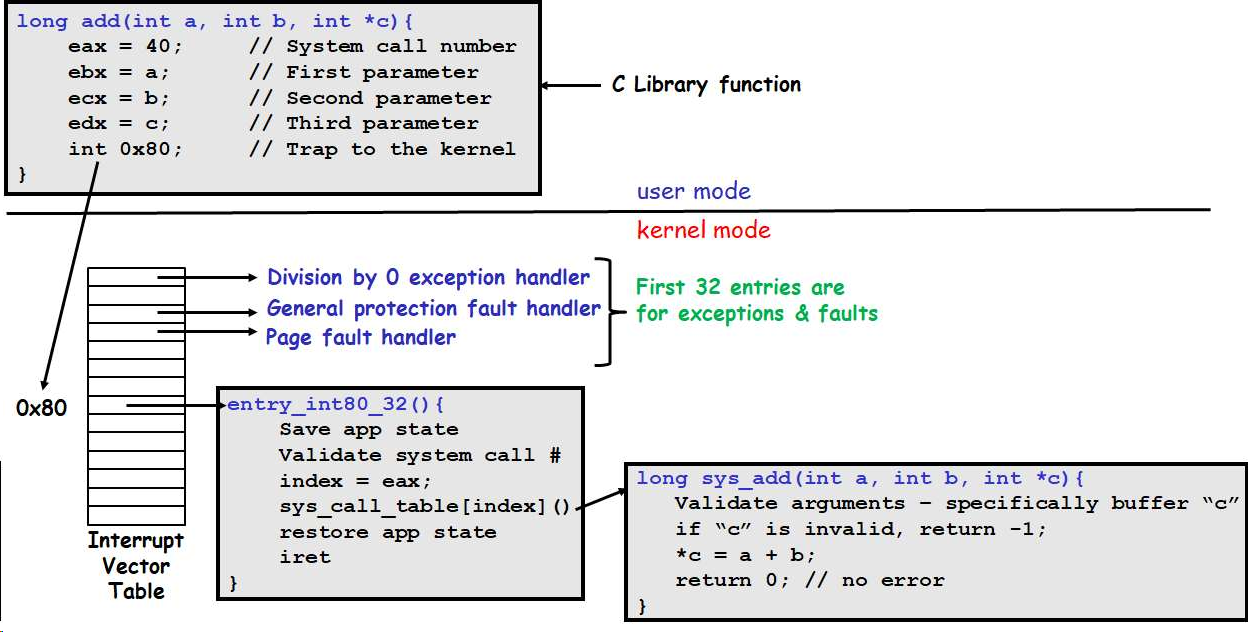
(b) Under what circumstance(s) would the system call return an error, i.e., returns -1.
Instructor Solution
The system call may fail under two conditions:
(1) The system call number passed in eax is invalid
(2) User buffer pointer c is invalid, i.e., NULL or points to an invalid memory address.
Elaboration (by LLM):
Understanding System Call Execution Flow
Complete Execution Timeline:
┌─────────────────────────────────────────────────────────────────┐
│ USER MODE EXECUTION │
└─────────────────────────────────────────────────────────────────┘
User program (C code):
int result = add(5, 3, &sum);
Compiled to assembly by libc wrapper:
mov $40, %eax [System call #40 into eax]
mov $5, %ebx [Parameter a=5]
mov $3, %ecx [Parameter b=3]
lea -4(%ebp), %edx [Parameter c (address of sum)]
int $0x80 [TRAP TO KERNEL]
At this point: Registers hold:
eax = 40
ebx = 5
ecx = 3
edx = address of buffer (somewhere in user stack/memory)
CPU action on int 0x80:
1. Recognize interrupt 0x80
2. Lookup Interrupt Vector Table (IVT) entry 0x80
3. IVT[0x80] contains address of entry_int80_32 handler
4. CPU switches privilege level from user (ring 3) to kernel (ring 0)
5. CPU saves return context:
- Old CS (code segment)
- Old EIP (instruction pointer)
- Old EFLAGS (CPU flags)
- Old SS (stack segment)
- Old ESP (stack pointer)
These are pushed onto the KERNEL STACK
6. Jump to entry_int80_32
┌─────────────────────────────────────────────────────────────────┐
│ KERNEL MODE EXECUTION │
│ (Trap Handler: entry_int80_32) │
└─────────────────────────────────────────────────────────────────┘
Trap handler does:
1. Save all registers to kernel stack
pushl %eax through pushl %edi
[All general-purpose registers saved]
2. Validate system call number
cmp $0, %eax [Is syscall# < 0?]
jl invalid_syscall [Jump if invalid]
cmp $NUM_SYSCALLS, %eax [Is syscall# >= max?]
jge invalid_syscall [Jump if invalid]
3. Dispatch to syscall handler
lea sys_call_table, %ebx [Address of syscall table]
call *(%ebx, %eax, 4) [Call sys_call_table[eax]]
[Each entry is 4 bytes (pointer), indexed by syscall #]
For our case (syscall 40 = add):
Jumps to: sys_add handler function
┌─────────────────────────────────────────────────────────────────┐
│ KERNEL MODE: SYSCALL HANDLER (sys_add) │
└─────────────────────────────────────────────────────────────────┘
Syscall handler function receives:
eax = 40 (syscall #)
ebx = 5 (parameter a)
ecx = 3 (parameter b)
edx = pointer to user buffer (parameter c)
Pseudocode (kernel handler):
sys_add(int a, int b, int *c) {
1. Validate parameter c (pointer validation)
if (c == NULL) {
return -1; // FAIL: Null pointer
}
// Check if c points to valid user memory
if (!is_in_user_memory(c)) {
return -1; // FAIL: Invalid address
}
// Check if c is accessible (readable/writable)
if (!page_table_has_write_permission(c)) {
return -1; // FAIL: No write permission
}
2. Perform computation
int result = a + b; // result = 5 + 3 = 8
3. Copy result to user buffer
// Must use special function to write to user space
put_user(result, c); // Copy to user memory safely
Alternative (dangerous, don't do this):
*c = result; // WRONG: Direct write to user pointer
// (CPU already in kernel mode)
// But could still cause page fault if invalid
4. Return success
return 0;
}
Critical validation: Pointer checking
Why validate the pointer?
1. NULL pointer dereference
c = NULL;
User program calls: add(5, 3, c);
Kernel: return -1 // SAFE
2. Invalid memory address
c = (int *)0xDEADBEEF;
(This address is outside user's allocated memory)
Kernel: return -1 // SAFE
3. Unmapped page
c points to valid address, but page isn't currently in memory
Kernel tries: put_user(result, c);
Page fault occurs
Kernel: return -EFAULT // Error due to bad address
4. Kernel memory pointer
c = (int *)0xC0000000; (kernel space on 32-bit Linux)
User tries to make kernel copy to kernel memory
Kernel: return -1 // FAIL: Can't write to kernel space
This is crucial! If kernel allowed this:
User process could corrupt kernel memory
User process could read kernel secrets (passwords, keys)
Complete system compromise
Solution: Copy-to/from-user functions always check
Detailed Parameter Passing (x86-32 Linux ABI):
x86-32 System Call Calling Convention:
Syscall#: eax
Arg 1: ebx
Arg 2: ecx
Arg 3: edx
Arg 4: esi
Arg 5: edi
Arg 6: ebp
Return value: eax
Error flag: eax = -1
For our add(a, b, c) syscall:
User code:
mov $40, %eax [syscall number: 40]
mov $5, %ebx [a = 5]
mov $3, %ecx [b = 3]
mov $&sum, %edx [c = address of sum variable]
int $0x80
After syscall returns:
eax contains return value
- 0: Success
- -1: Error
If error: User checks errno global variable for error type
(In our case: EACCES, EFAULT, EINVAL, etc.)
Part (a) Elaboration: Complete Execution Sequence
Step-by-step walkthrough:
Step 1: User Program Preparation
────────────────────────────────
User C code:
int sum = 0;
int result = add(5, 3, &sum);
Compiler generates:
(Assume add is a library function that wraps syscall)
add_wrapper:
mov $40, %eax [System call 40]
mov 4(%esp), %ebx [Load 1st arg (5) → ebx]
mov 8(%esp), %ecx [Load 2nd arg (3) → ecx]
mov 12(%esp), %edx [Load 3rd arg (&sum) → edx]
int $0x80 [TRAP]
ret
Step 2: Trigger the Trap
────────────────────────
Instruction: int $0x80
Hardware actions (CPU does this automatically):
1. Recognize this is interrupt 0x80
2. Access CPU's Interrupt Vector Table (IVT)
- 32-bit x86 has 256 possible interrupts
- IVT is at memory address (set by kernel)
- Each entry is 8 bytes (descriptor)
3. Read IVT[0x80] descriptor
- Contains: segment selector, offset, flags
- Points to kernel handler address
4. Save execution context to kernel stack:
KERNEL_STACK(after push):
[esp+16] = old SS [user stack segment]
[esp+12] = old ESP [user stack pointer]
[esp+8] = EFLAGS [CPU flags]
[esp+4] = old CS [user code segment]
[esp+0] = EIP [return address]
5. Change privilege level
- CPU privilege level: ring 3 → ring 0
- Can now execute privileged instructions
6. Change stack
- Stack pointer: from user stack → kernel stack
7. Jump to handler
- EIP = address from IVT[0x80]
- Start executing trap handler code
Step 3: Trap Handler (entry_int80_32)
──────────────────────────────────────
Trap handler assembly code:
entry_int80_32:
# Step 3a: Save all registers
pushl %eax # Saved context for debugging
pushl %ebx
pushl %ecx
pushl %edx
pushl %esi
pushl %edi
pushl %ebp
# At this point, kernel stack has:
# [esp+0] = ebp
# [esp+4] = edi
# [esp+8] = esi
# [esp+12] = edx
# [esp+16] = ecx
# [esp+20] = ebx
# [esp+24] = eax (syscall number!)
# [esp+28] = EIP (return address)
# [esp+32] = CS
# [esp+36] = EFLAGS
# [esp+40] = ESP (user stack)
# [esp+44] = SS
# Step 3b: Validate syscall number
movl %eax, %eax # Clear upper bits (already 32-bit)
cmpl $0, %eax # Check if < 0
jl invalid_syscall # Jump if negative
cmpl $NR_SYSCALLS, %eax # Check if >= max syscalls
jge invalid_syscall # Jump if too large
# NR_SYSCALLS on Linux typically ~300-400
# Step 3c: Dispatch to syscall handler
leal sys_call_table, %ebx # Load address of syscall table
movl (%ebx, %eax, 4), %ebx # Load pointer from table
# %ebx = sys_call_table[eax]
# Each entry is 4 bytes
# EBX now contains address of sys_add function
# Stack still has all parameters (eax-edi saved)
# Step 3d: Call syscall handler
# Pass eax, ebx, ecx, edx as arguments
# (They're already in the right registers from original call)
pushl %edx # Push parameter c (pointer)
pushl %ecx # Push parameter b
pushl %ebx # Push parameter a
call *%edi # Call function at address in edi
# (Actually ebx, but you get the idea)
# Returns with result in %eax
addl $12, %esp # Clean up arguments from stack
# At this point: eax = return value (0 or -1)
Step 4: Syscall Handler (sys_add)
──────────────────────────────────
C code equivalent:
long sys_add(int a, int b, int __user *c)
{
int result;
// Step 4a: Validate pointer 'c'
if (!access_ok(VERIFY_WRITE, c, sizeof(int))) {
return -EFAULT; // -1: Fault accessing memory
}
// Check null pointer
if (c == NULL) {
return -EINVAL; // -1: Invalid argument
}
// Step 4b: Perform computation
result = a + b; // result = 5 + 3 = 8
// Step 4c: Copy result to user buffer
// CRITICAL: Use copy-to-user function, not direct write
if (put_user(result, c)) {
return -EFAULT; // -1: Failed to copy
}
// Step 4d: Return success
return 0;
}
Internal details of put_user:
put_user(result, c):
# Validate c is in user memory
# Check if page is mapped
# Check write permissions
# Special CPU instruction: mov to user space
# This instruction can write to user memory even in kernel mode
# But checks memory protection first
# If any check fails: Exception
# → Handler catches
# → Returns error code
if (exception) {
return -EFAULT;
} else {
return 0;
}
Why put_user? Why not just *c = result?
Direct pointer dereference in kernel mode:
*c = result;
Problem 1: Might page fault if c not in memory
→ Kernel exception
→ Not handled properly
→ Kernel crash
Problem 2: Bypasses user space checks
→ User could pass kernel memory address
→ Kernel could write to kernel memory
→ User gains write access to kernel!
→ Complete security breach
put_user function:
1. Validates pointer is in user space only
2. Validates address is mapped
3. Validates user has write permission
4. Uses special "safe" write instruction
5. Catches any fault gracefully
6. Returns error code if problems
Step 5: Return from Syscall Handler
────────────────────────────────────
After sys_add completes, return to trap handler
Trap handler code:
movl %eax, [esp+24] # Store return value to saved eax
# Restore registers
popl %ebp
popl %edi
popl %esi
popl %edx
popl %ecx
popl %ebx
popl %eax
# Now do iret to return to user mode
iret
iret instruction does:
1. Pop EIP from stack → PC = return address
2. Pop CS from stack
3. Pop EFLAGS from stack
4. Restore privilege level (from saved CS)
ring 0 → ring 3 (back to user mode)
5. Jump to saved EIP
Step 6: Back in User Mode
──────────────────────────
User process resumes:
eax = return value (0 for success, -1 for error)
Other registers restored to saved values
Execution continues at next instruction after int 0x80
C code:
result = add(5, 3, &sum); // eax = return value stored in result
if (result == 0) {
printf("Success! sum = %d\n", sum); // sum now contains 8
} else {
printf("Error!\n");
}
Part (b) Elaboration: Error Conditions
Detailed error scenarios:
Error Condition 1: Invalid Syscall Number
═══════════════════════════════════════════
Scenario 1a: Negative syscall number
User (deliberately testing):
mov $-5, %eax [Invalid syscall -5]
int $0x80
Kernel trap handler:
cmpl $0, %eax [Check if < 0]
jl invalid_syscall [Jump because -5 < 0]
invalid_syscall:
mov $-EINVAL, %eax [Load error code -22]
jmp exit_handler
Result: User gets eax = -1 (or error code)
errno gets set to EINVAL
Scenario 1b: Syscall number too large
User (deliberately testing):
mov $999, %eax [Doesn't exist]
int $0x80
Kernel trap handler:
cmpl $NR_SYSCALLS, %eax [NR_SYSCALLS maybe 330]
jge invalid_syscall [Jump because 999 >= 330]
Result: Kernel jumps to error handler
errno = ENOSYS (No such system call)
Scenario 1c: Corrupted register
Possible due to memory corruption (very rare):
mov $40, %eax [Correct syscall]
// Corrupting code somewhere:
[Memory overflow corrupts eax on stack]
mov $corrupted_value, %eax [Now eax = garbage]
int $0x80
If eax value is garbage:
Kernel might:
1. Jump to invalid handler (if too large)
2. Jump to wrong handler (if valid but wrong number)
3. Could execute unintended syscall!
Real-world impact: Buffer overflow attack
Attacker overflows buffer, corrupts stack
Intentionally sets eax to different syscall number
Achieves unintended system call
Error Condition 2: Invalid Pointer Parameter
═════════════════════════════════════════════
Scenario 2a: NULL pointer
User code:
int *c = NULL;
add(5, 3, c);
Syscall handler validation:
if (c == NULL) {
return -EFAULT; // Error: Bad address
}
Result: eax = -1
errno = EFAULT
Scenario 2b: Pointer to invalid memory
User code:
int *c = (int *)0xFFFFFFFF; [Gibberish address]
add(5, 3, c);
Kernel validation:
if (!access_ok(VERIFY_WRITE, c, sizeof(int))) {
return -EFAULT;
}
access_ok checks:
1. Is c in user space?
[0xFFFFFFFF is in kernel space, reject]
2. Is c mapped in page table?
[Not mapped, reject]
3. Is page writable by user?
[No, reject]
Result: eax = -1
errno = EFAULT
Scenario 2c: Pointer to kernel memory
User code:
int *c = (int *)0xC0000000; [Kernel memory address on 32-bit Linux]
add(5, 3, c);
Kernel validation:
if (!access_ok(VERIFY_WRITE, c, sizeof(int))) {
return -EFAULT; // Kernel memory is not in user's space
}
Why this check is critical:
Without it, user could:
int *kernel_var = (int *)0xC0000000;
add(5, 3, kernel_var);
Kernel writes: *kernel_var = 8
User gains ability to write kernel memory!
User could:
- Overwrite kernel code
- Modify kernel data structures
- Disable security checks
- Install rootkit
- Complete system compromise
Result: eax = -1
errno = EFAULT
Scenario 2d: Unmapped page (page not in RAM)
User code:
Large array allocation, memory paged to disk:
int array[1000000];
int *c = &array[500000]; [Valid but paged out]
add(5, 3, c);
What happens:
1. Kernel validation: address looks OK
2. Kernel does: put_user(result, c);
3. CPU tries to write to page
4. Page is not in memory (on disk)
5. Page fault exception raised
6. Kernel page fault handler:
- Check: Is this a valid fault?
- Load page from disk
- Retry the write
- Now succeeds
Result: System call succeeds (page was valid, just not in RAM)
But if:
Page is invalid/corrupted on disk:
Page fault handler can't fix it
Kernel returns -EFAULT or -EIO
Result: eax = -1
Scenario 2e: Pointer to read-only memory
User code:
const char *msg = "Hello"; [In read-only segment]
add(5, 3, (int *)msg); [Trying to write to read-only data]
Kernel validation:
if (!access_ok(VERIFY_WRITE, ptr, size)) {
return -EFAULT;
}
access_ok checks page permissions:
[This page is read-only (from code segment)]
[User attempting write access]
[Return error]
Result: eax = -1
errno = EFAULT
Scenario 2f: Partially invalid pointer
User code:
int array[4];
int *c = &array[10]; [Points past array boundary]
add(5, 3, c);
Kernel validation:
if (!access_ok(VERIFY_WRITE, c, sizeof(int))) {
return -EFAULT;
}
access_ok details:
// Check if memory region starting at c, size sizeof(int)
// is all within user address space and writable
if (addr + sizeof(int) > USER_SPACE_END) {
return -EFAULT;
}
In this case:
c points beyond the 4-element array
&array[10] = array + 40 bytes
Might still be within user's address space
Might still be writable
System call might succeed!
But this writes to unintended memory location
Could cause data corruption
C runtime detection: Address Sanitizer would catch
Kernel doesn't validate intended use of memory
Result: eax = 0 (success)
But memory corruption occurred!
This is why C is dangerous: No bounds checking!
Scenario 2g: Signal/exception during copy
User code:
int sum;
add(5, 3, &sum);
During put_user:
1. Address looks valid
2. Kernel writes: result = 8
3. Physical memory failure
[Memory bit flipped during write]
[Machine check exception]
4. CPU raises exception
5. Kernel handler: Hardware error detected
6. Kernel returns -EIO (I/O error)
Result: eax = -1
errno = EIO
Error Checking in User Code (Best Practices):
Good error handling:
#include <errno.h>
#include <stdio.h>
#include <string.h>
int sum = 0;
int result = add(5, 3, &sum);
if (result == -1) {
fprintf(stderr, "add failed: %s\n", strerror(errno));
switch(errno) {
case EFAULT:
printf("Bad pointer\n");
break;
case EINVAL:
printf("Invalid argument\n");
break;
case ENOSYS:
printf("No such system call\n");
break;
default:
printf("Unknown error: %d\n", errno);
}
} else {
printf("Success! sum = %d\n", sum);
}
Bad error handling (ignore errors):
int result = add(5, 3, &sum); // Ignore return value!
printf("sum = %d\n", sum); // sum might be uninitialized!
Summary: When add() Fails:
| Error Condition | Return Value | errno | Root Cause |
|---|---|---|---|
| Invalid syscall number | -1 | ENOSYS | Bad register value |
| NULL pointer | -1 | EFAULT | Pointer validation failed |
| Invalid address | -1 | EFAULT | Address not in user space |
| Kernel memory pointer | -1 | EFAULT | Pointer is privileged |
| Read-only page | -1 | EFAULT | No write permission |
| Unmapped page (unfixable) | -1 | EFAULT/EIO | Page fault can’t be resolved |
| All other conditions | 0 | (unchanged) | Syscall succeeds |