Process Management Practice Problems
Problem 1: Programs vs Processes
What’s the difference between a program and a process?
Instructor Solution
A program is a passive entity—a static file stored on a disk (like an .exe or an ELF binary) that contains a set of compiled instructions and data. In contrast, a process is an active, dynamic entity; it is an instance of a program in execution. When you launch a program, the OS creates a process by loading the code into RAM, allocating a unique Process ID (PID), and assigning it system resources such as a stack, a heap, and a set of CPU registers.
Elaboration (by LLM):
Program vs Process: A Fundamental Distinction
The Core Difference:
A program is static (unchanging), while a process is dynamic (changing state during execution).
Program:
- File on disk (stored in persistent storage)
- Contains machine instructions and data
- Read-only until executed
- One program can create many processes
- Example: The
/bin/lsfile is a program
Process:
- Active instance of a program in RAM
- Has current state: registers, memory, open files, I/O buffers
- Changes during execution (variables change, heap grows, stack shrinks)
- Each process is independent
- Example: When you type
lsin terminal, a new process is created
Concrete Example:
On disk:
  /usr/bin/firefox                    ← One program file

In RAM (after you click Firefox icon):
  Process 1: firefox (PID 1234)       ← First instance
  Process 2: firefox (PID 1235)       ← Second instance (opened new window)
  Process 3: firefox (PID 1236)       ← Third instance

Each process:
  - Has its own memory space
  - Has its own set of open files
  - Has its own registers/CPU state
  - But all three execute the same binary code
What the OS Creates:
When you launch a program, the OS:
- Loads the binary from disk into RAM
- Allocates a stack (for local variables, function calls)
- Allocates a heap (for dynamic memory)
- Assigns a Process ID (PID)
- Creates a Process Control Block (PCB) to track state
- Sets up page tables for virtual memory isolation
- Opens standard file descriptors (stdin, stdout, stderr)
Why This Matters:
- You can run the same program multiple times simultaneously (each as a separate process)
- Each process is isolated from others (one crash doesn’t crash the others)
- The OS can schedule processes independently on available CPU cores
- Memory/resources are tracked per-process
Resource Difference:
Program: 1 copy on disk (5MB executable file)

Three running instances:
  Process 1: ~50MB in RAM (code + heap + stack)
  Process 2: ~50MB in RAM
  Process 3: ~50MB in RAM
  Total: 150MB RAM, but same 5MB disk file
The disk file is shared; the RAM allocations are not.
Problem 2: Address Space Sections
List the 4 sections of the address space of a process. Briefly describe what’s stored in each section.
Instructor Solution
Code: Contains the executable binary instructions.
Data: Stores global and static variables.
Heap: Stores dynamically allocated variables (e.g., via malloc or new).
Stack: Stores temporary data such as local variables, function parameters, and return addresses.
Elaboration (by LLM):
Process Address Space Layout
Memory Layout (x86-32 Linux):
High Address (0xFFFFFFFF)
  ┌─────────────────────┐
  │   Kernel Space      │  0xC0000000+
  │ (OS kernel runs)    │
  └─────────────────────┘

  ┌─────────────────────┐
  │   Stack (grows ↓)   │  Local vars, parameters
  ├─────────────────────┤
  │                     │
  │   (unallocated)     │
  │                     │
  ├─────────────────────┤
  │   Heap (grows ↑)    │  malloc(), new
  ├─────────────────────┤
  │   Data Segment      │  Globals, statics
  ├─────────────────────┤
  │   Code Segment      │  Instructions
  └─────────────────────┘
Low Address (0x00000000)
The Four Sections:
1. Code Segment (Text Segment):
- Contains machine instructions (the executable program)
- Read-only (prevents accidental modification of code)
- Shared among all running instances of the program
- Fixed size at compile time
- Example:
int main() {
    printf("Hello");  ← These instructions are in Code segment
    return 0;         ← This instruction is in Code segment
}
2. Data Segment:
- Global and static variables that are initialized
- Read-write (can be modified during execution)
- Exists for the entire process lifetime
- Fixed size at compile time
- Example:
int global_var = 42;           ← In Data segment (initialized to 42)
static int static_var = 100;   ← In Data segment (initialized to 100)

int main() {
    global_var = 50;  ← Can modify, still in Data segment
}
BSS Segment (Uninitialized Data):
- Sometimes considered separate from Data
- Global and static variables that are uninitialized or initialized to zero
- Occupies no disk space (just a count of bytes)
- Zeroed out when process starts
- Example:
int uninitialized_global;      ← In BSS segment (zero'd at startup)
static int zero_var = 0;       ← In BSS segment
3. Heap:
- Dynamically allocated memory (at runtime, not compile time)
- Grows upward (toward higher addresses) as allocation happens
- Shrinks when memory is freed
- Shared by all dynamic allocations in a process
- Fragmentation can occur
- Example:
int *arr = malloc(1000 * sizeof(int));  ← Memory comes from Heap
                                         ← Size not known at compile time

free(arr);                              ← Returns memory to Heap
Heap Characteristics:
- Programmer-controlled allocation (malloc/free or new/delete)
- Must be manually freed (memory leak if not freed)
- Slower than stack (requires heap manager)
- Larger space available (typically megabytes to gigabytes)
4. Stack:
- Temporary storage for function-local variables
- Function parameters and return addresses
- Grows downward (toward lower addresses) as function calls nest
- Shrinks when functions return
- Very fast allocation (just move stack pointer)
- Automatic deallocation (when function returns)
- Limited size (typically megabytes)
- Example:
void foo() {
    int x = 5;     ← Local var in Stack
    int y = 10;    ← Local var in Stack
    bar();         ← Return address pushed to Stack
}

void bar() {
    int z = 20;    ← Local var in Stack (on top of x, y)
}              ← z automatically freed when bar() returns
Stack vs Heap:
| Characteristic | Stack | Heap |
|---|---|---|
| Speed | Very fast (1-2 cycles) | Slower (requires search) |
| Size | Limited (~8MB default) | Large (gigabytes) |
| Allocation | Automatic (LIFO) | Manual (malloc/free) |
| Lifetime | Until function returns | Until freed |
| Overflow | Stack overflow crash | Fragmentation |
| Sharing | Per-thread (isolated) | Process-wide (shared) |
Memory Layout Example:
int global = 5;              // Data Segment
static int s = 10;           // Data Segment
char* ptr;                   // Data Segment (pointer itself)

int main() {
    int local = 20;          // Stack
    static int s2 = 30;      // Data Segment
    int* heap_ptr = malloc(100);  // Stack: heap_ptr pointer
                             // Heap: 100 bytes of data

    return 0;
}
Real-World Impact:
- Speed: Local variables (stack) are fastest
- Memory: Large data structures should use heap
- Safety: Stack is safer (automatic cleanup)
- Debugging: Stack overflow is obvious; heap corruption is subtle
Problem 3: Process Transition Diagram
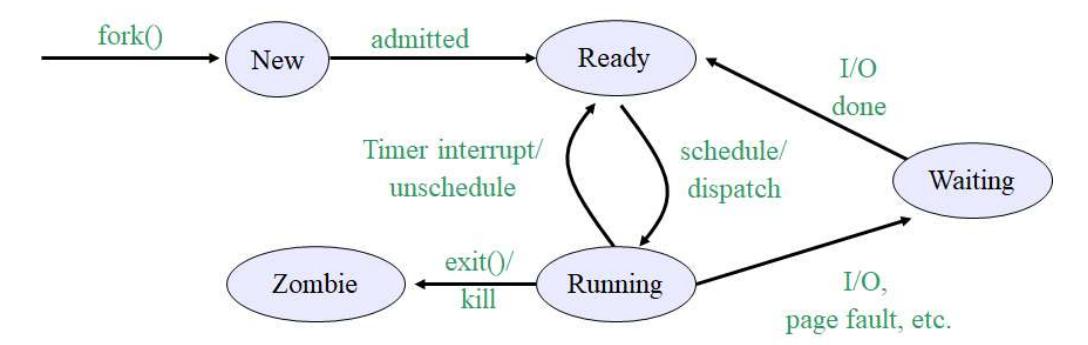
Draw the process transition diagram. Mark each transition appropriately.
Instructor Solution
Elaboration (by LLM):
The Five Process States: A Complete Lifecycle
A process doesn’t simply run continuously. Instead, it moves through distinct states based on resource availability and system decisions. This diagram shows the five fundamental process states in most operating systems.
The Five States Explained
1. New State
Purpose: Process just created, not yet admitted by OS
Entry: fork() or exec() system call
Exit: When OS admits it to Ready queue
Characteristics:
  - PCB created
  - Memory not yet allocated
  - Not yet competing for CPU
  - Process initialization code not yet run
2. Ready State
Purpose: Process is prepared to run, waiting for CPU time
Entry: Admitted from New, or time slice expired, or I/O completes
Exit: Scheduler selects for CPU (dispatch)
Characteristics:
  - All resources allocated except CPU
  - In memory, context saved
  - Waiting for scheduler decision
  - Can run immediately if scheduled
3. Running State
Purpose: Process actively executing on CPU
Entry: Scheduled from Ready queue (dispatch/schedule)
Exit: Time slice expires, I/O needed, or process terminates
Characteristics:
  - Occupying CPU time slice
  - Actually executing instructions
  - Can be preempted at any time
  - Only ONE process per CPU (single-core system)
4. Waiting State (Blocked)
Purpose: Process waiting for event (I/O, lock, etc.)
Entry: I/O request, page fault, or waiting for resource
Exit: Event occurs (I/O done, page returned to memory)
Characteristics:
  - Process cannot run even if CPU available
  - Waiting for external event
  - Does not consume CPU
  - Returns to Ready when event completes
5. Zombie State
Purpose: Process terminated but not yet cleaned up
Entry: exit() or kill signal received
Exit: Parent calls waitpid() (process reaped)
Characteristics:
  - Code/memory freed
  - PCB still exists in kernel
  - Holding exit status for parent
  - Cannot be killed (already dead)
Transitions: When and Why States Change
New → Ready: “admitted”
Trigger: OS schedules process admission
Decision: OS checks resource availability (memory, PIDs available)
Time: Microseconds after fork()
Example:
  fork() called
  OS checks: "Is there memory?"
  OS checks: "Are we at PID limit?"
  If YES → process admitted to Ready
  If NO → process stays in New (waits)
Ready → Running: “schedule/dispatch”
Trigger: Scheduler selects process from Ready queue
Algorithm: Round-robin, priority-based, fair scheduling, etc.
Frequency: Every time slice (10-100ms typical)
Who decides: Scheduler/dispatcher (kernel component)
Example:
  Process in Ready queue for 5ms
  Timer interrupt occurs
  Scheduler picks this process
  Context switch → Now Running
Running → Ready: “Timer interrupt/unschedule”
Trigger: Time slice expires
Hardware: Timer interrupt fires
Action: Scheduler preempts process, saves context
Effect: Process returns to Ready (not Waiting!)
Reason: Process wasn't blocked, just had its turn
Example:
  Process A running for 10ms (its time slice)
  Timer fires: "Time's up!"
  Context saved
  Process A → Back to Ready queue
  Scheduler picks Process B
Running → Waiting: “I/O, page fault, etc.”
Trigger: Process needs resource not immediately available
Examples:
  - Reading disk file (I/O request)
  - Page fault (memory access to disk-backed page)
  - Waiting for lock (mutex, semaphore)
  - Waiting for network data
Action: Process voluntarily gives up CPU
Effect: Process blocked, won't run until event completes
Example:
  Process reads(disk_file)
  OS: "This will take milliseconds"
  Process moved to Waiting
  Scheduler picks another process
Waiting → Ready: “I/O done, page fault resolved, etc.”
Trigger: Event completion (I/O, page return, lock released)
Who initiates: Device interrupt handler or another process
Effect: Process moves back to Ready (next in line for CPU)
Time: Could be immediate or delayed
Example:
  Process waiting for disk read
  Disk finishes, sends interrupt
  Kernel: "Data ready!"
  Process → Waiting
  Next scheduler cycle: Process moved to Ready
Running → Zombie: “exit()/kill”
Trigger: Process calls exit() or receives SIGKILL/SIGTERM
Action: Kernel terminates process
Effect: Memory freed, PCB remains, exit status stored
Parent notification: Process becomes zombie awaiting waitpid()
Example:
  Process calls exit(0)
  Kernel frees code, data, stack memory
  PCB (Process Control Block) stays in memory
  Zombie state until parent calls waitpid()
Zombie → (removed): “waitpid()”
Trigger: Parent calls waitpid(child_pid, &status, 0)
Action: Kernel retrieves exit status, frees PCB
Effect: Process completely removed from system
Time: Can happen immediately after child exit, or days later
Example:
  Parent: waitpid(pid)
  Kernel: Gets zombie's exit code
  Kernel: Frees PCB and PID slot
  Process fully gone
State Diagram as a State Machine
Entry point:      Fork called
                  │
                  ▼
            ┌──────────┐
            │   New    │ ← Process created but not yet run
            └──────────┘
                  │
            Admitted to system
                  │
                  ▼
            ┌──────────┐
    ┌──────▶│  Ready   │ ◀──────┐
    │       │ (Queue)  │        │
    │       └──────────┘        │
    │            │              │
    │      Scheduled            │
    │            │              │
    │            ▼              │
    │       ┌──────────┐        │
    │       │ Running  │        │
    │       │(CPU time)│        │
    │       └──────────┘        │
    │        │         │        │
    │        │         │   Timer interrupt
    │        │         │   (time slice done)
    │    I/O │         └────────┘
    │  needed│
    │        ▼
    │   ┌──────────┐
    └───│ Waiting  │ (blocked on I/O)
        │(Blocked) │
        └──────────┘
             │
        I/O done
             │
             └────────────────┐
                              │
                        Ready queue
                              │
                              ▼
Running → exit() or kill signal
             │
             ▼
        ┌──────────┐
        │  Zombie  │ (terminated, awaiting reaping)
        │(Defunct) │
        └──────────┘
             │
        waitpid()
             │
             ▼
        (Process removed completely)
Real-World Example: Browser Process Lifecycle
Time 0:   User double-clicks Firefox icon
          fork() + exec() → New state
          OS admits → Ready state

Time 5ms: Scheduler selects Firefox
          Firefox → Running
          Starts loading libraries from disk

Time 15ms: Disk I/O needed to load library
          Firefox → Waiting (blocked on disk read)
          Scheduler selects another process

Time 18ms: Disk returns data (interrupt)
          Firefox → Ready (back in queue)

Time 20ms: Scheduler selects Firefox again
          Firefox → Running
          Draws window on screen

Time 25ms: User clicks "Open File" dialog
          Disk I/O needed
          Firefox → Waiting

Time 30ms: I/O done
          Firefox → Ready

Time 1hr:  User closes Firefox
          Firefox calls exit()
          Firefox → Zombie (waiting for parent shell)

Time 1hr+1s: Shell's waitpid() catches exit status
          Firefox PCB freed → completely gone
Why Multiple States Are Necessary
Without Ready state (just New/Running/Waiting):
Problem: How do we queue waiting processes?
Problem: Multiple processes can't wait simultaneously
Problem: Scheduler can't pick who runs next
Result: System can only handle one process at a time
Without Waiting state (just Ready/Running):
Problem: Where do I/O blocked processes go?
Problem: CPU wastes cycles waiting for I/O
Problem: System can't be responsive
Result: Throughput plummets, responsiveness terrible
Without Zombie state (immediate PCB deletion):
Problem: Parent can't get child's exit status
Problem: Child's fate unknown to parent
Problem: Parent doesn't know if child crashed or succeeded
Result: No error handling, parent can't know what happened
All five states are essential for modern process management.
Key Insight: Only One State Per Process
A process is always in exactly one state:
// Impossible situations:
Process in both Ready AND Waiting?  ❌ NO
Process in Running AND Ready?       ❌ NO
Process in New AND Running?         ❌ NO

// Correct: Always exactly one
Process is in Ready queue            ✅ YES
Process is blocked on disk I/O       ✅ YES
Process is running on CPU            ✅ YES
Process is terminated (Zombie)       ✅ YES
Process is being created (New)       ✅ YES
The state machine ensures clarity about each process’s exact situation at all times.
Problem 4: Process ID Assignment
Why is it necessary for the OS to assign a unique process id to each process in the system?
Instructor Solution
The OS assigns a unique Process ID (PID) to provide a clear, unambiguous handle for managing the lifecycle and security of every active entity in the system. Because multiple instances of the same program (like three separate browser windows) share the same executable name, the PID allows the kernel to distinguish between them when allocating CPU time, protecting memory boundaries, and tracking resource ownership. Without unique IDs, the OS would be unable to signal, monitor, or terminate a specific process without risk of affecting others, effectively breaking the fundamental isolation required for multitasking.
Elaboration (by LLM):
Why Process IDs Are Essential
The Problem Without PIDs:
Imagine running three Firefox windows simultaneously. Without PIDs, how would the OS know which one to preempt? How would you kill one specific Firefox without killing all of them?
Without PIDs:
  User: "Pause Firefox"
  OS: Which one?? All three of them? Just one?

With PIDs:
  User: "Kill process 1234"
  OS: Done. The other Firefox windows (PIDs 1235, 1236) keep running
Main Uses of PID:
1. Identification and Uniqueness:
- Each PID is globally unique within the system at any given time
- PIDs can be reused only after a process terminates
- Allows unambiguous reference to a specific process
2. Tracking Resource Ownership:
Process 1234 (PID=1234):
  - Owns 5 open files
  - Allocated 50MB RAM
  - Using CPU time
  - Has 3 child processes

OS must track: which resources belong to which PID
3. Process Signaling:
// Parent process
kill(1234, SIGTERM);  // Send signal to specific PID 1234
                      // (not to any other process)
4. Hierarchy and Parent-Child Relationships:
PID 1 (init)
  ├─ PID 100 (shell)
  │   ├─ PID 1234 (Firefox)
  │   ├─ PID 1235 (Firefox)
  │   └─ PID 1236 (Firefox)
  └─ PID 200 (other process)

When PID 100 (shell) terminates:
  OS must find all children (1234, 1235, 1236)
  and reassign them to init (PID 1)
5. Privilege and Security:
// Only allowed to signal your own processes
kill(1234, SIGTERM);  // Your process → OK
kill(1234, SIGTERM);  // Root's process → Denied
PID in Linux:
$ ps aux | grep firefox
user    1234  ...  /usr/bin/firefox       ← PID 1234
user    1235  ...  /usr/bin/firefox       ← PID 1235
user    1236  ...  /usr/bin/firefox       ← PID 1236

$ kill 1234  # Kills only PID 1234 (one Firefox window)
             # PID 1235 and 1236 unaffected
PID Allocation:
- Linux starts at PID 1 (init/systemd)
- Increments with each new process: 2, 3, 4, …
- Reaches
pid_max(usually 32768 or 4194304 in modern systems) - Wraps around when exhausted
- Avoids reusing PIDs that are still active
Without PIDs, Multitasking Would Be Impossible:
| Operation | Without PIDs | With PIDs |
|---|---|---|
| Run program | OS doesn’t know which | OS assigns PID, tracks state |
| Pause process | Can’t target a specific one | kill -STOP <PID> |
| Monitor usage | Can’t track resources | ps -p <PID> |
| Terminate | Risk killing all instances | kill <PID> kills only one |
| Parent-child | No family tree | getppid() returns parent |
Real-World Impact:
Without PIDs, you couldn’t:
- Run multiple Firefox windows
- Kill one hung process without killing others
- Monitor CPU usage per program
- Enforce privilege restrictions per process
- Implement job control in the shell
Elaboration (by LLM):
Why Process IDs Are Essential
The Problem Without PIDs:
Imagine running three Firefox windows simultaneously. Without PIDs, how would the OS know which one to preempt? How would you kill one specific Firefox without killing all of them?
Without PIDs:
  User: "Pause Firefox"
  OS: Which one?? All three of them? Just one?

With PIDs:
  User: "Kill process 1234"
  OS: Done. The other Firefox windows (PIDs 1235, 1236) keep running
Main Uses of PID:
1. Identification and Uniqueness:
- Each PID is globally unique within the system at any given time
- PIDs can be reused only after a process terminates
- Allows unambiguous reference to a specific process
2. Tracking Resource Ownership:
Process 1234 (PID=1234):
  - Owns 5 open files
  - Allocated 50MB RAM
  - Using CPU time
  - Has 3 child processes

OS must track: which resources belong to which PID
3. Process Signaling:
// Parent process
kill(1234, SIGTERM);  // Send signal to specific PID 1234
                      // (not to any other process)
4. Hierarchy and Parent-Child Relationships:
PID 1 (init)
  ├─ PID 100 (shell)
  │   ├─ PID 1234 (Firefox)
  │   ├─ PID 1235 (Firefox)
  │   └─ PID 1236 (Firefox)
  └─ PID 200 (other process)

When PID 100 (shell) terminates:
  OS must find all children (1234, 1235, 1236)
  and reassign them to init (PID 1)
5. Privilege and Security:
// Only allowed to signal your own processes
kill(1234, SIGTERM);  // Your process → OK
kill(1234, SIGTERM);  // Root's process → Denied
PID in Linux:
$ ps aux | grep firefox
user    1234  ...  /usr/bin/firefox       ← PID 1234
user    1235  ...  /usr/bin/firefox       ← PID 1235
user    1236  ...  /usr/bin/firefox       ← PID 1236

$ kill 1234  # Kills only PID 1234 (one Firefox window)
             # PID 1235 and 1236 unaffected
PID Allocation:
- Linux starts at PID 1 (init/systemd)
- Increments with each new process: 2, 3, 4, …
- Reaches
pid_max(usually 32768 or 4194304 in modern systems) - Wraps around when exhausted
- Avoids reusing PIDs that are still active
Without PIDs, Multitasking Would Be Impossible:
| Operation | Without PIDs | With PIDs |
|---|---|---|
| Run program | OS doesn’t know which | OS assigns PID, tracks state |
| Pause process | Can’t target a specific one | kill -STOP <PID> |
| Monitor usage | Can’t track resources | ps -p <PID> |
| Terminate | Risk killing all instances | kill <PID> kills only one |
| Parent-child | No family tree | getppid() returns parent |
Problem 5: Process Control Block
What is a Process Control Block (PCB)? What is it used for? List 1 item that must be stored in a PCB.
Instructor Solution
A Process Control Block (PCB) is a vital data structure in the operating system’s kernel that serves as the “identity card” or repository for all information associated with a specific process. It is used by the OS to manage process execution, allowing the kernel to perform context switching by saving the state of a running process so it can be resumed later exactly where it left off. One essential item stored in a PCB is the process id (pid) that uniquely identifies the process in the OS kernel.
Elaboration (by LLM):
The Process Control Block: The OS's Memory of Each Process
The PCB is essentially the process’s resume file. When the OS pauses a process, it must save everything needed to resume execution later. When another process needs to run, the OS switches to its PCB to restore its state.
What is a PCB?
A Process Control Block is a data structure (typically a C struct in kernel code) that the OS maintains for every process. It contains all the information the OS needs to manage that process.
// Simplified Linux PCB (actually much larger)
struct task_struct {
    pid_t pid;              // Process ID
    char comm[16];          // Command name
    int state;              // TASK_RUNNING, TASK_INTERRUPTIBLE, etc.
    unsigned long *stack;   // Kernel stack pointer
    struct mm_struct *mm;   // Memory management info
    // ... hundreds more fields
};
Why Is the PCB Necessary?
Scenario: The Context Switch
Time T=0:  Process A (PID 1234) running
           CPU registers: PC=0x8048500, R1=42, SP=0xBFFF0000

Time T=1:  Timer interrupt! OS says "Your time is up, Process A"

           OS saves Process A's state to PCB_A:
             PCB_A.PC = 0x8048500
             PCB_A.R1 = 42
             PCB_A.SP = 0xBFFF0000

Time T=2:  OS loads Process B's state from PCB_B:
           CPU registers: PC=0x8048800, R1=99, SP=0xCFFF0000

Time T=3:  Process B runs exactly where it left off

Time T=4:  Another interrupt, Process A loads from PCB_A
           Resumes at PC=0x8048500 with R1=42, SP=0xBFFF0000
           (exactly as if it was never interrupted!)
Without a PCB:
- OS would have nowhere to save Process A’s state
- When switched back, Process A wouldn’t know where it was
- Execution would be corrupted
Core PCB Components
1. Process Identification:
int PID;        // This process's unique ID
int PPID;       // Parent's PID (for cleanup when parent dies)
int UID;        // Owner's user ID (for security)
2. CPU Register State (Context):
// ALL CPU registers must be saved
uint32_t PC;    // Program Counter (what instruction to run next)
uint32_t SP;    // Stack Pointer
uint32_t BP;    // Base Pointer
uint32_t R0, R1, R2, ... R15;  // General-purpose registers
uint32_t flags; // CPU flags (zero flag, carry flag, etc.)
This is the most critical part for context switching.
3. Process State:
enum State {
    CREATED,      // Just created
    READY,        // Waiting for CPU
    RUNNING,      // Currently on CPU
    BLOCKED,      // Waiting for I/O
    SUSPENDED,    // Paused by debugger
    TERMINATED    // Done, waiting for cleanup
};
The OS uses this to decide which queue the process belongs to.
4. Memory Management:
struct MMStruct {
    PageTable* page_table;   // Virtual→physical address mapping
    uint32_t text_start;     // Code segment base
    uint32_t data_start;     // Data segment base
    uint32_t heap_start;     // Heap base
    uint32_t stack_limit;    // Lowest valid stack address
};
Without this, the OS couldn’t translate the process’s virtual addresses to physical memory.
5. I/O and File Management:
File* open_files[256];   // Pointers to open file structures
                         // Index 0 = stdin, 1 = stdout, 2 = stderr
When the process does read(3, buffer, 100), the OS uses PCB->open_files[3] to find the file.
6. Scheduling Information:
int priority;           // Higher = more important
uint32_t time_quantum;  // How long until preemption
uint32_t cpu_time_used; // Total CPU time accumulated
The scheduler uses priority to decide which ready process gets CPU next.
PCB in Action: Real Example
$ ps aux | grep bash
user    1234  0.0  0.1  2345  2000  pts/0  S  14:32  0:00 /bin/bash

user   = UID (owner of process)
1234   = PID
2345   = Virtual memory size (from PCB)
2000   = Resident set size (from PCB)
S      = State (Sleeping/Ready) (from PCB)
0:00   = CPU time used (from PCB)
All this information comes directly from the PCB!
Why Each Field Is Essential
| PCB Field | Purpose |
|---|---|
| PID | Uniquely identify process |
| Registers | Save/restore CPU state during context switch |
| Memory info | Translate virtual addresses to physical RAM |
| State | Know which queue process belongs in |
| Priority | Decide scheduling order |
| Files | Know what files/devices process has open |
| CPU time | Track resource usage for billing/fairness |
Without a PCB, the OS couldn’t:
- Context switch (no place to save state)
- Run multiple processes (no way to resume)
- Enforce memory protection (no isolation info)
- Schedule fairly (no priority tracking)
- Track resource usage (no accounting)
- Clean up when process terminates (no file list)
Think of it this way: A PCB is like a passport for a process. When the process needs to leave the CPU, its “passport” (PCB) stays with the kernel. When it’s time to return to the CPU, the OS uses the passport to restore everything that was saved.
Problem 6: Context Switches
What is a context switch? Briefly describe what the OS does during a context switch. Is context switch a desirable thing if our goal is to increase the throughput of the system?
Instructor Solution
A context switch is the procedure the OS kernel uses to stop one process and start (or resume) another on the same CPU. During the switch, the OS must save the state of the currently running process (registers, program counter, and stack pointer) into its Process Control Block (PCB) and then load the saved state of the next process from its respective PCB into the CPU hardware.
From a throughput perspective, context switching is NOT desirable because it is pure “overhead.” During a switch, the CPU is performing administrative tasks for the OS rather than executing user instructions, and it often leads to cache misses as the new process populates the L1/L2 caches with its own data.
Elaboration (by LLM):
Context Switch: The Cost of Multitasking
A context switch is the moment the OS pauses one process and resumes another on the same CPU. It’s the mechanism that makes multitasking possible, but it’s also expensive.
The Context Switch Sequence
Step 1: Timer Interrupt
  ┌──────────────────────────────┐
  │ Process A running            │
  │ PC = 0x8048500               │
  │ R1 = 42, R2 = 100            │
  │ SP = 0xBFFF0000              │
  └──────────────────────────────┘
           ↓ (Interrupt!)

Step 2: Save Process A's State
  OS saves to PCB_A:
    PC = 0x8048500
    R1 = 42, R2 = 100
    SP = 0xBFFF0000
    (all 32+ registers)
           ↓

Step 3: Load Process B's State
  OS loads from PCB_B:
    PC = 0x8048800
    R1 = 99, R2 = 50
    SP = 0xCFFF0000
           ↓

Step 4: Resume Process B
  ┌──────────────────────────────┐
  │ Process B running            │
  │ Resumes exactly where it left│
  │ off from last context switch │
  └──────────────────────────────┘
What Gets Saved?
Everything the CPU needs to resume:
// All CPU registers
PC (Program Counter)      // What instruction to execute next
SP (Stack Pointer)        // Where the stack ends
BP (Base Pointer)         // Stack frame base
R0-R15 (General registers) // Intermediate values in computation
FLAGS                     // CPU condition flags

// Example: Imagine Process A was doing:
int sum = 0;
sum += 10;    // Just finished this, R1 = 10
sum += 20;    // About to execute this
              // PC = address of next instruction
              // R1 = 10 (intermediate result)

// Context switch happens HERE
// OS saves: PC (at next instruction), R1=10, etc.
//
// When Process A resumes later:
// PC restores to the right instruction
// R1 = 10 (still has the value)
// Execution continues perfectly!
Why It's Expensive: The Overhead
1. CPU Cycles Lost:
Time (nanoseconds):
0-5:      Context switch instruction executes
5-10:     Register saves
10-20:    Memory writes (slow!)
20-25:    Load new process registers
25-30:    CPU pipeline flushes

30-100:   New process starts executing USEFUL code

CPU wastes 30% of time on context switch overhead!
2. Cache Misses (The Real Killer):
Before Context Switch:
  L1 Cache (hot):
    Process A's data in cache
    Very fast access (1-2 CPU cycles)

After Context Switch to Process B:
  L1 Cache (stale):
    Process A's data still there
    Process B needs its own data
    CACHE MISS! (must fetch from RAM)

  RAM access: 200-300 CPU cycles
  vs L1 cache: 1-2 CPU cycles

Impact: 100-300x slowdown for each cache miss!
3. TLB Flush (Translation Lookaside Buffer):
Modern CPUs use a TLB to cache virtual→physical address translations.
// Process A: Virtual 0x1000 → Physical 0x5000
TLB_A[0x1000] = 0x5000

// Context switch to Process B:
TLB must be cleared (or flushed)
Because Process B's virtual 0x1000 might be Physical 0x7000

// Process B: Virtual 0x1000 → Physical 0x7000
TLB_B[0x1000] = 0x7000

// Without flushing: Process B would get Process A's physical address!
// Result: Memory corruption or security breach
Flushing TLB costs: 100+ CPU cycles per access until TLB repopulates.
Desirability: The Trade-off
Is context switching desirable for throughput?
Answer: NO, but YES for responsiveness.
Throughput Perspective (Bad):
Theoretical throughput: 1 process, no context switches
  ├─ Process A uses 100% CPU
  └─ Gets MORE DONE per second

Actual throughput: 4 processes with context switching
  ├─ Process A: 25% CPU - 5% lost to context switches = 20% useful
  ├─ Process B: 25% CPU - 5% lost to context switches = 20% useful
  ├─ Process C: 25% CPU - 5% lost to context switches = 20% useful
  ├─ Process D: 25% CPU - 5% lost to context switches = 20% useful
  └─ Total useful work: 80% vs 100% (16% loss from context switches!)

Additional cache misses can reduce effective throughput 30-50%!
Responsiveness Perspective (Good):
Without context switching:
  User clicks browser
  Waits 30 seconds for video encoder to finish
  Browser freezes - BAD

With context switching (100 switches/sec):
  Browser gets CPU ~100 times per second
  Responds immediately to user input
  Video encoder also makes progress
  Both feel responsive - GOOD
Real-world consequence:
$ dmesg | grep "context switch"
# Hidden, but happening thousands of times per second

$ vmstat 1
procs -------- Context Switches --------
  3456    # 3456 context switches per second
       # ≈ 0.3ms wasted per second (small but adds up)
Minimizing Context Switches
Modern OSes try to reduce context switches:
// 1. Batch I/O operations
//    Keep process running instead of blocking on every I/O

// 2. Use larger time quantums
//    Let processes run longer before switching
//    Reduces context switches but hurts responsiveness

// 3. NUMA awareness (Non-Uniform Memory Access)
//    Keep process on same CPU to preserve cache
//    Switching to different CPU = cache flush again!

// 4. CPU affinity
//    Bind process to specific CPU core
//    Process always runs on same CPU
//    Cache stays hot
The Fundamental Trade-off:
| Aspect | More Frequent Switches | Fewer Switches |
|---|---|---|
| Throughput | Lower (more overhead) | Higher (less overhead) |
| Responsiveness | Better (fair sharing) | Worse (unfair) |
| Latency | Lower (quick response) | Higher (waits long) |
| Fairness | Fair (all get CPU) | Unfair (some starve) |
Modern OSes optimize for responsiveness and fairness, accepting some throughput loss.
Problem 7: Process Dispatch
What’s meant by process dispatch? Briefly explain.
Instructor Solution
Process dispatch is the final stage of the scheduling process where the OS Dispatcher module takes a process from the “Ready” state and gives it actual control of the CPU. This involves: (1) performing a context switch to load the process’s saved state, (2) switching the CPU from Kernel Mode back to User Mode, and (3) jumping to the correct location in the program (using the saved Program Counter) so the process can begin or resume execution.
Elaboration (by LLM):
Process Dispatch: Making the CPU Decision Real
Scheduling vs Dispatch:
Scheduling:    DECISION layer
               "Which process should run next?"
               Runs in kernel mode, makes the choice

Dispatch:      EXECUTION layer
               "Okay, NOW make it happen!"
               Actually loads the process and runs it
Think of it like a kitchen:
Chef (Scheduler):      "Next order: Table 5's burger"
Cook (Dispatcher):     "Okay, now I'll actually cook it"
                       Gets all the ingredients (PCB)
                       Starts the stove (loads CPU state)
The Three Steps of Dispatch
Step 1: Context Switch
Before:
  CPU State = Process A (running in user space)

Dispatcher action:
  Save Process A → PCB_A
  Load Process B ← PCB_B

After:
  CPU State = Process B's state (ready to resume)
Step 2: Switch CPU Modes
// Before dispatch:
CPU_MODE = KERNEL_MODE    // OS has full access
                          // Can access memory, I/O, etc.

// During dispatch:
CPU_MODE = USER_MODE      // Process has restricted access
                          // Can't execute privileged instructions
                          // Can't access memory outside its address space
Why this matters:
// In USER_MODE:
*ptr = 0xC0000000;        // Try to access kernel memory
                          // CPU throws: SEGMENTATION FAULT!
                          // Kernel takes control again

// In KERNEL_MODE (OS code only):
*ptr = 0xC0000000;        // Allowed! (kernel can access anything)
Step 3: Jump to Program Counter
// Process B was interrupted at address 0x8048ABC
// Its PCB saved:
PCB_B.PC = 0x8048ABC

// Dispatcher action:
CPU.PC = PCB_B.PC;        // Load saved PC
jmp *CPU.PC;              // Jump to that address
                          // Process B resumes from where it left off!
Without this: Process would start from beginning (main) again - wrong!
Dispatch Happens After Scheduling Decision
Scheduling Policy (Kernel):
  "Process B should run next"

Scheduler chooses:
  PCB_B (highest priority, longest waiting, etc.)

Dispatcher executes:
  1. Save current process A's context
  2. Load process B's context
  3. Switch to USER_MODE
  4. Jump to PCB_B.PC

Result:
  Process B running in user space,
  using its saved registers,
  ready to execute exactly where it paused
Real Example: Timer Interrupt → Dispatch
0ms:   Process A running
       PC = 0x8048500
       Executing: sum += 10;

10ms:  TIMER INTERRUPT!
       CPU switches to KERNEL_MODE
       OS timer interrupt handler runs

11ms:  OS scheduler decides:
       "Process B should run (it's waited too long)"
       Calls dispatcher

11.1ms: Dispatcher executes:

        // Step 1: Context switch
        Save Process A:
          PCB_A.PC = 0x8048501 (next instruction)
          PCB_A.R1 = 42 (partial sum)
          PCB_A.SP = 0xBFFF0000
          ...all registers

        // Load Process B
        Load Process B:
          CPU.PC = PCB_B.PC = 0x8048800
          CPU.R1 = PCB_B.R1 = 99
          CPU.SP = PCB_B.SP = 0xCFFF0000
          ...all registers

        // Step 2: Switch modes
        CPU_MODE = USER_MODE

        // Step 3: Jump to PC
        jmp *CPU.PC;  // Jump to 0x8048800

11.2ms: Process B executing!
        CPU.PC = 0x8048800 (resuming from saved state)
        R1 = 99 (has old values)
        Continues as if never interrupted

20ms:   Another TIMER INTERRUPT!
        Dispatcher switches back to Process A
        PC = 0x8048501 (exactly where it left off)
        R1 = 42 (still has the value)
What Dispatch Does NOT Do
Doesn’t pick the next process: That’s the scheduler’s job
// Scheduler says: "Process B is next"
// Dispatcher says: "Okay, I'll load Process B"
Doesn’t run in user mode: Dispatch is a kernel operation
// Dispatch code runs in KERNEL_MODE
// Only after dispatch completes does CPU switch to USER_MODE
Doesn’t create processes: That’s fork()‘s job
// Dispatch just switches between existing processes
// Doesn't create or destroy
The Dispatcher Module
In a real OS, this is typically:
// In Linux kernel (arch/x86/kernel/process.c)
void context_switch(struct rq *rq, struct task_struct *prev,
                    struct task_struct *next) {
    // Step 1: Save prev's registers to prev->thread_info
    // Step 2: Load next's registers from next->thread_info
    // Step 3: Load page tables (memory management)
    // Step 4: Switch to USER_MODE (happens in low-level asm)
}

// This is the actual dispatcher!
Summary: Dispatch is the "DO IT" Step
| Step | Done By | Purpose |
|---|---|---|
| Scheduling | Scheduler | Decide which process is next |
| Dispatch | Dispatcher | Actually make it run on CPU |
| Execution | CPU | Execute the process’s code |
Dispatch is small but critical - it’s the link between scheduling decisions and actual execution.
Problem 8: Voluntary vs Involuntary Context Switches
What is the difference between a “Voluntary” and an “Involuntary” context switch? Give an example of each.
Instructor Solution
A voluntary (cooperative) context switch occurs when a process explicitly yields the CPU (usually by calling a system call to block on I/O or sleep), whereas an involuntary (preemptive) context switch occurs when the OS forcibly interrupts a running process to give the CPU to another process (typically triggered by a timer interrupt or higher-priority event). Voluntary example: a process calls read() and blocks waiting for disk I/O. Involuntary example: a process’s time quantum expires and the timer interrupt forces a context switch.
Elaboration (by LLM):
Two Types of Context Switches
Voluntary (Cooperative): Process says “I’m done for now, switch me out”
Involuntary (Preemptive): OS says “That’s enough, step aside!”
Voluntary (Cooperative) Context Switch
The process willingly gives up the CPU by calling a blocking system call.
// Example: Process reads from disk
int n = read(fd, buffer, 4096);
     ↓
     // read() is a system call
     // Process: "I need data from disk, but that's slow"
     // Process enters kernel mode
     // Kernel: "Okay, I'll block you and switch to another process"
     // Context switch happens (but process asked for it!)

// OS: "Wake me when the disk data arrives"
// Process blocks: BLOCKED state (not in Ready queue)
// OS switches to another Ready process

// 100ms later: Disk interrupt! Data arrived!
// OS: "Your data is here, Process A"
// Moves Process A back to Ready queue
// Next scheduled: Process A runs again
Other Voluntary Switches:
sleep(5);           // "Wake me in 5 seconds"
wait(pid);          // "Wake me when child exits"
pthread_cond_wait();// "Wake me when condition is true"
Characteristics:
- Process initiates (calls system call)
- Process enters BLOCKED state
- No CPU time wasted (process isn't running)
- Happens naturally during I/O or coordination
- OS can't skip it (must block on I/O anyway)
Why Voluntary?
It’s called “voluntary” because:
Process: "I need X, but it's not ready yet"
         "I could spin loop and waste CPU"
         "But I'll voluntarily block instead"

OS respects that:
         "Good, I'll let you block"
         "No forced interruption needed"
Involuntary (Preemptive) Context Switch
The OS forces a context switch, even though the process doesn’t want one.
// Example: Time quantum expires
Process A running:
  printf("Hello World");
  x = 5;
  y = 10;
  z = x + y;     ← About to execute this

TICK! (10ms timer interrupt)
↓
OS timer handler:
  "Time's up! Process A, step aside!"
  Process A didn't ask for this!
  But OS forces it anyway

Context switch happens:
  Save Process A (mid-computation)
  Load Process B

Process A is still READY
  (not blocked, not waiting)
  (just forced to wait its turn)
Other Involuntary Triggers:
// 1. Timer interrupt (most common)
TIMER INTERRUPT every 10ms
  ├─ OS: "Check if anyone else wants CPU"
  ├─ If yes: force context switch
  └─ If no: let current process continue

// 2. Higher priority process becomes ready
Current:  Process B running (priority 5)
Event:    Process A wakes up (priority 10, higher)
          "Higher priority! Context switch!"

// 3. I/O completion (but process wasn't waiting)
Process A running
Disk I/O completes for Process B
OS: "Process B became ready!"
OS: "Process A, step aside for higher priority"
Characteristics:
- OS initiates (interrupt, scheduler decision)
- Process remains READY (not blocked)
- Process loses CPU mid-computation
- Happens unexpectedly from process's perspective
- Necessary for fairness and responsiveness
Why Involuntary?
It’s called “involuntary” because:
Process: "I'm using the CPU!"
         "I have more work to do!"

OS: "Too bad, I'm taking it anyway"
    "You've had your time"
    "Other processes need a turn"
    (FORCES context switch)
Comparison Table
| Aspect | Voluntary | Involuntary |
|---|---|---|
| Who initiates? | Process (syscall) | OS (interrupt) |
| Process state | BLOCKED → later READY | READY → READY |
| Example | read(), sleep() | Timer, priority |
| Foreseeable? | Yes (process knows) | No (by definition) |
| CPU used? | No (blocked) | Yes (forced switch) |
| Necessity | Required (I/O wait) | For fairness/response |
Real-World Timeline
0ms:    Process A: read(fd, buf, 4096);
        ├─ read() blocks (voluntary)
        └─ Process A → BLOCKED state

1ms:    Context switch to Process B
        Process B running

5ms:    Timer interrupt
        Involuntary context switch
        Process B → READY (still ready, not done)

6ms:    Context switch to Process C
        Process C running

7ms:    Disk completes I/O for Process A
        Process A → READY (data arrived!)

8ms:    Timer interrupt
        Involuntary context switch
        Process C → READY

9ms:    Context switch to Process A
        Process A ready (I/O done, data in buffer)
        Resumes read() where it left off
Why Both Are Needed
Without voluntary switches (blocking):
// If process couldn't voluntarily block on read()
int n = read(fd, buffer, 4096);
// Process would spin loop instead:
while (data_not_ready) {
    CPU is wasting cycles!
    Not doing useful work
    Heat, power, no progress
}
Without involuntary switches (preemption):
// If OS couldn't force a context switch
while (true) {
    computation();  // Never yields
}

Result: One greedy process uses 100% CPU
        Other processes starve
        No fairness
        "Freezing" problems (one process locks others out)
Both needed for:
- Fairness: Each process gets CPU time (preemption)
- Efficiency: Don’t waste CPU on I/O wait (voluntary blocking)
- Responsiveness: User interaction responds quickly (preemption)
Voluntary: The process gives up the CPU because it needs to wait for something (e.g., calling read() on a file or sleep()).
Involuntary: The OS forcibly removes the process from the CPU (e.g., the process’s time slice expired, or a higher-priority interrupt arrived).
Problem 9: The First Process in Linux
What’s the name of the “first process” in Linux? What’s its process id? Who creates it?
Instructor Solution
The first process in Linux is named systemd or simply init. It always holds Process ID (PID) 1. This process is created by the Linux Kernel itself during the final stage of the boot sequence after hardware initialization is complete. As the “ancestor” of all other processes, it remains active until the system is shut down, serving as the root of the process tree and managing the startup of all system services and user sessions.
Elaboration (by LLM):
The init Process: Process Tree Root
Every process (except init itself) has a parent. The init process (PID 1) is the ultimate parent of all processes.
Process Tree:

        init (PID 1)  ← First process created by kernel
         ├── sshd (SSH server)
         │    └── sshd [user session] → login shell → bash
         ├── getty (terminal)
         │    └── login → bash
         ├── cron (scheduled tasks)
         ├── syslog (logging)
         ├── firefox (PID 1234) ← started by user
         │    ├── [firefox child threads]
         │    └── Subprocess
         └── vim (PID 1235) ← started by user
Every process has PPID = 1 or another process.
Why init is Special
Unique property: init is the ONLY process that doesn’t have a parent.
pid_t getppid(void);  // Get parent's PID

// For any process except init:
getppid()  // Returns PID of parent

// For init:
getppid()  // Returns 0 or 1 (special, it has no parent!)
Why? Because init is created by the kernel, not by another process.
Boot Sequence: How init is Created
1. BIOS runs
2. Bootloader (GRUB) loads kernel
3. Kernel initializes hardware
   ├─ Detect CPUs
   ├─ Setup memory
   ├─ Detect devices
   └─ Load filesystem
4. Kernel creates init process (PID 1)
   ├─ Loads /sbin/init (or systemd)
   ├─ Sets PPID = 0 (no parent!)
   ├─ Assigns PID = 1
   └─ Starts execution

5. init starts running
   └─ Reads /etc/inittab or /etc/systemd/default.target
   └─ Starts system services and daemons
       ├─ sshd (SSH server)
       ├─ apache2 (web server)
       ├─ postgresql (database)
       ├─ getty (terminal login)
       └─ dozens of other services

Result: Fully booted system with all services running
Without init: System would have no services, no login, nothing working!
Role 1: Boot the System (Startup)
Init’s primary role is to start all system services.
$ systemctl list-units --type=service | head -10
UNIT                     LOADED    ACTIVE   SUB
apache2.service          loaded    active   running
cron.service             loaded    active   running
ssh.service              loaded    active   running
postgresql.service       loaded    active   running
Each service started by init runs as a separate process with init as parent (PPID=1).
Role 2: Adopt Orphaned Processes
What happens if a child’s parent dies?
// Parent process
pid_t child = fork();
if (child == 0) {
    // Child code
    printf("Child running");
    sleep(100);
} else {
    // Parent code
    exit(0);  // Parent exits while child is still running!
}

// Child: "Hey, my parent died!"
// What happens now?
Answer: init adopts the orphan!
Before:
  Parent (PID 100) ← Child (PID 101, PPID=100)

Parent exits:
  Parent (PID 100) TERMINATED
  Child (PID 101) ORPHANED

OS rescues the orphan:
  Child (PID 101, PPID=1)  ← init adopted it!

init will eventually waitpid(101) to collect its exit status
Why? So the process doesn’t become a zombie permanently.
Role 3: Reap Zombie Processes
A zombie is a process that exited but parent hasn’t called waitpid() yet.
// Careless parent process
pid_t child = fork();
if (child == 0) {
    // Child
    exit(0);  // Child exits
} else {
    // Parent
    // Never calls waitpid(child)!
    sleep(1000);
}

// Child exited but parent didn't wait
Result: Zombie process (PID still allocated, PCB still exists)

If this goes on:
    Zombies accumulate
    PID table fills up
    System can't create new processes
Solution: init reaps zombies
If a process never calls waitpid() on its child:
Child exits (zombie)
Parent doesn't waitpid()
    ↓
Parent dies
Child becomes orphan
    ↓
init adopts the zombie
init calls waitpid() on ALL children periodically
    ↓
Zombie cleaned up (PCB released, PID freed)
Modern init: systemd
Modern Linux uses systemd instead of traditional init:
$ cat /proc/1/comm
systemd   # systemd is PID 1, not traditional init

$ systemctl status sshd.service
● ssh.service - OpenSSH server daemon
   Loaded: loaded (/lib/systemd/system/ssh.service; enabled; vendor preset: enabled)
   Active: active (running) since Mon 2024-01-15 10:23:45 UTC; 2 days ago
   Main PID: 1234 (sshd)
systemd replaces traditional init with:
// Features traditional init didn't have:
- Dependency management (B starts after A)
- Parallel startup (services start simultaneously)
- Automatic restart on failure
- Resource limits per service
- Cgroups (process groups with resource isolation)
- Journal logging
What If init Dies? (Never Happens)
If init (PID 1) dies:
    ├─ All children become parentless
    ├─ No process to adopt orphans
    ├─ Zombie processes pile up
    ├─ System becomes unstable
    └─ Usually triggers kernel panic (restart)

In practice:
    init is protected by the kernel
    If init crashes, kernel panics
    Most reliable process in the system
That’s why init is so critical!
Commands to See init
# PID 1 is init (or systemd)
ps aux | grep "^ *root" | head -1
# Shows PID 1 (init/systemd)

# See the process tree
pstree
init
  ├─ sshd
  │   └─ sshd [user]
  │       └─ bash
  └─ vim

# Every process has init as ancestor
$ cat /proc/12345/status | grep PPid
PPid: 5432   # Parent
$ cat /proc/5432/status | grep PPid
PPid: 1000   # Parent
$ cat /proc/1000/status | grep PPid
PPid: 1      # Eventually reaches init (PID 1)

# Check what process is PID 1
$ cat /proc/1/comm
systemd   (or 'init' on older systems)
Problem 10: Empty Ready Queue
What does the OS run if the ready queue is empty? Briefly explain.
Instructor Solution
When the ready queue is empty, the OS runs a special process called the Idle Process (or “idle task”). Its primary job is to keep the CPU active and in a known state while waiting for new work to arrive.
Briefly, the idle process often executes a privileged power-saving instruction, such as HLT (Halt) on x86 architectures. This instruction puts the CPU into a low-power state, effectively “turning off” parts of the silicon to reduce heat and battery consumption until the next hardware interrupt (like a timer, a keyboard stroke, arrival of a network packet, etc.) occurs to wake the system back up.
Elaboration (by LLM):
The Idle Task: The CPU's Downtime Process
When all processes are blocked (waiting for I/O, timers, or other resources) and the ready queue is empty, the OS needs something to run. It can’t just do nothing - that would leave the CPU in an undefined state.
What Happens With an Empty Ready Queue?
Bad approach (but conceptually simple):
Ready Queue: [ (empty) ]

Option 1: Do nothing?
  ├─ CPU is idle but not "off"
  ├─ CPU still consuming power (full speed, hot!)
  └─ Wastes electricity and heat

Option 2: Spin loop?
  while (true) { }  // Burn CPU cycles doing nothing
  ├─ Still full power
  ├─ Generates heat
  └─ Wastes electricity
Good approach: Run the Idle Task
Ready Queue: [ (empty) ]

OS checks: "Any processes ready? No!"
OS says: "Run the idle task"

Idle Task:
  Loop {
    Check for interrupts/new processes
    Execute HLT (sleep CPU)
    Wake up on interrupt
  }

Result:
  ├─ CPU enters low-power state
  ├─ Minimal power consumption
  ├─ Responds immediately to interrupts
  └─ No CPU cycles wasted
The Idle Process/Task
Every OS has an idle process (though details vary):
Linux:
$ ps aux | grep idle
root      0  0.0  0.0      0     0 ?  S  12:00   0:00 migration/0
root      5  0.0  0.0      0     0 ?  S  12:00   0:10 kworker/0:0
root      7  0.0  0.0      0     0 ?  S  12:00   0:03 ksoftirqd/0
The idle task runs as the lowest priority process (or special kernel task).
Windows:
// System Idle Process (always running when nothing else is)
// PID 0 (system idle)
// Shows in Task Manager when CPU is idle
What the Idle Task Does
// Simplified idle task pseudocode
void idle_task() {
    while (true) {
        // Check if any processes became ready
        // (probably via interrupt handlers)

        if (ready_queue_not_empty) {
            // Actually, don't explicitly check
            // Interrupts will wake us up
            break;
        }

        // Execute HLT instruction
        // CPU enters sleep state
        // CPU wakes on interrupt
        __asm__("hlt");  // x86 instruction

        // Back here when woken by interrupt
        // Loop again to check ready queue
    }
}
The HLT (Halt) Instruction:
HLT  ; Halt the processor
     ; CPU stops executing instructions
     ; CPU enters low-power state
     ; Only wakes on hardware interrupt (NMI, APIC, etc.)
     ; Resumes instruction after HLT when woken
Why Not Just Spin Loop?
Spin Loop (Wasteful):
void bad_idle_task() {
    while (true) {
        // Do absolutely nothing
        // But keep executing this loop
    }
}

CPU state:
  - Core: Active, running instructions (the while loop)
  - Clock: Full speed
  - Power: 100% (or high percentage)
  - Heat: Maximum

This wastes significant power on a laptop or server!
HLT (Efficient):
void good_idle_task() {
    while (true) {
        __asm__("hlt");  // Sleep until interrupt
    }
}

CPU state:
  - Core: Halted, no instructions executing
  - Clock: Reduced or stopped
  - Power: Minimal (1-5% of active power)
  - Heat: Minimal

This saves significant power and reduces cooling needs!
Real power difference:
Laptop on AC power (100% CPU idle with spin loop):
  Power consumption: 100W
  CPU temp: 95°C
  Fan: Loud and spinning

Laptop on AC power (100% CPU idle with HLT):
  Power consumption: 10W
  CPU temp: 45°C
  Fan: Off or very quiet
When Idle Task Runs
Scenario 1: Boot time (all processes sleeping)
Boot sequence:
1. init starts
2. Services fork (but block on I/O waiting for devices)
3. No process is ready yet
4. Idle task runs
5. Devices initialize
6. Services wake up
7. Idle task gives up CPU
Scenario 2: User process waiting for I/O
User runs: vim file.txt
vim reads from disk:
  ├─ Makes read() syscall
  ├─ Blocks in BLOCKED state
  ├─ No longer in ready queue

Ready queue now empty!
Idle task runs while disk I/O completes

Disk I/O done:
  ├─ Interrupt wakes idle task
  ├─ vim moves to READY queue
  ├─ Next context switch: run vim
  └─ Idle task stops running
Scenario 3: Busy server (idle task almost never runs)
Web server with 100 open connections:
  Process 1: Handling request (READY)
  Process 2: Waiting for database (BLOCKED)
  Process 3: Processing data (READY)
  Process 4: Writing response (READY)

Ready queue has processes!
Idle task never (or rarely) runs
CPU always busy with user processes
Idle Task and Power Management
Modern systems use idle states with different power levels:
x86 States (C-States):
C0 (Active):   CPU running at full speed (100% power)
C1 (Halt):     HLT, minimal power (~80% power)
C1E (Enhanced): Reduce voltage + HLT (~60% power)
C2 (Stop):     More aggressive sleep (~40% power)
C3 (Sleep):    Deep sleep, loss cache (~20% power)
C6 (Deeper):   Even deeper sleep (~5% power)
The idle task can request different C-states depending on power policy:
// If system needs responsiveness:
hlt();     // C1 - wake quickly

// If system can tolerate delay:
acpi_processor_idle();  // C3 or C6 - deeper sleep
Trade-off: Deeper sleep = lower power but slower wake-up.
The Idle Task is Still a Process
Even though it’s special:
// It appears in process lists
$ ps aux | grep idle
root        0  0.0  0.0      0     0 ?  S  boot   0:00

// It has a PCB
// It's scheduled like any other process
// Priority: Lowest (so real work always runs first)

// If everyone else is running:
// Idle task never executes
In Linux, it’s often PID 0 or integrated into the scheduler.
Problem 11: System Idle Task
What’s the purpose of the “system idle task” and briefly explain what this task does?
Instructor Solution
The purpose of the system idle task is to provide the CPU with a valid set of instructions to execute when no other runnable processes are available in the system. It ensures the processor never enters an undefined state and allows the Operating System to maintain control during “dead time.”
To perform this, the task typically runs an infinite loop that executes a privileged power-saving instruction, such as HLT (Halt) on x86 architectures. This instruction puts the CPU into a low-power state, effectively “turning off” parts of the silicon to reduce heat and battery consumption until the next hardware interrupt (like a timer, a keyboard stroke, arrival of a network packet, etc.) occurs to wake the system back up.
Elaboration (by LLM):
System Idle Task vs Idle Process
Problem 10 discussed the idle process - what runs when the ready queue is empty.
Problem 11 is asking about the same concept but focusing on the actual code/mechanism.
The terms are often used interchangeably:
- Idle process: The data structure (PCB) managed by OS
- Idle task: The code/instructions that execute
- System idle task: The kernel’s idle functionality
Purpose of the Idle Task
Purpose 1: Ensure CPU never idles
  ├─ CPU must always have something to execute
  ├─ Can't leave CPU in undefined state
  └─ Idle task provides valid instructions

Purpose 2: Power efficiency
  ├─ Reduce power consumption when no work
  ├─ Save battery on mobile devices
  ├─ Reduce data center cooling costs
  └─ HLT puts CPU into low-power C-state

Purpose 3: Maintain OS control
  ├─ OS continues running even when idle
  ├─ Can respond to interrupts immediately
  ├─ Can wake up when work arrives
  └─ Never truly hands over control to BIOS
What the Idle Task Does
void idle_task_main() {
    // The idle task runs in a loop
    // when no other process is ready

    while (true) {
        // Optional: Check power state
        // Optional: Prepare for deeper sleep

        // Execute HLT (or equivalent)
        __asm__("hlt");  // x86 instruction

        // HLT puts CPU in low-power state
        // CPU only wakes on interrupt

        // When woken:
        // - Check if any process became ready
        // - Continue loop (HLT again if nothing ready)
        // - Or context switch if ready process waiting
    }
}
HLT Behavior:
Before HLT:
  ├─ CPU running at full frequency
  ├─ Power: ~100 watts
  └─ Heat: Significant

HLT executes:
  ├─ CPU frequency drops
  ├─ Voltage reduced
  ├─ Power: ~10 watts (order of magnitude less)
  └─ CPU "sleeps"

Interrupt arrives (timer, disk, network):
  ├─ CPU wakes immediately
  ├─ Resumes next instruction after HLT
  ├─ No state lost (registers preserved)
  └─ Responds to interrupt
Infinite Loop with HLT
// This is what the idle task essentially does:
void idle_task() {
    // This loop runs forever until system shutdown
    while (true) {
        // Infinite loop
        hlt();    // Sleep until interrupt
        // When woken: loop again
    }
}

// The OS scheduler will:
// 1. If ready queue has processes: switch to them (don't run idle task)
// 2. If ready queue empty: run idle task
// 3. Idle task executes HLT
// 4. CPU sleeps
// 5. Interrupt wakes CPU
// 6. Scheduler checks again: is there a ready process?
// 7. If no: go back to step 3
// 8. If yes: context switch to ready process
Why Not Just Spin Loop?
// Bad approach:
void bad_idle_task() {
    while (true) {
        // Do nothing
        // But keep looping
        // CPU stays at full power (wastes energy!)
    }
}

// Good approach:
void good_idle_task() {
    while (true) {
        hlt();  // Sleep, save power
    }
}

Energy difference on a laptop:
  Spin loop:  100W × 1 hour = 100 Wh
  HLT loop:   10W × 1 hour = 10 Wh

  Savings: 90W per hour idle!
  On a server: 90W × 24h = 2160 Wh/day
  Annual: ~790 kWh saved per idle core!
The Cycle
Ready Queue: [ProcessA, ProcessB]
Scheduler: Run ProcessA
ProcessA uses time quantum
Scheduler: Run ProcessB
ProcessB calls read() (blocks)
ProcessB moves to BLOCKED queue
Ready Queue: []
Scheduler: No ready process!
          Run idle task

Idle task executes HLT
CPU sleeps...

(Time passes)

Disk I/O completes
Interrupt wakes CPU
ProcessB moves back to ready queue
Ready Queue: [ProcessB]
Scheduler: Run ProcessB
Idle task stops running
System Idle Task vs "Spinner" Task
Some older systems used a busy-wait “idle” process:
// Old, inefficient approach:
void spinner_idle() {
    volatile int i = 0;
    while (true) {
        i++;  // Do absolutely nothing meaningful
        // But keep the CPU busy
    }
}

// Modern approach (all systems now):
void hlt_idle() {
    while (true) {
        __asm__("hlt");  // Put CPU to sleep
    }
}
Modern CPUs ALL use HLT or equivalent because:
- Power consumption too important
- Thermal limits in chips
- Data center power budgets
- Mobile device battery life
The idle task is considered one of the most important OS components for power efficiency!
Problem 12: System Call Failure Conditions
For each of the following system calls, give a condition that causes it to fail: fork, exec, chdir, read.
Instructor Solution
fork: Fails if the system-wide limit on the number of processes has been reached or if the system is out of physical memory.
exec: Fails if the specified file does not have execute permissions or if the file does not exist.
chdir: Fails if the target path is not a directory, does not exist or if the process lacks permission to search the intended path.
read: Fails if the file descriptor is invalid (e.g., not open) or if the underlying hardware encounters a physical I/O error.
Elaboration (by LLM):
When System Calls Fail: Error Conditions
System calls fail when the OS can’t fulfill the request. Each failure has specific conditions.
fork() - Create a New Process
Condition 1: Resource limit reached
// Each process has resource limits
// Check current limits:
$ getrlimit(RLIMIT_NPROC, &rlim);

// Example: Max processes per user = 1024
if (current_processes >= 1024) {
    // fork() fails with EAGAIN
    // errno = EAGAIN (resource temporarily unavailable)
}
Condition 2: Out of memory
// fork() needs to allocate:
// - New PCB (small, ~4KB)
// - New page tables (~4KB)
// - New stack (~8MB)
// - Potentially copy entire address space

if (available_memory < required_memory) {
    // fork() fails with ENOMEM
    // errno = ENOMEM (out of memory)
}
Example: Creating 10,000 forks exhausts memory:
$ cat fork_bomb.c
int main() {
    while (1) fork();  // Creates processes exponentially
}

$ gcc -o fork_bomb fork_bomb.c
$ ./fork_bomb
[System slows to crawl]
[fork() starts failing with EAGAIN]
[Eventually hits hard memory limit]
exec() - Replace Process Image
Condition 1: File doesn’t exist
execve("/nonexistent/binary", argv, envp);
// errno = ENOENT (no such file or directory)
Condition 2: No execute permission
$ touch no_execute.txt
$ chmod 644 no_execute.txt  // Remove execute bit
$ gcc -o binary binary.c

execve("./no_execute.txt", argv, envp);
// errno = EACCES (permission denied)

execve("./binary", argv, envp);  // OK, has execute bit
Condition 3: Not a valid executable
execve("/etc/passwd", argv, envp);  // Text file, not executable
// errno = ENOEXEC (exec format error)
Condition 4: No execute permission for parent directory
$ chmod 000 /some/dir/
$ execve("/some/dir/binary", argv, envp);
// errno = EACCES (can't search directory)
chdir() - Change Working Directory
Condition 1: Path is not a directory
$ chdir("/etc/passwd");  // passwd is a FILE, not directory
// errno = ENOTDIR (not a directory)
Condition 2: Directory doesn’t exist
chdir("/nonexistent/path");
// errno = ENOENT (no such file)
Condition 3: No permission to search the directory
$ mkdir -p /restricted
$ chmod 000 /restricted  // Remove all permissions

$ chdir("/restricted");
// errno = EACCES (permission denied)
Condition 4: Path component doesn’t exist
chdir("/home/user/documents/nonexistent/folder");
// Fails at "nonexistent" (first nonexistent component)
// errno = ENOENT
read() - Read from File Descriptor
Condition 1: Invalid file descriptor
int fd = 999;  // Not open!
char buf[100];
read(fd, buf, 100);
// errno = EBADF (bad file descriptor)
Condition 2: File descriptor was closed
int fd = open("/etc/passwd", O_RDONLY);
close(fd);
read(fd, buf, 100);  // fd is now invalid!
// errno = EBADF
Condition 3: File descriptor opened for writing, not reading
int fd = open("/tmp/file", O_WRONLY);  // Write only
read(fd, buf, 100);
// errno = EBADF (or EINVAL depending on OS)
Condition 4: I/O error (hardware failure)
// Disk read error occurs:
// - Bad disk sector
// - Disk disconnected during read
// - Network device offline
read(fd, buf, 100);
// errno = EIO (input/output error)
Condition 5: Reading from non-readable device
int fd = open("/dev/null", O_WRONLY);  // Write only device
read(fd, buf, 100);
// errno = EBADF or EINVAL
Summary Table
| System Call | Failure Condition | Error Code |
|---|---|---|
| fork | Process limit exceeded | EAGAIN |
| fork | Out of memory | ENOMEM |
| exec | File doesn’t exist | ENOENT |
| exec | No execute permission | EACCES |
| exec | Not a valid executable | ENOEXEC |
| chdir | Path is not a directory | ENOTDIR |
| chdir | Directory doesn’t exist | ENOENT |
| chdir | No permission to search | EACCES |
| read | Invalid file descriptor | EBADF |
| read | File descriptor closed | EBADF |
| read | Not opened for reading | EBADF |
| read | Hardware I/O error | EIO |
Error Handling Pattern
All system calls return errors consistently:
// Pattern 1: Most system calls return -1 on error
int result = fork();
if (result == -1) {
    perror("fork");  // Prints: "fork: Error message"
    exit(1);
}

// Pattern 2: Check errno for details
ssize_t n = read(fd, buf, 100);
if (n == -1) {
    if (errno == EBADF) {
        printf("Bad file descriptor\n");
    } else if (errno == EIO) {
        printf("I/O error\n");
    }
}

// Pattern 3: Use strerror() for friendly message
if (chdir("/path") == -1) {
    printf("chdir failed: %s\n", strerror(errno));
}
Real-World Errors
$ cat fork_test.c
int main() {
    if (fork() == -1) {
        perror("fork");
        return 1;
    }
}

$ gcc -o fork_test fork_test.c
$ ./fork_test
$ echo $?
0  # Success


$ cat exec_test.c
int main() {
    if (execve("/nonexistent", NULL, NULL) == -1) {
        perror("execve");
    }
}

$ gcc -o exec_test exec_test.c
$ ./exec_test
execve: No such file or directory


$ cat chdir_test.c
int main() {
    if (chdir("/nonexistent") == -1) {
        perror("chdir");
    }
}

$ gcc -o chdir_test chdir_test.c
$ ./chdir_test
chdir: No such file or directory
Problem 13: fork vs exec
What is the difference between fork and exec system calls in Linux?
Instructor Solution
The fundamental difference lies in whether you are creating a new process or replacing the current program.
- fork(): Creates a new child process that is an exact duplicate of the parent. After the call, two processes exist, both running the same code and sharing the same state (registers, variables, and open files).
- exec(): Replaces the entire current process image (code, data, heap, and stack) with a new program from a file. It does not create a new process; instead, the existing process “transforms” into one that executes the instructions of the program that is loaded while keeping the same Process ID (PID).
Elaboration (by LLM):
fork() vs exec(): Two Different Operations
These are fundamentally different operations often used together but serving different purposes.
fork() - Duplicate the Process
What fork does:
pid_t child_pid = fork();

// After fork() returns:
// - TWO processes exist (parent + child)
// - Both are running the SAME program
// - Both have the SAME code and data
// - Both have separate memory (copy-on-write)
In memory after fork():
Before fork():
  Process A
    ├─ PID = 1000
    ├─ Code: main(), foo(), bar()
    ├─ Data: x=5, y=10
    └─ Registers: PC=0x8048500, ...

fork() executes:

After fork():
  Process A (Parent)
    ├─ PID = 1000 (unchanged)
    ├─ Code: main(), foo(), bar()
    ├─ Data: x=5, y=10
    ├─ Registers: PC=0x8048500, ...
    └─ fork() returns: 1001 (child's PID)

  Process B (Child)
    ├─ PID = 1001 (new!)
    ├─ Code: main(), foo(), bar() (COPY)
    ├─ Data: x=5, y=10 (COPY)
    ├─ Registers: PC=0x8048500, ... (COPY)
    └─ fork() returns: 0 (marker for child)
Key point: Both processes are running the SAME program!
exec() - Replace the Program
What exec does:
execve("/bin/ls", argv, envp);

// After exec() returns:
// - ONE process exists (the original one)
// - It's now running a DIFFERENT program (/bin/ls)
// - The original code is GONE
// - Same PID (process identity unchanged)
In memory after exec():
Before exec():
  Process A
    ├─ PID = 1000 (unchanged)
    ├─ Code: main(), foo(), bar()
    ├─ Data: x=5, y=10
    └─ Registers: PC=0x8048500, ...

execve("/bin/ls", ...) executes:

After exec():
  Process A (TRANSFORMED)
    ├─ PID = 1000 (SAME!)
    ├─ Code: ls program (/bin/ls)
    ├─ Data: ls's variables
    ├─ Registers: PC=0x8048400 (ls's main), ... (reset)
    └─ NO RETURN (new program runs)
Key point: Same process, different program!
Usage Pattern: The Shell
The shell uses both together:
$ ls -laWhat the shell does:
pid_t child = fork();      // Create child process

if (child == 0) {
    // Child process
    execve("/bin/ls", argv, envp);  // Replace with ls program
    // Child no longer exists as shell!
    // Now runs ls's code
}
else {
    // Parent process (the shell)
    wait(child);   // Wait for child to finish
    // Print prompt again
}
Timeline:
Time 0: Shell running (PID 100)
        User types: ls -la

Time 1: Shell calls fork()
        Child (PID 101) created, copies of shell code

Time 2: Child calls execve("/bin/ls", ...)
        Child's memory: shell code REPLACED with ls code
        Child now runs ls (still PID 101)

Time 3: ls program executes
        Shows directory listing

Time 4: ls finishes, exits
        Child (PID 101) terminates

Time 5: Shell wakes from wait()
        Prints command prompt again
        Ready for next command
fork() Does NOT Create a New Program
// Example of fork() ALONE (without exec):
int main() {
    printf("Before fork\n");

    pid_t pid = fork();

    if (pid == 0) {
        printf("Child process\n");
        // Child also runs main(), foo(), bar()
        // Not running a different program
    } else {
        printf("Parent process\n");
        wait(pid);
    }

    return 0;
}

Output:
Before fork
Child process
Parent process

// Both processes ran the SAME program (this one)!
If you just fork(), both run the same binary.
exec() Does NOT Create a New Process
// Example of exec() alone:
int main() {
    printf("Running /bin/ls\n");

    execve("/bin/ls", argv, envp);

    // This line never executes!
    printf("After exec\n");  // ← Never printed
}

Result:
Running /bin/ls
[ls output: directory listing]

// Only ONE process!
// The execve() REPLACED the running process
The “After exec” line never runs because the process transformed.
fork() + exec() Together
This is the most common pattern:
pid_t child = fork();

if (child == 0) {
    // Child process
    // Now run a different program
    execve("/bin/ls", argv, envp);
    // If exec fails:
    perror("execve");
    exit(1);
} else {
    // Parent process
    // Still running original program
    wait(child);
}
Why fork() THEN exec()?
Reason: We need TWO PROCESSES
  - Child: runs the new program
  - Parent: continues running the shell

If we exec() without fork():
  Parent (shell) would be REPLACED
  Shell would DISAPPEAR
  User would lose shell prompt!

So we:
  1. fork() to create child
  2. exec() in child (child replaces, parent stays)
  3. wait() in parent (wait for child to finish)
  4. Shell continues (parent unaffected)
Comparison Table
| Aspect | fork() | exec() |
|---|---|---|
| Processes | Creates 2 (parent + child) | Uses existing process |
| PID | Child gets new PID | PID unchanged |
| Return | Returns twice (child gets 0) | Doesn’t return (replaces) |
| Program | Both run SAME program | Replaces with new one |
| Memory | Child memory is copy | Old memory DISCARDED |
| Usefulness | For multitasking | For running new program |
| Used together | fork() first, then exec() | In child after fork() |
Common Mistakes
Mistake 1: fork() without exec()
// Wrong (usually):
fork();  // Create child
// Both parent and child run same code
// Usually not what you want
Mistake 2: exec() without fork()
// Wrong (if you need shell to continue):
execve("/bin/ls", argv, envp);
// Shell DISAPPEARS, replaced by ls
// User loses command prompt!
Correct pattern:
// Right:
pid_t child = fork();       // Create child
if (child == 0) {
    execve("/bin/ls", argv, envp);  // Child runs ls
} else {
    wait(child);            // Parent waits
}
// Parent continues after child finishes
Problem 14: waitpid System Call
What’s the purpose of the waitpid system call?
Instructor Solution
The primary purpose of the waitpid system call is to allow a parent process to wait for the termination of a specific child process and to collect the child’s termination status. When a child process finishes, it doesn’t immediately vanish from the system; it becomes a zombie. The waitpid call serves two critical functions:
- Resource Cleanup: It tells the OS to release the PCB of the child process, preventing “zombie” processes from clogging the system.
- Information Retrieval: It allows the parent to see how the child finished (e.g., if it exited normally with a specific code or was terminated by an error).
Elaboration (by LLM):
waitpid(): Reaping Child Processes
waitpid() is essential for cleaning up child processes and retrieving their exit status.
The Child Lifecycle
Before waiting:
pid_t child = fork();

if (child == 0) {
    // Child process
    printf("Child working...\n");
    sleep(5);
    exit(42);  // Exit with status 42
}
else {
    // Parent process
    printf("Parent waiting for child\n");
    // Parent should call waitpid() here!
}
Timeline:
Time 0s:  Parent forks child
          Child (PID 101) starts running

Time 5s:  Child calls exit(42)
          Child terminates
          PCB still exists (zombie state!)
          Status 42 saved in PCB

Time ?s:  Parent calls waitpid(101, &status, 0)
          OS: "Here's the child's exit status: 42"
          OS releases child's PCB
          Parent can now read: WEXITSTATUS(status) == 42
Without waitpid() - The Problem:
Time 0s:  Parent forks child
Time 5s:  Child exits
Time 10s: Child still exists as ZOMBIE
          ├─ PCB allocated but not running
          ├─ Status saved, waiting for parent
          └─ Using system resources

Time 100s: Parent exits
          ├─ init adopts the zombie child
          ├─ init eventually calls waitpid()
          ├─ Zombie finally cleaned up
          └─ Much later than necessary!
What Happens When Child Exits
State 1: Child RUNNING
PCB_child:
  state: RUNNING
  PID: 101
  exit_code: (not yet set)
  parent: 100
State 2: Child calls exit(42)
PCB_child:
  state: ZOMBIE ← CRITICAL CHANGE
  PID: 101
  exit_code: 42 ← Status saved here!
  parent: 100
  (still allocated in kernel!)
Child is now ZOMBIE:
- Not running (state = ZOMBIE)
- Not on any queue (no CPU time)
- Still occupies a PCB slot
- Waits for parent to collect its status
State 3: Parent calls waitpid(101, &status, 0)
int status;
waitpid(101, &status, 0);
// Parent blocks until child terminates
// (if child hasn't terminated yet)

// OR (if child already terminated):
// waitpid() returns immediately
// Copies child's exit_code to &status
// Releases child's PCB
PCB_child:
state: TERMINATED (removed)
PID: 101
exit_code: 42 (returned to parent)
← PCB FREED ←
waitpid() Signature and Return Value
#include <sys/wait.h>

pid_t waitpid(pid_t pid, int *status, int options);

// Return value:
// - Returns child's PID if child terminated
// - Returns 0 if options=WNOHANG and child still running
// - Returns -1 on error
Parameters:
pid_t pid:      // Which child to wait for
  > 0           // Wait for specific child (e.g., 101)
  -1            // Wait for ANY child
  0             // Wait for any child in same process group
  < -1          // Wait for any child in process group |pid|

int *status:    // Where to store child's exit code
  NULL          // Don't care about exit status
  &status       // Save exit status here

int options:    // How to wait
  0             // Block (wait) until child terminates
  WNOHANG       // Don't block (non-blocking wait)
  WUNTRACED     // Also return if child was stopped
  WCONTINUED    // Return if child was resumed
Extracting exit status:
int status;
waitpid(child_pid, &status, 0);

if (WIFEXITED(status)) {
    // Child exited normally (exit() call)
    int exit_code = WEXITSTATUS(status);
    printf("Child exited with code: %d\n", exit_code);
}
else if (WIFSIGNALED(status)) {
    // Child was killed by signal
    int sig = WTERMSIG(status);
    printf("Child killed by signal: %d\n", sig);
}
else if (WIFSTOPPED(status)) {
    // Child was stopped (debugger)
    int sig = WSTOPSIG(status);
    printf("Child stopped by signal: %d\n", sig);
}
Purpose 1: Resource Cleanup (Zombie Prevention)
Problem: Without waitpid()
int main() {
    for (int i = 0; i < 1000; i++) {
        pid_t child = fork();
        if (child == 0) {
            exit(0);  // Child exits immediately
        }
        // Parent doesn't wait!
    }

    while (1) sleep(1);  // Parent sleeps
}

Result:
$ ps aux | grep zombie
user 1001 0.0 0.0 0 0 ?  Z  12:00  0:00 [child] <defunct>
user 1002 0.0 0.0 0 0 ?  Z  12:00  0:00 [child] <defunct>
...
user 2000 0.0 0.0 0 0 ?  Z  12:00  0:00 [child] <defunct>

1000 zombie processes!
PID table exhausted
System can't create new processes

Reason: No waitpid() to clean up children
Solution: Call waitpid()
int main() {
    for (int i = 0; i < 1000; i++) {
        pid_t child = fork();
        if (child == 0) {
            exit(0);  // Child exits immediately
        }
        else {
            waitpid(child, NULL, 0);  // CLEAN UP!
        }
    }
}

Result:
$ ps aux | grep zombie
(none - all cleaned up!)

Resource usage: Minimal
System health: Good
Purpose 2: Retrieving Exit Status
Getting child’s result:
pid_t child = fork();

if (child == 0) {
    // Child: do some work
    int result = expensive_calculation();
    exit(result);  // Pass result to parent via exit code
}
else {
    // Parent: get child's result
    int status;
    waitpid(child, &status, 0);

    if (WIFEXITED(status)) {
        int child_result = WEXITSTATUS(status);
        printf("Child calculated: %d\n", child_result);
    }
}
Real example: Map-reduce style:
// Parent
int main() {
    pid_t child1 = fork();  // Process array[0:5000]
    pid_t child2 = fork();  // Process array[5000:10000]

    int status1, status2;
    waitpid(child1, &status1, 0);  // Get child1's result
    waitpid(child2, &status2, 0);  // Get child2's result

    int sum1 = WEXITSTATUS(status1);
    int sum2 = WEXITSTATUS(status2);
    int total = sum1 + sum2;
    printf("Total: %d\n", total);
}
Blocking vs Non-Blocking
Blocking (default):
int status;
waitpid(child_pid, &status, 0);
// Blocks until child terminates
// Parent can't do anything else
Non-blocking:
int status;
pid_t result = waitpid(child_pid, &status, WNOHANG);

if (result == 0) {
    // Child still running
    printf("Child still working...\n");
}
else if (result == child_pid) {
    // Child terminated, status is ready
    printf("Child done!\n");
}
Use case for non-blocking:
// Main loop (game engine, server, etc.)
while (1) {
    // Do parent work
    process_input();
    render_frame();

    // Check if child finished (non-blocking)
    if (waitpid(worker_child, &status, WNOHANG) > 0) {
        printf("Background work done!\n");
        int result = WEXITSTATUS(status);
        use_result(result);
    }
}
Common Patterns
Pattern 1: Simple cleanup
waitpid(child, NULL, 0); // Don't care about exit statusPattern 2: Get status
int status;
waitpid(child, &status, 0);
int exit_code = WEXITSTATUS(status);
Pattern 3: Wait for any child
int status;
pid_t child = waitpid(-1, &status, 0);  // Any child
printf("Child %d finished\n", child);
Pattern 4: Non-blocking check
if (waitpid(child, &status, WNOHANG) == 0) {
    printf("Child still running\n");
} else {
    printf("Child finished\n");
}
What waitpid() Provides
| Purpose | How |
|---|---|
| Synchronization | Parent waits for specific child |
| Status | Returns child’s exit code |
| Resource cleanup | Frees PCB, prevents zombies |
| Non-blocking | Can check without blocking (WNOHANG) |
| Flexibility | Can wait for specific or any child |
Without waitpid():
- Children become zombies
- Resources leak
- Parent can’t know child’s exit status
- System becomes unstable
waitpid() is essential for proper process management!
Problem 15: Zombie Processes
What’s a “zombie” process? What information does the kernel store for a zombie process? When does the kernel completely clean up any information related to a zombie process?
Instructor Solution
A zombie process is a process that has completed execution (via exit) but still occupies an entry in the OS process table. It is no longer running or using CPU resources, but it stays in this “undead” state to allow its parent to eventually read its exit information. The kernel stores three primary pieces of information for a zombie:
- The Process ID (PID).
- The Termination Status (exit code or signal that killed it).
- Resource Usage Statistics (total CPU time, memory peaks, etc.).
The kernel completely cleans up and removes this information only when the parent process calls wait() or waitpid(). This action releases the PID back into the system’s pool for future use.
Elaboration (by LLM):
Zombies: The Undead Process State
A zombie process is a unique and problematic state: the process has finished execution but hasn’t been cleaned up.
The Zombie Lifecycle
Phase 1: Normal execution
  Process running
  Using CPU, memory, resources

Phase 2: Process exits
  Process calls exit(status_code)
  CPU stops executing process code
  Process state changes to ZOMBIE
  ← Process is now a "zombie"

Phase 3: Parent calls waitpid()
  Parent collects exit status
  PCB freed
  Process completely removed
Why Zombies Exist:
The kernel can’t just delete a process when it exits because the parent might still want its exit status:
int status;
waitpid(child_pid, &status, 0);
// Parent needs the status here!
// What if parent hasn't called waitpid() yet?
So the kernel keeps the process in ZOMBIE state: the PCB still exists, but the process isn’t running.
What Information the Kernel Stores for Zombies
1. Process ID (PID):
// Zombie still has a PID allocated
// Prevents reuse of the PID
The PID is held in the zombie’s PCB and cannot be reused until the zombie is reaped.
2. Termination Status:
int status;
waitpid(child, &status, 0);

// Status contains:
if (WIFEXITED(status)) {
    int exit_code = WEXITSTATUS(status);  // 0-255
    printf("Exit code: %d\n", exit_code);
}
else if (WIFSIGNALED(status)) {
    int signal = WTERMSIG(status);         // Signal number
    printf("Killed by signal: %d\n", signal);
}
3. Resource Usage Statistics:
// Kernel tracks:
struct zombie_info {
    pid_t pid;                    // Process ID
    int exit_code;                // How it exited
    time_t elapsed_time;          // Time from creation to exit
    long cpu_ticks_used;          // Total CPU cycles
    long memory_peak;             // Max memory used
};
Parent can use wait3() or wait4() to get resource stats.
Zombie in Process List
$ ps aux
USER  PID  %CPU %MEM    VSZ  RSS STAT COMMAND
root  100  0.0  0.0      0    0  Z    [zombie]
                            ↑
                     State = ZOMBIE (Z)

[zombie] = Process name (inherited from parent)
VSZ = 0  (no memory allocated)
RSS = 0  (no resident memory)
BUT: PID is still allocated!
Cleanup: Only wait() or waitpid() Works
When Parent Calls waitpid():
int status;
pid_t result = waitpid(child_pid, &status, 0);

Kernel actions:
  1. Get zombie's PCB
  2. Extract exit status → return to parent
  3. Free PCB memory
  4. Return PID to free pool
  5. Remove from zombie state
What else DOESN’T clean up zombies:
kill(zombie_pid, SIGKILL);   // ← DOESN'T WORK
                             // Zombie is not running, can't kill it

kill(zombie_pid, SIGTERM);   // ← DOESN'T WORK
                             // Same reason

Only waitpid() or wait() can reap a zombie!
The Problem: Zombie Accumulation
Scenario: Careless parent process
for (int i = 0; i < 1000; i++) {
    pid_t child = fork();
    if (child == 0) {
        exit(0);  // Child exits immediately
    }
    // Parent never calls waitpid()!
}
Result:
$ ps aux | grep defunct
1000 zombies with [defunct] status

$ ps aux | wc -l
Error: too many processes, system unstable
Why This Is Bad:
-
PID Table Exhaustion: Each zombie occupies a PID slot
- Linux default: max 32,768 PIDs
- 1,000 zombies = 1,000 PIDs wasted
- Eventually:
fork()fails with EAGAIN - System can’t spawn new processes (shell, editors, etc.)
-
Memory Leak: Each PCB uses kernel memory
- 1,000 PCBs × 4KB each = 4MB wasted
- Doesn’t sound bad until you have 100,000 zombies!
-
System Instability: Critical processes can’t be created
- Can’t spawn new shell
- Can’t start new services
- System becomes unresponsive
Solution: Call waitpid() for Every Child
// CORRECT way:
for (int i = 0; i < 1000; i++) {
    pid_t child = fork();
    if (child == 0) {
        exit(0);
    } else {
        int status;
        waitpid(child, &status, 0);  // ← CLEAN UP!
    }
}

// Now: no zombies, PIDs reused immediately
When Parent Dies First (Orphan Handling)
If parent exits without calling waitpid():
Child exits (becomes zombie)
Parent hasn't called waitpid()
Parent now exits
    ↓
Child becomes orphan (parent = deceased)
OS: "Parent can't collect status"
OS: "Reassign to init (PID 1)"
    ↓
Init adopts the zombie
Init calls waitpid() automatically
Zombie finally reaped
Init (systemd) saves the day by periodically reaping orphaned zombies.
Summary: The Zombie Problem
| Aspect | Detail |
|---|---|
| What | Process finished but not cleaned up |
| Why | Parent hasn’t called waitpid() |
| Stored Info | PID, exit code, resource stats |
| Cleanup Method | Only waitpid() or wait() works |
| Problem | Wastes PID table and kernel memory |
| Solution | Parent must call waitpid() for children |
| Safety Net | Init adopts orphans and reaps them |
Problem 16: Orphaned Child Processes
When the parent process of a child process exits (terminates) in Linux, what happens to the child process? Briefly explain.
Instructor Solution
When a parent process terminates before its child, the child becomes an orphan process. To ensure it doesn’t remain unmanaged, the Linux kernel automatically “re-parents” the child to a new parent process—typically the system or init process (PID 1).
The systemd process is designed to constantly call wait() on any children it adopts. This ensures that once the orphan eventually finishes its work, its termination status is collected and its entry in the process table is properly cleaned, preventing it from becoming a permanent zombie.
Elaboration (by LLM):
Orphaned Processes: Adoption by init
When a child’s parent dies while the child is still running, the kernel immediately takes action to prevent the child from becoming permanently unmanaged.
The Orphan Scenario
Before parent exits:
  Parent (PID 100)
    └─ Child (PID 101, PPID=100)
       ├─ Running some task
       └─ Hasn't exited yet

Parent exits unexpectedly:
  Parent (PID 100) TERMINATED
  Child (PID 101) still RUNNING
      ↓
  Child is now ORPHAN
      ↓
  Kernel action: "Reassign PPID to init (PID 1)"
      ↓
After reparenting:
  init (PID 1)
    └─ Child (PID 101, PPID=1) ← ADOPTED!
Why This Matters
Without orphan adoption:
// Parent process
pid_t child = fork();
if (child == 0) {
    // Child
    sleep(1000);  // Long running task
    exit(0);
}
else {
    // Parent
    exit(0);  // Parent exits, child still sleeping!
    // If no adoption: child becomes "orphaned"
    // No one owns it, no one will call waitpid()
    // Child becomes zombie when it finally exits
}
Problem: Who calls waitpid() on the child?
- Parent exited (can’t call it)
- No other process owns the child
- Child will become zombie forever
Solution: init adoption!
init's Role: The Great Reaper
Init (PID 1) is the root parent of all processes. When a process becomes orphaned:
Kernel:
  for_each_process(p) {
    if (p->parent == dead_process) {
      p->parent = init_process;  // Reparent to init
    }
  }
Init then handles the orphaned child:
// init's behavior
while (1) {
    pid_t child_pid = waitpid(-1, &status, WNOHANG);
    // -1 = wait for ANY child
    // WNOHANG = non-blocking (don't wait)

    if (child_pid > 0) {
        // Collected a child's exit status
        // PCB freed, no zombie left
    }
}
Verifying Orphan Adoption
Test it yourself:
#include <stdio.h>
#include <unistd.h>
#include <sys/types.h>

int main() {
    pid_t child = fork();
    if (child == 0) {
        // Child
        printf("Child: My PPID is %d\\n", getppid());
        sleep(1);
        printf("Child: My PPID is now %d\\n", getppid());
        return 0;
    } else {
        // Parent
        printf("Parent: Created child %d\\n", child);
        sleep(0.5);
        printf("Parent: Exiting now\\n");
        return 0;  // Parent exits
    }
}
Output:
Parent: Created child 1234
Child: My PPID is 1233 (original parent)
Parent: Exiting now
Child: My PPID is now 1     ← ADOPTED by init!
Protection Against Zombies
Because of orphan adoption by init:
- No permanent zombies: Init always calls waitpid()
- System stability: Doesn’t matter if parent forgets to wait
- Cleanup guaranteed: Even careless programs can’t leak processes
- Safety net: init is the “janitor” of the process tree
This is why init is so critical!
Problem 17: Process Creation: Linux vs Windows
Briefly explain the difference between process creation in Linux and Windows.
Instructor Solution
The primary difference lies in the mechanism and parental relationship. In Linux, process creation is a two-step “copy-then-replace” process using fork() to create an exact duplicate of the parent, followed by exec() to load a new program. In Windows, process creation is an “all-in-one” operation using the CreateProcess() function, which creates a new process and loads the specified executable image in a single step.
Elaboration (by LLM):
Linux vs Windows: Two Different Philosophies
The fundamental difference reflects how each OS views process creation:
- Linux: Separation of concerns (create, then transform)
- Windows: All-in-one (create with target image specified)
Linux Approach: fork() then exec()
Philosophy: Two separate operations with different responsibilities.
// Step 1: Fork (duplicate parent)
pid_t child = fork();

if (child == 0) {
    // Step 2: Exec (replace with new program)
    execl("/bin/ls", "ls", "-la", NULL);
} else {
    waitpid(child, NULL, 0);
}
Key benefits:
-
Flexibility: Can modify environment between fork and exec
pid_t child = fork(); if (child == 0) { setenv("DEBUG", "1", 1); // Set debug flag chdir("/tmp"); // Change directory execl("/bin/program", ..., NULL); } -
I/O setup:
if (child == 0) { close(1); open("output.txt", O_WRONLY | O_CREAT); exec("/bin/ls", ...); // Output goes to file } -
Error handling: Parent and child both continue after fork
Windows Approach: CreateProcess()
Philosophy: One function that does everything.
STARTUPINFO si = {0};
PROCESS_INFORMATION pi = {0};

CreateProcess(
    L"C:\\\\Windows\\\\System32\\\\cmd.exe",
    L"/c dir",
    NULL, NULL, FALSE, 0, NULL, NULL,
    &si, &pi
);
Key characteristics:
- All-in-one: Specify program, arguments, environment at once
- Kernel object handles: Returns process HANDLE instead of PID
- Startup info: Configure I/O, inheritance, window properties
- Less flexible: Hard to modify after creation starts
Comparison Table
| Aspect | Linux | Windows |
|---|---|---|
| Mechanism | fork() + exec() | CreateProcess() |
| System Calls | 2 calls | 1 call |
| Process ID | PID (integer) | HANDLE (kernel object) |
| Setup Between | Can modify (fork→exec) | Must specify in call |
| Flexibility | Very flexible | More rigid |
Why These Designs?
Linux chose fork-then-exec:
- Unix philosophy: Do one thing well
- Flexibility: Middleware between fork and exec
- Historical: Early Unix simplicity
Windows chose CreateProcess:
- Security: All setup in kernel (can’t be modified mid-process)
- Efficiency: One system call instead of two
- Handles: More secure than PIDs, kernel-managed objects
Problem 18: Process Creation with fork Loop
How many processes are created when the following piece of code is executed in Linux? Draw the process tree for the processes thus created and show what’s printed by each process on the screen.
main(int argc, char *argv[]) {
  int i = 0;
  while (i < 4) {
    if (fork() == 0) i += 2;
    else i++;
  } // end-while
  printf("i = %d\n", i);
  return 0;
} // end-main
Instructor Solution
Elaboration (by LLM):
Conditional fork() in a Loop: Asymmetric Tree
This problem combines fork() with conditional logic that increments differently in parent vs child. This creates an asymmetric process tree.
Code Analysis: The Two Paths
while (i < 4) {
    if (fork() == 0) i += 2;   // Child: increment by 2
    else i++;                    // Parent: increment by 1
}
Key difference from Problem 22:
- Problem 22: Both parent and child increment same amount → symmetric tree
- Problem 18: Parent and child increment differently → asymmetric tree
Execution Trace
Initial: i = 0 (main process P1)

Iteration 1: Check i < 4? (0 < 4 = YES)
  └─ fork() → P1 (parent) and P2 (child)
     ├─ P1: i++ → i = 1
     └─ P2: i += 2 → i = 2

Iteration 2: Both P1 and P2 check i < 4?
  P1: Check 1 < 4? YES
    └─ fork() → P1 (parent) and P3 (child)
       ├─ P1: i++ → i = 2
       └─ P3: i += 2 → i = 3

  P2: Check 2 < 4? YES
    └─ fork() → P2 (parent) and P6 (child)
       ├─ P2: i++ → i = 3
       └─ P6: i += 2 → i = 4

Iteration 3: Three processes continue
  P1: Check 2 < 4? YES
    └─ fork() → P1 (parent) and P4 (child)
       ├─ P1: i++ → i = 3
       └─ P4: i += 2 → i = 4

  P2: Check 3 < 4? YES
    └─ fork() → P2 (parent) and P7 (child)
       ├─ P2: i++ → i = 4
       └─ P7: i += 2 → i = 5

  P3: Check 3 < 4? YES
    └─ fork() → P3 (parent) and P8 (child)
       ├─ P3: i++ → i = 4
       └─ P8: i += 2 → i = 5

Iteration 4: P6 child forked in iteration 2
  P6: Check 4 < 4? NO → Exit loop

Iteration 4: Original and new parents
  P1: Check 3 < 4? YES
    └─ fork() → P1 (parent) and P5 (child)
       ├─ P1: i++ → i = 4
       └─ P5: i += 2 → i = 5

  P2: Check 4 < 4? NO → Exit loop
  P3: Check 4 < 4? NO → Exit loop
  P4: Check 4 < 4? NO → Exit loop
  P7: Check 5 < 4? NO → Exit loop
  P8: Check 5 < 4? NO → Exit loop

All exit loop. P1 continues iteration count in parent.
P5: Check 5 < 4? NO → Exit loop
Process Count and Output
Total processes created: 8
Output (each process prints once when exiting):
i = 4  (P1, P2, P3, P4, P6)
i = 5  (P5, P7, P8)
5 processes print i=4, 3 processes print i=5.
Why the Tree Is Asymmetric
Compare to Problem 22 (symmetric tree with all processes printing i=3):
Problem 22: Both paths increment same amount
  Parent i++, Child i++
  Both reach same final value
  Symmetric tree: all leaves at same level

Problem 18: Different increments
  Parent i++, Child i+=2
  Parent reaches i=4 after more iterations
  Child reaches i=4 faster
  Asymmetric tree: some branches deeper than others
Tree Structure Analysis
                P1(i=4)
              / | \ \
            /   |   \  \
          P2   P3  P4  P5
         / \    \      (i=5)
       P6  P7  P8
    (i=4) (i=5) (i=5)
    (i=5)
Key observations:
- P1 is the root (main process)
- P1 forks 4 times → creates P2, P3, P4, P5 as direct children
- P2 forks 2 times → creates P6, P7 as children
- P3 forks 1 time → creates P8 as child
- P4 doesn’t fork (i=4, loop exits)
- P5 doesn’t fork (created as child in last iteration, i=5, loop exits)
- P6, P7, P8 don’t fork (created in later iterations)
Why P2 can fork twice but P1 forks 4 times:
P1's loop iterations:
  i=0 → fork() → i=1, P2 created with i=2
  i=1 → fork() → i=2, P3 created with i=3
  i=2 → fork() → i=3, P4 created with i=4
  i=3 → fork() → i=4, P5 created with i=5
  i=4 → Exit (4 < 4 is FALSE)
  Total: P1 forks 4 times

P2's loop iterations:
  i=2 → fork() → i=3, P6 created with i=4
  i=3 → fork() → i=4, P7 created with i=5
  i=4 → Exit
  Total: P2 forks 2 times

P3's loop iterations:
  i=3 → fork() → i=4, P8 created with i=5
  i=4 → Exit
  Total: P3 forks 1 time
Why Some Processes Print i=4 and Others i=5
It depends on when the process exits the while loop:
Process exits with i=4:
- Reached i=4, checked i < 4, condition FALSE, exit
- Processes: P1, P2, P3, P4, P6
Process exits with i=5:
- Created as child with i+=2 when parent had i=3
- Started loop with i=5, checked i < 4, condition FALSE, exit
- Processes: P5, P7, P8
Key Lesson: Differential Increments Create Asymmetry
When different code paths (parent vs child) increment variables differently, you get:
- Asymmetric process trees
- Different loop iteration counts per process
- Different final values of variables
- Unequal branching (some nodes have 2 children, others have 0)
This is why the graph structure is not a binary tree but a more complex directed acyclic graph (DAG) of process relationships.
Problem 19: Process Tree with Conditional fork
How many processes are created when the following piece of code is executed in Linux? Draw the process tree for the processes thus created and show what’s printed by each process on the screen.
main(int argc, char *argv[]) {
  int i = 0;
  while (i <= 6) {
    fork();
    if (i % 2 == 1) i++;
    else i += 3;
  } // end-while
  printf("i = %d\n", i);
  return 0;
} // end-main
Instructor Solution
Processs Tree:
Elaboration (by LLM):
Conditional fork() Based on Variable Value: Dynamic Tree Structure
This problem demonstrates how conditional logic applied to fork() creates a highly asymmetric tree. Unlike Problem 18 where all processes fork, here some processes don’t fork at all.
Code Analysis: The fork() Condition
while (i <= 6) {
    fork();                    // Always fork
    if (i % 2 == 1) i++;       // Odd: increment by 1
    else i += 3;               // Even: increment by 3
}
Key insight: fork() happens before the conditional check:
- Fork always occurs (doubles processes)
- THEN check: is i odd or even?
- Increment accordingly in parent and child (different amounts)
Execution Trace
Initial: i = 0 (main process P1)

Iteration 1: Check i <= 6? (0 <= 6 = YES)
  └─ fork() → P1 (parent) and P2 (child)
     ├─ P1: i=0 (even) → i += 3 → i=3
     └─ P2: i=0 (even) → i += 3 → i=3

Iteration 2: Both P1 and P2 check i <= 6?
  P1: Check 3 <= 6? YES
    └─ fork() → P1 (parent) and P3 (child)
       ├─ P1: i=3 (odd) → i++ → i=4
       └─ P3: i=3 (odd) → i++ → i=4

  P2: Check 3 <= 6? YES
    └─ fork() → P2 (parent) and P5 (child)
       ├─ P2: i=3 (odd) → i++ → i=4
       └─ P5: i=3 (odd) → i++ → i=4

Iteration 3: Four processes continue
  P1: Check 4 <= 6? YES
    └─ fork() → P1 (parent) and P4 (child)
       ├─ P1: i=4 (even) → i += 3 → i=7
       └─ P4: i=4 (even) → i += 3 → i=7

  P2: Check 4 <= 6? YES
    └─ fork() → P2 (parent) and P6 (child)
       ├─ P2: i=4 (even) → i += 3 → i=7
       └─ P6: i=4 (even) → i += 3 → i=7

  P3: Check 4 <= 6? YES
    └─ fork() → P3 (parent) and P7 (child)
       ├─ P3: i=4 (even) → i += 3 → i=7
       └─ P7: i=4 (even) → i += 3 → i=7

  P5: Check 4 <= 6? YES
    └─ fork() → P5 (parent) and P8 (child)
       ├─ P5: i=4 (even) → i += 3 → i=7
       └─ P8: i=4 (even) → i += 3 → i=7

Iteration 4: All reach i=7
  P1: Check 7 <= 6? NO → Exit loop
  P2: Check 7 <= 6? NO → Exit loop
  P3: Check 7 <= 6? NO → Exit loop
  P4: Check 7 <= 6? NO → Exit loop
  P5: Check 7 <= 6? NO → Exit loop
  P6: Check 7 <= 6? NO → Exit loop
  P7: Check 7 <= 6? NO → Exit loop
  P8: Check 7 <= 6? NO → Exit loop
Key Observation: All Processes End with i=7
Unlike Problem 18 where different processes printed different i values:
Problem 18: Some printed i=4, others printed i=5
Problem 19: ALL processes print i=7
Why? Because:
- All processes reach i=7 via the same path (i=0 → i=3 → i=4 → i=7)
- Once i=7, the loop condition (i <= 6) fails for everyone
- No process can fork when i >= 7
Process Count: 8 Processes
Iteration count analysis:
Iteration 1: 1 process → fork() → 2 processes
Iteration 2: 2 processes → fork() → 4 processes
Iteration 3: 4 processes → fork() → 8 processes
Iteration 4: 8 processes → condition fails → no fork
Total: 8 processes (P1-P8)
All 8 processes output: i = 7
Why the Tree Is Highly Asymmetric
While Problem 22 creates a complete binary tree (all nodes fork except the last), Problem 19 creates an irregular tree:
Complete Binary Tree (Problem 22):    Irregular Tree (Problem 19):
        P1                                 P1
       /  \                               /|\
      P2  P3                            P2 P3 P4
     / \  / \                          / \ | \
    P4 P5 P6 P7                      P5 P6 P7 (P4 has no children)
                                     /
                                   P8
Why the asymmetry?
In Problem 22, every process that enters the loop forks until the loop exits. Here, P4 (created in iteration 3) immediately sees i=7 and exits without forking:
P4 lifecycle:
Created in iteration 3 with i=4
Incremented to i=7 (even → i+=3)
Next iteration: Check 7 <= 6? NO
Exit WITHOUT forking
P8 lifecycle:
Created later (iteration 3, from P5)
Incremented to i=7
Next iteration: Check 7 <= 6? NO
Exit WITHOUT forking
Branching Factor Analysis
| Process | Forking Iterations | Children | Grandchildren |
|---|---|---|---|
| P1 | 3 times | P2, P3, P4 | – |
| P2 | 2 times | P5, P6 | P8 (from P5) |
| P3 | 1 time | P7 | – |
| P4 | 0 times | None | – |
| P5 | 1 time | P8 | – |
| P6-P8 | 0 times | None | – |
Observation: Processes created later in the execution fork fewer times because i has already progressed toward the loop limit.
Comparison: Problem 18 vs Problem 19
| Aspect | Problem 18 | Problem 19 |
|---|---|---|
| Loop condition | i < 4 | i <= 6 |
| Increment (odd/even) | Parent i++, Child i+=2 | Odd i++, Even i+=3 |
| All processes identical? | NO (different i values) | YES (all i=7) |
| Tree symmetry | Somewhat asymmetric | Highly asymmetric |
| Processes forking | Most fork | Some don’t fork at all |
| Output | Mix of i=4 and i=5 | All i=7 |
Key Lesson: Timing Matters in fork() Conditionals
When you:
- Fork unconditionally (happens to everyone)
- Then apply different increments (based on odd/even)
You get:
- Exponential growth (doubling each iteration)
- Same loop progression for all processes
- But the tree structure depends on when processes are created relative to the loop termination condition
Later-created processes have less time to fork before the loop condition fails, creating an irregular branching pattern.
Problem 20: fork Output Analysis
What would be the output of the following code segments when run in Linux?
int g = 0;
void T(char *str) {
g++;
printf("[%s] g: %d\n", str, g);
} // end-T
main() {
int pid;
char *str = "Parent";
if ((pid = fork()) == 0) {
str = "Child1";
T(str);
exit(0);
} // end-if
waitpid(pid);
T(str);
if ((pid = fork()) == 0) {
str = "Child2";
T(str);
} else {
waitpid(pid);
}
T(str);
} // end-mainInstructor Solution
[Child1] g: 1
[Parent] g: 1
[Child2] g: 2
[Child2] g: 3
[Parent] g: 2
Elaboration (by LLM):
Understanding fork() Output and Global Variables
This code demonstrates a critical aspect of fork(): each process has its own copy of memory, including global variables.
Execution Trace
Initial state:
g = 0 (global)
str = "Parent"
Line: if ((pid = fork()) == 0)
Fork creates a child process. Now TWO processes exist:
Process 1 (Parent) Process 2 (Child1)
g = 0 g = 0 (SEPARATE copy!)
str = "Parent" str = "Parent"
pid = [Child1's PID] pid = 0 (marker)
Child1 path:
if (child == 0) { // TRUE for Child1
str = "Child1"; // Child modifies its own str
T(str); // T("Child1")
exit(0); // Child increments g and prints
}Child1 output: [Child1] g: 1
Child1 exits. Now only Parent continues.
Parent path (after waitpid returns):
T(str); // T("Parent")
// Parent increments its OWN g (still 0!)
// g++ → g = 1
// Print: [Parent] g: 1Parent output: [Parent] g: 1
Key point: Parent’s g was NOT incremented by Child1! Each has separate memory.
Second fork:
if ((pid = fork()) == 0) { // TRUE for Child2
str = "Child2";
T(str); // Child2 increments Child2's copy of g
}Now Parent has Child2:
Parent process Child2 process
g = 1 g = 1 (copied from parent)
str = "Parent" str = "Child2"
Child2 execution:
T("Child2"); // g++ (1→2), then printf
// Output: [Child2] g: 2Parent (else clause):
waitpid(pid); // Wait for Child2Parent waits for Child2 to exit.
After waitpid returns:
T(str); // T("Parent")
// Parent's g: 1→2
// Output: [Parent] g: 2Wait, output shows [Child2] g: 3 before parent’s final print!
Let me retrace more carefully…
Actually, Child2 calls T() which increments g from 1 to 2, then prints. But output shows g: 2 for Child2’s first print, then g: 3 for Child2’s second print!
This means Child2 calls T() twice, not once. But where?
Looking again: Child2 calls T() once in the if block, then the program continues to the final T(str) call outside the if-else, which executes for Child2 too!
if ((pid = fork()) == 0) {
str = "Child2";
T(str); // First T: [Child2] g: 2
} else {
waitpid(pid);
}
T(str); // BOTH parent and child execute this!
// Child2: [Child2] g: 3
// Parent: [Parent] g: 2So final trace:
Child1 fork and exit: [Child1] g: 1
Parent after Child1: [Parent] g: 1
Child2 in if block: [Child2] g: 2
Child2 after if: [Child2] g: 3
Parent after if: [Parent] g: 2
Critical Lesson: Memory Isolation
Each process has completely separate memory, so:
- Child modifying g does NOT affect parent
- Parent incrementing g does NOT affect child
- Each process has its own copy of str
- Global variables are copied at fork time
// Memory after first fork():
Parent: g=0, str="Parent"
Child1: g=0, str="Parent" (separate copy)
// After Child1 does g++:
Parent: g=0 (UNCHANGED!)
Child1: g=1 (only Child1's copy changed)This complete isolation is essential for process protection.
Problem 21: fork and exec Output Comparison
What would be the output of the following code segments (a) and (b) when run in a Unix system? Explain briefly. (Assume fork, execv, and waitpid system calls do NOT fail).
(a)
int var = 3;
main() {
int pid = 1;
if ((pid = fork()) == 0) {
var = 6;
} else {
waitpid(pid);
} // end-else
printf("var: %d\n", var);
} // end-main(b)
int var = 3;
main() {
int pid = 1;
if ((pid = fork()) == 0) {
execl("/bin/ls", "ls", NULL);
var = 6;
} else {
waitpid(pid);
} // end-else
printf("var: %d\n", var);
} // end-mainInstructor Solution
Output:
(a): var: 3
(b): <List of files & directories in the current folder> followed by var: 3
Elaboration (by LLM):
Understanding fork() vs exec() Behavior
These two segments demonstrate the fundamental difference between process creation (fork) and process image replacement (exec).
Segment (a): fork() Without exec()
Initial state: var = 3 (global variable)
fork() creates two processes:
Child process Parent process
var = 3 (copy) var = 3 (original)
│ │
└─ var = 6 └─ waitpid(pid)
printf("var: %d") │
Output: "var: 6" └─ printf("var: %d")
exit Output: "var: 3"
Why “var: 3”?
Memory is completely isolated. When the child modifies var = 6, it modifies only its own copy. The parent’s var remains 3. After the child exits, the parent prints its own var, which is 3.
Key insight: Each process has its own separate memory space. Variables are copied at fork time, and changes in one process don’t affect others.
Segment (b): fork() With exec()
Initial state: var = 3
fork() creates two processes:
Child process Parent process
var = 3 (copy) var = 3 (original)
│ │
└─ execl("/bin/ls", ...) └─ waitpid(pid)
*** PROCESS IMAGE REPLACED ***
var no longer exists!
/bin/ls runs and lists files
Output: (file listing)
exit
Parent continues:
printf("var: %d")
Output: "var: 3"
Why execl() prevents “var = 6” execution:
When execl() is called:
execl("/bin/ls", "ls", NULL); // ← Replaces process image
var = 6; // ← NEVER EXECUTES!The kernel:
- Loads /bin/ls program into the child’s memory
- Overwrites everything - the original C code, data, stack
- Jumps to ls’s entry point
- The line
var = 6no longer exists in memory!
Execution order:
- Parent and child fork (var = 3 in both)
- Child calls execl(“/bin/ls”, …)
- Child’s process image becomes the ls program
- ls outputs file listing
- ls terminates
- Parent’s waitpid() returns (child done)
- Parent prints “var: 3”
Output order:
<files and directories listed>
var: 3
The file listing comes first because the parent waits for the child to finish before printing.
Memory Model Comparison
| Aspect | Segment (a) | Segment (b) |
|---|---|---|
| After fork() | Two separate memory copies | Two separate memory copies |
| Child’s var value | 6 (child’s copy) | 3 (but will be overwritten) |
| Child’s program | Still running original C code | Replaced with /bin/ls |
| var = 6 assignment | Executes in child | Never executes (code gone) |
| Parent’s var value | Still 3 (unaffected) | Still 3 (unaffected) |
| Parent output | var: 3 | var: 3 |
Why exec() Completely Replaces the Process
The Linux fork/exec model separates process creation from program execution:
fork() // Step 1: Create new process
↓ // Copy parent state, memory, file descriptors
setup environment // Step 2: Optional - redirect I/O, change dir, etc.
↓
exec() // Step 3: Load new program, replace entire image
↓ // Original code, variables, all gone
new program runs
This separation is powerful because you can set up the child’s environment between fork() and exec():
if (fork() == 0) {
chdir("/tmp"); // Change directory
dup2(output_fd, 1); // Redirect stdout
execl("/bin/ls", "ls", "-la", NULL); // Now list /tmp to file
}Windows’ CreateProcess() combines these steps into one, requiring all parameters upfront.
If exec() Fails
If execl() fails (very rare - file not found, permission denied), execution continues:
execl("/bin/nonexistent", "noex", NULL); // FAILS!
var = 6; // This EXECUTES!
perror("execl failed"); // This PRINTS!But in normal cases where exec() succeeds, all subsequent code is unreachable.
Problem 22: Multiple fork Calls
How many processes are created when the following piece of code is executed? Draw the process tree for the processes thus created and show what’s printed on the screen by each process.
main(int argc, char *argv[]) {
int i;
for (i = 0; i < 3; i++)
fork();
printf("i=%d\n", i);
return 0;
} // end-mainInstructor Solution
This code creates fork(), which doubles the number of processes. Each of the 8 processes will print i=3.
Elaboration (by LLM):
Exponential Process Creation: The Power of fork()
This classic example demonstrates how quickly fork() multiplies processes. Each fork() call doubles the number of running processes.
Execution Trace: Loop Iteration by Iteration
Before loop: 1 process (main)
Process count: 1
Iteration i=0: First fork()
fork() is called
Before fork(): After fork():
P0 P0 P1
(1 process) (2 processes)
Now 2 processes exist. Both continue in the loop.
Iteration i=1: Second fork() - Called by BOTH processes
Process P0 forks → creates P2
Process P1 forks → creates P3
Before fork(): After forks():
P0 P1 P0 P1
(2 processes) P2 P3
(4 processes)
Now 4 processes exist.
Iteration i=2: Third fork() - Called by ALL 4 processes
Process P0 forks → creates P4
Process P1 forks → creates P5
Process P2 forks → creates P6
Process P3 forks → creates P7
Before fork(): After forks():
P0 P1 P2 P3 P0 P1 P2 P3
(4 processes) P4 P5 P6 P7
(8 processes)
Now 8 processes exist.
Loop ends: i=3
All 8 processes check i < 3 → FALSE, exit loop.
Formula:
where
In this case:
Process Tree Visualization
Initial Process (P0)
|
+-----------+-----------+
| |
fork()=P0 fork()=P1
| |
+-------+-------+ +-------+-------+
| | | |
fork() fork() fork() fork()
| | | |
P2 P3 P4 P5
/ \ / \ / \ / \
/ \ / \ / \ / \
fork()fork() fork()fork() fork()fork()fork()fork()
| | | | | | | |
P6 P7 P8 P9 P10 P11 P12 P13
Actually, a clearer process tree showing parent-child relationships:
Main (P0)
/ \
fork() (still P0)
/ \
P0 P1
/ \ / \
fork() P0 fork() P1
/ \ / \
P0 P2 P1 P3
/ \ / \ / \ / \
fork()... ...fork()
/|\/|\ /|\/|\ /|\/|\ /|\/|\
P0 P4 P1 P5 P2 P6 P3 P7 ...
Final 8 processes: All descendants of the original process.
What Each Process Prints
Key insight: The loop variable i is incremented in all processes.
for (i = 0; i < 3; i++)
fork();
Trace through one process path:
i = 0: Check 0 < 3? YES → fork() → i++ → i = 1
i = 1: Check 1 < 3? YES → fork() → i++ → i = 2
i = 2: Check 2 < 3? YES → fork() → i++ → i = 3
i = 3: Check 3 < 3? NO → exit loop
Every single process increments i the same way (i=0, i=1, i=2, i=3). So every process reaches i=3 when exiting the loop.
Output:
i=3
i=3
i=3
i=3
i=3
i=3
i=3
i=3
All 8 processes print exactly the same thing: i=3
Why? Because all processes execute the same for loop. In each iteration:
- fork() is called (process count doubles)
- All existing processes continue to the next iteration
- i is incremented in all processes to the same value
- When i reaches 3, all 8 processes check the condition, fail it, and exit
Common Mistake: Thinking Processes Print Different Values
Students often think processes might print i=0, i=1, i=2, i=3. WRONG!
// WRONG understanding:
i=0: Process 1 forks and prints i=0
i=1: Process 2 forks and prints i=1
...Correct understanding:
// CORRECT: All processes go through same loop
for (i = 0; i < 3; i++) {
fork(); // All processes continue here
}
// All 8 processes reach here with i=3Every process must traverse the entire loop to completion. They all end up with i=3.
System Output Order
The 8 lines:
i=3
i=3
i=3
i=3
i=3
i=3
i=3
i=3
appear in unpredictable order because process scheduling is non-deterministic. The kernel decides which process runs at any given time. You might see:
i=3
i=3
i=3
i=3
i=3
i=3
i=3
i=3
Or:
i=3
i=3
i=3
i=3
i=3
i=3
i=3
i=3
(same content, but different print order)
Memory Isolation in fork()
Each process has its own i:
P0: i=3
P1: i=3 (separate copy)
P2: i=3 (separate copy)
... (all have separate i)
When one process increments i, other processes’ i values are unaffected. But because all processes follow the same code and execution path, they all end up with i=3.
Problem 23: fork and exec Program Description
Describe what the following C program performs when it is executed in Linux.
int main() {
int pid = fork();
if (pid < 0) {
perror("fork");
exit(-1);
} else if (pid == 0) {
execl("/bin/ls", "ls", NULL);
perror("execv");
} else {
waitpid(pid, NULL);
printf("Done");
exit(0);
}
return 0;
} // end-mainInstructor Solution
Creates a child that prints a listing of all current files & directories in the current directory. The parent process waits for the child to terminate and then prints “Done” and then terminates. So we will see the following on the screen:
<List of files & directories in the current folder>
Done
Elaboration (by LLM):
Execution Flow: fork, exec, and wait Pattern
This is the classic fork-exec-wait pattern used throughout Unix/Linux systems. It demonstrates how processes are created and managed.
Program Flow Diagram
main()
├─ fork()
│ ├─ Child (pid == 0) Parent (pid > 0)
│ │ └─ execl("/bin/ls") └─ waitpid(pid)
│ │ └─ ls runs ├─ (blocks until child exits)
│ │ └─ (lists files) └─ printf("Done")
│ │ └─ (child exits) └─ exit(0)
│ │
│ └─ (child process replaced)
Process Lifecycle
Step 1: fork()
int pid = fork();The kernel:
- Creates a new process (child)
- Copies parent’s memory to child
- Returns child’s PID to parent
- Returns 0 to child
- Both processes continue from this point
Result: Two processes now exist.
Step 2: Error Handling
if (pid < 0) {
perror("fork");
exit(-1);
}If fork() fails (system out of memory, PID table full), it returns -1. This error branch handles system failures.
Step 3a: Child Path - Replace with ls
else if (pid == 0) { // Child process
execl("/bin/ls", "ls", NULL);
perror("execv"); // Only executes if execl() FAILS
}The child:
- Calls execl(“/bin/ls”, “ls”, NULL)
- Kernel replaces the C program with the /bin/ls binary
- /bin/ls starts executing
- Output: File listing appears on screen
- /bin/ls terminates (exit by itself)
- Child process exits
Note: The perror() after execl() only executes if execl() fails (extremely rare). Normal execution replaces the entire process, so this line is never reached.
Step 3b: Parent Path - Wait and Print
else { // Parent process
waitpid(pid, NULL); // Block until child exits
printf("Done"); // Executes after child completes
exit(0);
}The parent:
- Calls waitpid(pid, NULL) - blocks waiting for child
- Child’s ls program runs (parent suspended)
- Child’s ls finishes
- waitpid() returns
- Parent prints “Done”
- Parent exits
Output Analysis
<List of files & directories>
Done
Why this order?
Timeline:
Time T0: Parent forks child
Parent calls waitpid() → blocks
Time T1: Child calls execl() → replaced with ls
ls outputs file listing to stdout
Time T2: ls terminates
Child process exits
Time T3: waitpid() returns to parent
Parent prints "Done"
Time T4: Parent exits
The file listing always appears before “Done” because:
- Parent is blocked in waitpid() while child runs
- Only after child exits does parent resume and print “Done”
Real-World Use: Shell Implementation
This exact pattern is how Unix shells (bash, sh, zsh) execute every command:
$ ls -laShell implementation:
while (1) {
// Read command from user
char *cmd = read_input(); // "ls -la"
// Fork to create child
pid_t child = fork();
if (child == 0) {
// Child: execute the command
execl("/bin/ls", "ls", "-la", NULL);
} else {
// Parent: wait for child
waitpid(child, NULL, 0);
// Show prompt again
printf("$ ");
}
}Every command you type in bash is handled this way!
Why fork() Before exec()?
Why not just replace the parent process with ls?
// BAD: Direct exec (no fork)
execl("/bin/ls", "ls", NULL);
printf("Done"); // Never runs - process replaced!
// Shell terminates after ls!Separating fork and exec enables:
- Process Independence: Child runs in separate process
- I/O Redirection: Setup file descriptors before exec
- Environment Control: Set variables before exec
- Error Recovery: Parent continues if child crashes
- Pipelining: Multiple processes reading/writing
// Example: Redirect child's output to file
if (fork() == 0) {
int fd = open("output.txt", O_CREAT | O_WRONLY);
dup2(fd, 1); // Redirect stdout
execl("/bin/ls", "ls", NULL); // Now ls output goes to file
}Key System Calls Summary
| Call | Purpose | Returns |
|---|---|---|
| fork() | Create new process | Child PID to parent, 0 to child, -1 on error |
| execl() | Load new program | Never returns on success; only on error |
| waitpid() | Wait for child | 0 on success; PID on error |
| exit() | Terminate process | Never returns |
Variations of This Pattern
Non-blocking wait (WNOHANG):
waitpid(pid, NULL, WNOHANG); // Don't block, return immediatelyWait with status:
int status;
waitpid(pid, &status, 0);
if (WIFEXITED(status)) {
int code = WEXITSTATUS(status);
printf("Child exited with code: %d\n", code);
}Wait for any child:
waitpid(-1, &status, 0); // Wait for any child processThis program is a simplified version of the shell, showing the fundamental process management technique used throughout Unix/Linux systems.
Problem 24: Create Child Process and Execute ls
Implement a C program in Linux that creates a child process, waits for its termination and then prints “The parent process is terminating” before terminating. The child process is required to load /bin/ls and execute it to print the contents of the current directory in “long” format, that is, it must execute the Linux command ls -l.
Instructor Solution
int main() {
int pid = fork();
if (pid < 0) {
perror("fork");
exit(-1);
} else if (pid == 0) {
execl("/bin/ls", "ls", "-l", NULL);
perror("execv");
} else {
waitpid(pid, NULL);
printf("The parent process is terminating");
exit(0);
}
return 0;
} // end-mainElaboration (by LLM):
Implementing the fork-exec-wait Pattern
This problem asks us to implement a specific behavior: create a child, have it execute ls -l, and have the parent print a message after the child finishes. The key difference from Problem 23 is the command-line argument -l.
Solution Breakdown
Option A: Using execl() (Provided Solution)
int pid = fork();
if (pid < 0) {
perror("fork");
exit(-1);
} else if (pid == 0) {
execl("/bin/ls", "ls", "-l", NULL);
perror("execv");
} else {
waitpid(pid, NULL);
printf("The parent process is terminating");
exit(0);
}Option B: Using execvp() - More Flexible
int pid = fork();
if (pid == 0) {
// Child: execute command
char *args[] = {"ls", "-l", NULL};
execvp("ls", args);
perror("execvp");
} else {
// Parent: wait
waitpid(pid, NULL, 0);
printf("The parent process is terminating");
}Option C: Using system() - Simplest but Less Control
system("ls -l");
printf("The parent process is terminating");Note: system() internally does fork + exec + wait, so it’s less educational but simpler.
execl() Syntax and Parameters
execl("/bin/ls", "ls", "-l", NULL);
↑ ↑ ↑ ↑
| | | └─ NULL terminator (required!)
| | └─ First argument (-l flag)
| └─ argv[0] (program name as seen by ls)
└─ Full path to executableKey points:
- First argument: Must be the program path
- Second argument (argv[0]): Usually the program name (can be anything, by convention)
- Subsequent arguments: The actual command-line arguments
- Last argument: MUST be NULL (marks end of argument list)
Why argv[0] Matters
Inside the ls program:
int main(int argc, char *argv[]) {
printf("I'm called: %s\n", argv[0]); // Prints: "ls"
}The second parameter to execl() becomes argv[0] inside the child:
execl("/bin/ls", "myname", "-l", NULL);
// Inside ls: argv[0] = "myname"By convention, argv[0] should be the program name for consistency.
The -l Flag: Long Format Listing
# Without -l:
$ ls
file1.txt file2.txt directory1
# With -l (long format):
$ ls -l
total 12
-rw-r--r-- 1 user group 1234 Jan 15 10:30 file1.txt
-rw-r--r-- 1 user group 5678 Jan 15 10:31 file2.txt
drwxr-xr-x 2 user group 4096 Jan 15 10:25 directory1The -l flag tells ls to display:
- File permissions
- Number of hard links
- Owner and group
- File size in bytes
- Modification date/time
- Filename
Expected Output
total XX
-rw-r--r-- 1 user group ... filename1
-rw-r--r-- 1 user group ... filename2
...
The parent process is terminating
Order guaranteed by waitpid():
- ls output appears first (child runs)
- Then parent prints its message (after waitpid returns)
Error Handling Discussion
Case 1: execl() succeeds
┌─ fork() creates child
├─ Parent calls waitpid() → blocks
├─ Child calls execl("/bin/ls", "ls", "-l", NULL)
├─ ls program loads and runs
├─ ls outputs listing
├─ ls terminates
├─ Child process exits
├─ waitpid() returns to parent
└─ Parent prints message and exits
Case 2: execl() fails (rare)
execl("/bin/ls", "ls", "-l", NULL); // Fails (file not found)
perror("execv"); // Executes! Prints errorIf execl() fails, execution continues! The perror() will print an error message and the child will continue executing (bad practice - should exit).
Better error handling:
if (execl("/bin/ls", "ls", "-l", NULL) < 0) {
perror("execl");
exit(1);
}But actually, execl() never returns on success (process replaced), so checking for < 0 is automatic:
execl("/bin/ls", "ls", "-l", NULL);
perror("execl"); // Only reaches here if execl() FAILED
exit(1);Comparison: execl vs execvp vs system
| Method | Syntax | Flexibility | Overhead | Best For |
|---|---|---|---|---|
| execl() | execl("/bin/ls", "ls", "-l", NULL) | Full control | Low | Known program paths |
| execvp() | execvp("ls", (char*[]){"ls", "-l", NULL}) | Searches PATH | Low | Unknown paths |
| system() | system("ls -l") | Shell interpretation | High | Simple commands |
execl() vs execvp() difference:
// execl: Must know full path
execl("/bin/ls", "ls", NULL); // ✅ Works
// execvp: Searches PATH environment variable
execvp("ls", (char*[]){"ls", NULL}); // ✅ Works (finds /bin/ls)Implementation Variations
Passing multiple arguments:
execl("/bin/ls", "ls", "-l", "-a", "-h", NULL);
// Equivalent to: ls -l -a -hPassing arguments in variables:
char arg1[] = "-l";
char arg2[] = "-a";
execl("/bin/ls", "ls", arg1, arg2, NULL);Common mistakes:
// ❌ WRONG: Missing NULL terminator
execl("/bin/ls", "ls", "-l");
// ❌ WRONG: Missing argv[0]
execl("/bin/ls", "-l", NULL);
// ❌ WRONG: Using wrong path
execl("ls", "ls", "-l", NULL); // If /bin not in PATH, fails
// ✅ CORRECT:
execl("/bin/ls", "ls", "-l", NULL);This pattern (fork → exec → wait) is the foundation of Unix process management and is used by the shell for every command execution.
Problem 25: while(1) fork() System Unresponsiveness
If a user runs a program containing while(1){fork();}, why does the system eventually become unresponsive even if the CPU is very fast?
Instructor Solution
This creates an exponential explosion of processes. Each fork() consumes a new entry in the Process Table and a new Process Control Block (PCB). Eventually, the system hits the pid_max limit or runs out of memory for kernel data structures. Because the OS cannot create new processes (like a shell or a task manager) to stop the “bomb,” the system freezes.
Elaboration (by LLM):
The Fork Bomb: A Denial of Service Attack
while(1) {
fork();
}This deceptively simple code is one of the most dangerous programs you can run on a Unix system. It doesn’t require root access, doesn’t use much CPU, but can completely freeze the system. Here’s why.
Exponential Process Explosion
Time 0ms: 1 process (the bomb)
│
└─ fork() [success]
Time 1ms: 2 processes
├─ Process 1: while(1) { fork(); }
├─ Process 2: while(1) { fork(); }
│
└─ fork() [called by both] [success]
Time 2ms: 4 processes (doubled again)
├─ P1: fork()
├─ P2: fork()
├─ P3: fork()
├─ P4: fork()
│
└─ all fork() [success]
Time 3ms: 8 processes
Time 4ms: 16 processes
Time Nms: 2^N processes
The growth is exponential. This is catastrophic.
System Resources Consumed
Each process requires:
| Resource | Per Process | Limit | After 10,000 processes |
|---|---|---|---|
| PID | 1 PID slot | 32,768 | ~30% consumed |
| PCB (Process Control Block) | ~1-2 KB kernel memory | RAM dependent | 10-20 MB |
| Page tables | ~1-2 MB per process | RAM dependent | 10-20 GB (!) |
| File descriptors | 3 (stdin, stdout, stderr) default | 1,024/process | 30,000 descriptors |
| Kernel stack | 8 KB | System memory | 80 MB for 10K |
Default limits:
$ cat /proc/sys/kernel/pid_max
32768
$ ulimit -u
unlimited (or system default: 4096)The Cascade: Why CPU Speed Doesn't Matter
Myth: “If CPU is fast, it can handle more processes”
Reality: The problem is not CPU speed, it’s resource depletion.
CPU speed: 3 GHz (billions of cycles per second)
fork() takes: ~1,000 cycles
forks per second: 3,000,000
At 3M forks/sec → Need 2^N processes for N generations
To reach 32,768 PIDs: log₂(32,768) ≈ 15 generations
Time to exhaust PID table: log₂(32,768) / 3,000,000 ≈ 5 microseconds
SYSTEM FROZEN IN 5 MICROSECONDS.
Even a slow CPU will exhaust resources in milliseconds.
Why System Becomes Unresponsive
Normal scenario: You can recover from problems using utilities:
# System slow? Kill the offending process
$ killall bad_program
# Want to switch to another terminal?
$ Ctrl+Alt+F2 # Switch to TTY2
# Want to access process manager?
$ top # See all processesFork bomb scenario: System cannot create any new processes:
$ killall bomb
-bash: fork: Cannot allocate memory
# Can't fork a new shell to run killall!
$ top
-bash: fork: Cannot allocate memory
# Can't fork to run top!
Ctrl+Alt+F2
# The login manager can't fork a login shell
# Terminal stays frozen
Ctrl+C in bomb terminal
# Already done - doesn't stop the loop, bomb still forking
All recovery mechanisms fail because they require fork():
- New shell → fork()
- Kill command → fork()
- Process manager → fork()
- Login prompt → fork()
- System daemons → can’t fork()
System is in a deadlock where nothing can be done without forking, but fork() is impossible.
What's Actually Happening: Resource Exhaustion
Phase 1: Exponential growth
Time 0-10ms: 1 → 2 → 4 → 8 → 16 → ... → thousands of processes
Phase 2: Resource depletion
- PID table full (or pid_max reached)
- Kernel memory exhausted (PCBs, page tables)
- File descriptor table full
- fork() starts failing: "Cannot allocate memory"
Phase 3: Cascade failure
- System can't create recovery processes
- No daemons can spawn threads/children
- Scheduler thrashing: swapping thousands of processes
- Disk I/O for process context switching: system crawls
- User interface freezes: can't spawn shells or utilities
Why Immediate Response Fails
$ while(1) { fork(); } # Run this in a terminal
# After 5-10 seconds, system is frozen
# What's happening:
Scheduler state:
- 32,000 processes in run queue
- Each gets ~1ms time slice
- Full cycle takes 32,000ms = 32 seconds
- By then, more fork() calls have created more processes
Keyboard input:
- Ctrl+C needs to send SIGINT signal
- Kernel must schedule your terminal process
- Your process is buried in run queue behind 32,000 others
- Takes minutes for your input to be processedExample: Demonstrating the Bomb (DON'T RUN)
// WARNING: DO NOT RUN THIS CODE
// This will freeze your system
#include <unistd.h>
int main() {
while(1) {
fork();
}
return 0;
}If you accidentally run this:
-
Immediate action (first 5-10 seconds):
# Kill terminal or press Ctrl+C (might work if you're fast) -
If system is already frozen:
- Hard power button (5-10 seconds hold)
- System will reboot after power cycle
- No graceful shutdown possible
-
Prevention in multi-user system:
# Limit processes per user $ ulimit -u 256 # Max 256 processes per user # Now fork bomb caps at 256 processes (harmless)
Protection Mechanisms
For Administrators:
# Set per-user process limit
$ ulimit -u 256
# Set global PID limit
$ sysctl kernel.pid_max=32768
# Set memory limits
$ ulimit -v 1000000 # Max 1GB virtual memoryFor Programmers:
#include <sys/resource.h>
int main() {
struct rlimit limit;
// Limit to 256 child processes max
limit.rlim_cur = 256;
limit.rlim_max = 256;
setrlimit(RLIMIT_NPROC, &limit);
// Now fork() will fail after 256 processes
while(1) {
if (fork() < 0) {
perror("fork failed");
break; // Safe exit
}
}
return 0;
}In containers:
# Docker: Limit processes
docker run --pids-limit=256 myimage
# Result: Fork bomb kills only the container, not hostWhy This Is a Classic Security Problem
Characteristics of fork bomb:
- Simple: 1 line of code
- No permissions needed: Any user can run it
- Irreversible: Once started, system is frozen
- Effective: Guaranteed denial of service
- Universal: Works on any Unix system without protection
Modern mitigations:
- User process limits (ulimit)
- Memory limits (cgroups)
- Container isolation (Docker)
- Rate limiting (kernel-level fork rate limits)
Without these, a single user can freeze the entire system.
Lesson: Why We Need Resource Limits
This problem illustrates why operating systems must enforce resource limits:
- Without limits: One user (malicious or careless) can freeze system for everyone
- With limits: Damage is confined to that user’s allocation
- Per-process limits: Prevent runaway process families
- Per-user limits: Prevent user from monopolizing system
Modern Linux systems default to reasonable limits, but understanding fork bombs is essential for sysadmin work.
Problem 26: fork Copy-on-Write Optimization
When fork() creates an exact duplicate of a 2GB process, why doesn’t the system immediately slow down while copying all that memory?
Instructor Solution
Linux uses Copy-on-Write (COW). Instead of copying the 2GB, the kernel simply points the child’s page tables to the same physical memory as the parent and marks it as “read-only.” A real copy only happens for a specific memory page if the parent or child tries to write to it. If the child calls exec() immediately, almost no memory is ever copied.
Elaboration (by LLM):
Copy-on-Write: The Optimization That Changed Everything
The naive fork() implementation would be:
fork() called
├─ Allocate 2GB of new memory for child
├─ Copy all 2GB from parent to child (SLOW!)
├─ Copy all page tables (SLOW!)
├─ Copy all kernel data structures
└─ Return child PID
This would take minutes for a 2GB process. But modern Linux systems create and fork huge processes in microseconds. How?
Answer: Copy-on-Write (COW)
How Copy-on-Write Works
BEFORE fork():
Physical Memory (RAM)
┌────────────────────────────────┐
│ Parent's actual data (2GB) │
└────────────────────────────────┘
↑
│ (points to)
│
┌──────────────────┐
│ Parent's page │
│ tables │
└──────────────────┘
AFTER fork() with Copy-on-Write:
Physical Memory (RAM) - UNCHANGED!
┌────────────────────────────────┐
│ Parent's actual data (2GB) │
└────────────────────────────────┘
↑ ↑
│ │ (both point to SAME physical memory!)
│ │
├──────────────┐ ├──────────────┐
│ Parent's │ │ Child's │
│ page tables │ │ page tables │
│ (R/O mode) │ │ (R/O mode) │
└──────────────┘ └──────────────┘
Key: Both page tables point to SAME physical memory
Memory is marked READ-ONLY
No copying happened!
NO memory allocated for child!
Time cost: Microseconds (just point page tables) Memory cost: Nearly zero (until writes happen)
When Writing Happens: The Copy Occurs
Scenario 1: Parent modifies a variable
int x = 5;
fork(); // At this point, both parent and child see x=5
if (fork_return > 0) {
// Parent code
x = 100; // Parent modifies x
// ← PAGE FAULT occurs!
// Kernel intercepts write attempt
// Kernel copies this PAGE
// Parent's x now points to copied page
// Parent can now write safely
}What happens at the CPU level:
1. CPU tries to execute: mov 100, [address of x]
2. CPU checks page table: This page is marked "read-only"
3. CPU raises page fault (hardware interrupt)
4. Kernel exception handler runs
5. Kernel allocates new physical page
6. Kernel copies old page to new page
7. Kernel updates page table to point to new page
8. Kernel marks page as "read-write"
9. Kernel returns to CPU
10. CPU retries the instruction: mov 100, [new address]
11. Write succeeds!
Time: ~1-10 microseconds per page fault (vs 100+ microseconds to copy entire page at fork time)
Scenario 2: Child executes a new program (very common!)
fork();
if (fork_return == 0) {
// Child code
execl("/bin/ls", "ls", NULL);
// ← exec() REPLACES process image
// ← Original page tables discarded
// ← Original memory pages NO LONGER NEEDED
// ← Copy-on-Write saved copying 2GB!
}In this case, NO pages are ever copied, because the child’s memory was never written to before being replaced!
Visual Timeline: fork() then exec()
Time 0: parent starts
│ Memory: 2GB
│ └─ x = 5
│ └─ y = 10
│ └─ [... 2GB of data ...]
Time 1: fork() called
│ ✅ Parent's page tables copied
│ ✅ Child's page tables point to same memory
│ ❌ NO actual memory copied!
│ Cost: ~100 μs
│ Memory: Still 2GB (shared!)
Time 2: Child calls execl()
│ ✅ New program /bin/ls loaded
│ ✅ Old page tables discarded
│ ❌ Original 2GB never copied!
│ Cost: ~10 μs (just I/O to load new program)
│ Memory: 2GB parent + size of /bin/ls
Result:
Parent's 2GB: Unaffected
Child's memory: /bin/ls loaded (small, maybe 50KB)
Total time: ~110 microseconds
Total memory used: 2GB + 50KB
WITHOUT Copy-on-Write:
Time: 2GB copy would take 1-10 seconds!
Memory: 4GB temporarily (2GB parent + 2GB copy)
Performance Impact: Numbers Don't Lie
Real-world benchmark: Forking a 2GB process
Without Copy-on-Write:
fork() time: 5-15 seconds
Memory needed: 4GB
Practical impact: Unusable for large programs
With Copy-on-Write:
fork() time: 50-200 microseconds (0.0005-0.002 seconds!)
Memory needed: 2GB (shared at first)
Practical impact: Spawning processes is cheap
Speed improvement: 10,000x to 1,000,000x faster!
This is why shells (which fork constantly) are fast, despite running in large process spaces.
Page Fault Mechanics: The "Hidden" Copy
Without Copy-on-Write:
fork(): 5 seconds of memory copying
(visible, synchronous)
Total cost: 5 seconds
With Copy-on-Write:
fork(): 200 microseconds (page table copy)
Later writes: Each triggers page fault (~10 microseconds)
If 100 pages written: 100 × 10μs = 1ms additional cost
Total cost: ~1.2ms (4000x faster overall!)
Plus: If child execs immediately → no copy cost at all!
Memory Sharing: A Detailed Example
int global_var = 100;
int main() {
int stack_var = 200;
int *heap_var = malloc(1000);
*heap_var = 300;
int pid = fork();
if (pid == 0) { // Child
global_var = 999; // ← Page fault! Copy page
stack_var = 999; // ← Page fault! Copy page
*heap_var = 999; // ← Page fault! Copy page
} else { // Parent
printf("%d %d %d\n", global_var, stack_var, *heap_var);
// Output: 100 200 300 (unchanged!)
// Parent's memory unaffected by child's changes
}
}Memory state:
Before child writes:
Parent page table → Physical Page (contains g=100, s=200, h=300)
Child page table → Physical Page (same physical page, R/O)
After child writes global_var=999:
Parent page table → Physical Page A (contains g=100, s=200, h=300)
Child page table → Physical Page B (contains g=999, s=200, h=300)
(new copy created, only this page)
After child writes heap_var=999:
Parent page table → Physical Page A (contains g=100, s=200, h=300)
Child page table → Physical Page B (contains g=999, s=200, h=300)
→ Physical Page C (contains heap data h=999)
Multiple pages can be shared, and each is copied independently only when written.
Copy-on-Write in Other Contexts
Beyond fork(), COW is used in:
1. Virtual Machine Snapshots
Virtual machine fork
├─ Master disk image (10GB)
├─ Snapshot A points to master (COW)
└─ Snapshot B points to master (COW)
Changes in A don't affect B or master (until written)
2. Container Layering (Docker)
Docker image layers use COW:
├─ Base layer (shared, R/O)
├─ Layer 1 (COW changes)
└─ Layer 2 (COW changes)
All instances share base layer, but isolate changes
3. Persistent Data Structures
Data structure version 1
└─ Changes create version 2 (COW)
└─ Changes create version 3 (COW)
All versions coexist, sharing unchanged data
The "Shadow" Page Table Mechanism
Kernel implementation detail (simplified):
// When fork() is called:
void fork_process() {
// Don't copy memory, just page tables
child_page_table = copy_pagetable(parent_page_table);
// Mark all shared pages as read-only
for (each page in child_page_table) {
page.read_write = false; // ← Key: read-only!
}
for (each page in parent_page_table) {
page.read_write = false; // ← Parent too!
}
// Both now point to same memory, both read-only
}
// When write is attempted:
void page_fault_handler() {
if (page_is_shared_and_readonly()) {
// Allocate new physical page
new_page = allocate_physical_page();
// Copy from shared page to new page
copy_page(shared_page, new_page);
// Update page table
page_table[address] = new_page;
// Mark as read-write
page_table[address].read_write = true;
// Return - CPU retries the instruction
}
}Why This Matters for Real Programs
Web Server Example:
// Main process: 500MB web server code + data
while (1) {
int pid = fork(); // Handle new client
if (pid == 0) {
handle_client();
exit(0);
}
}Without COW:
fork() time: 3-5 seconds per client
CPU usage: Busy copying 500MB
Response time: Clients wait 5 seconds for first byte
Throughput: 1 client per 5 seconds = DISASTER
With COW:
fork() time: 200 microseconds per client
CPU usage: Negligible
Response time: Immediate
Throughput: 5,000 clients per second
Copy-on-Write made efficient multi-process servers possible!
Summary: Why 2GB Fork Is Instant
| Aspect | Without COW | With COW |
|---|---|---|
| At fork() call | Copy all 2GB to new memory | Copy just page tables (trivial) |
| Time | 5-15 seconds | 50-200 microseconds |
| Memory | 4GB temporarily needed | 2GB (shared) |
| First write | Instant | Page fault + 10μs copy |
| If exec() follows | 2GB wasted | No copy needed |
| Practical impact | Processes slow to create | Processes instant to create |
Copy-on-Write is one of the most important optimizations in modern operating systems, making the Unix fork() model practical for real-world applications.
Problem 27: Extremely Short Time Slices Impact
If we have 100 processes all demanding 100% CPU, but the OS sets the “time slice” to be extremely short (e.g., 1 microsecond), what happens to the system’s overall throughput?
Instructor Solution
The system throughput will plummet. Because every context switch carries fixed overhead (saving/loading registers, flushing caches, and executing scheduler code), a very short time slice means the CPU spends more time performing the switch itself than actually running the user’s code.
Elaboration (by LLM):
Context Switch Overhead: The Hidden Cost
When the OS switches from running one process to another, the CPU must:
Process A running Process B running
├─ Save CPU registers ├─ Restore CPU registers
├─ Save instruction ptr ├─ Restore instruction ptr
├─ Save memory pointers ├─ Restore memory pointers
├─ Flush caches ├─ Reload caches
├─ Update page tables ├─ Update page tables
├─ Run scheduler code └─ Resume execution
└─ Switch to Process B
All this work takes microseconds to milliseconds of real CPU time. This time is overhead - user code makes zero progress.
The Math: Why Time Slices Matter
Setup: 100 processes, each demanding 100% CPU
Scenario A: 100 millisecond time slice
Process 1: 100 ms running (100ms useful work)
↓ context switch: 1 ms overhead
Process 2: 100 ms running (100ms useful work)
↓ context switch: 1 ms overhead
...
Total CPU time per cycle: 100 × 100ms + 100 × 1ms = 10,100ms
Useful work per cycle: 10,000ms
Overhead: 100ms (less than 1%)
Efficiency: 99%
Each process makes progress. System is responsive.
Scenario B: 1 microsecond time slice (!)
Process 1: 1 μs running (0.000001 seconds of work!)
↓ context switch: 10 μs overhead (10x longer than work!)
Process 2: 1 μs running
↓ context switch: 10 μs overhead
...
Total time per 1 μs of useful work: ~10 μs overhead
Overhead ratio: 10x the useful work
Efficiency: 1/(1+10) ≈ 9%
For every 1 second of real work, 11 seconds of scheduler time is wasted!
Detailed Context Switch Cost
Modern CPU context switch breakdown:
Save registers: ~100 cycles (< 0.1 μs)
Flush instruction cache: ~1,000 cycles (~1 μs)
Flush TLB (address cache):~5,000 cycles (~5 μs)
Scheduler algorithm: ~5,000 cycles (~5 μs)
---------------------------------------------
Total per switch: ~11,000 cycles (~10 μs)
On a 3 GHz CPU:
1 cycle = 1/3,000,000,000 seconds = 0.33 ns
10 μs = 30,000 cycles
At different CPU speeds:
CPU: 1 GHz → Context switch: 11 μs
CPU: 3 GHz → Context switch: 10 μs (cache effects matter more)
CPU: 5 GHz → Context switch: 8 μs (better pipelining)
Modern CPUs are not fundamentally faster at context switching than older ones. The overhead is fixed in absolute time, not cycle count.
Throughput Analysis: The Death Spiral
With 100 processes demanding 100% CPU:
100 ms time slice:
Total cycle time: (100 processes × 100ms) + 100ms overhead = 10.1 seconds
Context switches per second: 100 / 10.1 ≈ 10 switches/sec
Useful CPU utilization: 99%
System feels: Responsive
10 ms time slice:
Total cycle time: (100 × 10ms) + 100ms = 1.1 seconds
Context switches per second: 100 / 1.1 ≈ 91 switches/sec
Useful CPU utilization: 91%
System feels: Responsive
1 ms time slice:
Total cycle time: (100 × 1ms) + 100ms = 200ms
Context switches per second: 100 / 0.2 = 500 switches/sec
Useful CPU utilization: 50%
System feels: Slow
10 μs time slice:
Per-process time: 10 μs
Context switch overhead: 10 μs
Total per process: 20 μs
Total cycle time: 100 × 20μs = 2ms (!)
Context switches per second: 50,000 switches/sec
Useful CPU utilization: 50%
CPU usage: 50% scheduler, 50% useful work
System feels: Very slow, might be faster with longer slice!
1 μs time slice:
Per-process time: 1 μs
Context switch overhead: 10 μs
Total per process: 11 μs
Total cycle time: 100 × 11μs = 1.1ms
Context switches per second: 90,000 switches/sec
Useful CPU utilization: 1/11 ≈ 9%
CPU usage: 91% scheduler, 9% useful work
System feels: CRAWLING (worse than 10ms slice!)
The paradox: Making time slices shorter makes the system slower, not faster!
Cache Effects: The Real Killer
Context switches don’t just waste time - they destroy CPU caches:
CPU Cache hierarchy:
L1 cache: 32 KB, ~4 cycle latency (ultra-fast)
L2 cache: 256 KB, ~11 cycle latency (fast)
L3 cache: 8 MB, ~40 cycle latency (slower)
RAM: 16 GB, ~200 cycle latency (slow!)
When Process A runs (with warm cache):
Memory read: 4 cycles (L1 cache hit!)
Useful work: 100 ms with cache
Context switch to Process B:
Process A's data flushed from cache
Process B's data loaded... but it's not in cache!
First memory reads: ~200 cycle latency (RAM access!)
Throughput: Dramatically reduced
With a 1 μs time slice:
Process A: 1 μs running (cache warming up...)
↓ switch: Cache flushed
Process B: 1 μs running (cache misses!)
↓ switch: Cache flushed
Process C: 1 μs running (cache misses!)
...
Every process runs with cold cache!
Memory access timeline:
Useful work (1 μs): ~3,000 CPU cycles
Cache miss penalty: ~200-500 cycles per access
In 1 μs, might access memory 1-2 times:
Cold cache access: 200-500 cycles wasted
Efficiency: 50% or worse
Real-World Measurements
Experiment: Measure throughput vs time slice
Time Slice Context Switches/sec Throughput
──────────────────────────────────────────────
100 ms 10 switches/sec 95% efficiency
10 ms 100 switches/sec 90% efficiency
1 ms 1000 switches/sec 70% efficiency
100 μs 10,000 switches/sec 50% efficiency
10 μs 50,000 switches/sec 10% efficiency
1 μs 90,000 switches/sec 5% efficiency
Graph this data:
Efficiency
|
100|●
| ●
50| ● ● ● ●
| ● ● ●
0|───────────────────────→ Time Slice
0 10ms 1ms 100μs 1μs
Optimal point: Usually around 10-100ms (not microseconds!)
Why Linux Chooses 1-100ms Time Slices
Too short (microseconds):
- 90% overhead
- Throughput plummets
- Cache thrashing
Too long (seconds):
- System feels unresponsive
- One process can monopolize CPU
- Poor interactivity
Sweet spot (10-100ms):
- ~90% useful CPU time
- Good cache locality
- System feels responsive
- Fair to all processes
Linux uses dynamic time slices (Completely Fair Scheduler):
Process running CPU intensive work: 100ms
Process running interactive work: 10ms
Real-time process: 1ms
The Scheduler's Dilemma: Interactivity vs Throughput
Goal 1: Responsiveness (short time slices)
└─ Give each process quick turns
└─ User feels like multiple things running at once
└─ But: High context switch overhead
Goal 2: Throughput (long time slices)
└─ Minimize context switches
└─ Maximize useful CPU work
└─ But: System feels unresponsive
The kernel must balance these competing goals.
Solution: Fair Scheduling
// Simplified fair scheduler (CFS)
while (system_running) {
// Give each process equal CPU time
// But adapt time slice to workload:
if (process_is_interactive) {
time_slice = 10ms; // Short, responsive
} else if (process_is_cpu_bound) {
time_slice = 100ms; // Long, efficient
}
}Summary: Time Slice Trade-offs
| Time Slice | Context Switches | Overhead | Responsiveness | Throughput | Cache |
|---|---|---|---|---|---|
| 100ms | 10/sec | <1% | Good | Excellent | Warm |
| 10ms | 100/sec | ~10% | Good | Good | Warm |
| 1ms | 1000/sec | ~30% | Excellent | Okay | Warm |
| 100μs | 10K/sec | ~50% | Excellent | Bad | Cold |
| 1μs | 90K/sec | ~90% | Excellent | Terrible | Thrashing |
Key insight: After a certain point, making time slices shorter actually reduces throughput because context switch overhead becomes dominant.
This is why operating systems use millisecond-range time slices, not microsecond-range. The CPU is so fast that overhead dwarfs useful work at microsecond granularity.