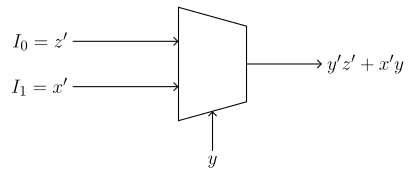
Lec 02-04-2025: Creating a MUX from a Boolean Function
Implementing a Boolean Function with a MUX
Section titled “Implementing a Boolean Function with a MUX”To see how this works, we’ll implement using a MUX with as the select lines.
How a MUX Works
Section titled “How a 4×14 \times 14×1 MUX Works”A MUX has four inputs and two select lines — we’ll label our inputs . The select lines determine which input gets routed to the output — when they read , comes through; when , comes through; and so on.
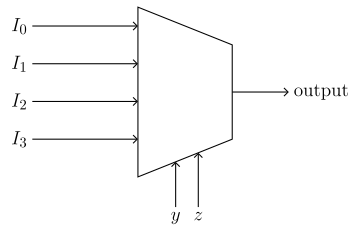
Since and are the select lines, the task essentially becomes: what should each of be so that whenever the MUX selects it, the output matches ?
Identifying the Minterms
Section titled “Identifying the Minterms”Start by drawing the truth table for , then identify which entries make . These are the minterms: the cases the MUX needs to produce a for.
| Entry | |||
|---|---|---|---|
| 0 | 0 | 0 | 0 |
| 1 | 0 | 0 | 1 |
| 2 | 0 | 1 | 0 |
| 3 | 0 | 1 | 1 |
| 4 | 1 | 0 | 0 |
| 5 | 1 | 0 | 1 |
| 6 | 1 | 1 | 0 |
| 7 | 1 | 1 | 1 |
Since is a sum (OR) of product terms, then whenever at least one product term equals 1.
Since each term directly encodes the variable values that make it 1, we can just read off the variable values that make each term 1:
Note that variables that don’t appear in a term are unconstrained — says nothing about , so can be either or . Similarly, says nothing about .
So for , then we can just look for entries where and , likewise for we can just look for the entries where and , and those entries will be the minterms.
| Entry | |||
|---|---|---|---|
| 0 | 0 | 0 | 0 |
| 1 | 0 | 0 | 1 |
| 2 | 0 | 1 | 0 |
| 3 | 0 | 1 | 1 |
| 4 | 1 | 0 | 0 |
| 5 | 1 | 0 | 1 |
| 6 | 1 | 1 | 0 |
| 7 | 1 | 1 | 1 |
Assigning the MUX Inputs
Section titled “Assigning the MUX Inputs”Every entry in the truth table belongs to exactly one input of . Since and are the select lines, they determine which input gets routed through — so within any of , the only remaining variable is .
We notice from the truth table that there exist four pairs of entries that share the same value but differ in — this means each of can only be a constant ( or ) or a function of alone. Entries and both have , so they both belong to ; entries and both have , so they both belong to ; and so on. We’ll line up these entries in a column in the table below:
A convenient way to organize this is a grid where the columns are and the entries split by whether or . Each cell holds the corresponding truth table entry number, and the minterms from above are circled:
| 0 | 1 | 2 | 3 | |
| 4 | 5 | 6 | 7 |
Reading off from each column:
- Both cells circled: regardless of , so .
- No cells circled: regardless of , so .
- Only the cell circled: when and when , so . The same logic applies to , so as well.
To generalize this: each column tells you what must be.
- None of the rows circled: for both values, so .
- Otherwise, we take the union of all the circled rows. In our example, where we have a case that has all rows circled, we get (by the complementarity law), so for this reason we can just say when all rows are circled.
Reading the Output Expression
Section titled “Reading the Output Expression”Internally, a MUX AND-gates each input with the select-line combination that activates it, then OR-s all of those together. For , the activating combination is , so contributes ; for it’s , contributing ; and so on. Summing all four gives the general output expression:
Substituting the values found above:
As a quick sanity check, this simplifies back to :
The Completed MUX
Section titled “The Completed MUX”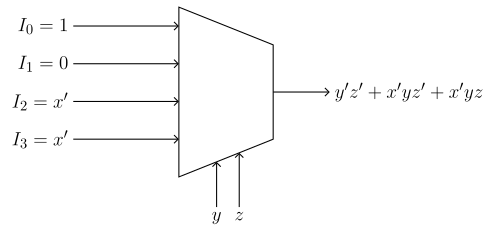
Example 1
Section titled “Example 1”Using a MUX of size , implement using as control lines:
Based on your solution, provide the completed MUX and give the expression of the MUX’s output.
Solution
| 0 | 0 | 0 | 0 |
| 1 | 0 | 0 | 1 |
| 2 | 0 | 1 | 0 |
| 3 | 0 | 1 | 1 |
| 4 | 1 | 0 | 0 |
| 5 | 1 | 0 | 1 |
| 6 | 1 | 1 | 0 |
| 7 | 1 | 1 | 1 |
| 0 | 2 | 4 | 6 | |
| 1 | 3 | 5 | 7 |
Inputs:
Output Expression:
The MUX
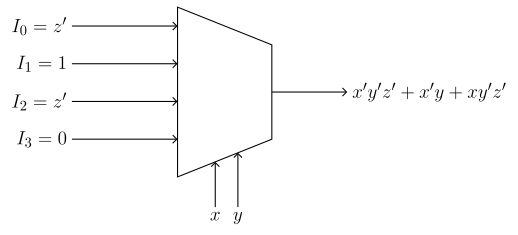
Example 2: Using a MUX
Section titled “Example 2: Using a 2×12 \times 12×1 MUX”Implement using a MUX with as the select line.
Draw the completed MUX and give the expression of the MUX’s output.
Solution
| 0 | 0 | 0 | 0 |
| 1 | 0 | 0 | 1 |
| 2 | 0 | 1 | 0 |
| 3 | 0 | 1 | 1 |
| 4 | 1 | 0 | 0 |
| 5 | 1 | 0 | 1 |
| 6 | 1 | 1 | 0 |
| 7 | 1 | 1 | 1 |
| 0 | 2 | |
| 1 | 3 | |
| 4 | 6 | |
| 5 | 7 |
Inputs:
Output Expression:
The MUX