Lec 03-11--03-13: MIPS Instruction Formats & Addressing Modes | CSCI 343
Instruction Formats
Section titled “Instruction Formats”- 3 types: R-format (register format), I-format (immediate format), and J-format (jump format)
- Each 32 bits long
- Opcode always in bits 31-26 (6 bits wide)
- These 6 bits are sufficient to tell the hardware what we want it to do
- The remaining 26 bits are used for operands for those commands
- The type of format that we use is largely dependent on the operands that we have to use for that instruction
R-format (Register Format)
Section titled “R-format (Register Format)”Contains:
op: Operation code (6 bits)- 000000 for R-type instructions
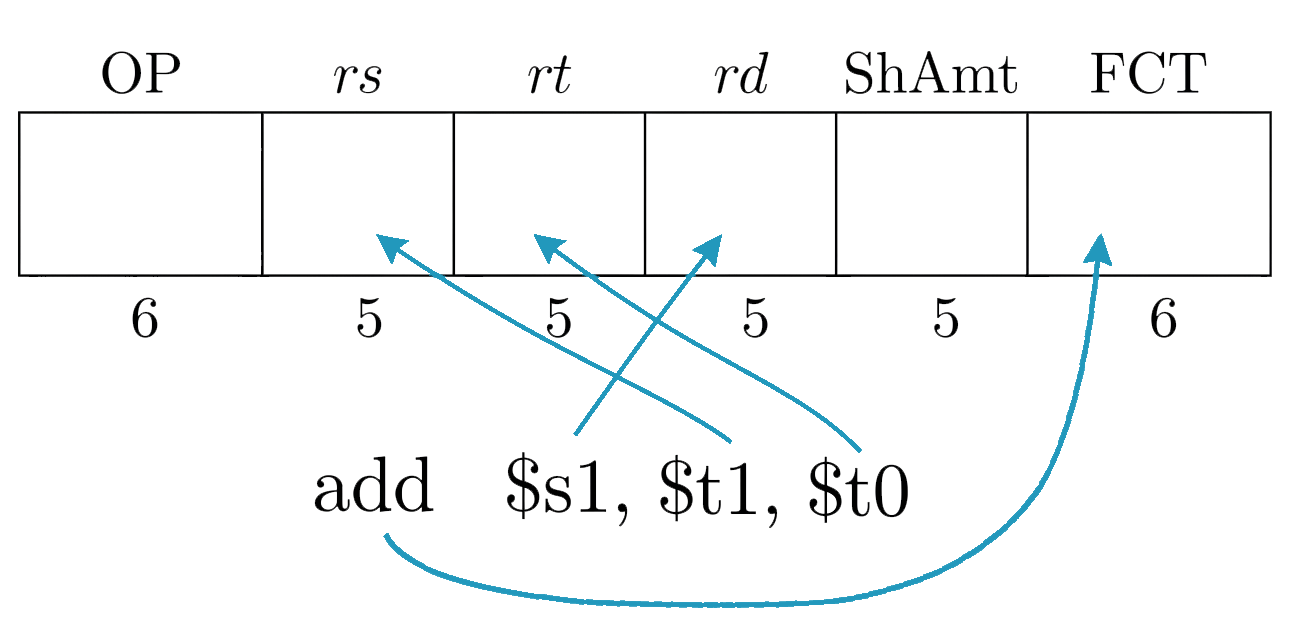
- 3 register fields (5 bits each)
rs: first source registerrt: second source registerrd: destination register
ShAmt: Shift amount field (5 bits)fct: Function code (6 bits)
Binary Field Format:
eg: add, sub, and, or, slt, sll, srl
# fct rd rs rt add $s1, $s2, $s3 # $s1 <- $s2 + $s3 sub $s1, $s2, $s3 # $s1 <- $s2 - $s3 and $s1, $s2, $s3 # $s1 <- $s2 AND $s3 or $s1, $s2, $s3 # $s1 <- $s2 OR $s3 slt $s1, $s2, $s3 # $s1 <- 1 if $s2 < $s3, else 0
# fct rd rt shamt sll $t0, $t1, 3 # $t0 <- $t1 shifted left 3 bits (same as $t1 * 2^3 = $t1 * 8) srl $t0, $t1, 3 # $t0 <- $t1 shifted right 3 bits (same as $t1 / 2^3 = $t1 / 8)- Only format that can handle having 3 registers
- Will frequently have 2 inputs coming from registers, and a third register as a destination
- Useful for a lot of arithmetic instructions
- ShAmnt will only be used for shift instructions, otherwise it will be set to 0
- Since the opcode is always
000000for all R-type instructions, FCT is what actually differentiates one R-type instruction from another (e.g.addvssubvsand)
I-format (Immediate Format)
Section titled “I-format (Immediate Format)”Contains:
op: Opcode (6 bits)- 2 register fields (5 bits each)
rs: source registerrt: destination register (foraddi,lw); source register (forsw,beq,bne)
imm: Immediate value (16 bits)
Binary Field Format:
eg: addi, lw, sw, beq, bne, slti
# op rt rs imm addi $t1, $t2, -20 # $t1 <- $t2 + (-20) slti $t1, $t2, 50 # $t1 <- 1 if $t2 < 50, else 0
# op rt imm(rs) # here, the immediate is the offset lw $s1, 20($s2) # $s1 = Memory[$s2 + 20] sw $s1, 20($s2) # Memory[$s2 + 20] = $s1
# op rs rt imm beq $s1, $s2, label # branch to label if $s1 == $s2 bne $s1, $s2, label # branch to label if $s1 != $s2- Used for Add Immediate (
addi) instruction where we add some constant value to the contents of a register and store the result in a different register - Used for load and store instructions, where we have a base address in a register, a constant offset in the immediate field, and a second register that is either written to (load) or read from (store)
- Branch instructions use the immediate field for a PC-relative offset — the field will contain the offset as a measure of words (instructions). The branch target is computed as , where is the already-incremented PC at the time the branch is evaluated.
J-format (Jump Format)
Section titled “J-format (Jump Format)”Contains:
- Operation code (6 bits)
- Jump target address (26 bits)
Binary Field Format:
eg: j, jal
- Only two fields — much simpler than R or I format
- All MIPS addresses are 32 bits (4 bytes), meaning they are word-aligned and always a multiple of 4, so the lower 2 bits are always
00and can be dropped - That gives us 30 potentially useful bits, but we only have 26 bits to store them in
- Since we rarely jump far from where we currently are in the program, the upper 4 bits of any target address are unlikely to differ from the current PC
- So we drop those too, storing only the middle 26 bits in the instruction
- To reconstruct the full 32-bit address at runtime: take the 26-bit field, append
00to the right (lower 2 bits), and copy the upper 4 bits from the current PC
Addressing Modes
Section titled “Addressing Modes”We’ll refer to as content of the address field in an instruction
Immediate Addressing (MIPS uses it)
Section titled “Immediate Addressing (MIPS uses it)”The operand is the data itself — no memory access needed.
For example:
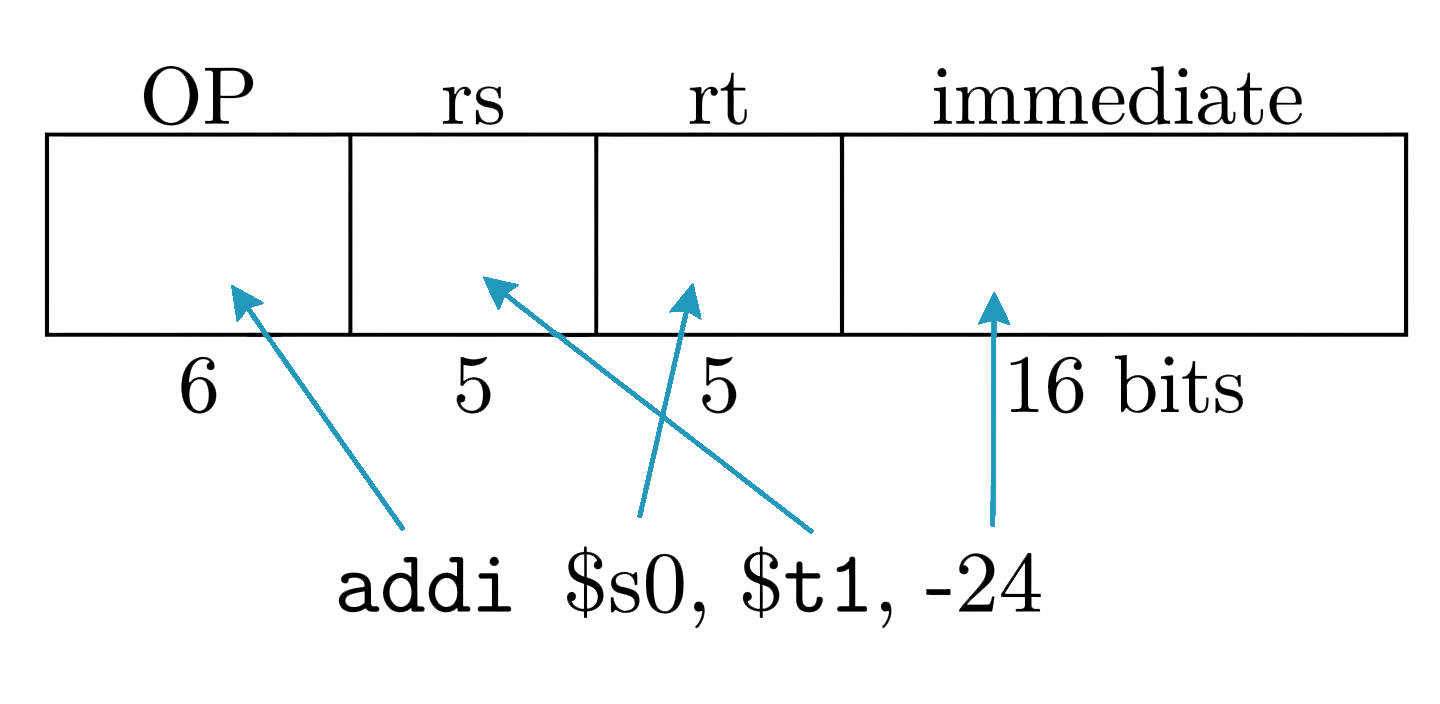
addi $s0, $t1, -24 # $s0 <- $t1 - 24Here -24 is embedded directly in the instruction. The diagram below shows how the immediate field maps to the constant operand:
Another I-type example:
ori $s0, $t1, 0xAB05 # $s0 <- $t1 | 0xAB05 (bitwise OR immediate)Direct Addressing (MIPS doesn’t use it)
Section titled “Direct Addressing (MIPS doesn’t use it)”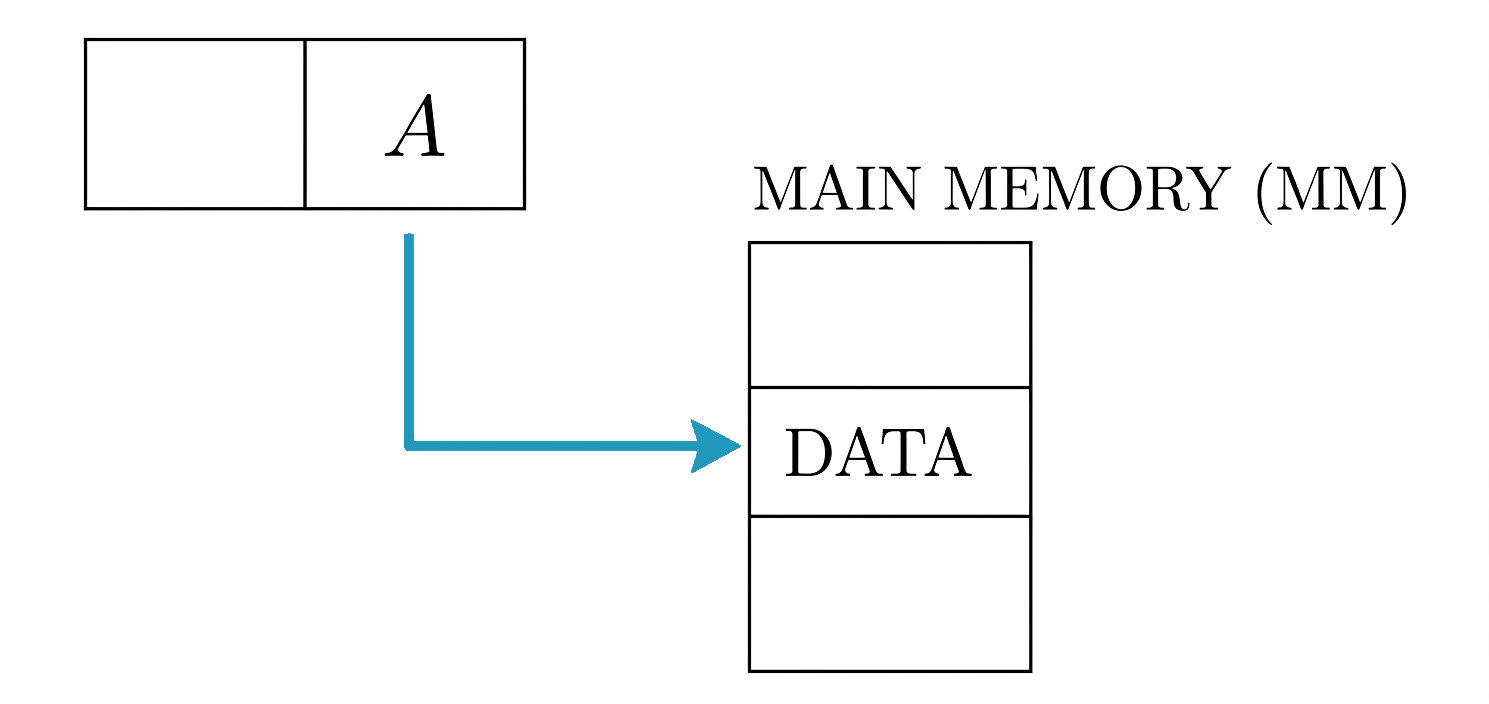
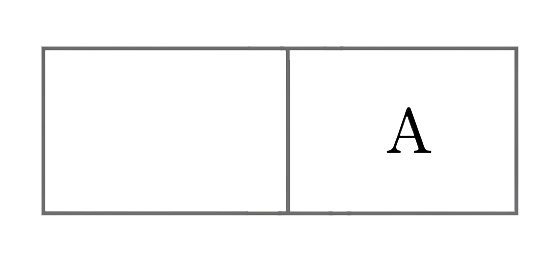
The address field in the instruction directly specifies the memory location where the data is stored.
Indirect Addressing (MIPS doesn’t use it)
Section titled “Indirect Addressing (MIPS doesn’t use it)”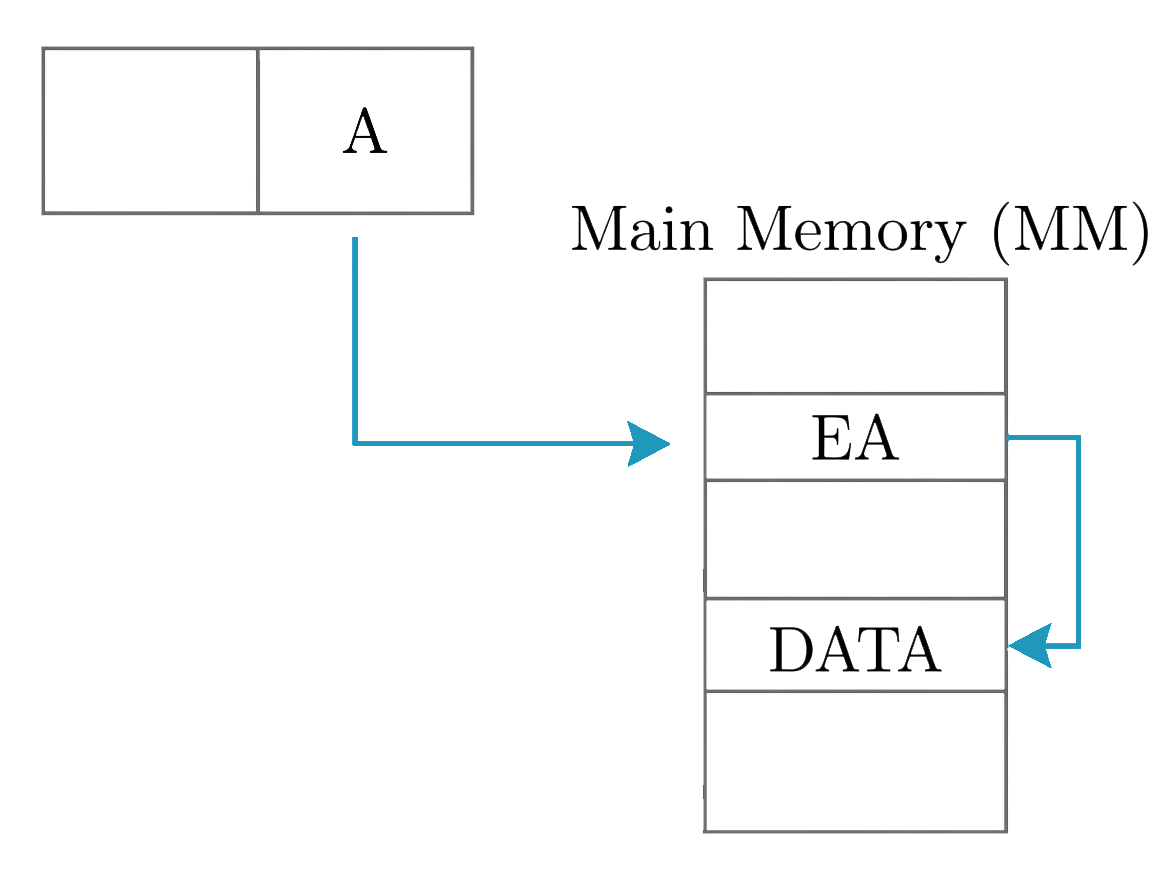
The address field in the instruction does not contain the actual data’s memory location. Instead, holds a memory address where the effective address (EA) is stored. The processor first retrieves the EA from this memory location, then uses it to access the actual data in main memory.
Register Addressing (MIPS uses it)
Section titled “Register Addressing (MIPS uses it)”eg:
add $s1, $t1, $t0 # $s1 <- $t1 + $t0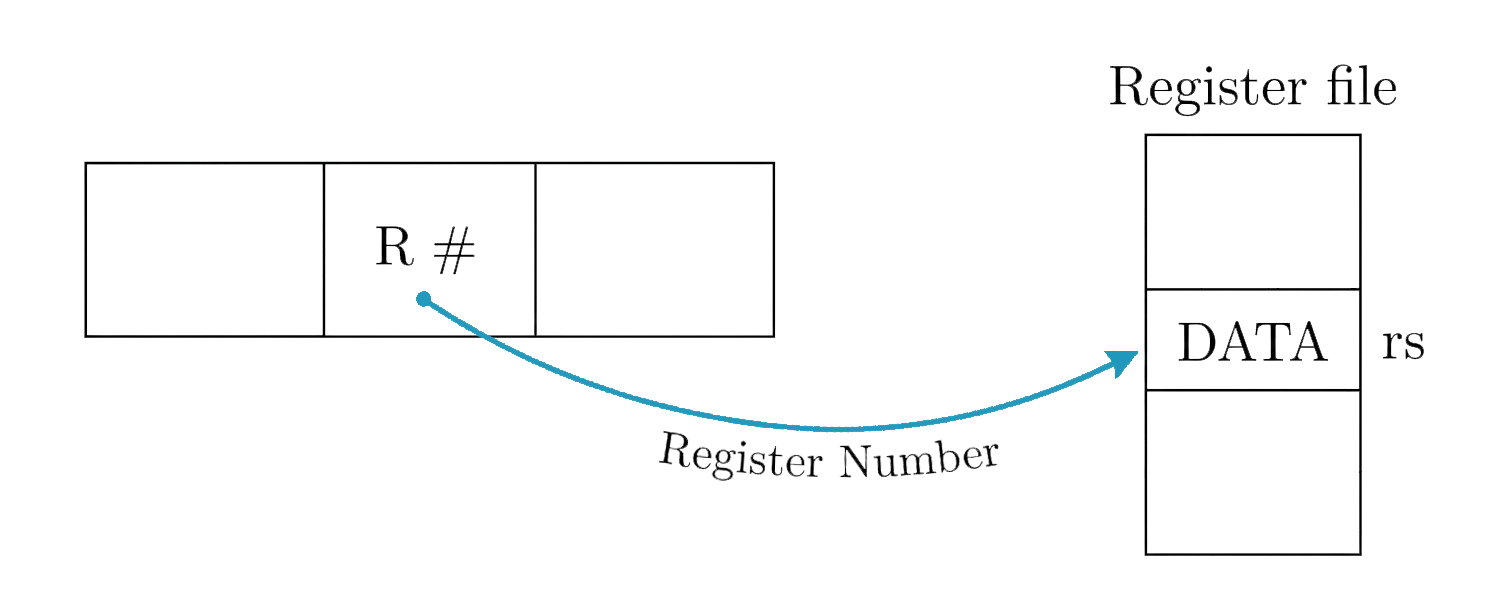
- The instruction contains a register number
- The processor retrieves the data from the specified register in the register file
- This eliminates the need to access memory, improving speed
Register Indirect Addressing (MIPS doesn’t use it)
Section titled “Register Indirect Addressing (MIPS doesn’t use it)”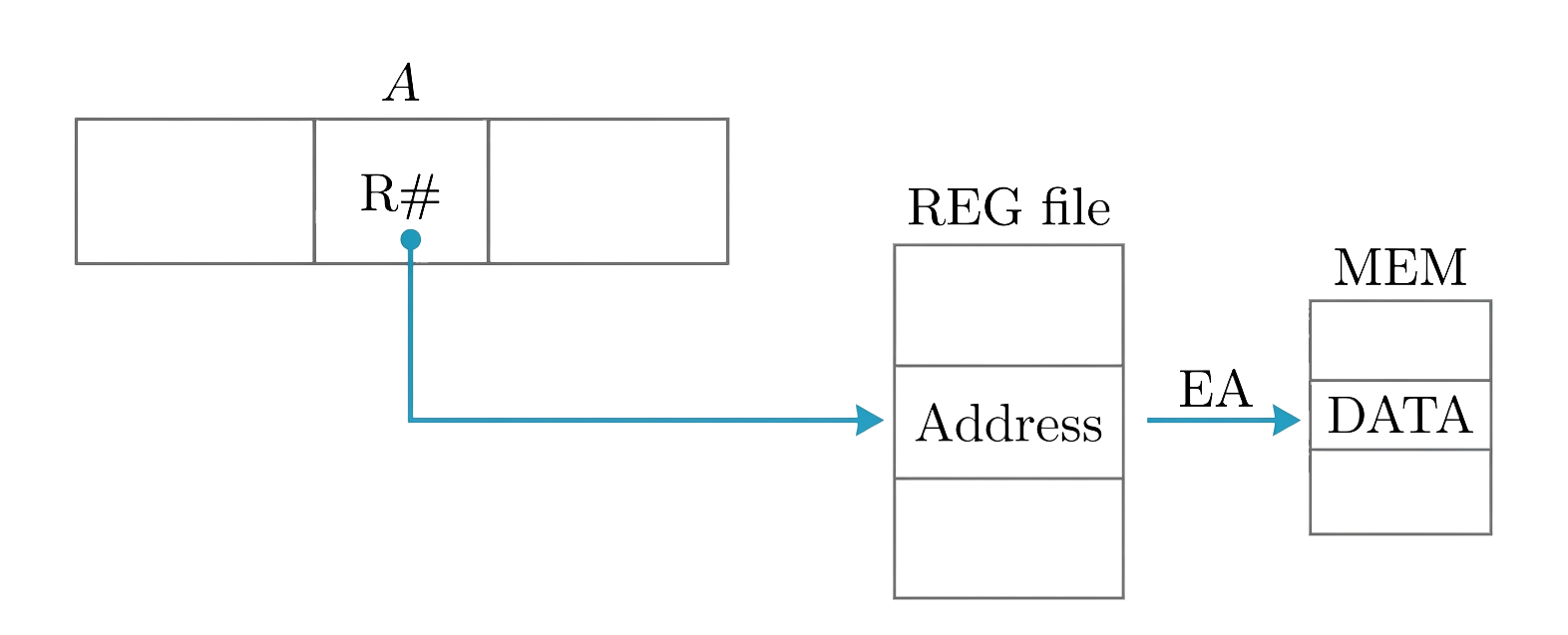
- The instruction contains a register number that holds a memory address
- The processor fetches the effective address from that register, then uses the EA to access memory and retrieve data
- Similar to base-register addressing, but with no offset — MIPS folds this case into displacement addressing with an offset of 0
Base-Register Addressing / Displacement Addressing (MIPS uses it)
Section titled “Base-Register Addressing / Displacement Addressing (MIPS uses it)”Used for lw and sw.
eg:
lw $t1, 24($s0) # load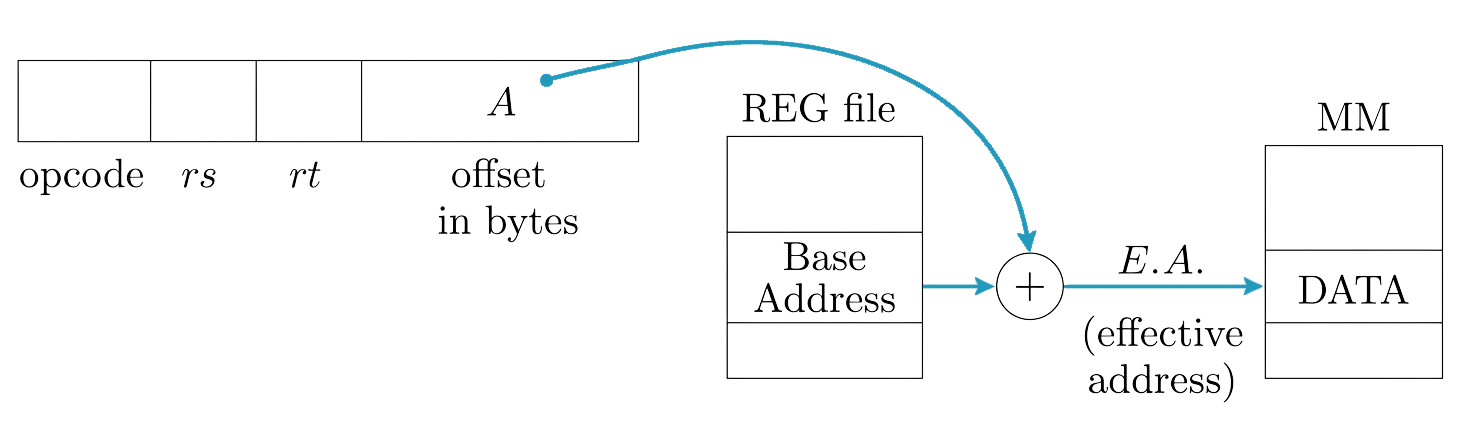
- The base register holds a memory address
- The offset is a signed immediate included in the instruction
- The processor computes the effective address (EA) by adding the offset to the value in the base register
- The EA is then used to access memory
Example
Section titled “Example”Consider an instruction where the address field contains the value 2000. When needed, register #18 is used. Register 18 contains the value 1600. The list below shows a few addresses and the memory content at each of those addresses. Consider the second table: we want to fill in the effective address and value for each addressing mode.
| Address (bytes) | Memory Content |
|---|---|
| 48 | 844 |
| 2000 | 3000 |
| 1600 | 400 |
| 2500 | 800 |
| 3000 | 1200 |
| 3600 | 500 |
| Addressing Mode | Effective Address (bytes) | Value |
|---|---|---|
| Immediate | ||
| Direct | ||
| Indirect | ||
| Register | ||
| Register Indirect | ||
| Displacement |
Solution:
Content of the address field in the instruction.
- Immediate: is 2000, grab it immediately
- Direct: is 2000, an address of a memory location that contains our data 3000
- Indirect: is 2000, an address of a memory location that contains an address (3000) of a memory location that contains our data 1200
- Register: Uses the register number given in the instruction (18) which contains our data 1600
- Register Indirect: Uses the register number given in the instruction (18) which contains an address (1600) of a memory location that contains our data 400
- Displacement:
Completed table:
| Addressing Mode | Effective Address (bytes) | Value |
|---|---|---|
| Immediate | — | 2000 |
| Direct | 2000 | 3000 |
| Indirect | 3000 | 1200 |
| Register | REG #18 | 1600 |
| Register Indirect | 1600 | 400 |
| Displacement | 3600 | 500 |